
1. Product Overview
The Tupavco TP325 is a high-performance Ethernet surge protector designed to safeguard your network equipment from damaging electrical surges and lightning strikes. It supports 2.5 Gigabit Ethernet (2500 Mbps) and Power over Ethernet (PoE++) up to 150W, making it suitable for a wide range of LAN applications, including routers, modems, cameras, and Ethernet switches. This device incorporates a hybrid protection system utilizing both Gas Discharge Tubes (GDT) for large voltage surges and Silicon Avalanche Suppressor Diodes (SASD) for fast surge protection, ensuring comprehensive defense against transient overvoltages.
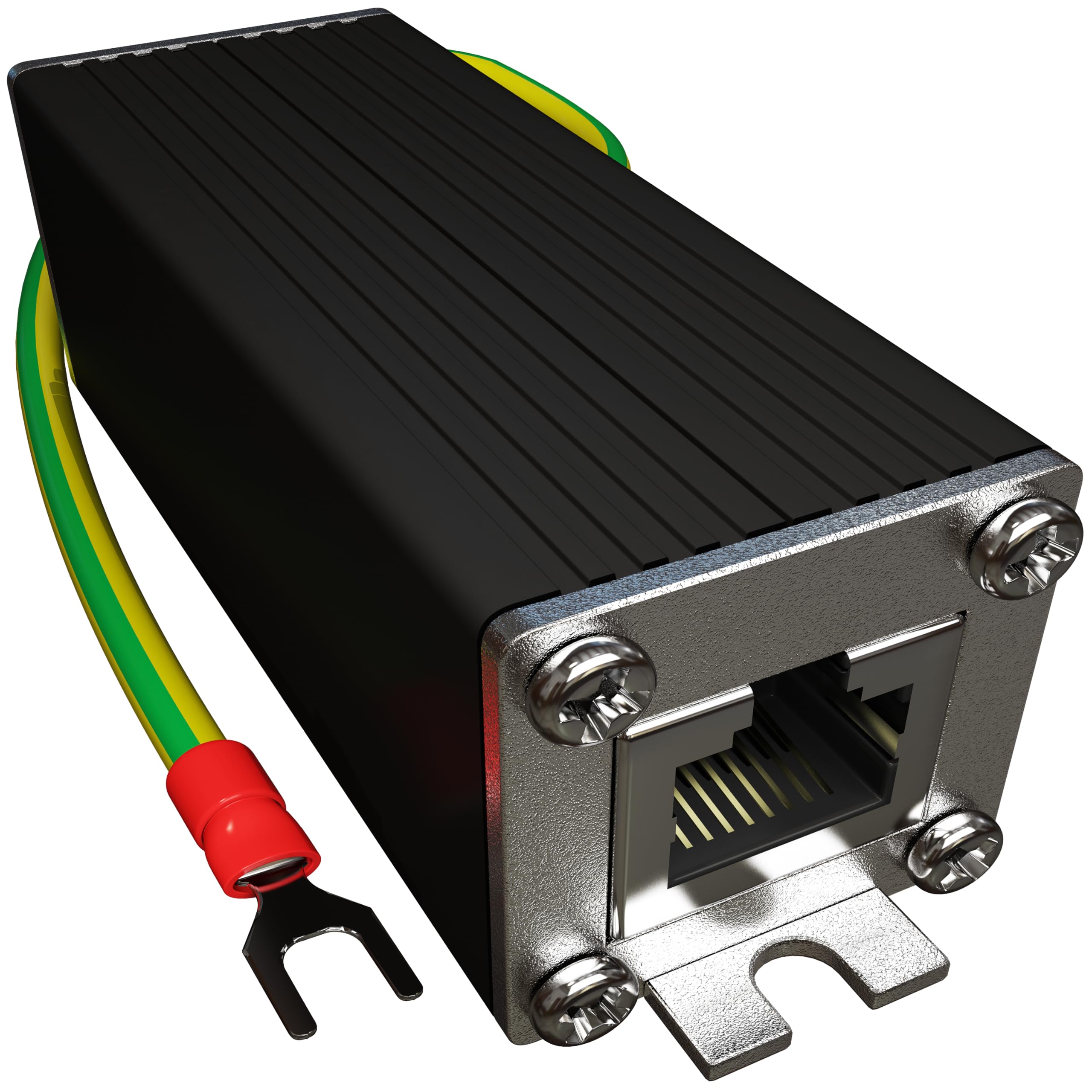
Figure 1: Tupavco TP325 Ethernet Surge Protector, front view with attached ground wire.
2. Key Features
- 2.5 Gigabit Ethernet Support: Compatible with 2500 Mbps LAN Ethernet networks.
- PoE++ (HPoE) 150W: Provides transient protection for IEEE 802.3 af/at/bt (PoE++ 15V/24V/30V/48V/50V/56V Transmission) Mode A and B, with PoE current of 1.6A / 2 pairs and 3.2A / 4 pairs (154W/48V max).
- Hybrid Protection: Features Gas Discharge Tubes (GDT) for large voltage surges and Silicon Avalanche Suppressor Diodes (SASD) for rapid response to fast surges.
- High Surge Rating: Offers 20KA (8/20µs) surge protection.
- Durable Construction: Housed in an aluminum case for enhanced durability and heat dissipation.
- Grounding: Includes a 12AWG ground wire for effective line-line and line-ground protection.
- Bidirectional Clamping: Ensures protection regardless of surge direction.
- Mounting Options: Equipped with mounting flanges for secure screw-mount installation to walls, electrical panels, or network rack cabinets.
3. Package Contents
Please verify that all items are present and in good condition upon opening the package.
- 1 x Tupavco TP325 Ethernet Surge Protector
- 1 x Pre-terminated 12AWG Ground Wire
4. Safety Information
Read and understand all safety instructions before installation and operation. Failure to follow these instructions may result in electrical shock, fire, or damage to equipment.
- Proper Grounding is Essential: The surge protector must be properly grounded to an earth ground. An improper ground connection can render the device ineffective and potentially dangerous.
- Qualified Personnel: Installation should be performed by qualified personnel familiar with local electrical codes and network wiring practices.
- Outdoor Use: While designed for outdoor environments, ensure all connections are weatherproofed and protected from direct exposure to water where necessary.
- Power Disconnection: Always disconnect power to network devices before installing or removing the surge protector.
- Inspection: Regularly inspect the device and its connections for any signs of damage or wear. Replace immediately if damage is detected.
5. Setup & Installation
The Tupavco TP325 is designed for easy installation. Follow these steps to ensure proper setup and maximum protection.
5.1 Physical Installation
- Choose a Location: Select a location for the surge protector that is as close as possible to the network equipment it will protect, ideally at the point where the Ethernet cable enters the building or enclosure.
- Mounting: Use the integrated mounting flanges to securely attach the device to a wall, electrical panel, or network rack. Screws are not included and should be appropriate for the mounting surface.
- Grounding Connection: Connect the pre-terminated 12AWG ground wire from the surge protector to a reliable earth ground. This is a critical step for effective surge protection. Ensure the connection is tight and secure.
- Ethernet Connections: Connect the incoming Ethernet cable (from the unprotected side) to one RJ45 port of the surge protector. Connect a short Ethernet patch cable from the other RJ45 port of the surge protector to your network device (e.g., router, switch, camera).

Figure 2: Mounting the surge protector using its flanges. Ensure a stable and secure attachment.

Figure 3: Close-up view of the surge protector showing the attached yellow and green ground wire.

Figure 4: Typical installation diagram. The protector is placed inline between the incoming Ethernet signal and the protected equipment, with a dedicated ground connection.
5.2 Product Video Overview
Video 1: An official product overview of the Tupavco TP325 Ethernet Surge Protector, highlighting its features and benefits. This video is provided by Tupavco Equipment.
6. Operation
Once properly installed and grounded, the Tupavco TP325 operates passively to protect your Ethernet-connected devices. It continuously monitors the Ethernet line for transient overvoltages. When a surge occurs, the GDT and SASD components activate to divert the excess voltage to the earth ground, preventing it from reaching and damaging your sensitive network equipment. The device requires no configuration or power supply for its surge protection function.
7. Maintenance
The Tupavco TP325 is designed for minimal maintenance. However, periodic checks are recommended to ensure continued optimal performance:
- Visual Inspection: Annually inspect the surge protector, Ethernet cables, and ground wire for any signs of physical damage, corrosion, or loose connections.
- Grounding Integrity: Verify that the ground connection remains secure and free from corrosion. A compromised ground connection will reduce the effectiveness of the surge protector.
- Post-Surge Check: After a significant electrical event (e.g., lightning strike nearby), inspect the surge protector. While designed to withstand multiple surges, extreme events can sometimes cause damage. If network connectivity issues arise after a surge, consider testing or replacing the unit.
8. Troubleshooting
If you experience issues after installing the Tupavco TP325, consider the following troubleshooting steps:
- No Network Connectivity:
- Ensure both Ethernet cables are securely connected to the surge protector and your network devices.
- Verify the integrity of the Ethernet cables. Try bypassing the surge protector temporarily to see if connectivity is restored (only for testing, do not operate without surge protection).
- Check the status lights on your network devices (e.g., router, switch) to confirm link activity.
- Slow Network Speed:
- Ensure you are using Cat5e, Cat6, or higher-rated Ethernet cables for 2.5 Gigabit speeds.
- Verify that all network devices in the chain (router, switch, NIC) support 2.5 Gigabit speeds.
- Test network speed with and without the surge protector (if safe to do so for a brief test) to isolate the issue.
- Grounding Issues:
- Ensure the ground wire is firmly connected to a proper earth ground. Loose or corroded connections can impair performance.
- Consult an electrician if you are unsure about the quality of your earth ground.
9. Specifications
| Brand | Tupavco |
| Model Number | TP325 |
| Data Rate | 2.5 Gigabit (2500 Mbps) |
| PoE Support | PoE++ (IEEE 802.3 af/at/bt), up to 150W (1.6A / 2 pairs, 3.2A / 4 pairs max) |
| Surge Protection Rating | 20KA (8/20µs) |
| Protection Components | Hybrid Gas Discharge Tubes (GDT) and Silicon Avalanche Suppressor Diode (SASD) |
| Clamping | Bidirectional |
| Ground Wire | 12AWG |
| Enclosure Material | Aluminum |
| Product Dimensions | 2.5"L x 1"W |
| Item Weight | 2.4 Ounces |
10. Warranty & Support
10.1 Warranty Information
The Tupavco TP325 Ethernet Surge Protector comes with a 1-year limited warranty from the date of purchase. This warranty covers defects in materials and workmanship under normal use. It does not cover damage caused by improper installation, accidents, misuse, abuse, natural disasters, or unauthorized modifications.
10.2 Customer Support
For technical assistance, troubleshooting, or warranty claims, please contact Tupavco customer support. Refer to the product packaging or the official Tupavco website for the most current contact information.