
Introduction
Welcome to the user manual for your Nautica Urban SP600 True Wireless Outdoor Speaker. This guide provides essential information on setting up, operating, and maintaining your speaker to ensure optimal performance and longevity. Please read these instructions carefully before using the product.
Product Overview
Included Components
- Portable Wireless Speaker
- Charging Cable
- Hanging Strap
Key Features
- Dynamic Sound: Delivers 15W PMPO power for clear highs and deep bass, suitable for indoor and outdoor spaces.
- Bluetooth 5.3 Connectivity: Ensures easy and stable wireless connection up to 10 meters.
- True Wireless Stereo (TWS): Pair two SP600 speakers for a combined 30W stereo sound experience.
- Extended Playtime: Up to 8 hours of audio playback on a single charge.
- Multiple Input Options: Supports USB, SD, and AUX inputs for versatile music playback.
- IP5 Splash-Proof Rating: Designed to withstand splashes, making it suitable for outdoor use near water.
- Ambient Light Modes: Features 5 different light modes that can sync with your music.
- Portable Design: Includes a convenient strap for easy carrying and attachment.
Speaker Components and Controls
Familiarize yourself with the speaker's layout and controls for easy operation.
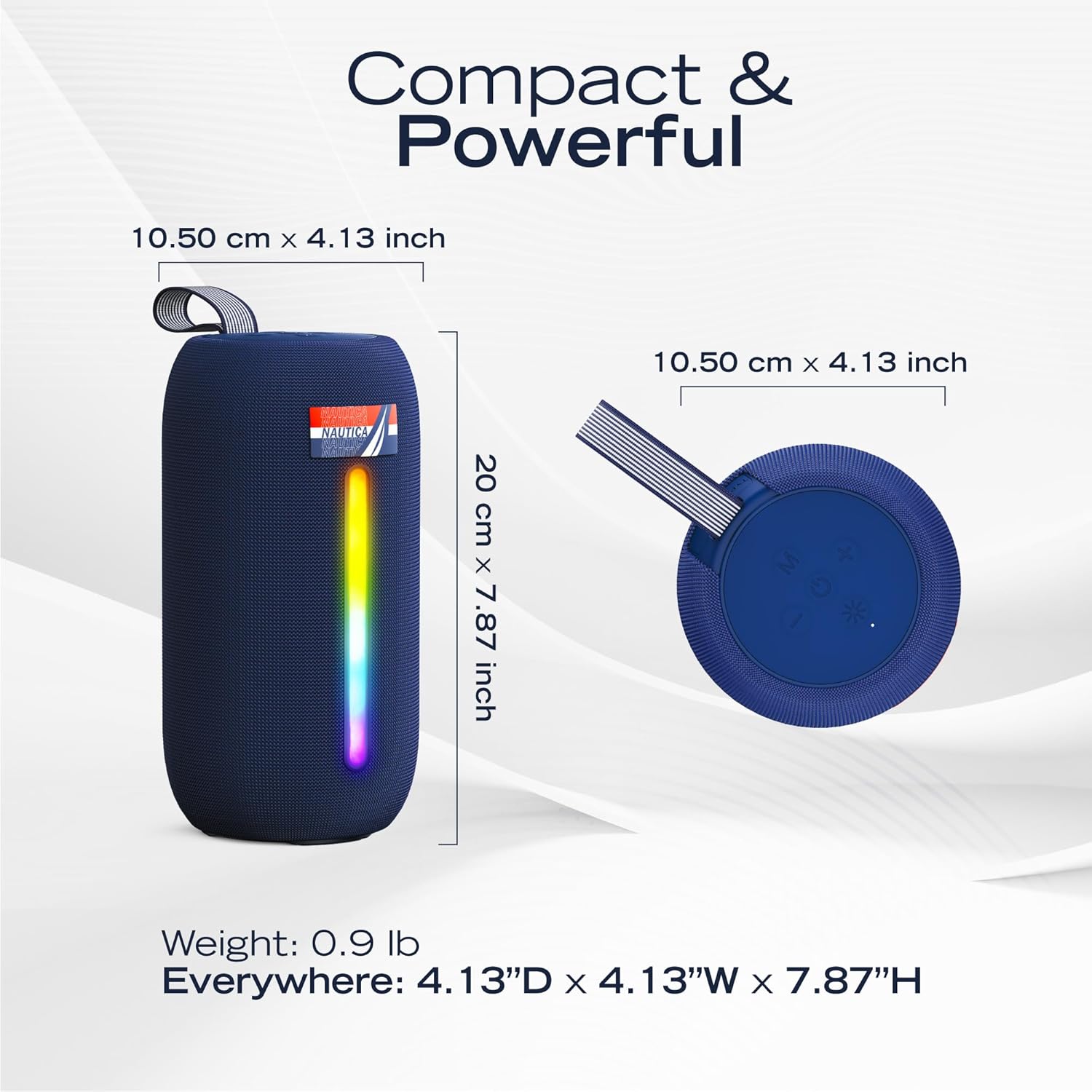
Image: Nautica Urban SP600 speaker displaying its dimensions and the control panel located on the top surface. The control panel includes buttons for power, mode, volume up/down, and light effects.
The top panel typically includes buttons for Power, Mode selection (M), Volume Up (+), Volume Down (-), and Light Mode control (sun icon). The side features a light bar and the Nautica logo.
Setup
1. Charging the Speaker
Before first use, fully charge the speaker using the provided charging cable. Connect the charging cable to the speaker's charging port and a compatible USB power source. The charging indicator light will show the charging status.
2. Bluetooth Pairing
- Power on the speaker by pressing and holding the Power button. The speaker will enter Bluetooth pairing mode, indicated by a flashing light.
- On your device (smartphone, tablet, etc.), enable Bluetooth and search for available devices.
- Select "Nautica SP600" from the list of devices.
- Once connected, the speaker will emit an audible confirmation, and the light indicator will change to a steady state.
3. True Wireless Stereo (TWS) Pairing (Optional)
To achieve a stereo sound experience, you can pair two Nautica Urban SP600 speakers together.
- Ensure both SP600 speakers are powered on and not connected to any other Bluetooth device.
- On one speaker (this will be the primary speaker), press the 'M' (Mode) button twice quickly. The speaker will enter TWS pairing mode.
- The primary speaker will automatically search for and connect to the second speaker.
- Once paired, both speakers will emit a confirmation sound, and their light indicators will synchronize.
- Now, connect your device to the primary speaker via Bluetooth as described in step 2. Audio will play in stereo through both speakers.

Image: Two Nautica Urban SP600 speakers positioned side-by-side, illustrating their True Wireless Stereo (TWS) pairing capability for a synchronized audio experience.
Operating Instructions
Power On/Off
- Power On: Press and hold the Power button (usually marked with a circle and a vertical line) until the speaker powers on.
- Power Off: Press and hold the Power button again until the speaker powers off.
Volume Control
- Increase Volume: Press the '+' button.
- Decrease Volume: Press the '-' button.
Playback Control (in Bluetooth mode)
- Play/Pause: Press the Power button once.
- Next Track: Press and hold the '+' button.
- Previous Track: Press and hold the '-' button.
Mode Selection
Press the 'M' (Mode) button to switch between available input modes: Bluetooth, USB, SD Card, and AUX.
Ambient Light Modes
The speaker features 5 ambient light modes. Press the Light Mode button (sun icon) to cycle through the different lighting effects or to turn the lights off.

Image: The Nautica Urban SP600 speaker showcasing its illuminated ambient light bar, which can display various colors and patterns.
Maintenance
Cleaning
- Wipe the speaker with a soft, dry cloth.
- Do not use abrasive cleaners, alcohol, or chemical solvents, as these may damage the surface.
Storage
- Store the speaker in a cool, dry place away from direct sunlight and extreme temperatures.
- If storing for an extended period, charge the battery periodically to maintain its lifespan.
IP5 Splash-Proof Rating
The Nautica Urban SP600 speaker has an IP5 splash-proof rating. This means it is protected against low-pressure water jets from any direction. It is suitable for use in environments where it might encounter splashes, such as by a pool or at the beach. It is not designed to be submerged in water.

Image: The Nautica Urban SP600 speaker positioned on a surface next to a swimming pool, highlighting its suitability for splash-prone environments.
Troubleshooting
| Problem | Possible Solution |
|---|---|
| Speaker does not power on. | Ensure the battery is charged. Connect the speaker to a power source using the charging cable. |
| Cannot pair via Bluetooth. | Make sure the speaker is in pairing mode (flashing light). Turn off and on Bluetooth on your device. Ensure no other devices are connected to the speaker. Move closer to the speaker. |
| No sound or low volume. | Check the volume levels on both the speaker and your connected device. Ensure the speaker is not muted. Verify the correct input mode is selected. |
| TWS pairing fails. | Ensure both speakers are not connected to any other Bluetooth device. Try resetting both speakers and repeating the TWS pairing steps. |
| Lights are not working. | Press the Light Mode button (sun icon) to cycle through modes or turn them on. |
Specifications
| Model Name | UCCSP10-01 |
| Brand | Nautica |
| Speaker Type | Portable Speaker |
| Connectivity Technology | Bluetooth 5.3 |
| Speaker Maximum Output Power | 8 Watts (15W PMPO) |
| Audio Output Mode | Stereo (with TWS) |
| Bluetooth Range | Up to 10 Meters |
| Battery Life | Up to 8 hours |
| IP Rating | IP5 Splash-Proof |
| Product Dimensions | 8.74"D x 4.17"W x 5.9"H |
| Item Weight | 0.94 Pounds (approx. 15 ounces) |
| Material | Fabric, Rubber |
| Power Source | Battery Powered (1 Nonstandard Battery included) |

Image: The Nautica Urban SP600 speaker shown on a boat, emphasizing its portable design suitable for outdoor adventures.
Warranty and Support
The Nautica Urban SP600 speaker comes with a Limited Warranty. For specific warranty terms and conditions, please refer to the documentation included with your product or contact Nautica customer support.
For technical assistance, troubleshooting not covered in this manual, or warranty claims, please visit the official Nautica website or contact their customer service department.
