
Introduction
This user manual provides comprehensive instructions for the Sxhlseller Automatic 360° Rotating Card Dealer, Model #511. Please read this manual carefully before operating the device to ensure proper use, optimal performance, and longevity. This device is designed for automatic shuffling and dealing of playing cards for various card games, supporting up to 8 players.
Safety Information
- Keep the device away from water and moisture.
- Do not attempt to disassemble or repair the device yourself. Contact customer support for assistance.
- Use only the provided charging cable or a compatible USB-C cable.
- Ensure cards are clean and free from damage before use to prevent jamming.
Package Contents
- Sxhlseller Automatic Card Dealer
- USB-C Charging Cable
- User Manual (this document)
Setup
- Unpacking: Carefully remove the card dealer from its packaging. Inspect for any signs of damage.
- Charging the Battery: Before first use, fully charge the device.
Locate the USB-C charging port on the side of the device. Connect the provided USB-C cable to the port and the other end to a compatible USB power adapter (not included). The battery indicator on the display will show charging status. A full charge typically takes several hours.

Image: The Sxhlseller Automatic Card Dealer shown with its USB-C charging cable connected, illustrating the charging port location.
- Placement: Place the card dealer on a stable, flat surface. The non-slip base ensures stability during operation.

Image: A view of the bottom of the card dealer, highlighting its non-slip design for secure placement.
Operating Instructions
Device Overview and Controls
Familiarize yourself with the control panel and various buttons:

Image: A detailed diagram of the Sxhlseller Automatic Card Dealer, indicating the location and function of each button and the display screen.
- Power Button: Turns the device on/off.
- Shuffling Button: Initiates the card shuffling process.
- Directional Key: Used for navigation and selection on the display.
- Adjustment Keys (+/-): Adjusts values such as number of players or cards.
- Function Key: Accesses different settings and modes.
- Dealing Key: Initiates the card dealing process.
- Dice Key: (If applicable) May be used for specific game modes or random functions.
- Guandan Mode Key: Activates a specific game mode (Guandan).
- Display Screen: Shows current settings, battery status, and operational feedback.
Basic Operation
- Power On: Press the Power Button to turn on the device. The display will illuminate.
- Loading Cards: Place decks of cards into the designated card slots on top of the device. The device can hold up to 792 cards.

Image: A hand is shown placing a deck of cards into one of the input slots of the automatic card dealer.
- Setting Parameters:
- Use the Function Key to cycle through settings like number of players (1-8) and number of cards per player.
- Use the Adjustment Keys (+/-) to change the values.
- The device supports various dealing orders: clockwise, counter-clockwise, basic cards first/last, and consecutive dealing. Select your preferred mode using the Directional Key or Function Key.
- Shuffling: Press the Shuffling Button. The device will automatically shuffle the cards. It is designed for quiet operation.
- Dealing: After shuffling, press the Dealing Key. The device will distribute cards to players in a 180-degree or 360-degree rotation, according to your settings.

Image: The automatic card dealer is shown actively distributing cards in a full 360-degree rotation to multiple player positions.
- Power Off: Press and hold the Power Button to turn off the device when not in use.
Maintenance
- Cleaning: The device features an adaptive self-cleaning sensor. For external cleaning, wipe the surface with a soft, dry cloth. Do not use abrasive cleaners or immerse the device in water.
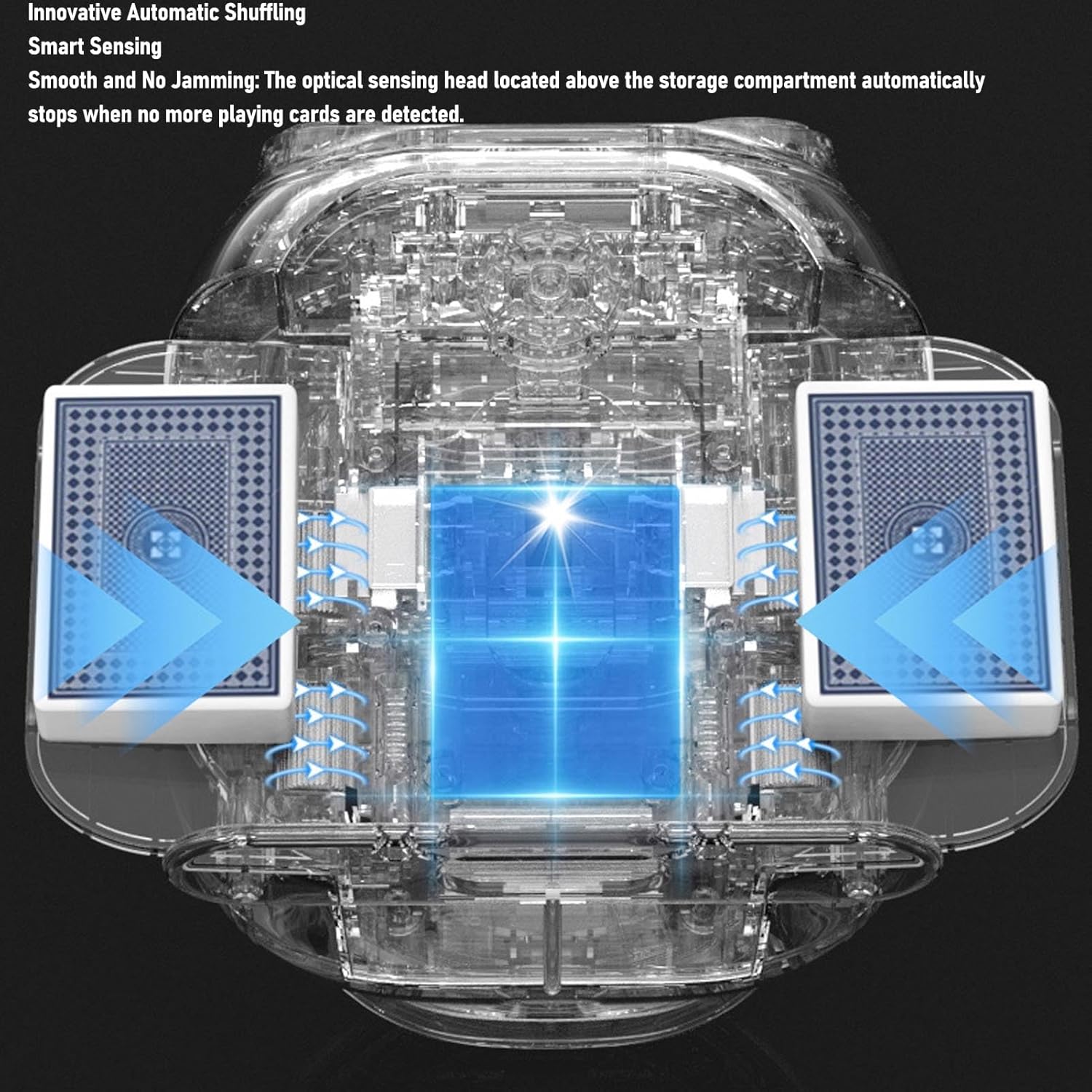
Image: An internal diagram of the card dealer, illustrating the card path and the smart sensing mechanism designed to prevent jamming and assist with cleaning.
- Battery Care: To prolong battery life, avoid fully discharging the battery frequently. Charge the device regularly, even if not in constant use. The device includes overcharge, over-discharge, overcurrent, and short-circuit prevention.
- Storage: Store the card dealer in a cool, dry place away from direct sunlight and extreme temperatures.
Troubleshooting
| Problem | Possible Cause | Solution |
|---|---|---|
| Device does not power on. | Low battery or power button not pressed correctly. | Charge the device fully. Ensure the power button is pressed firmly. |
| Cards are jamming. | Damaged, bent, or dirty cards; incorrect card placement; too many cards. | Use clean, undamaged cards. Ensure cards are placed correctly in the slots. Do not exceed the maximum card capacity (792 cards). |
| Dealing is inconsistent. | Incorrect settings for players/cards; uneven card stack. | Verify player and card settings on the display. Ensure card stacks are even before placing them in the device. |
| Device is noisy during operation. | Unusual noise may indicate an internal issue. | The device is designed for quiet operation. If unusual noise persists, discontinue use and contact customer support. |
Specifications
- Model: #511
- Brand: Sxhlseller
- Material: ABS
- Max Card Capacity: Up to 792 cards
- Max Players Supported: 8 players
- Battery: Built-in 2600mAh rechargeable battery
- Charging Port: USB-C
- Dimensions: Approximately 172mm (6.8in) x 142mm (5.6in) x 115mm (4.5in)
- Weight: Approximately 1.05 kg
Image: A diagram showing the approximate dimensions of the Sxhlseller Automatic Card Dealer: 172mm (length), 142mm (width), and 115mm (height).
Warranty and Support
For warranty information and customer support, please refer to the purchase documentation or contact your retailer. Sxhlseller products typically come with a standard manufacturer's warranty against defects in materials and workmanship.
If you encounter any issues not covered in the troubleshooting section, or require further assistance, please contact Sxhlseller customer service through their official website or the contact information provided with your purchase.


