
1. Introduction
This manual provides detailed instructions for the installation, operation, and maintenance of your Lominie F20-001 16W Full Spectrum Aquarium Light. This light is designed to provide optimal lighting for freshwater planted nano aquariums, promoting healthy plant growth and enhancing the vibrant colors of your fish.
Please read this manual thoroughly before using the product to ensure proper function and longevity.
2. Product Overview
The Lominie F20-001 aquarium light features a 16W full spectrum LED design with 4 independent channels, allowing for customizable lighting modes. It includes a flexible gooseneck for adjustable positioning and comes with both a wired controller and a remote control for convenient operation. An optional WiFi controller is available for smart device integration.
2.1 Key Features
- 4-Channel Full Spectrum LED: Provides a comprehensive light spectrum suitable for aquatic plants and fish, including a 24/7 natural light cycle simulation (sunrise, midday, sunset, night).
- High Brightness: Equipped with 16 high-quality LEDs (6933K color temperature) for clear and bright illumination.
- Adjustable Gooseneck: A 360-degree flexible gooseneck allows for precise light positioning. The clamp accommodates glass up to 25mm thick.
- Multiple Control Options: Includes a wired controller and an RF remote control. An optional WiFi controller (sold separately) enables smart device control with programmable channels, timing, dimming, and group control.
- Efficient Heat Dissipation: Designed with integrated cooling modules, a high-speed torque motor, and honeycomb cooling holes to maintain optimal operating temperature.
2.2 Components
Familiarize yourself with the main components of your Lominie F20-001 aquarium light:
- LED Light Head
- Flexible Gooseneck Arm
- Mounting Clamp
- Wired Controller
- RF Remote Control (includes battery)
- Power Adapter (not explicitly listed but implied)

Figure 1: Lominie F20-001 Aquarium Light with its components, including the light head, gooseneck, clamp, wired controller, and remote control. Images of fish and plants are shown below, illustrating the light's effect.

Figure 2: Close-up view highlighting the flexible gooseneck, the secure mounting clamp, and the LED light head with its internal components.

Figure 3: Diagram illustrating the 16W 3030 Super Bright Chip Integrated Lamp Beads, 90-degree UV Resistant Glass Lenses, and the layered shape for better heat dissipation.

Figure 4: Exploded view detailing the heat dissipation components, including 20pcs petal air intake, high-speed torque motor (3300 RPM), integrated cooling module (36pcs cooling aluminum sheets), and 150pcs honeycomb cooling holes.
3. Setup Instructions
- Unpack the Light: Carefully remove all components from the packaging. Inspect for any damage.
- Attach the Clamp: Position the mounting clamp onto the edge of your aquarium tank. Ensure the clamp is securely tightened using the plastic screws. The clamp is designed for glass thickness up to 25mm. Avoid overtightening to prevent damage to the tank.
- Adjust the Gooseneck: Bend the flexible gooseneck arm to position the LED light head directly over your aquarium. The 360-degree adjustability allows for optimal light coverage.
- Connect Power: Plug the wired controller into the light head, then connect the power adapter to the wired controller. Finally, plug the power adapter into a suitable electrical outlet.
- Initial Power On: Press the ON/OFF button on the wired controller or the remote control to turn on the light.

Figure 5: The Lominie F20-001 light installed on an aquarium, illuminating aquatic plants and fish.
4. Operating Instructions
Your Lominie F20-001 light can be controlled using the wired controller, the included RF remote control, or an optional WiFi smart controller.
4.1 Wired Controller Operation
The wired controller provides basic functions:
- ON/OFF Button: Powers the light on or off.
- Brightness +/- Buttons: Adjusts the light intensity from 0% to 100%.
- Mode (M) Button: Cycles through the 4 built-in lighting modes.

Figure 6: The wired button controller with power, brightness adjustment, and mode selection buttons.
4.2 RF Remote Control Operation
The RF remote control offers more advanced features, including timing functions and direct brightness percentage settings. The remote has a range of up to 10 meters.
- ON/OFF Button: Turns the light on or off.
- Brightness +/- Buttons: Adjusts overall brightness.
- Percentage Buttons (20%, 40%, 80%, 100%): Sets brightness to specific levels.
- Timing Buttons (2H, 8H, 10H, 12H, 16H, 18H): Activates a timer for the specified duration.
- Channel Buttons (CH1, CH2, CH3, CH4): Allows individual control or adjustment of the four light channels.
- WIFI Button: This button is for use with the optional WiFi controller and has no function without it.

Figure 7: The RF remote control showing buttons for power, brightness, percentage settings, timing, and channel control.

Figure 8: The remote control highlighting its timing functions for 2, 8, 10, 12, 16, and 18 hours.
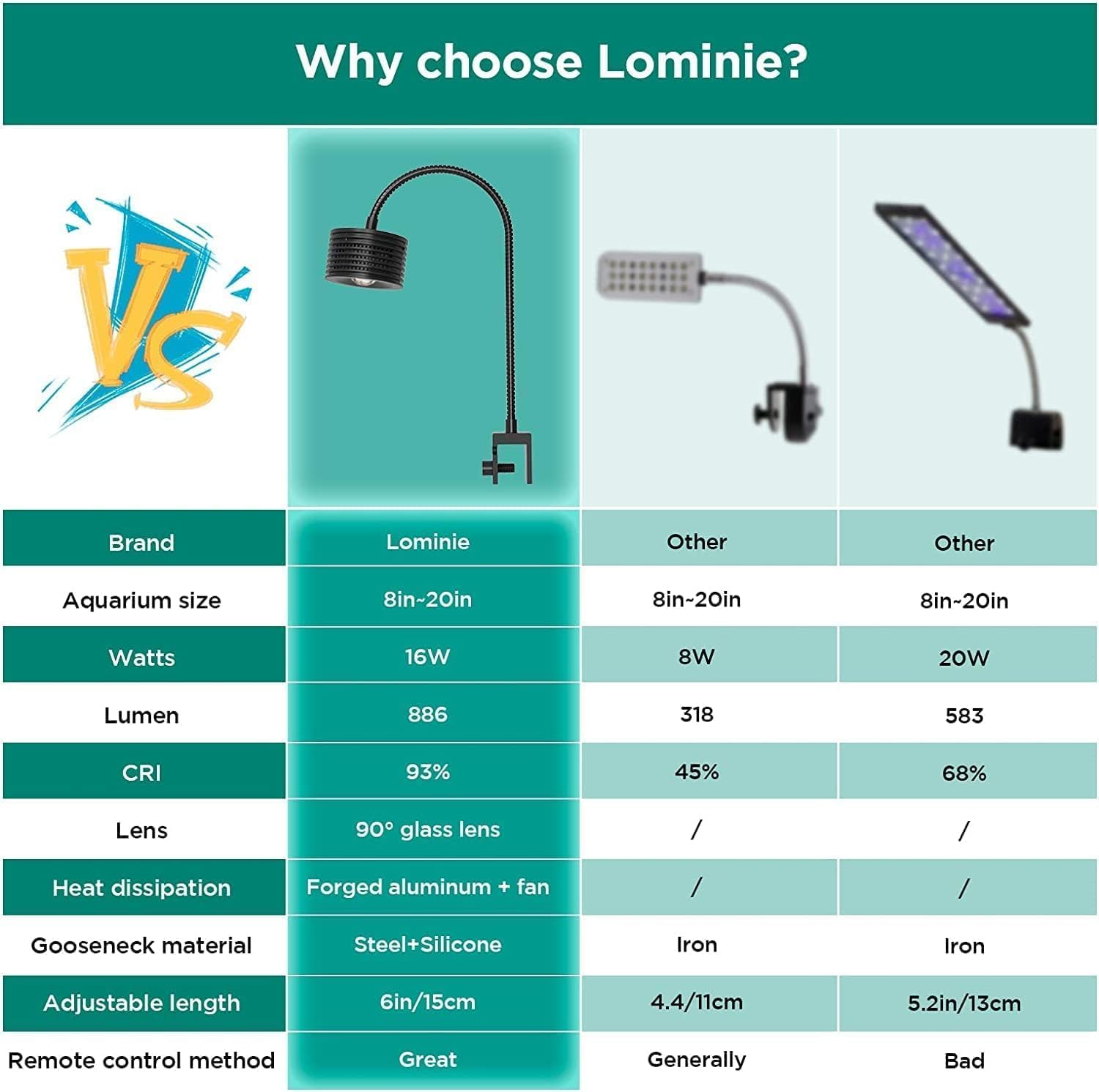
Figure 9: Illustration of the 4-channel full spectrum white LED combination and dimming capabilities from 20% to 100%.
4.3 Optional WiFi Smart Controller (Sold Separately)
For enhanced control and customization, a WiFi smart controller can be purchased separately. This controller allows you to manage your light via a mobile application, offering features such as:
- Mobile APP control
- Free custom spectrum settings
- Extended timer settings
- Sunrise and sunset simulation functions
- Voice control (with compatible smart home systems)
- Remote control of all basic functions from anywhere.
Note: The WiFi controller cannot be used simultaneously with the infrared remote or wired control. One WiFi controller works for one aquarium lamp.

Figure 10: The optional WiFi smart device controller, showing its connection to a mobile app for advanced light management.

Figure 11: Screenshots of the mobile application interface, demonstrating features like APP control, ramp timer, voice control, and custom spectrum settings.
5. Maintenance
- Cleaning: Regularly wipe the LED light head and lenses with a soft, dry cloth to remove dust and water spots. Ensure the light is unplugged before cleaning. Do not use abrasive cleaners or solvents.
- Gooseneck and Clamp: Periodically check the gooseneck and mounting clamp for stability. Re-tighten the clamp screws if necessary, but avoid overtightening.
- Ventilation: Ensure the cooling fins and honeycomb holes on the light head are free from obstructions to allow for proper heat dissipation.
- Power Connections: Inspect all power connections for any signs of wear or damage. If any damage is observed, discontinue use and contact customer support.
6. Troubleshooting
| Problem | Possible Cause | Solution |
|---|---|---|
| Light does not turn on. | No power, loose connection, faulty remote battery. | Check power outlet. Ensure all cables are securely connected. Replace remote control battery. |
| Remote control not working. | Remote battery depleted, obstruction, out of range. | Replace remote battery. Ensure no objects block the signal. Operate within 10 meters of the light. |
| Light appears dim or flickers. | Brightness setting too low, power supply issue. | Increase brightness using the controller or remote. Check power connections. |
| Light color seems off (e.g., too green). | Specific mode selected, individual channel settings. | Cycle through different modes or adjust individual channel settings via the remote or optional WiFi controller to achieve desired spectrum. |
| Gooseneck does not hold position. | Clamp not tight enough, excessive weight. | Ensure the mounting clamp is securely fastened to the tank. The gooseneck is designed to be stiff and hold position. |
7. Specifications
| Feature | Detail |
|---|---|
| Brand | Lominie |
| Model Name | F20-001 |
| Wattage | 16 watts |
| Light Source Type | LED |
| Number of Light Sources | 16 |
| Color Temperature | 6933K (Cool White) |
| Material | Plastic (Base, Shade) |
| Switch Type | Remote, Wired Controller |
| Product Dimensions | 9.3 x 5.3 x 3 inches |
| Item Weight | 1.39 pounds |
| Indoor/Outdoor Usage | Indoor |
| Is Waterproof | Yes |
| Certification | FCC |
| Included Components | Battery (for remote) |
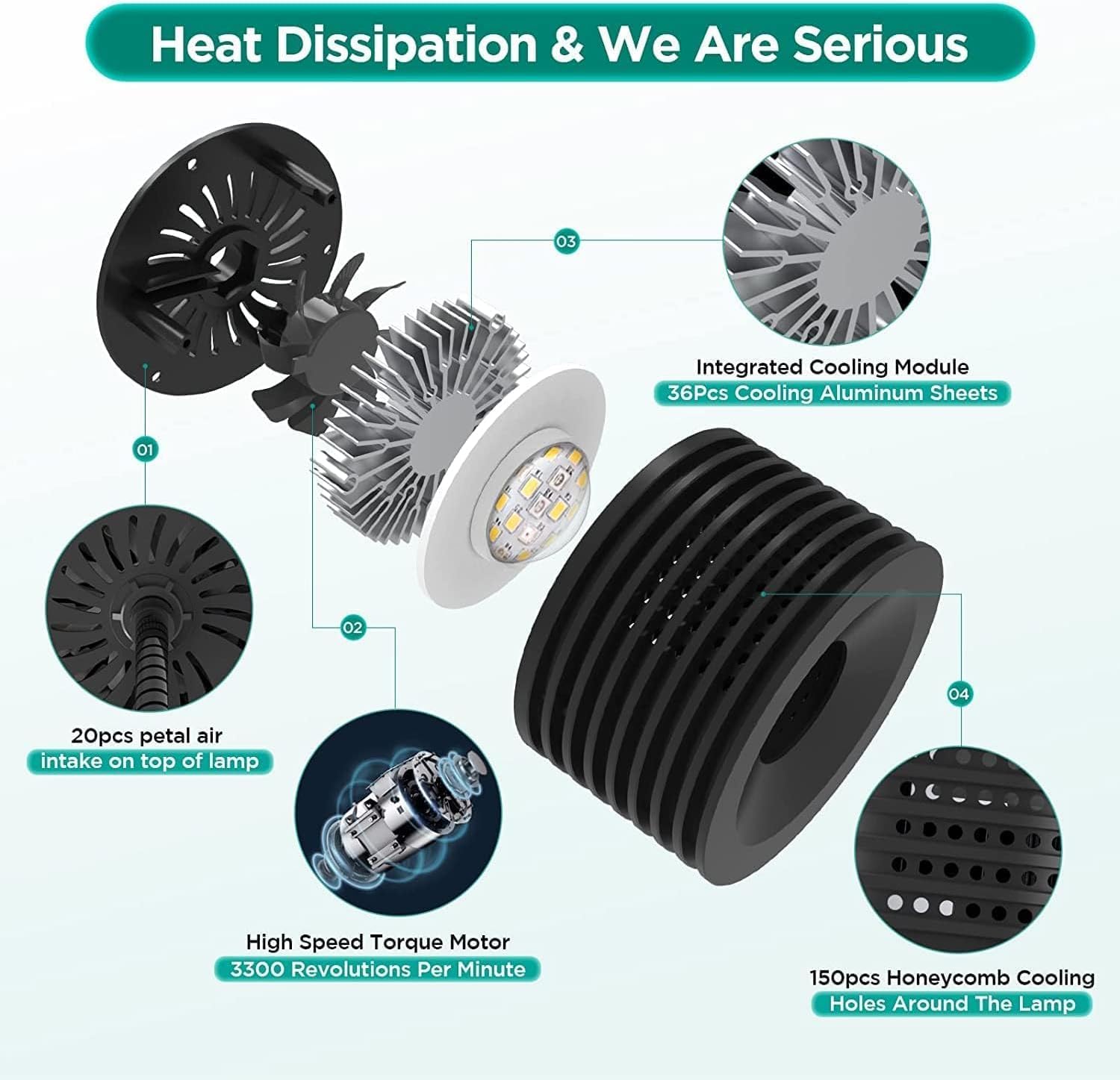
Figure 12: Spectrum analysis of the F20 light, indicating strong performance in the 410-580 nm frequency band, beneficial for aquatic plants and fish coloration.
8. Warranty Information
The Lominie F20-001 Aquarium Light comes with a 1-year manufacturer warranty from the date of purchase. This warranty covers defects in materials and workmanship under normal use.
The warranty does not cover damage caused by misuse, accident, unauthorized modification, or improper installation. Please retain your proof of purchase for warranty claims.
9. Support
For technical assistance, troubleshooting, or warranty inquiries, please contact Lominie customer support through their official channels. You can also visit the Lominie store on Amazon for more product information and support resources.
Lominie Store: Visit the Lominie Store on Amazon
Manufacturer: Lominie


