
1. Introduction
This manual provides detailed instructions for the installation, operation, and maintenance of the NUZEZCJG KWS-306L (with RS485) 3-Phase 4-Wire Power Meter. This device is designed to accurately measure and display electrical parameters such as voltage, current, power, and energy consumption (KWh) in a three-phase, four-wire system. It also incorporates voltage protection relay functions and RS485 communication capabilities for remote monitoring and control.
2. Safety Information
Please read and understand all safety instructions before installing or operating this device. Failure to follow these instructions may result in electric shock, fire, or damage to the product.
- Installation and maintenance should only be performed by qualified personnel.
- Ensure power is disconnected before any wiring or installation procedures.
- Do not operate the device in wet or damp conditions.
- Verify all wiring connections are secure and correct according to the wiring diagram.
- Do not exceed the specified voltage and current ratings of the device.
3. Product Overview
The KWS-306L is a versatile 3-phase 4-wire power meter with a color display and integrated protection features. It is designed for DIN rail mounting.
3.1 Key Features
- 3-Phase 4-Wire Measurement: Monitors voltage, current, power, and energy for each phase.
- Color Screen Display: Provides clear, real-time data visualization.
- Voltage Protection Relay: Includes overvoltage and undervoltage protection.
- Current Protection: Overcurrent protection.
- Power Protection: Over power protection.
- Temperature Protection: Over temperature protection via NTC sensor.
- Voltage/Current Imbalance Protection: Detects and protects against phase imbalances.
- Power Off Memory: Retains settings and accumulated data during power outages.
- Timed Shutdown: Programmable shutdown function.
- RS485 Communication: Enables remote data acquisition and control (specific to KWS-306L model).
3.2 Components and Display

Image Description: This image shows the front view of the NUZEZCJG KWS-306L power meter. It features a vibrant color display screen in the center, showing various electrical parameters. Above and below the screen are screw terminals labeled 'A', 'B', 'C', and 'N' for three-phase, four-wire connections. An 'NTC' terminal for temperature sensing is also visible. On the right side of the display, there are control buttons labeled 'M', '+', '-', and 'NO/OFF'. The model number 'KWS-306' is printed on the lower left of the display.
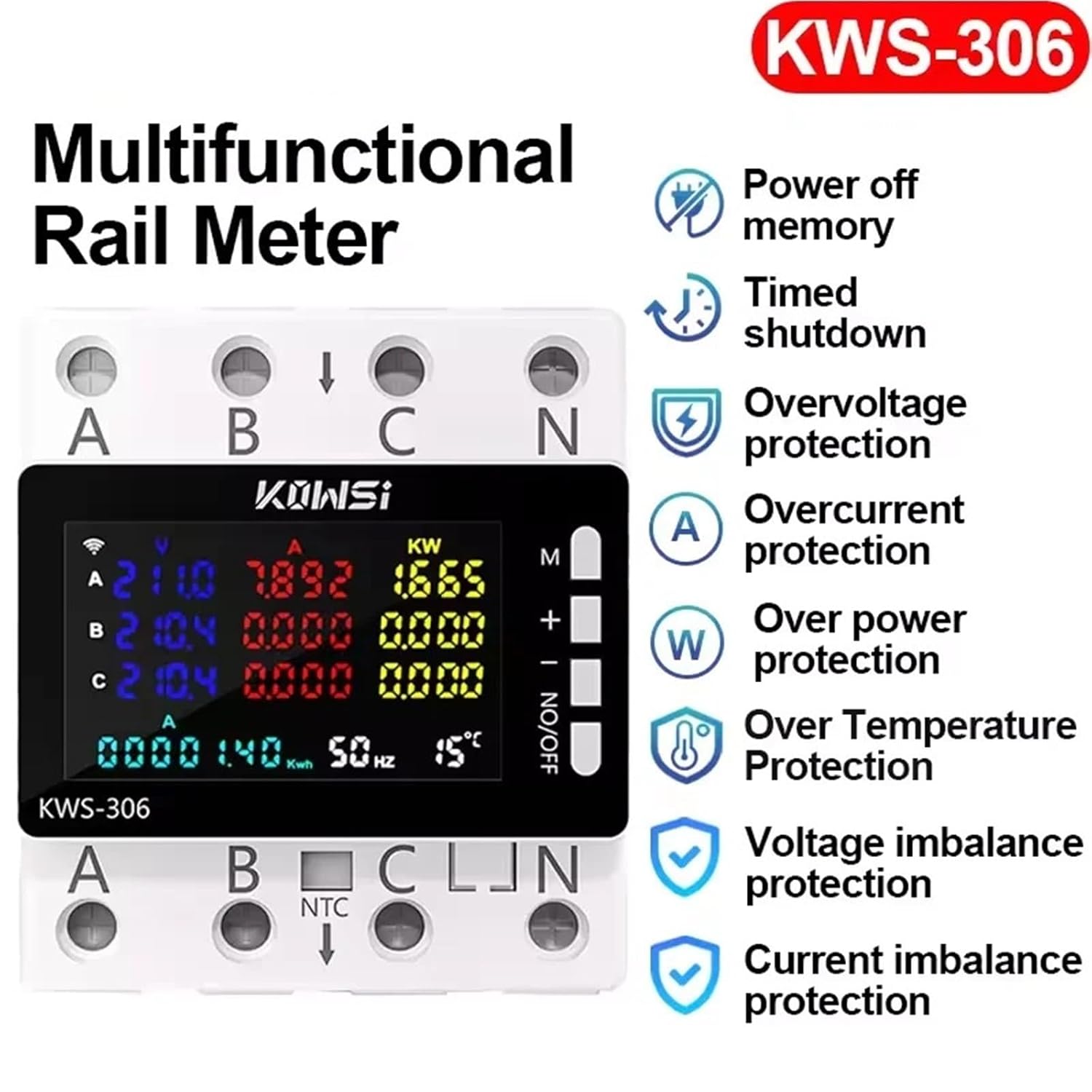
Image Description: This diagram highlights the key features of the KWS-306 series power meters. Icons and text indicate functionalities such as Power off memory, Timed shutdown, Overvoltage protection, Overcurrent protection, Over power protection, Over Temperature Protection, Voltage imbalance protection, and Current imbalance protection. The main unit with its display and terminals is shown on the left.

Image Description: This image displays the KWS-306 series meter with text stating "Electric energy meter Three-phase four-wire rail meter". A crucial note at the bottom clarifies: "Only Model KWS-306WF with wifi". This indicates that while the KWS-306 series are 3-phase 4-wire rail meters, the WiFi remote control feature is exclusive to the KWS-306WF variant, not the KWS-306L (with RS485) model.

Image Description: This image presents a side-by-side comparison of three models in the KWS-306 series: KWS-306WF (WiFi version), KWS-306L (RS485 version), and KWS-306 (Normal version). Each meter's display is shown, indicating similar core measurement capabilities but differing in connectivity options. The KWS-306L, which is the subject of this manual, is clearly labeled as the "RS485 version".
Note on Remote Control: While some KWS-306 series models (specifically KWS-306WF) offer mobile remote control via WiFi, the KWS-306L model covered by this manual utilizes RS485 for communication and remote capabilities. The image showing mobile remote control ( ) is applicable only to the KWS-306WF variant.
4. Setup and Installation
4.1 Mounting
The KWS-306L is designed for standard DIN rail mounting. Ensure the DIN rail is securely installed in a suitable enclosure, away from direct sunlight, moisture, and excessive vibrations.
- Align the meter with the DIN rail.
- Press the meter firmly onto the rail until it clicks into place.
- Ensure the meter is stable and does not wobble.
4.2 Wiring
The KWS-306L is a 3-phase 4-wire meter. Carefully follow the wiring diagram provided on the device or in supplementary documentation. Ensure all connections are tight and correct to prevent damage or inaccurate readings.
- Power Input: Connect the three phase lines (L1, L2, L3 or A, B, C) and the neutral line (N) to their respective terminals on the meter.
- NTC Sensor: Connect the NTC temperature sensor to the designated NTC terminals for temperature monitoring.
- RS485 Communication (KWS-306L only): Connect the RS485 A and B lines to the corresponding terminals for data communication with external systems.
4.3 Initial Power-up
After all wiring is complete and verified, restore power to the circuit. The meter's display should illuminate and begin showing real-time electrical parameters.
5. Operating Instructions
5.1 Display Interpretation
The color display shows various parameters simultaneously. Common readings include:
- V (Voltage): Voltage for each phase (A, B, C).
- A (Current): Current for each phase (A, B, C).
- KW (Power): Real power for each phase and total power.
- KWh (Energy): Accumulated energy consumption.
- Hz (Frequency): System frequency.
- °C (Temperature): Temperature reading from the NTC sensor.
5.2 Button Functions
The control buttons on the right side of the display are used for navigation and setting parameters:
- M (Menu/Mode): Press to cycle through different display modes or enter the settings menu.
- + (Up/Increase): Used to navigate up in menus or increase values during settings.
- - (Down/Decrease): Used to navigate down in menus or decrease values during settings.
- NO/OFF (On/Off/Confirm): Short press to toggle output (if applicable), long press to confirm settings or power the device on/off.
5.3 Setting Protection Parameters
To set overvoltage, undervoltage, overcurrent, overpower, or temperature protection thresholds:
- Press the 'M' button repeatedly until you reach the desired setting menu (e.g., Overvoltage Setting).
- Use the '+' and '-' buttons to adjust the threshold value.
- Press 'NO/OFF' to confirm the setting and save it.
- Repeat for other protection parameters as needed.
5.4 RS485 Communication (KWS-306L)
The KWS-306L model supports RS485 communication for integration into building management systems or other monitoring platforms. Refer to the specific communication protocol documentation (typically Modbus RTU) for details on addressing, baud rates, and data registers. This allows for remote reading of all displayed parameters and potentially remote control of certain functions.
6. Maintenance
The KWS-306L power meter requires minimal maintenance to ensure long-term accuracy and reliability.
- Cleaning: Periodically wipe the display and exterior with a soft, dry cloth. Do not use abrasive cleaners or solvents.
- Connection Checks: Annually, or as needed, verify that all wiring connections are secure and free from corrosion.
- Environmental Conditions: Ensure the operating environment remains within the specified temperature and humidity ranges.
7. Troubleshooting
If you encounter issues with your KWS-306L power meter, refer to the following common problems and solutions:
| Problem | Possible Cause | Solution |
|---|---|---|
| Display is blank | No power supply; Loose wiring | Check power source; Verify all power connections (A, B, C, N) are secure. |
| Incorrect readings | Incorrect wiring; Sensor malfunction | Review wiring diagram and correct connections; Contact support if issue persists. |
| Protection relay trips frequently | Thresholds set too low; Actual electrical fault | Adjust protection thresholds to appropriate levels; Investigate for actual overvoltage/overcurrent conditions in the circuit. |
| RS485 communication failure | Incorrect wiring; Incorrect communication settings (baud rate, address); Software issue | Check RS485 A/B wiring; Verify baud rate and device address settings; Consult RS485 communication protocol documentation. |
If the problem persists after attempting these solutions, please contact your supplier or a qualified electrician for assistance.
8. Specifications
| Parameter | Value |
|---|---|
| Model | KWS-306L (with RS485) |
| Voltage Range | AC 85-290V |
| Current Range | 0-80A |
| Power Range | 0-23KW |
| Frequency Range | 50-60Hz |
| Operating Temperature | -20~150°C |
| Display Type | Digital Only (Color Screen) |
| Phase | Three Phase |
| Power Supply | AC |
| Connectivity | RS485 |
| Mounting | DIN Rail |
| Approximate Dimensions (Parcel) | 1 x 1 x 1 cm |
| Approximate Weight (Parcel) | 50 g |
9. Warranty and Support
The NUZEZCJG KWS-306L power meter is covered by the manufacturer's standard warranty. Please refer to your purchase documentation or contact your retailer for specific warranty terms and conditions. For technical support or inquiries, please reach out to the vendor or manufacturer through the contact information provided at the time of purchase.