
1. Introduction
Thank you for choosing the Braytron Bulkhead 12W LED Luminaire. This product is designed to provide efficient and versatile lighting for various indoor and outdoor applications, featuring an IP65 protection rating and adjustable color temperature. Please read this manual carefully before installation and use to ensure proper operation and safety.
This manual covers the following model: Braytron Bulkhead 12W LED Luminaire - Black (Model: 4210e657-52c8-4833-82d2-ba38732b7202).

Figure 1: Braytron Bulkhead LED Luminaire providing illumination on an exterior wall.
2. Safety Instructions
Always follow basic safety precautions when installing, operating, and maintaining electrical equipment. Failure to do so may result in personal injury or property damage.
- Electrical Safety: Installation must be performed by a qualified electrician in accordance with all local and national electrical codes. Ensure the power supply is disconnected before any installation, maintenance, or repair work.
- Product Integrity: Do not modify or disassemble the luminaire. Any unauthorized modifications will void the warranty and may compromise safety.
- Handling: Handle the product with care. Avoid dropping or subjecting it to strong impacts.
- Operating Environment: This luminaire is rated IP65, making it suitable for outdoor use where it may be exposed to dust and water jets. However, avoid submerging the product in water.
- Light Source: Do not stare directly into the LED light source when it is illuminated, as this may cause eye strain or damage.
3. Package Contents
Please check the package contents to ensure all items are present and undamaged:
- Braytron Bulkhead 12W LED Luminaire (1 unit)
- Mounting Screws and Wall Plugs (set)
- User Manual (this document)
4. Product Overview
The Braytron Bulkhead LED Luminaire features a robust ABS housing and an integrated LED light source. Its design allows for versatile installation and provides adjustable color temperature options.

Figure 2: Front view of the Braytron Bulkhead LED Luminaire.
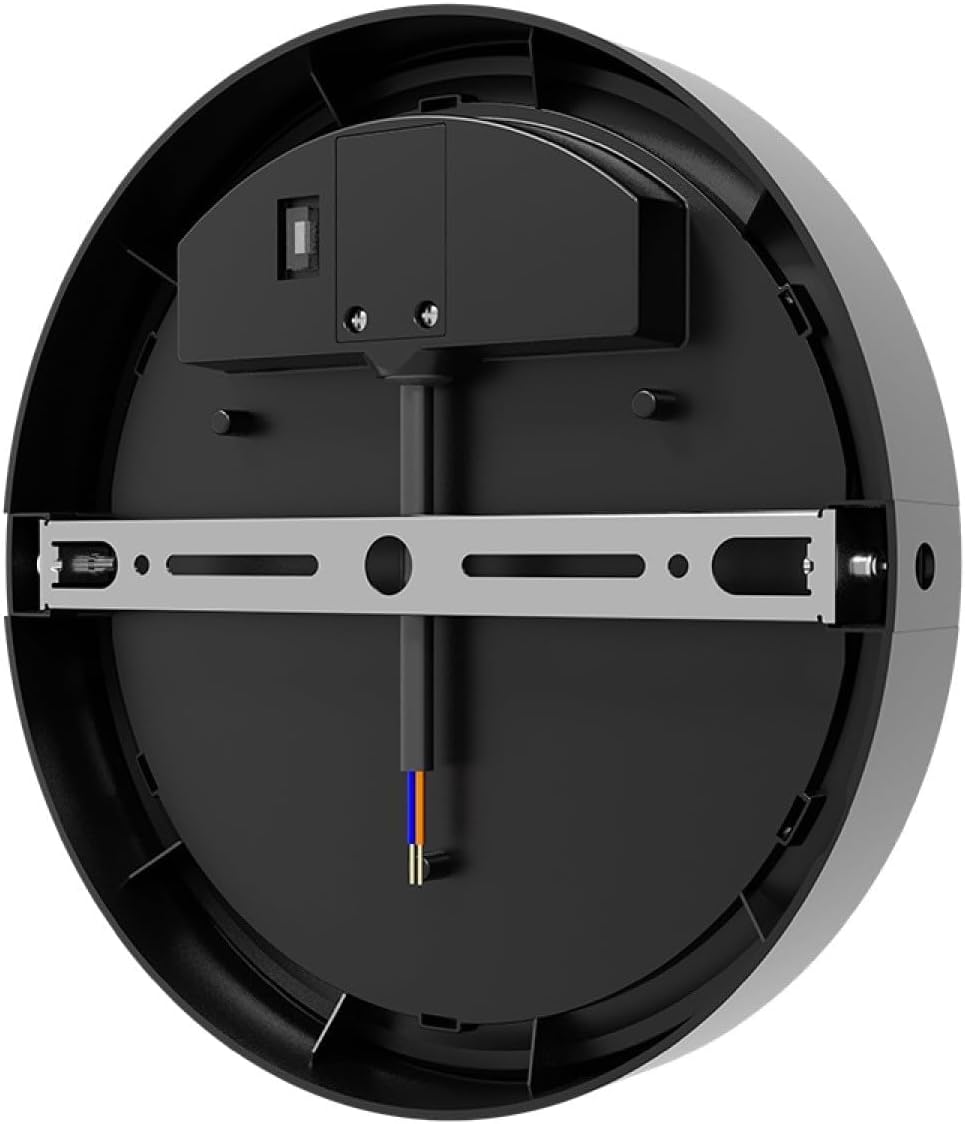
Figure 3: Rear view with mounting bracket and wiring terminals.
5. Setup and Installation
Before beginning installation, ensure the main power supply is switched off at the circuit breaker to prevent electric shock.
5.1. Mounting
- Prepare the Mounting Surface: Choose a suitable location on a wall or ceiling. Ensure the surface is solid and can support the weight of the luminaire.
- Mark Drilling Points: Detach the mounting bracket from the back of the luminaire (refer to Figure 3). Place the bracket against the desired mounting surface and mark the drilling points.
- Drill Holes: Drill holes at the marked points using an appropriate drill bit for your wall material. Insert wall plugs if necessary.
- Secure Mounting Bracket: Attach the mounting bracket to the surface using the provided screws.
5.2. Wiring
- Connect Electrical Wires: Carefully connect the electrical supply wires to the luminaire's terminals. Ensure correct polarity (Live, Neutral, Earth) as indicated on the luminaire or in Figure 3. Use appropriate wire connectors if needed.
- Secure Luminaire: Once wiring is complete, align the luminaire with the secured mounting bracket and fasten it securely. Ensure all connections are tight and the luminaire is stable.
- Restore Power: Switch the main power supply back on at the circuit breaker.
6. Operating Instructions
The Braytron Bulkhead LED Luminaire is designed for straightforward operation.
6.1. Turning On/Off
The luminaire is controlled by a standard wall switch connected to its power supply. Simply toggle the switch to turn the light on or off.
6.2. Adjusting Color Temperature (3-Color Feature)
This luminaire offers three distinct color temperature options (e.g., Warm White, Neutral White, Cool White). To cycle through the available color temperatures:
- Turn the luminaire ON using the wall switch.
- Turn the luminaire OFF and then immediately ON again. The color temperature will change to the next setting.
- Repeat this process until your desired color temperature is selected. The luminaire will typically remember the last selected setting when powered off for a longer period.
7. Maintenance
The Braytron Bulkhead LED Luminaire requires minimal maintenance.
- Cleaning: Disconnect power before cleaning. Wipe the luminaire with a soft, damp cloth. Do not use abrasive cleaners, solvents, or harsh chemicals, as these can damage the finish or electrical components.
- Inspection: Periodically inspect the luminaire for any signs of damage, loose connections, or wear. If any issues are found, disconnect power and consult a qualified electrician.
- LED Light Source: The LED light source is integrated and not user-replaceable. If the LEDs fail, the entire luminaire should be replaced.
8. Troubleshooting
If you encounter issues with your luminaire, refer to the following common problems and solutions:
| Problem | Possible Cause | Solution |
|---|---|---|
| Luminaire does not turn on. | No power supply. Loose wiring connection. Faulty switch. | Check if the circuit breaker is tripped. Ensure the wall switch is ON. Verify all wiring connections are secure. Test the switch with another device or replace it if faulty. |
| Light flickers or dims. | Unstable power supply. Loose wiring. Product fault. | Check power supply stability. Inspect wiring for loose connections. If the problem persists, contact customer support. |
| Color temperature does not change. | Incorrect operation. | Ensure you are cycling the power switch quickly (OFF then ON) to trigger the color change function. |
If the problem persists after attempting these solutions, please contact customer support.
9. Specifications
| Feature | Specification |
|---|---|
| Brand | Braytron |
| Model Number | 4210e657-52c8-4833-82d2-ba38732b7202 |
| Power Consumption | 12W |
| Light Source | Integrated LED |
| Luminous Flux | 1320 lm |
| Color Temperature | 3000K (Adjustable to other white tones via switch cycling) |
| Material | ABS |
| Protection Rating | IP65 |
| Dimensions (WxDxH) | 180 x 48 x 180 mm |
| Color | Black |
| Energy Efficiency Class | E |

Figure 4: Product Dimensions.

Figure 5: Energy Efficiency Label. For more details, visit EPREL Database.
10. Warranty and Support
This Braytron product is covered by a standard manufacturer's warranty against defects in materials and workmanship. The specific terms and duration of the warranty may vary by region and retailer. Please retain your proof of purchase for warranty claims.
For technical support, warranty inquiries, or replacement parts, please contact your retailer or the Braytron customer service department. Contact information can typically be found on the product packaging or the official Braytron website.