
1. Product Overview
The Ansody 140W 25000mAh Power Bank (Model S140) is a high-capacity portable charger designed to provide fast and efficient power to a wide range of electronic devices, including laptops, tablets, and smartphones. Featuring a smart digital display and multiple output ports, it ensures your devices remain charged on the go.
Key Features:
- 140W Fast Charging: Delivers up to 140W maximum output to a single device, capable of charging a 14" MacBook Pro to 50% in under 40 minutes.
- 25,000mAh Large Capacity: Provides multiple charges for smartphones (e.g., iPhone 15 4.3 times) and laptops (e.g., MacBook Pro 1.3 times).
- Triple-Port Design: Equipped with two USB-C ports and one USB-A port, allowing simultaneous charging of up to three devices.
- Smart Digital Display: Intuitive display shows remaining power, output power, device life, and temperature.
- Wide Compatibility: Supports various fast charging protocols including PD3.0, QC2.0, QC3.0, FCP, SCP, AFC, DCP, BC1.2, and APPLE 2.4A.
- Low Current Mode: Designed for charging low-power electronic devices (e.g., watches, headphones) safely.
- Travel-Friendly: Airline-friendly with a 90Wh capacity.
2. Package Contents
- 1 x Ansody 140W 25000mAh Portable Charger
- 1 x 3.28ft 100W USB-C to USB-C Cable
- 1 x User Manual (this document)
3. Product Features and Ports
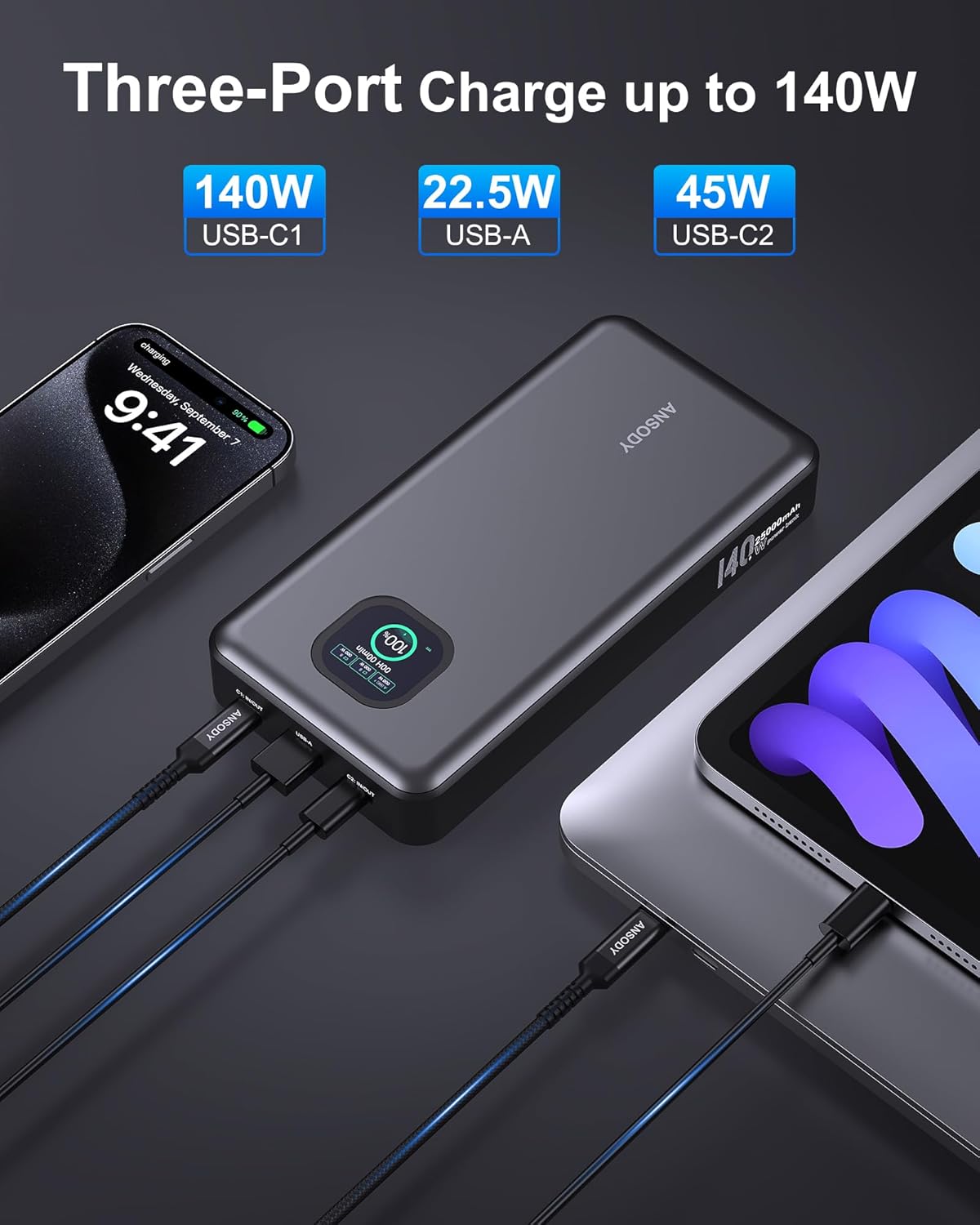
Image 1: The Ansody 140W Power Bank simultaneously charging a smartphone, a tablet, and a laptop. It features a USB-C1 port (140W), a USB-A port (22.5W), and a USB-C2 port (45W).

Image 2: The smart digital display provides real-time information including remaining battery percentage, estimated time to recharge, battery health, and temperature. It also shows input/output wattage for each port (C1, C2, A).

Image 3: Demonstrates the superior 25000mAh capacity, capable of charging a MacBook Air M3 1.3 times, a Samsung S23 3.8 times, an iPhone 15 4.3 times, and an iPad Pro M4 1.4 times.

Image 4: High-speed 140W charging capability, shown charging a MacBook Pro 16" to 55% in 30 minutes. For optimal 140W performance, use PD 3.1 compatible cables and devices.

Image 5: The power bank supports PD 100W Max fast recharge, allowing a full recharge of its 25000mAh capacity in approximately 1.8 hours when using a 100W adapter.

Image 6: Detailed view of the power bank's rich interface, including a C1 IN/OUT port (up to 140W), a USB-A port (up to 22.5W), and a C2 IN/OUT port (up to 45W).
4. Setup and Initial Use
4.1 Initial Charging of the Power Bank
Before first use, fully charge your Ansody Power Bank. Connect the provided 100W USB-C to USB-C cable to the C1 IN/OUT port on the power bank and to a compatible wall adapter (not included). The digital display will show the charging progress. A full charge typically takes about 1.8 hours with a 100W adapter.
4.2 Powering On/Off
Press the power button once to turn on the power bank and activate the digital display. The display will show the current battery percentage and other relevant information. The power bank will automatically turn off after a period of inactivity to conserve power.
5. Operating Instructions
5.1 Charging Your Devices
- Connect your device to one of the available output ports (C1 IN/OUT, C2 OUT, or USB-A OUT) using a compatible charging cable.
- The power bank will automatically detect the connected device and begin charging. The digital display will update to show the output wattage for each active port.
- For optimal fast charging, especially for laptops, use the C1 IN/OUT port with a PD 3.1 compatible cable and device.
- When charging multiple devices simultaneously, the total power output (145W combined) will be distributed among the connected devices.
5.2 Understanding the Digital Display
The smart digital display provides crucial information at a glance:
- Battery Percentage: Shows the remaining charge of the power bank.
- Time to Recharge: Displays the estimated time required to fully recharge the power bank.
- Input/Output Wattage: Indicates the power being drawn by the power bank (input) or delivered to connected devices (output) for each port.
- Battery Health/Temperature: Provides insights into the battery's condition and operating temperature.
5.3 Low Current Mode
For charging low-power electronic devices (less than 50mA), such as smartwatches, headphones, or TWS earphones, you need to activate Low Current Mode. Long press the power button for approximately 3 seconds to enter or exit this mode. In Low Current Mode, if no device is connected or charging, the power bank will automatically shut down after 2 hours.
6. Compatibility
The Ansody 140W Power Bank is compatible with a wide range of USB-C and USB-A powered devices, supporting various fast charging protocols:
- Supported Protocols: PD3.0, QC2.0, QC3.0, FCP, SCP, AFC, DCP, BC1.2, APPLE 2.4A.
- Compatible Devices: iPhone 16/15 series, MacBook, Dell XPS, SteamDeck, Laptops, iPad Pro, Samsung Galaxy S24, Google Pixel, and other low-power electronic devices (watches, headphones).
7. Safety Information
- Over Charging Protection: Built-in safeguards prevent overcharging of connected devices and the power bank itself.
- Short Circuit Protection: Protects against short circuits to ensure safe operation.
- Temperature Control: Monitors and regulates internal temperature to prevent overheating.
- Risk of Fire and Burns: Do not open, crush, heat above 65°C, or incinerate. Follow manufacturer's instructions.
- Airline Travel: The 25000mAh (90Wh) capacity is generally airline-friendly for carry-on luggage. Always check with your airline's specific regulations before traveling.
8. Specifications
| Brand | Ansody |
| Model Number | S140 |
| Battery Capacity | 25000mAh (90Wh) |
| Max Output Power | 140W (Single Port) / 145W (Total) |
| Input (C1) | PD 100W Max |
| Output (C1) | PD 140W Max |
| Output (C2) | PD 45W Max |
| Output (USB-A) | QC 22.5W Max |
| Product Dimensions | 16.45 x 8.1 x 2.74 cm |
| Item Weight | 489 g (17.53 ounces) |
| Special Features | Digital Display, Fast Charging, Over Charging Protection, Short Circuit Protection |
| Color | Dark Gray |
| Manufacturer | Allytec Electronics Co.,Ltd |
| Country of Origin | China |
9. Troubleshooting
- Device not charging: Ensure the power bank is sufficiently charged. Check that the charging cable is securely connected to both the power bank and your device. Verify that your device is compatible with the power bank's output specifications.
- Slow charging: Ensure you are using a fast-charging compatible cable and that your device supports fast charging protocols. When charging multiple devices, the total output power is shared, which may reduce individual charging speeds.
- Digital display not working: Press the power button to activate the display. If it remains off, the power bank might be completely discharged or require a reset.
- Power bank not recharging: Ensure the charging cable is connected to the C1 IN/OUT port and a compatible wall adapter. Check the wall adapter's power output to ensure it meets the power bank's input requirements.
- Overheating: The power bank has built-in temperature protection. If it feels excessively hot, disconnect all devices and allow it to cool down in a well-ventilated area. Avoid charging in direct sunlight or enclosed spaces.
10. Warranty and Support
Ansody provides an industry-leading 24-Month Ansody Care warranty and lifetime technical support for the 140W 25000mAh Power Bank. For any inquiries or assistance, please do not hesitate to contact our customer service team, available 24 hours a day, seven days a week.
Contact: Refer to the contact information provided in your product packaging or visit the official Ansody website for support.