
1. Product Overview
The LINEDEPOT H4 Computer Case is designed for high-performance gaming systems, offering both aesthetic appeal and functional design. It features a spacious interior, 270-degree transparent tempered glass panels, and comes equipped with 7 pre-installed PWM ARGB fans for efficient cooling and customizable lighting.
Key features include:
- Pre-installed Cooling: Seven PWM ARGB fans ensure optimal airflow and customizable lighting effects.
- Spacious Interior: Accommodates large components including GPUs up to 400mm (15.7"), CPU coolers up to 175mm, 360mm liquid radiators, and PSUs up to 200mm.
- Full-View Design: Dual tempered glass panels provide a 270-degree view of internal components.
- Advanced I/O Panel: Includes 1x Type-C, 1x USB 3.0, 1x USB 2.0, Reset button, and Audio jack for convenient connectivity.
- Optimized Airflow: Innovative air duct layout with side panel apertures and magnetic dust filters for enhanced cooling and dust prevention.

Figure 1: Front view of the LINEDEPOT H4 Gaming PC Case, showcasing its full-view tempered glass design and pre-installed ARGB fans.
2. Setup and Installation
This section provides guidance for installing your PC components into the LINEDEPOT H4 case. Ensure all power is disconnected before beginning installation.
2.1 Preparing the Case
- Carefully remove the tempered glass side panels. These are typically secured with thumbscrews or a latch mechanism.
- Identify the motherboard standoffs. Ensure they match your motherboard's form factor (ATX, Micro ATX).
2.2 Component Compatibility and Placement

Figure 2: Internal layout and maximum component dimensions for the H4 case.
- Motherboard: Supports ATX and Micro ATX motherboards.
- GPU: Maximum length of 400mm (15.7 inches).
- CPU Cooler: Maximum height of 175mm.
- PSU: Maximum length of 200mm (7.87 inches). Mounts at the bottom.
- Radiators: Supports up to 360mm liquid radiators on top.
- Storage: Dedicated bays for 2x HDDs and 1x SSD.
2.3 Power Supply Unit (PSU) Installation
Install the PSU into its designated compartment, typically at the bottom rear of the case. The H4 features a left-right split design for independent PSU cooling.
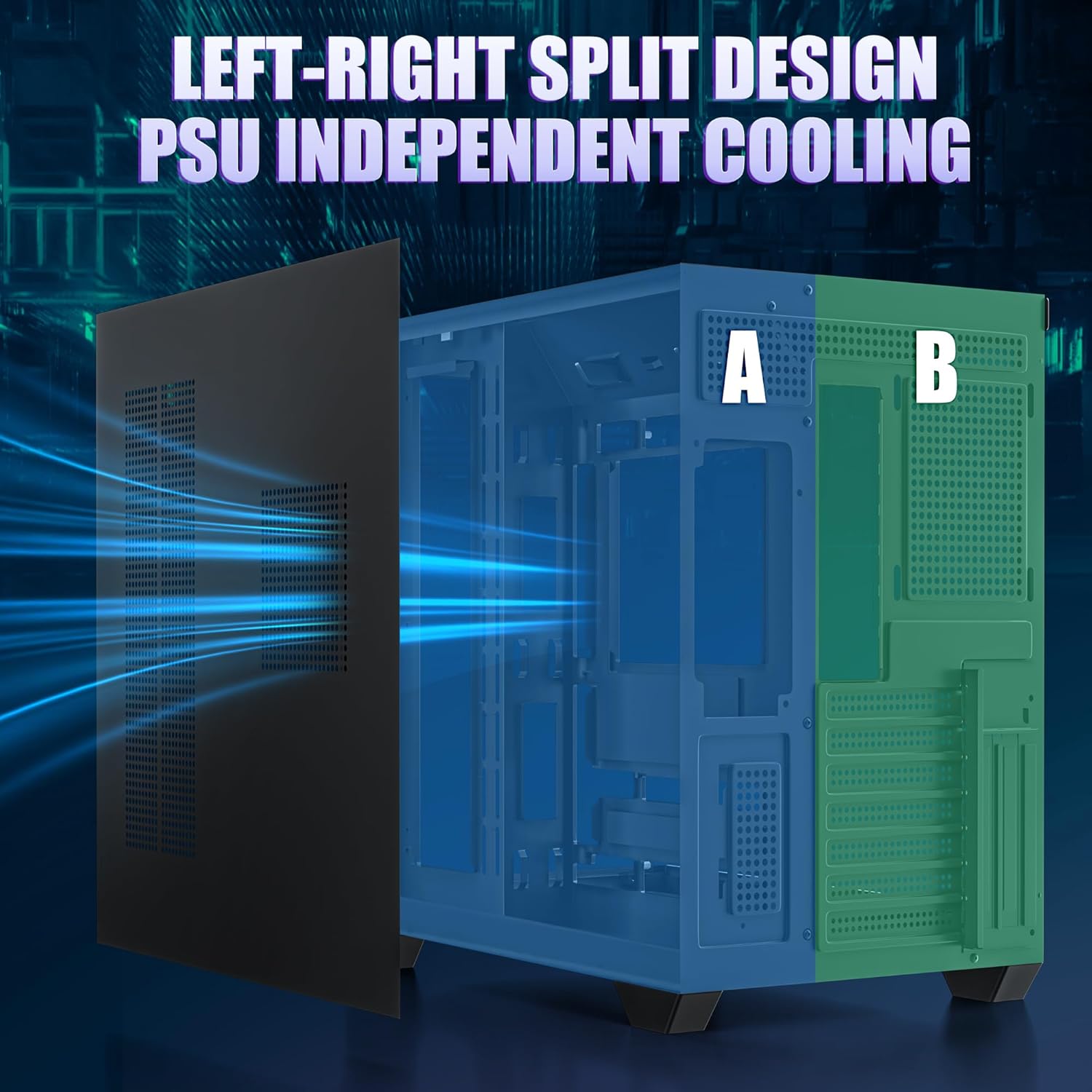
Figure 3: The case's internal structure showing the separated compartment for the Power Supply Unit (PSU) to ensure independent cooling.
2.4 Fan and Cooling System
The case comes with 7 pre-installed PWM ARGB fans. Ensure all fan cables are properly connected to your motherboard or a fan controller for power and ARGB synchronization.

Figure 4: Airflow diagram demonstrating the cooling efficiency of the pre-installed fans.

Figure 5: Comparison of PWM ARGB fans with other fan types, detailing features and benefits.
3. Operating Instructions
Once all components are installed and connected, you can power on your system and utilize the case's features.
3.1 Front I/O Panel
The front I/O panel provides convenient access to various ports and controls:

Figure 6: Detailed view of the front I/O panel and its connectivity options.
- Power Button: To turn the system on/off.
- Reset Button: To restart the system.
- USB 2.0 Port: For connecting peripherals (40MB/s transfer speed).
- USB 3.0 Port: For high-speed data transfer (300MB/s transfer speed).
- Type-C Port: For ultra-high-speed data transfer (1280MB/s transfer speed).
- HD Audio Jack: For connecting headphones or microphones.
3.2 ARGB Fan Control
The pre-installed ARGB fans can be controlled via your motherboard's software. Refer to your motherboard's manual for specific instructions on customizing lighting effects and fan speeds. This allows for synchronization with other ARGB components in your system.
4. Maintenance
Regular maintenance helps ensure optimal performance and longevity of your PC components.
- Dust Filters: The LINEDEPOT H4 case includes magnetic and power supply dust filters. Regularly remove and clean these filters to prevent dust buildup and maintain efficient airflow.
- Interior Cleaning: Periodically open the case and use compressed air to remove dust from fans, heatsinks, and other components. Ensure the system is powered off and unplugged before cleaning.
- Cable Management: Ensure cables are neatly routed to avoid obstructing airflow.
5. Troubleshooting
This section addresses common issues you might encounter.
- System Not Powering On:
- Check all power connections, including the PSU to the wall outlet, PSU to motherboard, and front panel power switch cables to the motherboard.
- Ensure the PSU switch is in the 'ON' position.
- Fans Not Spinning or ARGB Not Lighting Up:
- Verify that all fan power cables are securely connected to the motherboard or fan controller.
- Check ARGB headers for proper connection to the motherboard.
- Ensure motherboard software for ARGB control is installed and configured correctly.
- Poor Cooling Performance:
- Clean dust filters and internal components.
- Ensure fans are oriented correctly for optimal airflow (intake/exhaust).
- Verify fan speeds are set appropriately via motherboard software.
- Front Panel USB/Audio Ports Not Working:
- Check that the front panel USB and audio headers are correctly connected to the motherboard.
- Ensure motherboard drivers are up to date.
6. Specifications
| Feature | Detail |
|---|---|
| Brand | LINEDEPOT |
| Model Name | H4 |
| Case Type | Mid Tower |
| Motherboard Compatibility | ATX, Micro ATX |
| Color | Black |
| Material | Metal |
| Item Weight | 16.91 pounds |
| Package Dimensions | 19.5 x 19.5 x 14.5 inches |
| GPU Max Length | 400mm (15.7 inches) |
| CPU Cooler Max Height | 175mm |
| PSU Max Length | 200mm (7.87 inches) |
| Cooling Method | Air, Water |
| Pre-installed Fans | 7 PWM ARGB Fans |
| Front I/O Ports | 1x USB 3.0, 1x USB 2.0, 1x Type-C, HD Audio, Reset |
7. Warranty and Support
For warranty information and technical support, please refer to the official LINEDEPOT website or contact their customer service. Keep your proof of purchase for warranty claims.
Note: Specific warranty terms may vary by region and retailer.
8. Additional Resources
For visual guidance on assembly and features, please refer to the following videos:
Video 1: Overview of the LINEDEPOT H4 PC Case features and design.
Video 2: Demonstration of internal component installation and cable management.