Introduction
This manual provides comprehensive instructions for the setup, operation, maintenance, and troubleshooting of your Generic HK28 Ultra Round Smart Watch. Please read this manual carefully before using your device to ensure optimal performance and longevity.
The HK28 Ultra Smart Watch features an ultra-round AMOLED display, advanced health monitoring, smartphone notifications, and compatibility with both Android and iOS devices.
Package Contents
- HK28 Ultra Round Smart Watch
- Charging Cable
- User Manual (this document)
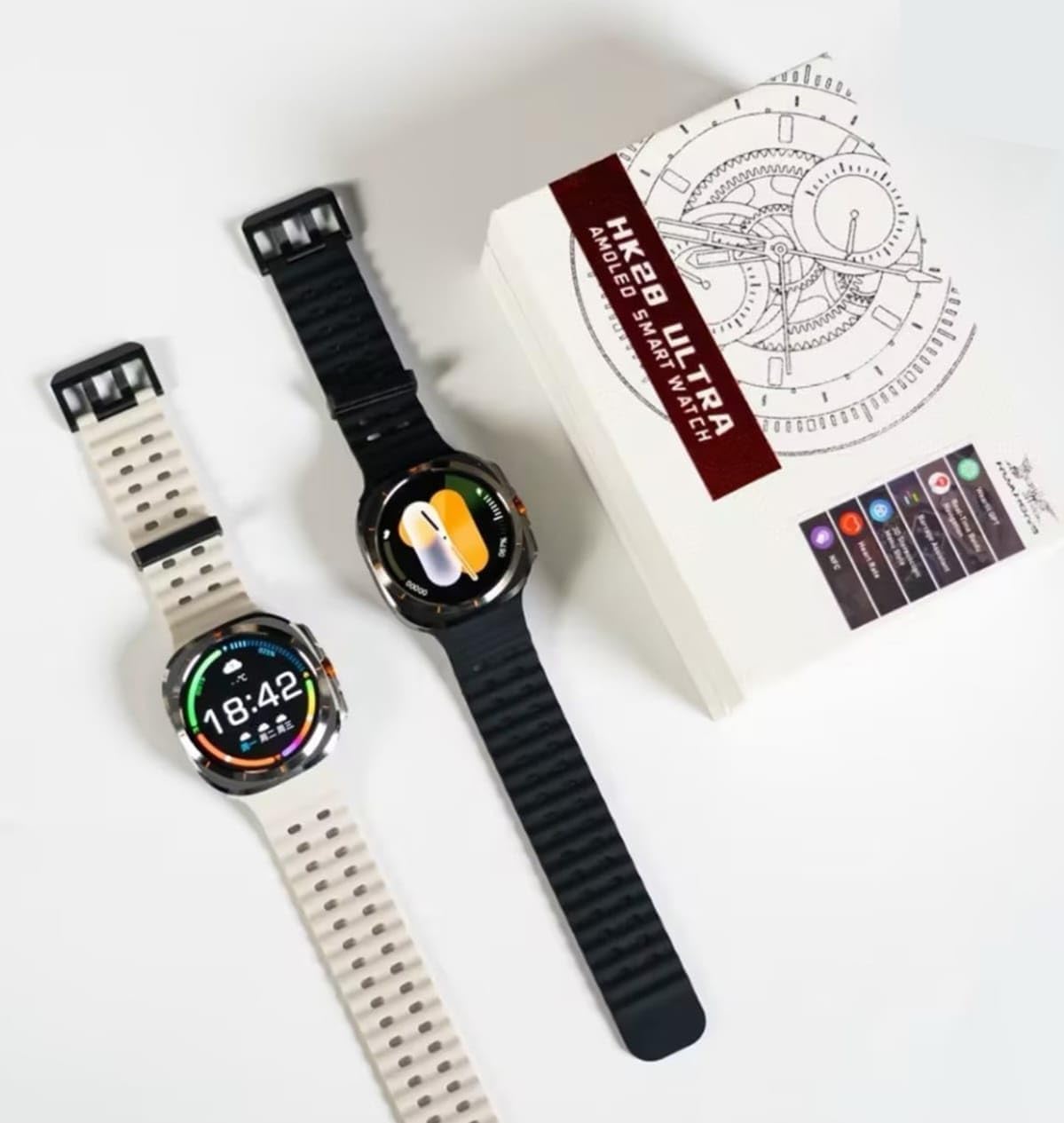
Image: The HK28 Ultra Smart Watch in black and white variants, alongside its product packaging.
Setup Guide
1. Charging the Device
Before initial use, fully charge your HK28 Ultra Smart Watch. Connect the charging cable to the watch's charging port and a USB power adapter (not included). The watch display will indicate charging status.
- Charging Time: Approximately 2 hours for a full charge.
- Battery Life: Varies based on usage.
2. Powering On/Off
- Power On: Press and hold the side button until the screen illuminates.
- Power Off: Press and hold the side button, then select "Power Off" on the screen.
3. Pairing with Your Smartphone
- Download the companion app from your smartphone's app store (search for "HK28 Smart Watch App" or refer to the QR code on the watch/packaging).
- Ensure Bluetooth is enabled on your smartphone.
- Open the app and follow the on-screen instructions to create an account or log in.
- In the app, select "Add Device" or "Pair New Device".
- Select "HK28 Ultra" from the list of available devices.
- Confirm the pairing request on both your watch and smartphone.

Image: Close-up of the HK28 Ultra Smart Watch display showing the time, date, weather, and battery percentage.
Operating Instructions
Basic Navigation
- Touch Screen: Swipe left, right, up, or down to navigate through menus and notifications. Tap to select.
- Side Button: Press to return to the home screen or wake the device. Press and hold for power options.
Key Features
- Watch Faces: Customize your watch face by long-pressing the home screen or through the companion app.
- Notifications: Receive call, message, and app notifications directly on your watch. Swipe down from the top to view.
- Health Monitoring:
- Heart Rate: Access the heart rate monitor from the app list.
- Sleep Tracking: Automatically monitors sleep patterns when worn during sleep.
- Step Counter: Tracks daily steps, distance, and calories burned.
- Sports Modes: Select various sports modes (e.g., running, cycling) to track specific workout data.
- Music Control: Control music playback on your smartphone from your watch.
- Weather: View current weather conditions (requires connection to smartphone).

Image: The HK28 Ultra Smart Watch worn on a wrist, displaying a watch face with a step counter and time.
Maintenance and Care
- Cleaning: Wipe the watch and strap regularly with a soft, dry cloth. Avoid using harsh chemicals or abrasive materials.
- Water Resistance: The watch has a certain level of water resistance (refer to specifications for details). Avoid prolonged submersion or exposure to hot water/steam.
- Storage: Store the watch in a cool, dry place when not in use.
- Charging: Use only the provided charging cable. Do not attempt to disassemble the watch or battery.
Troubleshooting
| Problem | Solution |
|---|---|
| Watch does not power on. | Ensure the watch is fully charged. Connect to the charger for at least 30 minutes. |
| Cannot pair with smartphone. |
|
| Notifications are not received. |
|
| Inaccurate health data. | Ensure the watch is worn snugly on your wrist, about one finger's width above the wrist bone. Avoid excessive movement during measurements. |
Specifications
| Feature | Detail |
|---|---|
| Model Name | HK28 Ultra |
| Display | Round AMOLED Display |
| Brand | Generic |
| Connectivity | Bluetooth (compatible with Android and iOS) |
| Health Monitoring | Heart Rate, Sleep Tracking, Step Counter |
| Item Weight | 55 Grams |
| Package Dimensions | 21 x 4 x 4 cm |
Warranty and Support
For warranty information and technical support, please refer to the documentation provided with your purchase or contact the retailer. Keep your proof of purchase for warranty claims.
For further assistance, you may also visit the manufacturer's website (if available) or contact their customer service.