1. Introduction
Thank you for choosing the Kinetijy Tablet Case for your HEADWOLF WPad 6 W6 10.1 inch tablet. This case is designed to provide comprehensive protection and enhanced functionality, featuring a 360-degree rotating stand and multiple viewing angles. This manual will guide you through the setup, operation, and maintenance of your new tablet case.
What's in the Box:
- 1 x Kinetijy Tablet Case (Brown)
2. Setup: Installing Your Tablet
Follow these steps to correctly install your HEADWOLF WPad 6 W6 10.1 inch tablet into the Kinetijy case:
- Open the Case: Lay the case flat on a clean surface and open it completely.
- Align the Tablet: Carefully align your HEADWOLF WPad 6 W6 tablet with the case's internal frame. Ensure the tablet's corners and edges match the case's protective shell.
- Secure the Tablet: Gently press the tablet into the flexible frame until all corners are securely seated. Verify that all ports, buttons, and the camera lens are accessible through the case's precise cutouts.
- Close the Cover: Close the folio cover. The magnetic strap will help keep the case securely shut.

Image: Proper tablet insertion into the case, ensuring a secure and compatible fit.
The case is designed with thickened anti-drop corner protectors to provide enhanced protection against impacts.
3. Operating Instructions
3.1. 360-Degree Rotation and Multi-Viewing Angles
The Kinetijy tablet case features a 360-degree rotating mechanism, allowing you to easily switch between portrait and landscape viewing orientations. The integrated stand supports multiple viewing angles for comfortable use.
- Adjusting Viewing Angle: Open the folio cover and position the tablet's edge into one of the anti-slip grooves on the inside cover.
- Rotating the Tablet: To change orientation, gently rotate the tablet within its frame. The 360-degree swivel allows for seamless transitions between horizontal and vertical viewing modes without removing the tablet from the case.
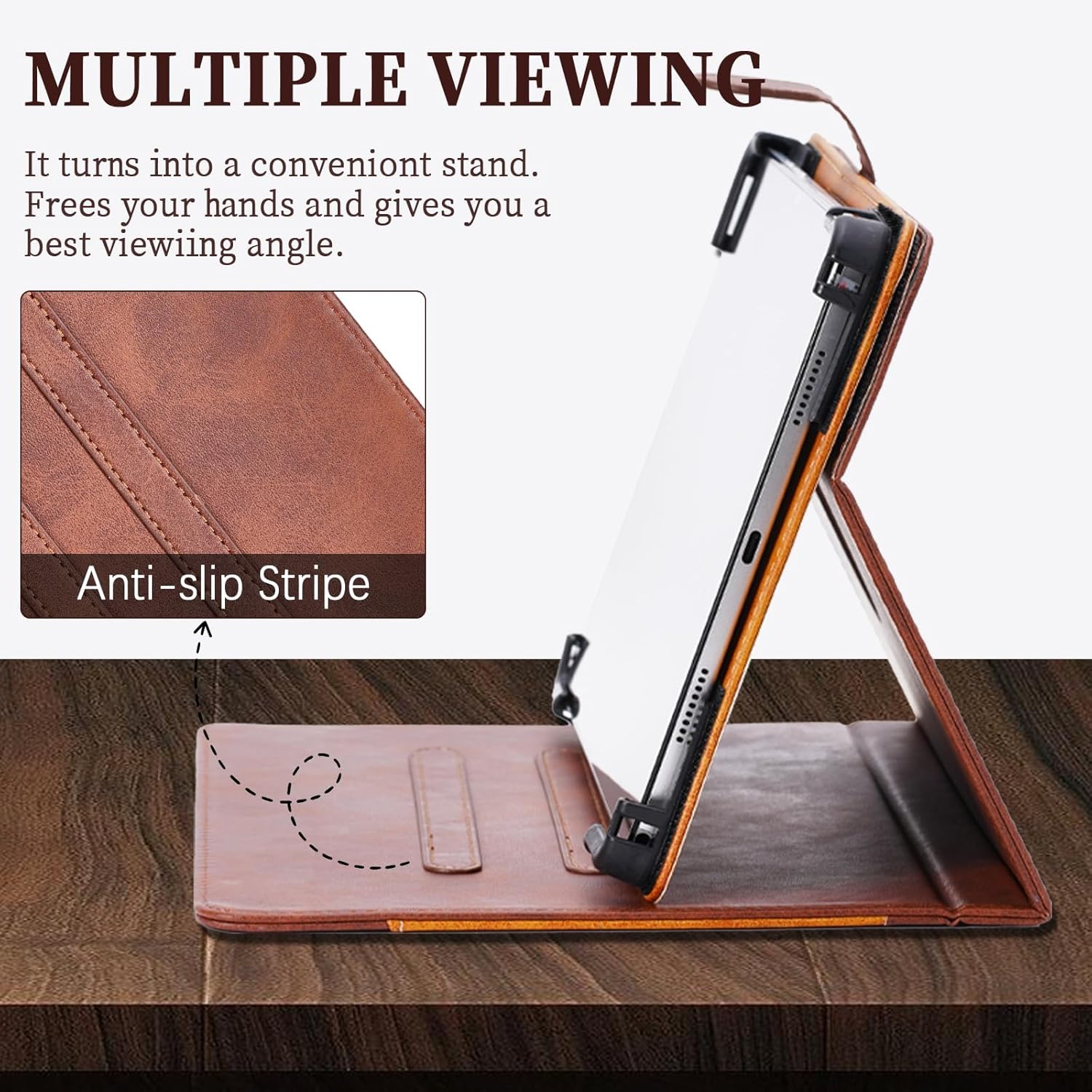
Image: Illustration of the 360-degree rotation and various adjustable viewing angles.
3.2. Anti-Slip Strip Feature
The interior of the case is equipped with an anti-slip strip design. This feature ensures that your tablet remains stable and securely propped up at your chosen viewing angle, preventing it from sliding flat during use.

Image: Detail of the anti-slip stripe providing stable support for the tablet.
3.3. Camera Access and Cutouts
The case includes reserved cutouts for the tablet's rear camera. These cutouts are designed to support 99% camera usage, accommodating tablets with different camera positions. Ensure your tablet's camera aligns with the appropriate cutout for unobstructed use.

Image: Various camera cutout options for broad compatibility.
3.4. Storage Pocket
The case features a convenient storage pocket, ideal for carrying cards, documents, or cash. This additional feature enhances the practicality of your tablet case.
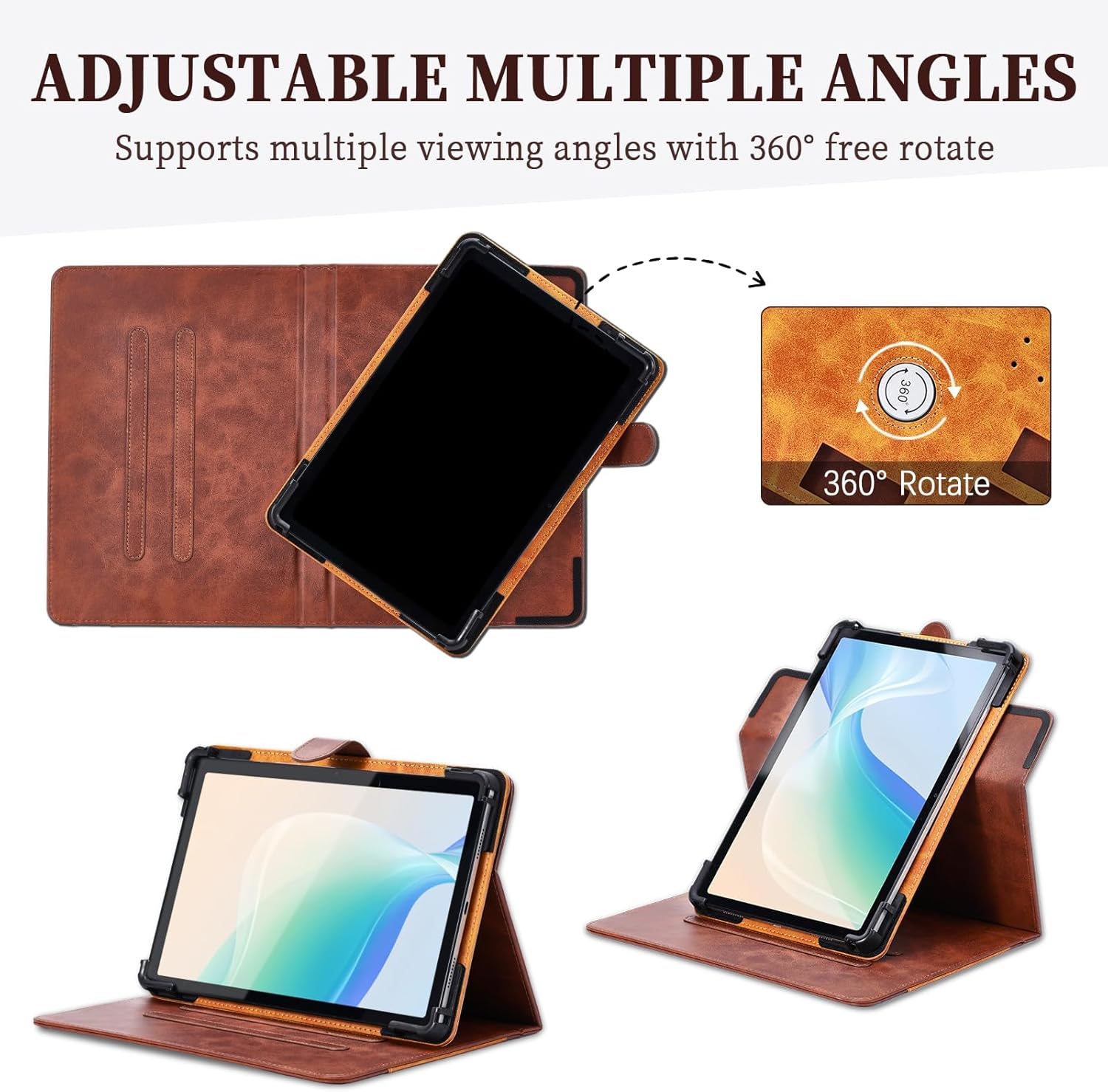
Image: Integrated storage pocket for cards and documents.
4. Maintenance
To ensure the longevity and appearance of your Kinetijy tablet case, follow these maintenance guidelines:
- Cleaning: Wipe the PU leather surface with a soft, damp cloth. Avoid using harsh chemicals, abrasive cleaners, or solvents, as these can damage the material.
- Stain Removal: For minor stains, use a mild soap solution on a cloth and gently dab the affected area. Wipe clean with a separate damp cloth and allow to air dry.
- Storage: When not in use, store the case in a cool, dry place away from direct sunlight and extreme temperatures to prevent material degradation.
- Avoid Sharp Objects: Keep the case away from sharp objects to prevent scratches or punctures to the PU leather.
5. Troubleshooting
5.1. No Auto-Sleep/Wake Function
Please note that this Kinetijy tablet case does not support any tablet's auto-sleep/wake function. You will need to manually put your tablet to sleep or wake it up using its power button.
5.2. Camera Obstruction
If your tablet's camera appears obstructed, ensure that the tablet is correctly seated within the case and aligned with the appropriate camera cutout. The case features multiple cutouts to accommodate various camera positions. If obstruction persists, verify that your tablet model is indeed the HEADWOLF WPad 6 W6 10.1 inch tablet.
6. Specifications
| Feature | Detail |
|---|---|
| Brand | Kinetijy |
| Model Number | K-2504-SSPB-143 |
| Compatible Devices | HEADWOLF WPad 6 W6 10.1 inch Tablet |
| Color | Brown |
| Material | Premium Durable Synthetic PU Leather |
| Form Factor | Flip Case / Folio Cover |
| Shell Type | Hybrid |
| Special Features | 360 Degree Rotation, Multi-Viewing Angles, Anti-slip Strip, Card Insertion, Storage Pocket, Thickened Anti-drop Corner Protector |
| Item Dimensions | 0.39 x 0.39 x 0.39 inches (approximate) |

Image: Overview of the case's protective design, including port access and corner reinforcement.
7. Warranty and Support
For any questions, concerns, or support regarding your Kinetijy Tablet Case, please refer to the retailer's return policy or contact the seller directly through your purchase platform. Please retain your proof of purchase for any warranty claims.