
1. Product Overview
The Masoll Gen 2 TPMS Sensor Kit provides a comprehensive solution for monitoring tire pressure in compatible GM vehicles. This kit includes four external tire pressure sensors and one EL-50448 TPMS relearn tool, designed for easy DIY installation and accurate real-time tire pressure monitoring.

Figure 1: Masoll TPMS Sensor Kit components and in-car display example.
2. Compatibility
This Masoll TPMS sensor set is compatible with a wide range of GM branded vehicles manufactured after 2006. The Gen 2 sensors offer broader vehicle coverage and robust performance for various vehicle types, including cars, SUVs, and pickup trucks.
Key Compatibility Features:
- Compatible with GM vehicles manufactured after 2006.
- Supports 315/433Mhz sensors.
- Designed for Chevy, Chevrolet, Buick, Cadillac, GMC, and Pontiac models.

Figure 2: Detailed list of applicable vehicle models.
For a complete list of compatible vehicles, please refer to the detailed table provided in Figure 2.
3. What's in the Box
Your Masoll TPMS Sensor Kit includes the following items:
- 4 x Aftermarket TPMS Replacement Sensors
- 1 x TPMS Relearn Tool (EL-50448)
- Necessary Accessories for installation
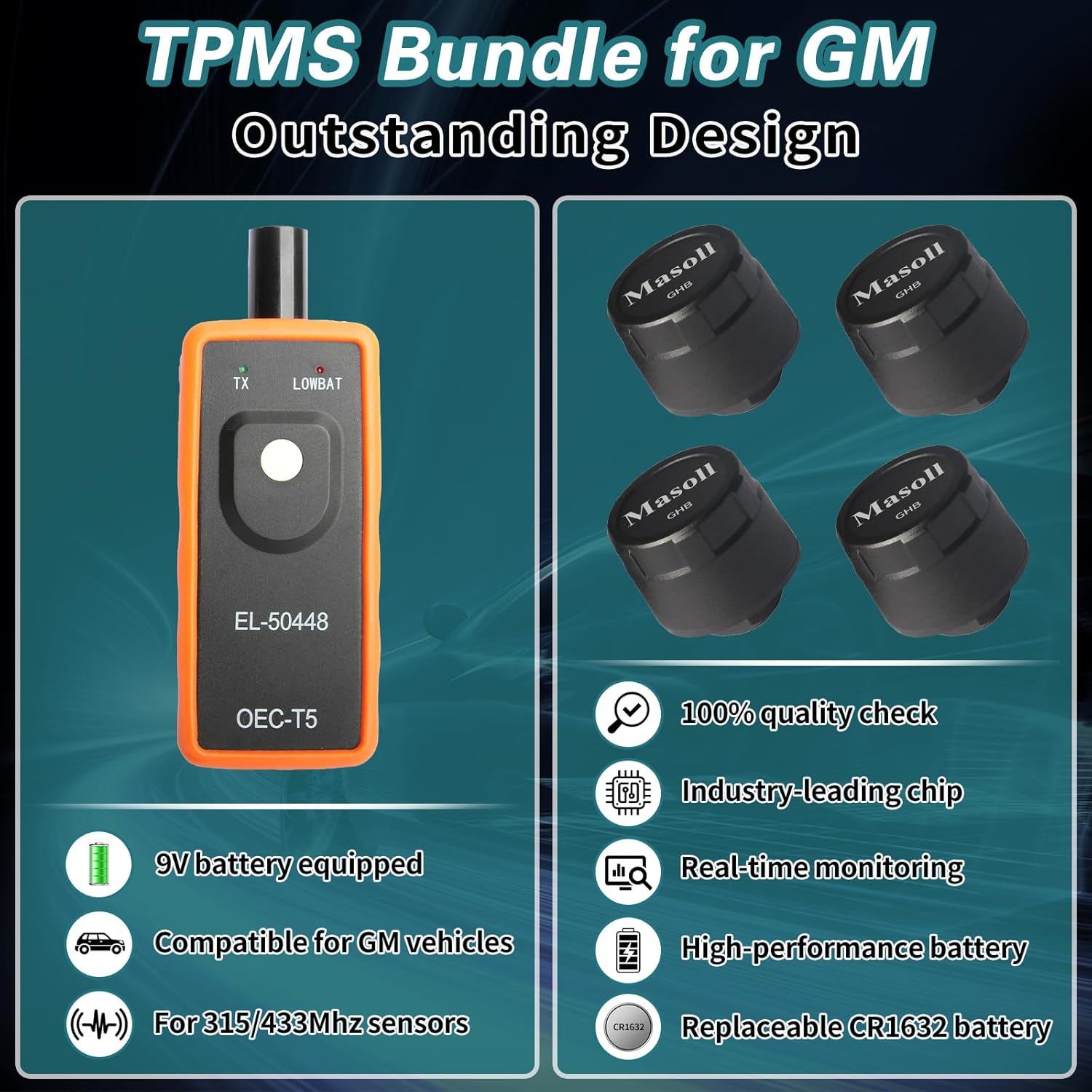
Figure 3: Contents of the Masoll TPMS Sensor Kit.
4. Installation Guide
The Masoll TPMS kit is designed for easy DIY installation, typically taking around 5-10 minutes. Unlike internal TPMS sensors, these external sensors do not require tire dismounting or professional shop services.

Figure 4: DIY installation advantage over traditional methods.
4.1. Sensor Installation
Prepare Your Vehicle:
Ensure your vehicle is parked on a level surface with the engine off and parking brake engaged.Remove Valve Cap:
Unscrew the existing valve cap from each tire's valve stem.Install Sensors:
Screw each Masoll cap sensor onto the tire valve stem firmly. Ensure a snug fit to prevent air leakage.
Figure 5: Step 1 - Install the cap sensors onto the tire valves.
4.2. TPMS Relearn Process (Using EL-50448 Tool)
After installing the sensors, you must perform a relearn procedure to sync them with your vehicle's ECU. The included EL-50448 TPMS relearn tool simplifies this process.
Enter TPMS Learning Mode:
Operate your car to enter the TPMS learning mode. This procedure varies by vehicle model; consult your vehicle's owner's manual for specific instructions. Typically, two horn sounds indicate the car has entered the learning mode.
Figure 6: Example of original dashboard display after successful relearn.
Trigger Sensors:
Using the EL-50448 TPMS relearn tool, trigger each tire sensor in the specified order (usually Left Front (LF), Right Front (RF), Right Rear (RR), Left Rear (LR)). Point the tool near the valve stem and activate it. A horn sound typically confirms successful triggering of each sensor.Figure 7: Step 3 - Use the provided TPMS relearn tool to trigger tire sensors.
Completion:
After all four sensors have been successfully triggered, the vehicle's horn will sound twice, indicating that the operation is complete and the TPMS system is updated.
5. Maintenance
The Masoll TPMS sensors are designed for low power consumption and long-term reliability.
Battery Life:
The sensors have an approximate battery life of 2 years.Battery Replacement:
The sensors feature replaceable CR1632 batteries, allowing for extended product lifespan. Refer to the specifications section for details on battery type.Environmental Durability:
The sensors are designed to adapt to various weather conditions, offering waterproof, dust-proof, and anti-theft features, ensuring accurate monitoring in extreme conditions.
6. Troubleshooting
If you encounter issues with your Masoll TPMS Sensor Kit, consider the following:
TPMS Light Remains On:
Ensure all sensors are securely screwed onto the valve stems. Re-attempt the TPMS relearn process as described in Section 4.2. Verify your vehicle is in the correct learning mode.Inaccurate Readings:
Check tire pressure with a reliable manual gauge to confirm discrepancies. Ensure sensors are tightly installed.Sensor Not Triggering:
Ensure the EL-50448 tool has sufficient battery power. Position the tool correctly near the valve stem.Compatibility Issues:
Double-check your vehicle's make, model, and year against the compatibility list in Section 2.
For persistent issues, please contact Masoll customer support.
7. Specifications
Detailed specifications for the Masoll TPMS Sensor Kit:
| Feature | Specification |
|---|---|
| Brand | Masoll |
| Model Number | EL50448+4SP |
| Measurement Accuracy | ±1.5 PSI |
| Mounting Type | Tire Mount (External Cap Sensor) |
| Output Type | Digital |
| Upper Temperature Rating | 100 Degrees Fahrenheit |
| Item Weight | 10.5 ounces (total package) |
| Sensor Battery Type | CR1632 (replaceable) |
| Relearn Tool Battery | 9V battery (included) |

Figure 8: Physical specifications of the TPMS sensors and relearn tool.
8. Warranty and Support
For warranty information, technical support, or any inquiries regarding your Masoll TPMS Sensor Kit, please contact Masoll customer service directly. Refer to the product packaging or the official Masoll website for contact details.