1. Introduction
This manual provides essential information for the safe and efficient operation, installation, and maintenance of your new Arrow RO-5555GSF 4-burner gas oven. Please read all instructions carefully before using the appliance and retain this manual for future reference.
2. Safety Information
WARNING: Gas appliances can cause carbon monoxide poisoning. Use only in well-ventilated areas. Read all safety warnings before use.
- Ensure proper ventilation when operating the gas oven.
- Do not store flammable materials near the appliance.
- Keep children and pets away from the oven during operation.
- Always use oven mitts when handling hot items.
- Do not use water on grease fires; smother the fire or use a dry chemical extinguisher.
- Regularly check gas connections for leaks using a soapy water solution (never an open flame).
- Ensure the appliance is installed by a qualified technician.
3. Product Overview
The Arrow RO-5555GSF is a freestanding 4-burner gas oven designed for versatile cooking. It features a durable stainless steel construction and manual controls for precise heat management.
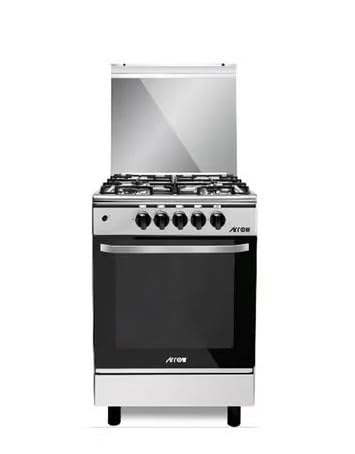
Figure 3.1: Front view of the Arrow RO-5555GSF Gas Oven.
Key Features:
- Dimensions: This gas oven measures 55 cm (Depth) x 55 cm (Width) x 55 cm (Height), designed to fit standard kitchen spaces.
- Burner Configuration: Equipped with four efficient gas burners and six control knobs, allowing for precise heat adjustment across multiple cooking zones.
- Safety Features: Includes heat-resistant control knobs and a durable glass top cover for enhanced safety during operation.
- Construction: Constructed from high-quality stainless steel with robust supports, ensuring durability and stability.
- Design: Features a modern design with easy-to-clean surfaces, optimized for efficient gas consumption and practical daily cooking.
4. Setup and Installation
Installation of this gas oven must be performed by a qualified and certified technician in accordance with local regulations and standards.
4.1 Unpacking
- Carefully remove the oven from its packaging.
- Remove all packing materials, tapes, and protective films from the appliance.
- Check for any damage during transit. Contact your retailer immediately if damage is found.
4.2 Placement
- Place the oven on a stable, level surface.
- Ensure adequate clearance from walls and cabinets as specified by local building codes.
- Do not place the oven near flammable materials.
4.3 Gas Connection
The gas connection must be made by a qualified technician. Ensure the gas supply pressure is compatible with the appliance specifications. Use appropriate gas hoses and fittings.
4.4 Electrical Connection (if applicable)
If your model includes an electric igniter or oven light, ensure it is connected to a properly grounded electrical outlet. Consult the electrical diagram for specific requirements.
5. Operating Instructions
5.1 Using the Gas Burners
- Place cookware centrally on the burner grate.
- Push and turn the desired burner control knob counter-clockwise to the maximum flame setting.
- Hold the knob in for a few seconds to allow the igniter to spark and light the gas.
- Once lit, release the knob and adjust the flame to the desired intensity.
- To turn off, turn the knob clockwise to the 'OFF' position.
5.2 Using the Gas Oven
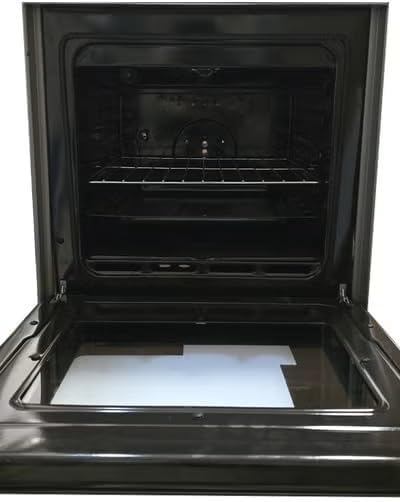
Figure 5.1: Interior of the oven with racks.
- Open the oven door.
- Push and turn the oven control knob to the desired temperature setting.
- Hold the knob in for a few seconds to allow the igniter to light the oven burner.
- Once the burner is lit, release the knob. The oven will preheat to the set temperature.
- Monitor cooking through the oven door window.
- To turn off, turn the oven control knob to the 'OFF' position.

Figure 5.2: Example of food placed on oven racks for cooking.
6. Maintenance and Cleaning
Regular cleaning and maintenance will ensure the longevity and optimal performance of your oven.
6.1 Daily Cleaning
- Wipe down the stainless steel surfaces with a soft cloth and mild detergent after each use.
- Clean burner grates and caps with warm soapy water. Ensure they are completely dry before reassembling.
6.2 Deep Cleaning
- For stubborn stains, use a non-abrasive stainless steel cleaner.
- The oven interior can be cleaned with oven cleaner, following the product's instructions. Ensure adequate ventilation.
- Remove oven racks and clean them separately.
6.3 Maintenance Tips
- Periodically check the oven door seal for damage. A damaged seal can affect oven performance.
- Ensure burner ports are clear of food debris to maintain efficient flame distribution.
- Have gas connections inspected annually by a qualified technician.
7. Troubleshooting
Before contacting customer service, please refer to the following common issues and solutions:
| Problem | Possible Cause | Solution |
|---|---|---|
| Burner not lighting | No gas supply, igniter faulty, burner ports clogged | Check gas valve, clean burner ports, contact technician |
| Oven not heating | Pilot light out (if applicable), oven igniter faulty, gas supply issue | Relight pilot, check gas supply, contact technician |
| Uneven cooking | Improper rack placement, faulty thermostat, oven door seal damaged | Adjust rack position, check door seal, contact technician |
| Gas odor | Gas leak | Immediately turn off gas supply, open windows, evacuate, and call emergency services. Do not operate electrical switches. |
8. Specifications
| Feature | Detail |
|---|---|
| Brand | Arrow |
| Model Name | RO-5555GSF |
| Burner Type | Gas |
| Number of Burners | 4 |
| Form Factor | Freestanding |
| Product Dimensions (D x W x H) | 55D x 55W x 55H cm |
| Material | Stainless Steel |
| Finish Type | Stainless Steel |
| Control Type | Manual |
| Drawer Type | Heating |
| Item Weight | 49 Kilograms |
9. Warranty and Support
Specific warranty information for the Arrow RO-5555GSF gas oven is not provided in the product data. Please refer to your purchase documentation or contact your retailer for details regarding warranty coverage and customer support.
For technical assistance or service inquiries, please contact the authorized Arrow service center in your region.


