
1. Product Overview
This manual provides essential information for the safe and efficient operation of your Generic 27.5-inch 100W Bluetooth Soundbar (Model: Sb-100). This soundbar is designed to enhance your audio experience for movies, TV shows, and music, delivering powerful stereo surround sound with 3D audio technology.
Key features include:
- Four integrated speakers for immersive audio.
- Bluetooth connectivity for wireless streaming.
- 100-watt maximum output power with 85dB signal-to-noise ratio.
- Compact and sleek black design, suitable for placement under most TVs.
- USB rechargeable power source.
2. What's in the Box
Please check the package contents carefully. If any items are missing or damaged, contact your retailer.
- Soundbar (1 unit)
- USB Charging Cable (1 unit)
- Remote Control (1 unit)
- User Manual (This document)
3. Important Safety Information
Read all instructions before using the product. Keep this manual for future reference.
- Power Source: Use only the specified USB charging cable and a compatible USB power adapter (not included) for charging.
- Water and Moisture: Do not expose the soundbar to rain, moisture, or dripping/splashing liquids. Do not place objects filled with liquids, such as vases, on the apparatus.
- Heat: Do not place the soundbar near heat sources such as radiators, heat registers, stoves, or other apparatus (including amplifiers) that produce heat.
- Ventilation: Ensure proper ventilation. Do not block any ventilation openings.
- Cleaning: Unplug the soundbar from the power source before cleaning. Use a dry cloth only.
- Servicing: Do not attempt to service this product yourself. Refer all servicing to qualified service personnel.
- Placement: Place the soundbar on a stable, flat surface or mount it securely if using a wall mount (mounting hardware not included).
4. Setup Guide
4.1 Unpacking and Placement
Carefully remove the soundbar and all accessories from the packaging. Place the soundbar on a stable, flat surface, such as a TV stand, directly in front of your television for optimal sound projection. Ensure there is adequate space around the unit for ventilation.
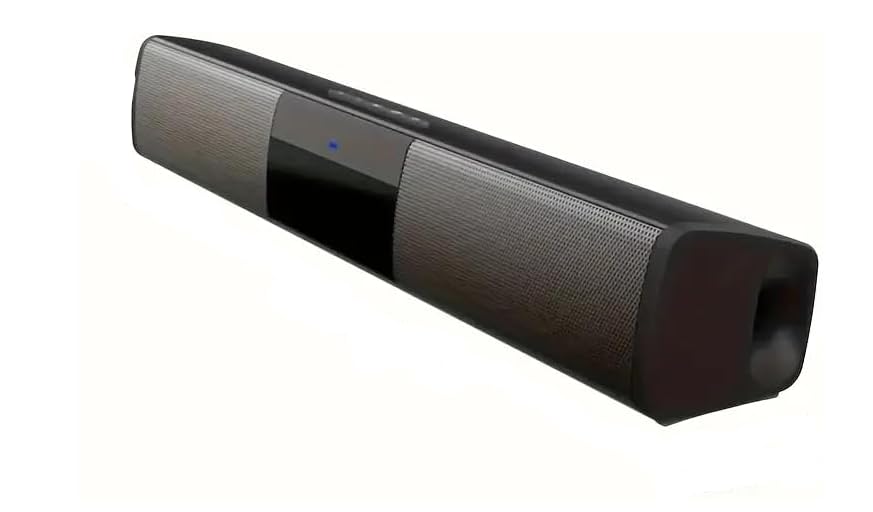
Figure 4.1: The Generic 27.5-inch Soundbar. This image displays the main unit of the soundbar, showcasing its sleek black design, speaker grilles, and the integrated control panel on the top surface.
4.2 Power Connection
The soundbar is USB rechargeable. Before first use, ensure the soundbar is fully charged.
- Locate the USB charging port on the soundbar.
- Connect one end of the provided USB charging cable to the soundbar's USB port.
- Connect the other end of the USB charging cable to a compatible USB power adapter (e.g., a 5V/1A phone charger, not included) or a powered USB port on your TV or computer.
- The charging indicator light will illuminate. Once fully charged, the light may change color or turn off, depending on the model.
4.3 Connecting to Your TV or Devices
The soundbar primarily uses Bluetooth for wireless connectivity. Ensure your TV or device has Bluetooth capability.
- For Bluetooth Devices: Proceed to the "Bluetooth Pairing" section under Operating.
- For USB Devices: The soundbar supports USB playback. Insert a USB drive containing audio files into the designated USB port on the soundbar.
5. Operating Instructions
5.1 Powering On/Off
- To Power On: Press and hold the Power button on the soundbar's control panel or the remote control.
- To Power Off: Press and hold the Power button again.
5.2 Control Methods
The soundbar can be controlled via its integrated touch controls or the included remote control.
- Touch Controls: Located on the top surface of the soundbar. These typically include Power, Volume Up/Down, Mode, and Play/Pause buttons.
- Remote Control: Provides full functionality, including power, volume, input mode selection, track control (for Bluetooth/USB), and sound effects.
5.3 Bluetooth Pairing
- Ensure the soundbar is powered on.
- Press the "Mode" button on the soundbar or remote control until the Bluetooth indicator light flashes, indicating pairing mode.
- On your device (smartphone, tablet, TV), enable Bluetooth and search for available devices.
- Select "Sb-100" (or similar name) from the list of found devices.
- Once paired, the Bluetooth indicator light on the soundbar will become solid, and you will hear a confirmation tone.
- You can now play audio from your device through the soundbar.
Note: The soundbar will automatically attempt to reconnect to the last paired device when powered on.
5.4 USB Playback
To play audio from a USB drive:
- Insert a USB flash drive (formatted to FAT32) containing MP3 or WAV audio files into the USB port on the soundbar.
- Press the "Mode" button until the soundbar switches to USB input mode.
- Playback should begin automatically. Use the remote control or touch controls to play/pause, skip tracks, or adjust volume.
5.5 Sound Modes and Effects
The soundbar features 3D Surround Sound technology. Use the remote control to cycle through available sound modes (e.g., Movie, Music, News) to optimize your listening experience for different content types.
6. Maintenance
6.1 Cleaning
- Always disconnect the soundbar from any power source before cleaning.
- Use a soft, dry, lint-free cloth to wipe the exterior surfaces of the soundbar.
- Do not use liquid cleaners, aerosol sprays, or abrasive cleaning agents, as they may damage the finish or internal components.
- Gently brush dust from speaker grilles using a soft brush.
6.2 Storage
If storing the soundbar for an extended period, power it off, disconnect all cables, and store it in a cool, dry place away from direct sunlight and extreme temperatures. It is recommended to use the original packaging for storage to protect the unit.
7. Troubleshooting
If you encounter issues with your soundbar, refer to the following common problems and solutions.
| Problem | Possible Cause | Solution |
|---|---|---|
| No power | Battery is depleted. | Connect the soundbar to a USB power source and allow it to charge. |
| No sound | Volume is too low or muted. Incorrect input mode selected. Bluetooth not paired. | Increase volume on soundbar and source device. Press "Mode" button to select correct input (e.g., Bluetooth, USB). Re-pair Bluetooth device. |
| Bluetooth pairing fails | Soundbar not in pairing mode. Device too far. Interference. | Ensure soundbar is in pairing mode (flashing light). Move device closer to soundbar. Turn off other Bluetooth devices nearby. |
| Distorted sound | Volume too high. Source audio quality is poor. | Reduce volume. Try a different audio source or file. |
If the problem persists after trying these solutions, please contact customer support.
8. Product Specifications
| Feature | Detail |
|---|---|
| Model Name | 27.5-inch Soundbar (Sb-100) |
| Brand | Generic |
| Speaker Type | Soundbar With Subwoofer (integrated) |
| Speaker Maximum Output Power | 100 Watts |
| Number of Speakers | 4 integrated speakers |
| Surround Sound Channel Configuration | 2.0, 3D Surround |
| Signal-to-Noise Ratio | 85 dB |
| Frequency Response | 20 Hz |
| Connectivity Technology | Bluetooth |
| Wireless Communication Technology | Bluetooth |
| Power Source | USB Rechargeable |
| Control Method | Remote, Touch |
| Product Dimensions (D x W x H) | 3.03"D x 15.74"W x 10.74"H |
| Item Weight | 3.5 pounds |
| Material | Plastic, Metal |
| Color | Black |
| Mounting Type | Tv Stand Mount |
| Recommended Uses | Music, TV, Home Theater, Movies |
| Compatible Devices | Television, USB Devices, Bluetooth Devices |
| Manufacturer | Ulta |
| Country of Origin | China |
Note: The product title mentions "27.5 inch", which refers to the model name. The actual width dimension is 15.74 inches as per specifications.
9. Warranty and Support
For information regarding the product warranty, please refer to the warranty card included with your purchase or contact the retailer where you purchased the soundbar. Warranty terms and conditions may vary by region and retailer.
For technical support or service inquiries, please contact the seller or manufacturer directly using the contact information provided with your product or on their official website.