
1. Product Overview
The IKEEPFIT MAXwarm 4.0 is a versatile cordless heating pad with integrated massage and lumbar support, designed for targeted relief of back pain, menstrual cramps, and general muscle discomfort. Its portable design allows for use anywhere, anytime.
This device combines deep heat, gentle vibration, and brace-level lumbar support. The extra-wide graphene heating zone quickly warms both your lower back and abdomen, providing deep, even heat. The vibration feature helps relax tight muscles, while the X-shaped brace and dual elastic straps offer robust lumbar support and ensure a snug fit.
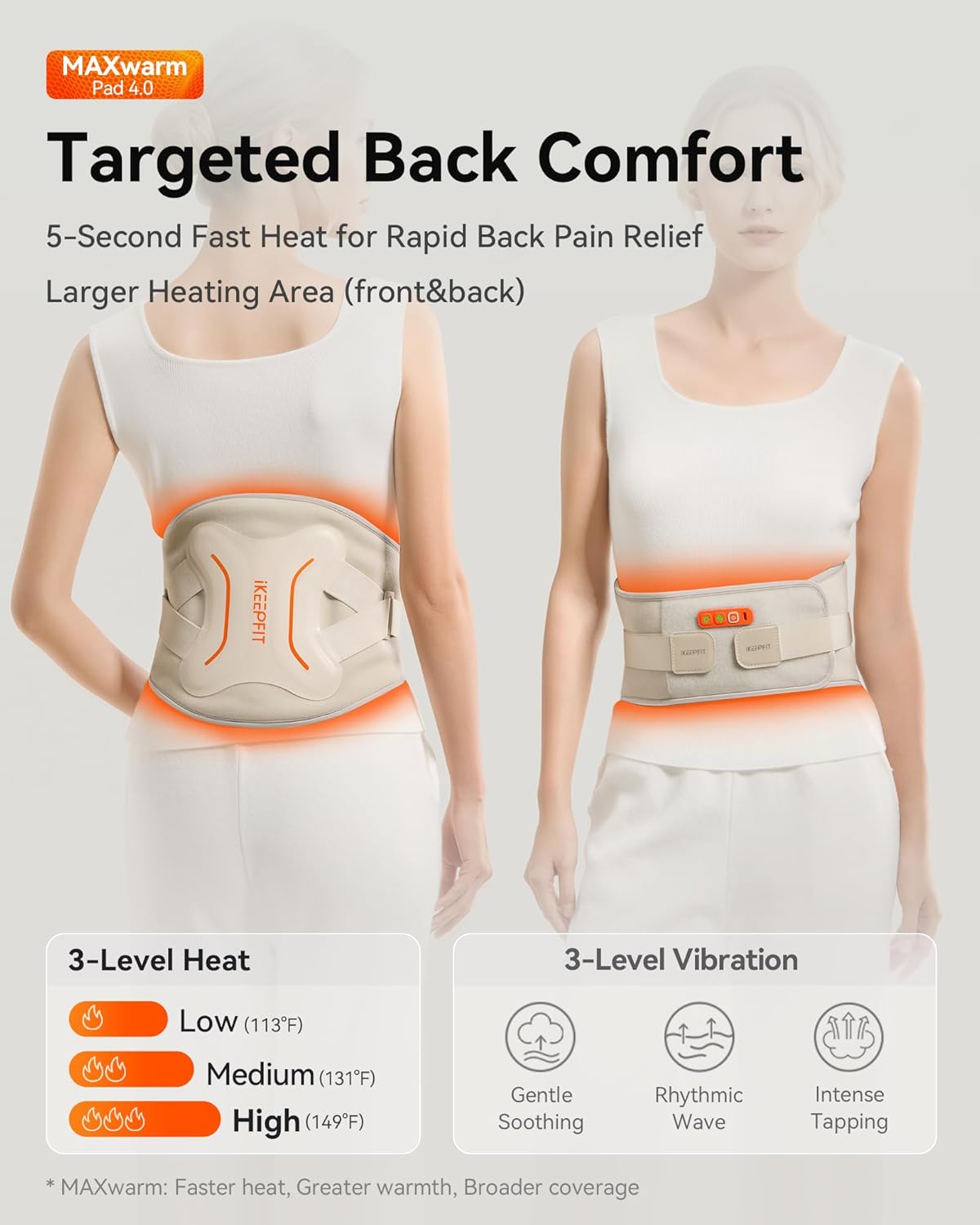
Image: The MAXwarm 4.0 heating pad provides targeted comfort with 3 heat levels (Low 113°F, Medium 131°F, High 149°F) and 3 vibration levels (Gentle, Rhythmic, Intense Tapping).

Image: Ergonomic Back Brace Support with 3 reinforced metal support bars and 2 ultra-elastic bionic straps for lumbar stabilization and improved posture.

Image: The cordless design, powered by an 8000mAh battery, ensures true wireless freedom and ergonomic fitting without slipping.
2. Key Features
- MAXwarm Technology: Features an extra-wide graphene heating area (2X typical) that warms both back and abdomen in 5 seconds, providing deep, even heat.
- Cordless & Portable: Equipped with a built-in 8000 mAh battery for true wireless freedom. Can be used on various body parts like hips, legs, or shoulders with included extension straps.
- Brace-Level Lumbar Support: 3 reinforced metal support bars and 2 ultra-elastic bionic straps form an ergonomic 'X' brace, stabilizing the lumbar area and encouraging better posture.
- Dual Zone Heating: Front and back heating zones can be activated independently or together.
- Smart Safety Features: NTC smart temperature and safety sensors, plus a 20-minute auto-off function, prevent hot spots and ensure user comfort and safety.

Image: MAXwarm Technology provides rapid and extensive heat coverage.

Image: The 8000mAh battery ensures extended use and portability.
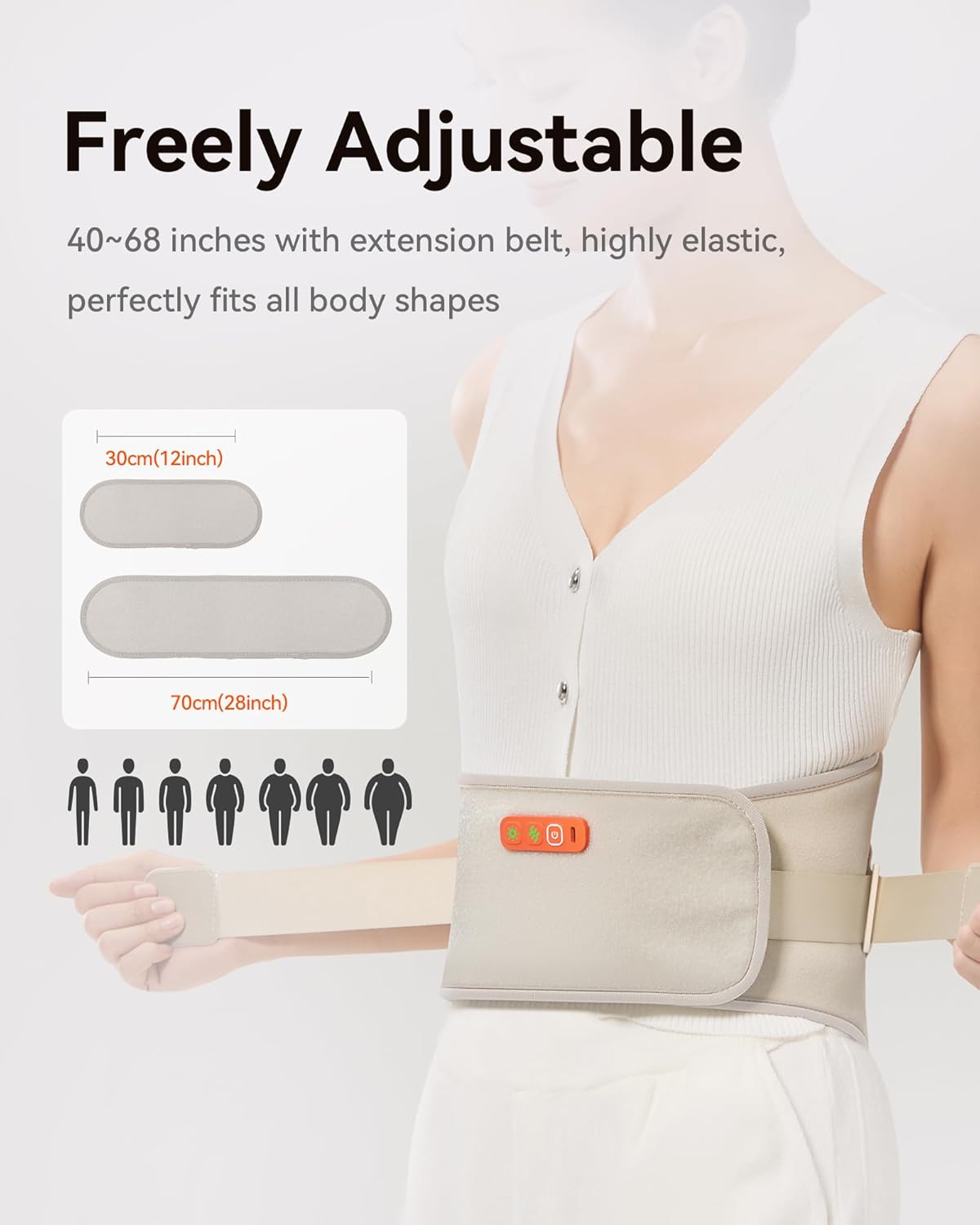
Image: The adjustable design with extension straps (12"/28") fits waist sizes from 30" to 68".
3. Setup and Wearing Instructions
- Prepare the Belt: Ensure the heating pad is charged. If needed, attach the appropriate extension strap(s) (12" or 28") to achieve a comfortable fit. The hard-textured side of the extension strap should attach to the Velcro on the side of the belt without buttons.
- Positioning: Wear the belt around your waist, ensuring the main heating and massage unit is centered on your lower back or abdomen, depending on the area you wish to treat. Make sure to wear form-fitting clothing underneath; do not use directly on bare skin.
- Secure the Belt: Use the main Velcro closure to secure the belt around your waist, maintaining a comfortable position and tightness.
- Adjust for Support: Utilize the two ultra-elastic bionic straps on the sides to further tighten and secure the belt, preventing slipping and enhancing lumbar support.
Video: Demonstrates the correct way to wear the IKEEPFIT Heating Pad, including how to attach extension straps and secure the belt for optimal fit and support.

Image: Step 1: Wear form-fitting clothing underneath the pad.

Image: Step 2: Secure the main Velcro for comfortable tightness.

Image: Step 3: Use elastic straps for additional security and to prevent slipping.
4. Operating Instructions
- Power On/Off: Press and hold the power button (usually indicated by a universal power symbol) on the control panel to turn the device on or off.
- Adjust Heat Levels: Press the 'Temp' button (often indicated by a sun or heat symbol) to cycle through three heat levels: Low (113°F), Medium (131°F), and High (149°F).
- Adjust Vibration Modes: Press the 'Vibrate' button (often indicated by wavy lines) to select from three vibration modes: Gentle, Rhythmic, and Intense.
- Dual Zone Control: The device may offer independent control for front and back heating zones. Refer to the control panel for specific indicators or buttons to manage these zones.
- Automatic Shut-off: For safety, the device automatically turns off after 20 minutes of continuous use. You can restart it if further therapy is desired.

Image: Easy-to-use control panel with distinct buttons for temperature, vibration, and power/zone selection.
Video: Illustrates the operation of the cordless heated back brace, demonstrating how to select heat and vibration settings.
5. Charging and Battery
The MAXwarm 4.0 features a built-in 8000 mAh battery for extended use. To charge the device:
- Connect the provided USB-C charging cable to the charging port on the control panel.
- Plug the other end of the cable into a 5V/2A adapter (not included). Using high-voltage chargers may shorten battery life.
- A white breathing light on the power indicator will confirm that the device is charging.
- Once fully charged, the indicator light may change or turn off. A full charge typically provides 4-5 sessions on maximum heat + vibration, or up to 20 sessions at the lowest setting.
Video: Provides detailed instructions on how to charge the heating pad's battery.
Video: Covers charging instructions and troubleshooting tips for the heating pad.
6. Safety Information
- Do Not Use on Bare Skin: Always wear form-fitting clothing between the heating pad and your skin to prevent irritation or burns.
- Automatic Shut-off: The device automatically turns off after 20 minutes for safety. You can turn it on again after a brief pause if needed.
- Charging Adapter: Use only a 5V/2A adapter for charging. High-voltage chargers can damage the battery and shorten its lifespan.
- Skin Irritation: Be cautious with skin irritation. If you experience discomfort, discontinue use.
- Medical Advice: This product is not intended to diagnose, treat, cure, or prevent any disease or health condition. Consult a healthcare professional for medical advice.
7. Maintenance
To ensure the longevity and optimal performance of your IKEEPFIT MAXwarm 4.0 heating pad:
- Cleaning: Gently wipe the surface of the heating pad with a damp cloth. Do not submerge the device in water or use harsh cleaning agents.
- Storage: Store the device in a cool, dry place away from direct sunlight and extreme temperatures.
- Avoid Folding Tightly: Do not fold the heating pad excessively or tightly, as this may damage internal components.
8. Troubleshooting
- Device Not Charging: Ensure the charging cable is firmly connected to both the device and the 5V/2A adapter. Check if the power outlet is active. If the issue persists, try a different USB-C cable or adapter.
- Short Battery Life: If your unit runs for less than 3 sessions on Max heat + vibration after a full charge, please contact customer support. Ensure you are using a 5V/2A adapter for charging.
- No Heat/Vibration: Ensure the device is powered on and the respective heat/vibration settings are activated via their buttons. The device has a 20-minute auto-off feature; restart if necessary.
9. Specifications
| Feature | Detail |
|---|---|
| Product Dimensions | 42 x 10 x 0.6 inches |
| Item Model Number | KPF-W15 |
| Batteries | 1 9V battery required (included) |
| Manufacturer | IKEEPFIT |
| Special Feature | 8000mAh Built-In Battery, Cordless & Portable, Extra-Large Heat Coverage, Front & Back Heating, Smart Safety & Auto Shut-Off |
| Material | Faux Leather |
| Item Weight | 0.7 Pounds |
10. Warranty and Support
IKEEPFIT is committed to providing quality heating and massage solutions. Your MAXwarm 4.0 heating pad comes with:
- 2-Year Warranty: We stand behind our product with a 2-year warranty for free replacement for any reasons.
- 24/7 Support: Our customer support team is available 24/7 to assist you with any questions or concerns.
For assistance, please refer to the contact information provided with your product packaging or visit the official IKEEPFIT website.


