
Introduction
This manual provides essential information for the safe and effective use of your TERENCE P10 88-Key Weighted Digital Piano. Please read this manual thoroughly before operating the instrument and retain it for future reference.
1. Setup
1.1 Unboxing and Component Identification
Carefully remove all components from the packaging. Ensure all parts listed below are present. The packaging is designed to protect the instrument during transit; inspect for any damage upon arrival.

Figure 1.1: TERENCE P10 Digital Piano and included accessories. This image displays the main keyboard unit, four wooden stand legs, a triple pedal unit, a detachable music stand, a power adapter, a USB cable, and the user manual.
1.2 Assembly
Assemble the piano stand by attaching the four wooden legs to the main keyboard unit using the provided screws. Ensure all connections are secure before placing the piano upright. The music stand can be inserted into the designated slot on the top of the piano.
1.3 Connecting Power and Pedals
Connect the power adapter to the Type-C 5V port on the rear panel of the piano and plug it into a suitable power outlet. Connect the triple pedal unit to the '3-PED' port on the rear panel. Ensure all connections are firm.

Figure 1.2: Rear connection panel of the TERENCE P10. This image highlights the various input and output ports, including USB MIDI, Sustain, 3-PED (for triple pedal), Aux In, Headphone, Volume, Power Switch, and Type-C 5V power input.
2. Operating Instructions
2.1 Power On/Off and Volume Control
To power on the piano, press the 'SW' (Power Switch) button on the rear panel. Adjust the overall volume using the 'VOL' knob. To power off, press the 'SW' button again.
2.2 Key Action and Sound
The P10 features 88 semi-weighted keys designed to emulate the feel of an acoustic piano. The instrument utilizes a French dream sound source, offering 100 different tones and 128-note polyphony for rich and expressive play. It includes 10 demo songs for listening or learning.

Figure 2.1: Detail of the P10's semi-weighted keys. This image shows the texture and design of the keys, engineered for a responsive playing experience.

Figure 2.2: Overview of P10 features. This diagram highlights the instrument's premium key action, concert-grade sound, dual high-fidelity speakers, silent practice mode, triple pedal support, and MIDI connectivity.
2.3 Pedal Functions
The included triple pedal unit provides three essential functions:
- Soft Pedal: Reduces the volume and softens the tone.
- Sostenuto Pedal: Sustains only the notes held down at the moment the pedal is pressed.
- Sustain Pedal: Sustains all notes played while the pedal is held down.

Figure 2.3: Triple pedal functions. This image details the three pedals and their respective effects on the piano's sound.
2.4 Connectivity
The P10 offers versatile connectivity options:
- Bluetooth: Connect smart devices wirelessly to play music or accompaniment through the piano's speakers.
- USB MIDI: Connect to tablets, mobile phones, or computers for use with music software, learning apps, and lossless internal recording.
- Headphone Jack: For private practice, connect standard headphones to the headphone jack on the rear panel.
- Audio Input: Connect external audio sources via the Aux In port.

Figure 2.4: MIDI connectivity in use. This image shows the piano connected to a mobile device, illustrating its capability for integration with various music applications.

Figure 2.5: Headphone use for private practice. This image demonstrates the use of headphones with the piano, allowing for quiet practice sessions.
3. Maintenance
3.1 Cleaning
To clean the piano, use a soft, dry cloth. For stubborn dirt, slightly dampen the cloth with water. Avoid using abrasive cleaners, solvents, or harsh chemicals, as these can damage the finish and electronic components.
3.2 Storage and Handling
Store the piano in a stable environment, away from direct sunlight, extreme temperatures, and high humidity. Do not place heavy objects on the piano. When moving the instrument, lift it carefully to avoid dropping or impacts, which could cause damage.
3.3 Power Supply Precautions
Always ensure the power supply voltage matches the piano's requirements (Type-C 5V). Unplug the power adapter during thunderstorms or if the instrument will not be used for an extended period. Do not pull the power cord to disconnect; always grasp the plug.
4. Troubleshooting
| Problem | Possible Reason | Solution |
|---|---|---|
| No sound is produced when keys are pressed. | Volume is set to minimum; headphones are connected; power supply issue. | Increase volume; disconnect headphones; ensure power is connected and switch is on. |
| Unable to transfer data via USB/MIDI. | Incorrect cable connection; driver not installed (if required by OS); software not configured. | Verify USB/MIDI cable connection; check computer's device manager for drivers; configure MIDI settings in your software. |
| Pedals not functioning correctly. | Pedal cable not fully inserted or damaged. | Ensure the pedal cable is securely plugged into the '3-PED' port. Inspect cable for damage. |
| Bluetooth connection issues. | Bluetooth not enabled on device; piano not in pairing mode; interference. | Ensure Bluetooth is active on your device and search for 'TERENCE PIANO'. Try restarting both devices. |
5. Specifications
- Model: P10
- Keys: 88-key, Semi-Weighted
- Sound Source: French Dream Sound Source
- Tones: 100
- Demo Songs: 10
- Polyphony: 128-note
- Speakers: Dual 20W High-Power Stereo Speakers
- Pedals: Triple Pedal Unit (Sustain, Sostenuto, Soft)
- Connectivity: USB MIDI, Bluetooth, Headphone Jack, Aux Input
- Power Supply: Type-C 5V
- Dimensions (Assembled): Approximately 123 cm (W) x 24.5 cm (D) x 74 cm (H)
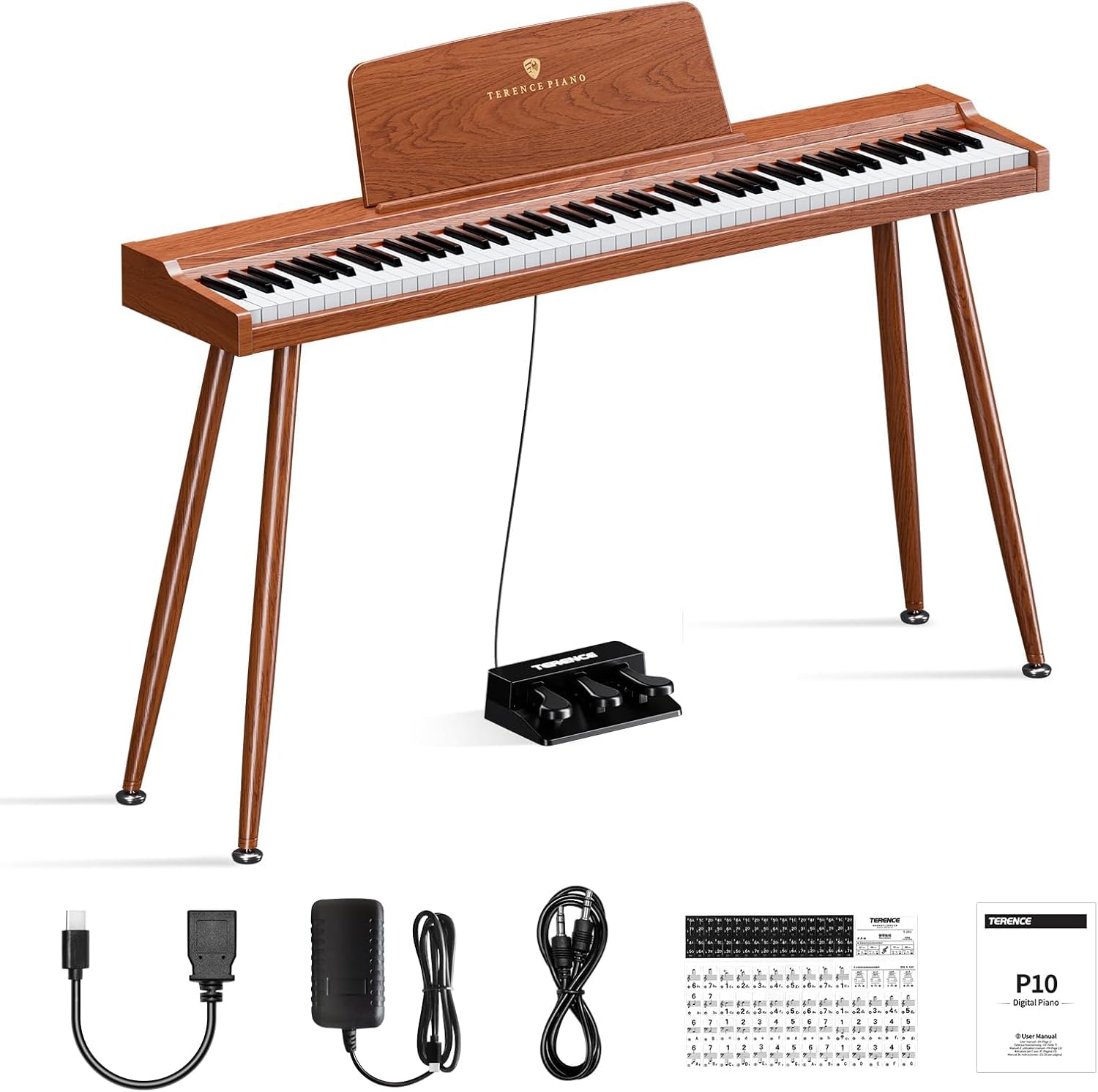
Figure 5.1: TERENCE P10 Digital Piano dimensions. This image provides a visual representation of the piano's key measurements when assembled.
6. Warranty Information
For detailed information regarding the warranty coverage for your TERENCE P10 Digital Piano, please refer to the warranty card included with your product or contact TERENCE customer support. Warranty terms and conditions may vary by region and retailer.
7. Support
Should you require technical assistance, have questions about product functionality, or need to report an issue, please contact TERENCE customer support. You can typically find contact information on the TERENCE official website or through the retailer from whom you purchased the product.