
Beanify Beanify Electric Razor
Beanify 4-in-1 Rechargeable Electric Razor User Manual
Brand: Beanify | Model: Beanify Electric Razor
Introduction
Thank you for choosing the Beanify 4-in-1 Rechargeable Electric Razor. This versatile grooming device is designed for efficient and comfortable hair removal across various body areas. It features a main unit and four interchangeable heads for different applications, ensuring a smooth experience. Please read this manual thoroughly before first use to ensure proper operation and maintenance.
Included Components
Your Beanify Electric Razor package includes the following items:
- Main Electric Razor Unit with LED Display
- Body Shaver Head
- Eyebrow Trimmer Head
- Nose Trimmer Head
- Facial Hair Remover Head
- USB-C Charging Cable
- Cleaning Brush

Image: The Beanify 4-in-1 Electric Razor main unit, along with its body shaver head, eyebrow trimmer head, nose trimmer head, facial hair remover head, USB-C charging cable, and cleaning brush, all neatly arranged in its packaging.
Setup
Charging the Device
Before first use, fully charge the electric razor. Connect the provided USB-C charging cable to the charging port on the main unit and plug the other end into a compatible USB power source. The LED display will indicate the battery percentage, showing 100% when fully charged. A full charge typically takes approximately 2 hours.
Attaching and Detaching Heads
To attach a head, align the head with the main unit and twist clockwise until it locks securely into place. To detach, twist counter-clockwise and gently pull the head off. Ensure the device is turned off before changing heads.
Video: This video demonstrates the process of attaching and detaching the various heads of the Beanify Electric Razor, showcasing the simple twist-and-lock mechanism. It also highlights the LED display indicating battery life.
Video: This video provides a detailed look at the Beanify Electric Razor, including how to power it on, read the LED battery display, and easily swap between the different grooming heads for various uses.
Operating Instructions
The Beanify Electric Razor supports both wet and dry shaving. For wet shaving, you may use shaving foam or gel. For dry shaving, ensure your skin is clean and dry.

Image: A visual representation of the electric razor being used for both wet shaving with foam and dry shaving on different body parts, highlighting its versatility.
Using the Body Shaver Head
The body shaver head is ideal for larger areas such as legs, arms, bikini line, and underarms. It features curved blades for armpit/bikini hair, straight blades for arm/leg hair, and 3D floating blades for stubble. Hold the shaver perpendicular to the skin and move it gently against the direction of hair growth for optimal results.

Image: A detailed view of the body shaver head, illustrating the different blade types (curved, straight, 3D floating) and their intended uses, along with a before-and-after comparison of armpit hair removal.
Using the Eyebrow Trimmer Head
Attach the eyebrow trimmer head for precise shaping and trimming of eyebrows. It includes a guide comb to help achieve desired hair length and prevent over-trimming. Move the trimmer gently in the direction of hair growth.
Using the Nose Trimmer Head
For nose hair removal, attach the nose trimmer head. Carefully insert the trimmer tip into the nostril and move it in a circular motion to trim unwanted hair. Avoid inserting too deeply.
Using the Facial Hair Remover Head
The facial hair remover head is designed for delicate areas like the upper lip, chin, and cheeks. Gently press the head against the skin and move in small, circular motions to remove fine facial hair.

Image: This image displays the four interchangeable heads of the Beanify Electric Razor, each being used on a specific body part: the body shaver for general body hair, a trimmer for short hair, the eyebrow trimmer, and the nose trimmer.
Maintenance
Cleaning the Heads
The four interchangeable heads are IPX7 compliant, meaning they can be rinsed under running water for easy cleaning. After each use, detach the head and rinse it thoroughly. Use the provided cleaning brush to remove any trapped hairs. Do not submerge the main body of the razor in water, as it is not waterproof.
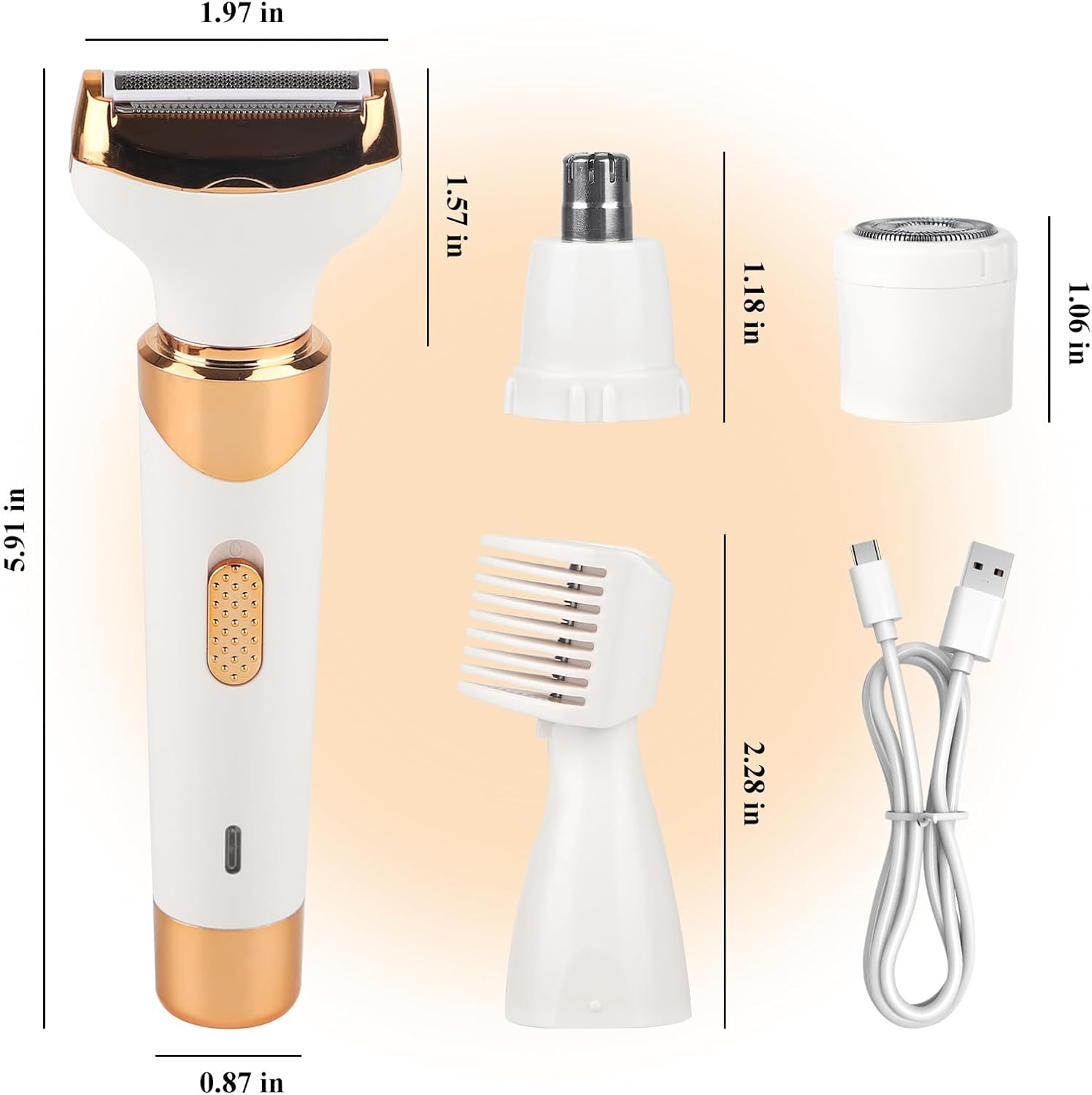
Image: A step-by-step guide illustrating how to remove, wash, and reinstall the shaver head, with a clear warning against submerging the main body of the device in water.

Image: A visual instruction on how to replace the shaver head, detailing the rotation and upward pull required for removal and installation.
Troubleshooting
- Device not turning on: Ensure the device is fully charged. Check the USB-C cable connection during charging.
- Poor shaving performance: Ensure the correct head is attached securely. Clean the blades thoroughly to remove any hair buildup. For body shaving, hold the shaver perpendicular to the skin.
- Irritation after shaving: Ensure blades are clean. Consider using the device on wet skin with shaving cream for sensitive areas.
If you encounter persistent issues not covered here, please refer to the warranty and support section for assistance.
Specifications
| Feature | Detail |
|---|---|
| Model Name | Beanify Electric Razor |
| Power Source | Battery Powered |
| Special Features | Travel Size, Waterproof (Heads only) |
| Recommended Uses | Ear, Eyebrow, Face, Leg, Nose Hair |
| Manufacturer | Beanify |
| Package Dimensions | 7.6 x 5.87 x 1.46 inches |
| Item Weight | 6.38 ounces |

Image: A visual representation of the electric razor and its attachments with their respective dimensions, providing a clear understanding of the product's size.
Safety Information
- Handle all trimmer heads with caution to avoid skin irritation or injury.
- Keep the device and all accessories out of reach of children to prevent accidental harm.
- Do not share personal grooming devices with others to reduce the risk of spreading infections.
- Always clean the trimmer heads before and after each use to maintain hygiene.
- The main body of the device is not waterproof; avoid submerging it in water.
Warranty and Support
Beanify offers 24/7 customer support for any questions or issues you may encounter with your product. If the product fails to meet your expectations or if you require assistance, please do not hesitate to contact us. We are committed to resolving any issues in a timely manner and ensuring your satisfaction.
Ask a question about this manual
Ask about setup, troubleshooting, compatibility, parts, safety, or missing instructions. Manuals+ will review the question and use this page’s manual context to help answer it.