
YHMMYSHX ST-30
YHMMYSHX ST-30 3000W Steam Generator User Manual
Model: ST-30 | Power: 3000W
1. Introduction
This manual provides essential instructions for the safe installation, operation, and maintenance of your YHMMYSHX ST-30 3000W Steam Generator. Please read this manual thoroughly before installation and use to ensure proper function and to prevent injury or damage. Keep this manual for future reference.
2. Safety Information
WARNING: Failure to follow these safety instructions may result in fire, electric shock, or other injury or damage.
- Always disconnect power before performing any service or maintenance.
- Installation must be performed by a qualified electrician and plumber in accordance with all local and national codes.
- Ensure proper grounding of the unit.
- Do not operate the steam generator if it is damaged or malfunctioning.
- Keep children and pets away from the steam generator during operation.
- The steam outlet will be hot. Avoid direct contact with steam to prevent burns.
- Ensure adequate ventilation in the steam room.
- This appliance is designed for generating steam for personal sauna or steam shower use only. Do not use for other purposes.
- The unit features water shortage and overheating protection. Do not bypass these safety features.

3. Product Overview
The YHMMYSHX ST-30 is a 3000W steam generator designed for home sauna and steam shower applications. It features a durable stainless steel water tank and an electrolytic plate for efficient steam production. The unit is controlled by a microcomputer digital display panel, allowing for precise time and temperature settings.
3.1 Key Features
- Power Output: 3000W (3KW) suitable for areas up to 3m³.
- Construction: Stainless steel water tank and electrolytic plate for durability.
- Control: Microcomputer digital display control panel for time and temperature settings.
- Safety: Integrated water shortage and overheating protection.
3.2 Components and Connections
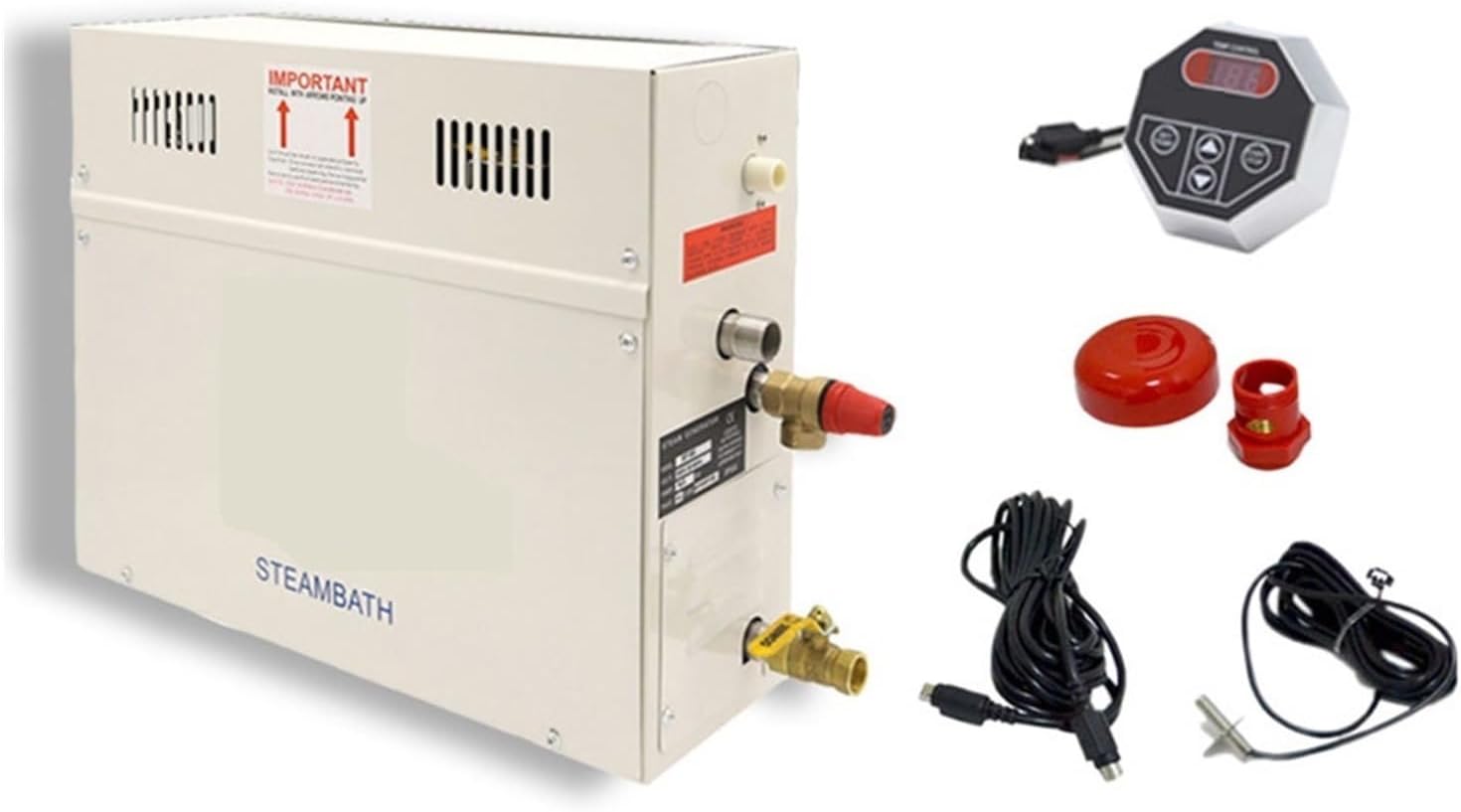
- Intake: Water supply connection.
- Air Outlet: For steam delivery to the steam room.
- Safety Valve: Releases pressure if it exceeds safe limits.
- Outfall: Water drainage connection.

The steam generator comes with a digital control panel (Type A or B, selected randomly) for setting operational parameters.
4. Setup and Installation
Important: Installation should only be performed by a certified professional to ensure compliance with all electrical and plumbing codes.
4.1 Location Requirements
- Install the steam generator in a dry, accessible location, protected from freezing temperatures.
- Ensure sufficient space around the unit for ventilation and future maintenance.
- The unit should be installed as close as possible to the steam room to minimize steam line length.
4.2 Electrical Connection
- The ST-30 model requires an AC 220V power supply.
- Connect the unit to a dedicated circuit with appropriate overcurrent protection.
- Ensure proper grounding according to local electrical codes.
- Refer to the wiring diagram provided with the unit for specific connections.
4.3 Plumbing Connection
- Connect a cold water supply line to the "Intake" port. Install a shut-off valve for maintenance.
- Connect the steam line from the "Air Outlet" to the steam head inside the steam room. Ensure the steam line is sloped to prevent condensation buildup.
- Connect a drain line from the "Outfall" port to a suitable drain.
- Install the safety valve as directed.
4.4 Control Panel Installation
- Mount the digital control panel in a convenient location inside or outside the steam room, away from direct steam spray.
- Connect the control panel cable to the designated port on the steam generator.
5. Operating Instructions
Once the steam generator is properly installed and connected, follow these steps to operate it:
- Power On: Ensure the main power supply to the steam generator is switched on.
- Activate Unit: Press the "ON/OFF" or "Opening key" button on the digital control panel to turn on the unit.
- Set Temperature: Use the "Upward" and "Down" arrows (or similar buttons) to adjust the desired steam room temperature. The temperature display will show the current setting.
- Set Time: Use the "SET" button (or similar) to switch to time setting mode, then use the "Upward" and "Down" arrows to set the desired duration for your steam session.
- Start Steaming: The unit will begin heating water and producing steam once settings are confirmed or after a short delay.
- Monitor: The control panel will display the current time remaining and temperature.
- Power Off: To end the session, press the "ON/OFF" or "Opening key" button again, or the unit will automatically shut off after the set time expires.
The specific button labels may vary slightly depending on the control panel type (refer to Figure 3.2).
6. Maintenance
Regular maintenance ensures the longevity and efficient operation of your steam generator.
- Descaling: Depending on water hardness, periodic descaling of the water tank and heating elements may be required. Consult a professional for this procedure.
- Cleaning: Wipe down the exterior of the unit and control panel with a soft, damp cloth. Do not use abrasive cleaners.
- Inspection: Periodically inspect all connections for leaks or signs of wear.
- Professional Service: For any internal maintenance or repairs, contact a qualified service technician.
7. Troubleshooting
If you encounter issues with your steam generator, refer to the following common problems and solutions:
| Problem | Possible Cause | Solution |
|---|---|---|
| No steam production | No power; water supply off; water shortage protection activated; heating element failure. | Check power connection and circuit breaker; ensure water supply valve is open; check for water leaks; contact service if heating element is suspected. |
| Insufficient steam | Low water level; clogged steam line; mineral buildup on heating elements. | Check water supply; inspect steam line for obstructions; descale the unit (professional service recommended). |
| Unit not turning on | No power; faulty control panel; internal fault. | Verify power supply; check control panel connection; contact customer support. |
| Error code on display | Specific internal fault (e.g., sensor error, overheating). | Refer to the unit's specific error code list (if available) or contact customer support with the error code. |
For problems not listed here or if solutions do not resolve the issue, please contact customer support.
8. Specifications
| Parameter | Value |
|---|---|
| Model | ST-30 |
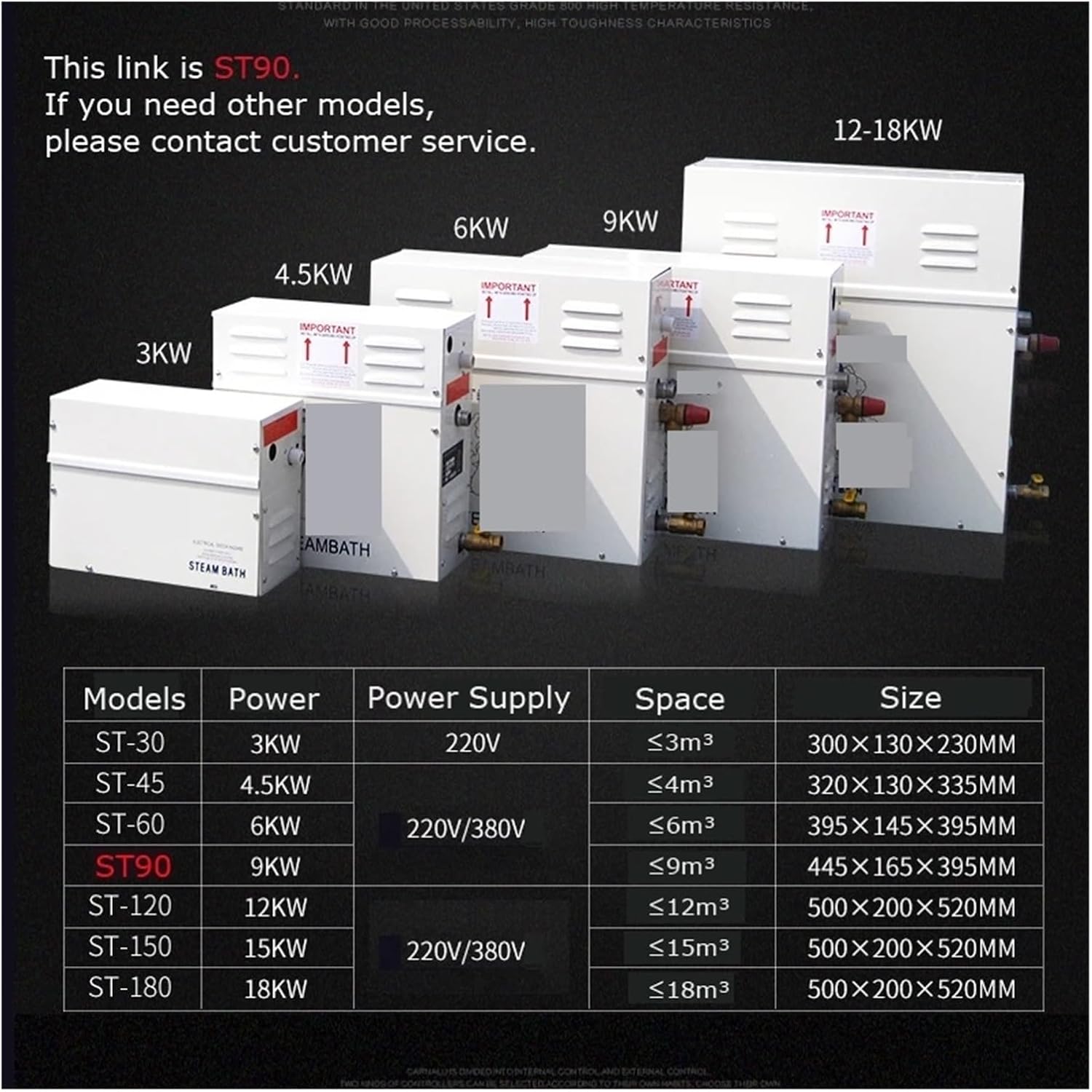
| Power | 3000W (3KW) |
| Voltage | AC 220V |
| Suit Area | ≤3m³ |
| Water Tank Material | Stainless Steel |
| Main Material | Electrolytic plate with spray, Stainless Steel |
| Function | Wet Steam |
| Control Panel | Microcomputer digital display (time and temperature set up) |
| Item Weight | 12.35 pounds (5.6 kg) |
| Package Dimensions | 18.9 x 14.96 x 7.09 inches (48 x 38 x 18 cm) |
| Unit Dimensions (approx.) | 300 × 130 × 230mm (from image) |
9. Warranty and Support
For warranty information, technical support, or service inquiries, please contact your retailer or the manufacturer directly. Please have your model number (ST-30) and purchase date available when contacting support.
Manufacturer: YHMMYSHX
Contact Information: [Insert Manufacturer/Retailer Contact Information Here]
Ask a question about this manual
Ask about setup, troubleshooting, compatibility, parts, safety, or missing instructions. Manuals+ will review the question and use this page’s manual context to help answer it.