
Bolwins MC053VRF
Merrytek MC053VRF Microwave Motion Sensor User Manual
Model: MC053VRF
Brand: Bolwins
Introduction
This manual provides comprehensive instructions for the installation, setup, operation, and maintenance of the Merrytek MC053VRF Microwave Motion Sensor. This advanced radio control module utilizes 868 MHz technology for intelligent lighting and building control systems, offering features such as dimming functions and wireless cluster control. Please read this manual thoroughly before installation and use to ensure optimal performance and safety.
Safety Information
Important Safety Notice: Ensure that the motion detector is installed and used in accordance with the safety and warning instructions of the EU-GPSR to ensure optimal safety and performance.
- Always disconnect power before installation or maintenance.
- Installation should be performed by a qualified electrician in accordance with local electrical codes.
- Do not expose the device to moisture or extreme temperatures.
- Ensure proper grounding to prevent electrical shock.
- Do not attempt to modify or repair the device yourself. Refer to qualified personnel.
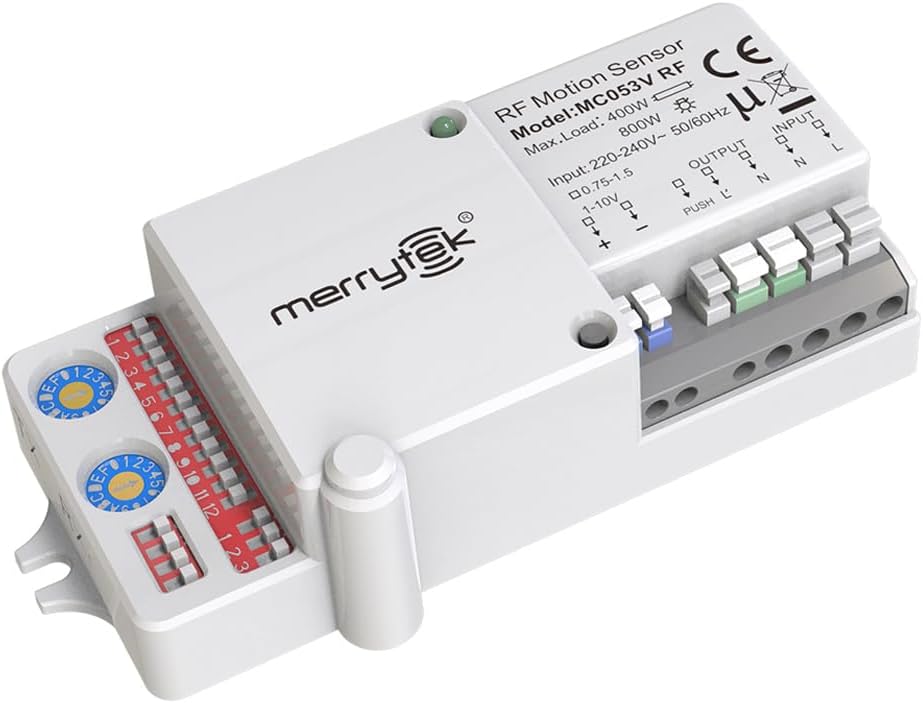
Figure 1: Front view of the Merrytek MC053VRF Microwave Motion Sensor, showing its compact design and connection terminals.
Product Features
The MC053VRF sensor offers a range of advanced features for intelligent and energy-efficient lighting control:
- Intelligent Microwave Technology (5.8 GHz): Detects movements precisely, even through thin materials like glass or plastic, making it ideal for various indoor environments.
- Built-in RF Radio Module (868MHz): Supports wireless group networking up to 100m in open fields or 50m indoors, with easy channel allocation via rotary switches.
- Flexible Dimming Options: Supports 1-10V dimming and PUSH dimming for customized light control, perfect for energy-efficient LED lighting.
- Versatile Adjustment Options: Customizable waiting times (0s to ∞), daylight sensor (5-150lux), and a wide detection angle of 150° at up to 8m mounting height.
- Reliable & Energy Saving: Features low standby consumption (<1W), an emergency override function, and narrowband technology to minimize interference for RF signals.
- Manual Control: Includes a manual control button for on/off and brightness adjustment.
- Advanced Code Detection: Designed to prevent lost signals or codes.
Components and Structure
The MC053VRF sensor is designed with clearly identifiable components for easy installation and configuration.
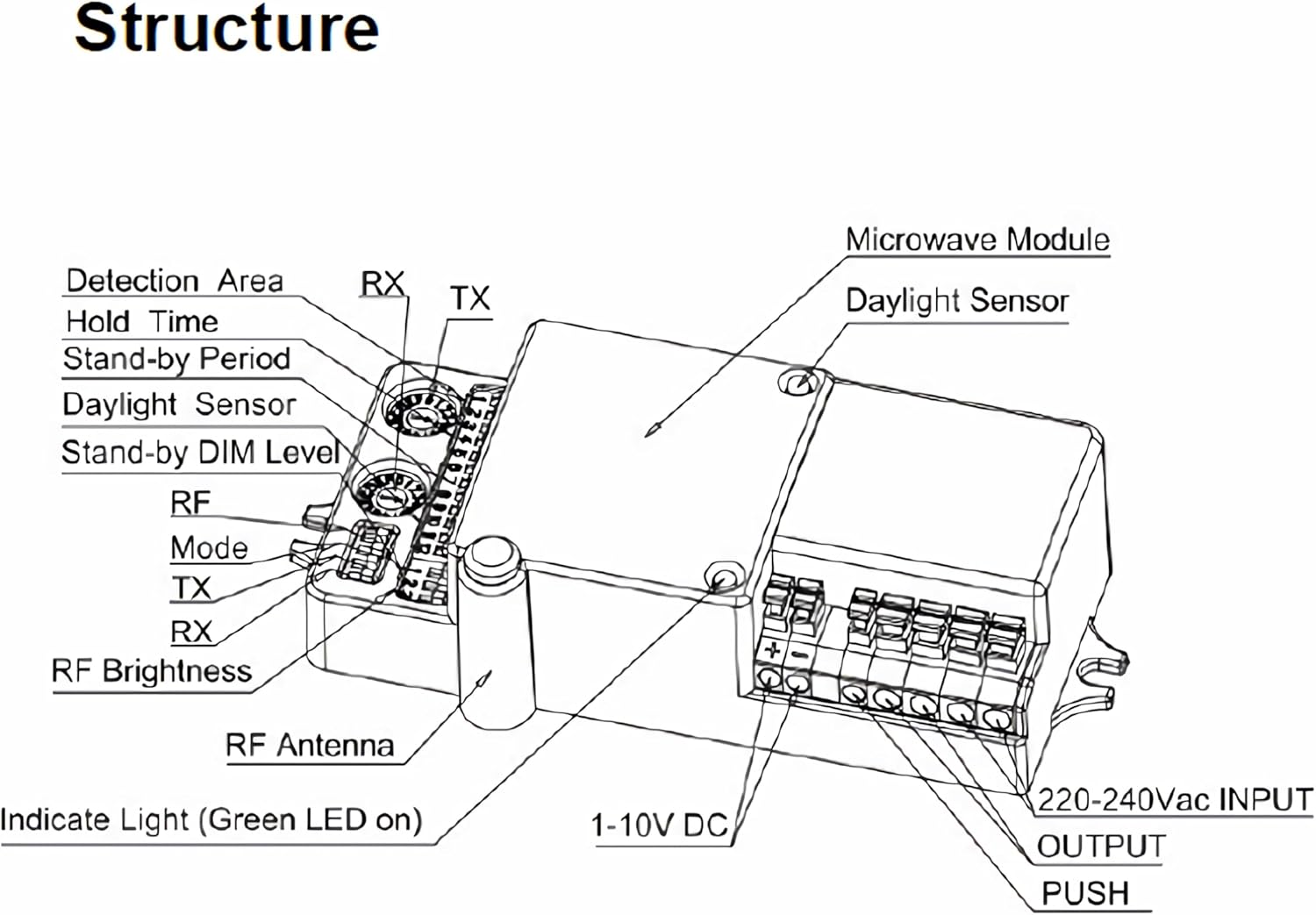
Figure 2: Internal structure and component layout of the MC053VRF sensor, indicating the Microwave Module, Daylight Sensor, RF Antenna, and various adjustment points.
Key components include the Microwave Module for motion detection, a Daylight Sensor for ambient light measurement, and an RF Antenna for wireless communication. Adjustment points for Detection Area, Hold Time, Stand-by Period, Daylight Sensor sensitivity, Stand-by DIM Level, RF Mode, TX/RX channels, and RF Brightness are accessible via rotary switches and dip switches.
Installation
The MC053VRF sensor is designed for indoor use. Ensure the mounting location is stable and free from excessive vibrations.
- Mounting Height: The sensor can be mounted at a maximum height of 8 meters for optimal detection.
- Placement: Position the sensor to cover the desired detection area (150° angle). Avoid placing it near large metal objects or sources of strong electromagnetic interference that could affect microwave detection.
- Wiring: Connect the sensor to a 220/240Vac 50Hz input. The output supports 400W (LED, ESL) and 800W (incandescent, resistive load). Ensure correct wiring for 1-10V dimming and PUSH dimming if these functions are utilized.
Setup and Configuration
The MC053VRF offers various adjustable settings to customize its operation:
- Daylight Sensor Adjustment: The sensor's sensitivity to ambient light can be set to 5lux, 15lux, 30lux, 50lux, 100lux, 150lux, or disabled. This determines when the light will activate based on natural light levels.
- Waiting Time (Hold Time) Adjustment: Configure the duration the light remains on after motion is detected and no further motion is sensed. Options include 0s, 5s, 5min, 10min, 30min, 60min, or continuous (∞).
- RF Grouping: For wireless cluster control, use a small screwdriver to turn the rotary switches on both the MC053V RF (TX and RX channels) and any connected MW05 (RX channel) devices to the same channel. Grouping is then automatically established. The MC053V RF has both a TX (transmitter) and an RX (receiver) channel.

Figure 3: Top view of the MC053VRF sensor, highlighting the rotary switches for adjusting detection parameters and RF channels.
Operating Instructions
The MC053VRF sensor operates in various modes to suit different lighting control needs:
- ON/OFF Mode: The sensor detects motion and switches the connected light on. After the set waiting time, if no further motion is detected, the light switches off.
- 1-10V Dimming: When motion is detected, the sensor outputs a 1-10V signal to control the brightness of compatible LED drivers. The brightness level can be adjusted.
- PUSH Dimming: Allows for manual brightness control via a push-button switch connected to the sensor. A short press can toggle on/off, while a long press can adjust brightness.
- Emergency Override: The sensor includes an emergency override function for specific scenarios, ensuring lights can be manually controlled regardless of sensor input.
Wireless Connectivity and Grouping
The integrated 868 MHz RF technology enables seamless wireless communication between multiple sensors for cluster control.
- Group Networking: Multiple MC053VRF sensors or a combination of MC053VRF and MW05 modules can form a wireless group. This allows for synchronized lighting control across a larger area.
- Channel Selection: Use the rotary switches to select one of the 32 available frequency channels. All devices intended to be in the same group must be set to the identical channel.
- Transmission Range: The wireless signal can transmit up to 100 meters in open fields and up to 50 meters inside buildings, depending on environmental factors.
- Narrowband Technology: This technology is employed to effectively mitigate DC channel interference, ensuring reliable signal transmission.
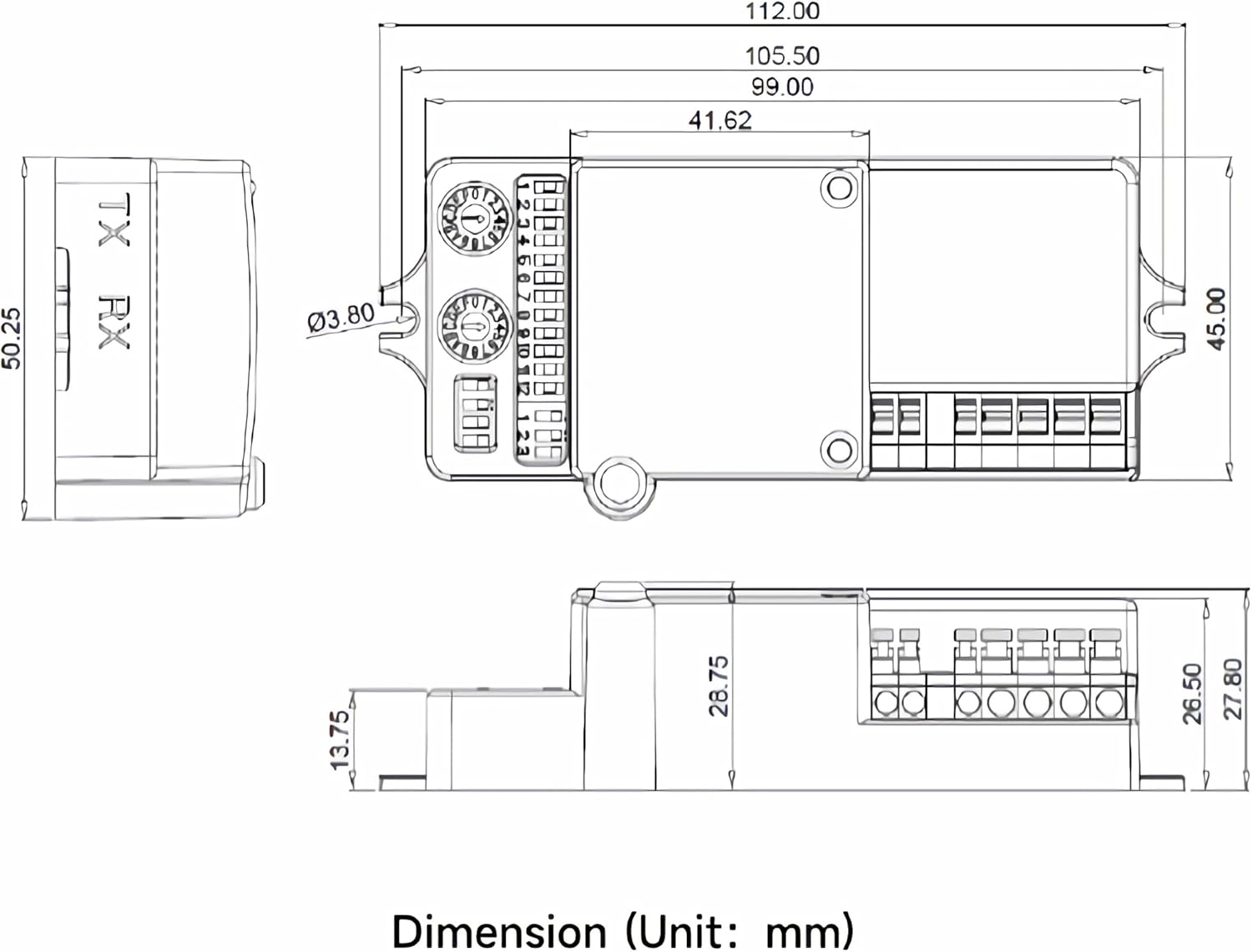
Figure 4: Wiring diagrams illustrating how to connect and group MC053VRF sensors with other MC053VRF units or MW05 modules for wireless cluster control.
Maintenance
The Merrytek MC053VRF sensor requires minimal maintenance to ensure long-term performance.
- Cleaning: Gently wipe the sensor's exterior with a soft, dry cloth. Do not use abrasive cleaners, solvents, or excessive moisture.
- Inspection: Periodically check for any visible damage to the casing or wiring. If damage is found, disconnect power and consult a qualified technician.
- Environment: Ensure the operating environment remains within the specified temperature range (-25°C to +60°C) and is free from excessive dust or humidity.
Troubleshooting
If you encounter issues with your MC053VRF sensor, consider the following common solutions:
| Problem | Possible Cause | Solution |
|---|---|---|
| Sensor not detecting motion. | Incorrect detection area setting; Obstruction in detection path; Power supply issue. | Adjust detection area setting; Remove obstructions; Check power connections. |
| Light stays on continuously. | Waiting time set to infinity (∞); Constant motion in detection area; Faulty sensor. | Adjust waiting time; Ensure no continuous motion; Contact support if issue persists. |
| Lights not dimming correctly. | Incorrect dimming mode selected; Incompatible LED driver; Wiring issue. | Verify 1-10V or PUSH dimming settings; Ensure driver compatibility; Check wiring. |
| Wireless grouping not working. | Channels not matched; Devices out of range; Interference. | Ensure all devices are on the same RF channel; Reduce distance between devices; Check for sources of interference. |
If the problem persists after attempting these solutions, please contact customer support.
Technical Specifications
Detailed specifications for the Merrytek MC053VRF Microwave Motion Sensor:
| Model | MC053VRF |
| Technology | High Frequency 5.8 GHz (Microwave) |
| Input Voltage | 220/240Vac 50Hz |
| Switching Capacity (LED, ESL) | 400 W |
| Switching Capacity (Incandescent, Resistive Load) | 800 W |
| Power Consumption (Standby) | <1 W |
| Operating Modes | ON/OFF, 1-10V Dimming, PUSH Dimming |
| Mounting Height (Max) | 8 meters |
| Detection Angle | 150° |
| Adjustable Daylight Sensor | 5lux / 15lux / 30lux / 50lux / 100lux / 150lux / disable |
| Adjustable Waiting Time | 0S / 5s / 5min / 10min / 30min / 60min / +∞ |
| RF Module Frequency Range | 820MHz - 880MHz |
| Transmission Distance (Open Field) | Max. 100 meters |
| Transmission Distance (Inside Buildings) | Max. 50 meters |
| Operating Temperature | -25°C to +60°C |
| Dimensions (L x W x H) | 112 x 50 x 28.5 mm |
| Color | White |

Figure 5: Detailed dimension diagram of the MC053VRF sensor (dimensions in mm).
Warranty and Support
Bolwins is committed to customer satisfaction. If you encounter any issues or have questions regarding your Merrytek MC053VRF Microwave Motion Sensor, please do not hesitate to contact us.
- Return Policy: This product is eligible for a 30-day refund/replacement policy. Please refer to your purchase details for specific terms.
- Customer Service: We strive to ensure our customers are completely satisfied. For any problems or inquiries, please contact our support team promptly. We are happy to assist you.
Ask a question about this manual
Ask about setup, troubleshooting, compatibility, parts, safety, or missing instructions. Manuals+ will review the question and use this page’s manual context to help answer it.