
iFi GO Pod Max
iFi Audio GO Pod Max User Manual
Model: GO Pod Max
Introduction
The iFi Audio GO Pod Max is a wearable lossless Bluetooth DAC designed to transform your In-Ear Monitors (IEMs) into a high-fidelity wireless stereo system. It features advanced audio technologies for superior sound quality and convenience, including aptX Lossless Bluetooth, K2HD processing, and a built-in UVC sterilization system for your IEMs.
What's in the Box
- GO Pod Max set (left and right units)
- Charging Case
- 0.78mm 2-Pin Ear Loops (set)
- MMCX Ear Loops (set)
- USB-A to C Charging Cable
- Instruction Card / Quick Start Card
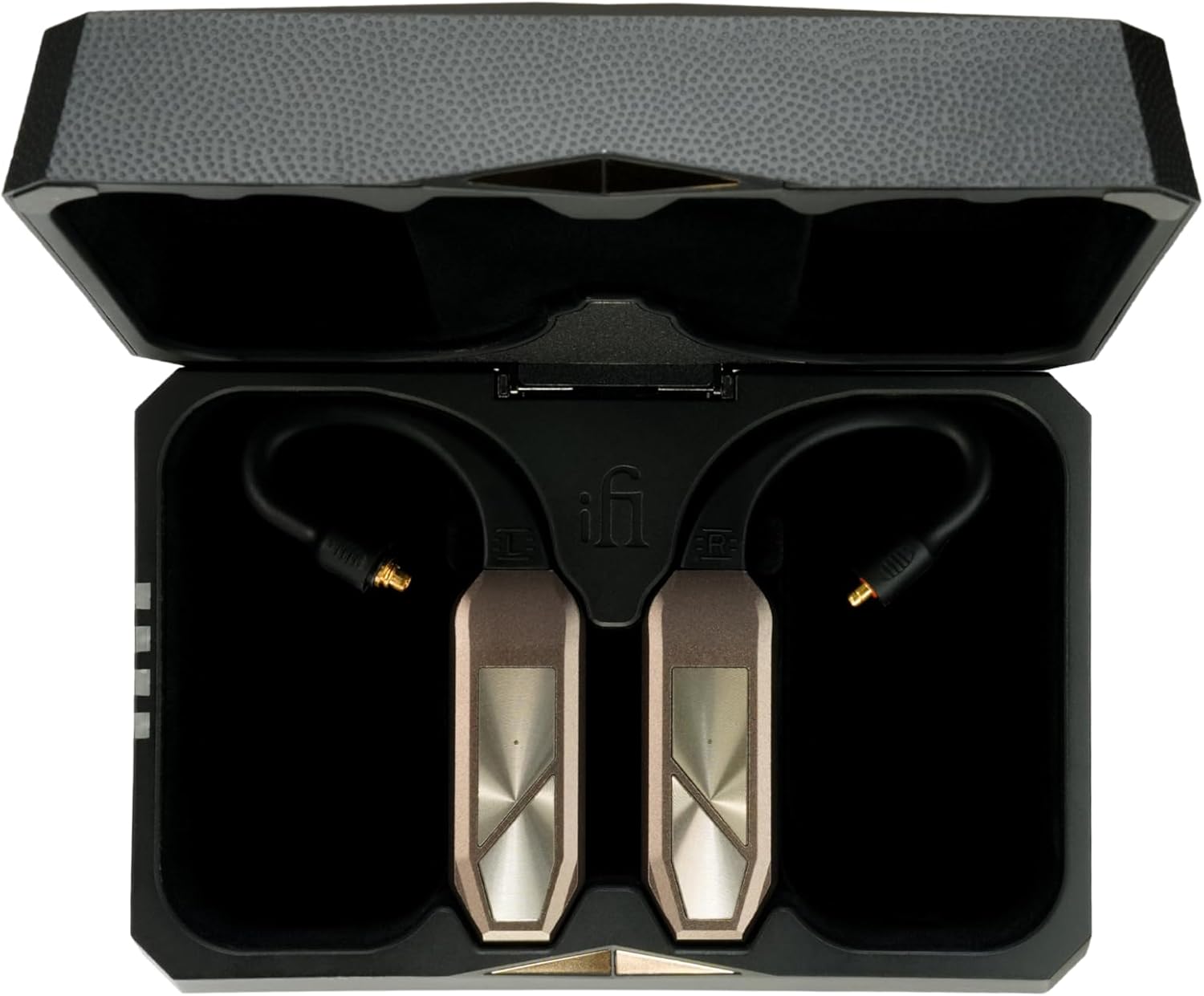
Image: The iFi Audio GO Pod Max units stored within their charging case, showcasing the compact design and storage solution.
Product Overview
The GO Pod Max consists of two main components: the wearable DAC units and the charging case. Each wearable unit integrates a Bluetooth receiver, DAC, and amplifier, designed to connect directly to your In-Ear Monitors (IEMs).
GO Pod Max Wearable Units

Image: Front view of the left and right GO Pod Max wearable units, showing the main control surfaces and ear loops.
- Control Buttons: Located on the front surface for playback, call management, and other functions.
- Ear Loops: Flexible loops designed to fit over the ear, providing secure placement for connected IEMs.
- IEM Connectors: Interchangeable connectors (MMCX and 2-Pin 0.78mm) at the end of the ear loops for broad IEM compatibility.
- Charging Contacts: Gold-plated contacts on the rear for charging within the case.

Image: Rear view of the left and right GO Pod Max wearable units, displaying the iFi logo and charging contacts.

Image: Side view of the GO Pod Max units, highlighting the profile and button placement.

Image: A GO Pod Max unit with its ear loop detached, demonstrating the interchangeable connection system.
Charging Case

Image: The GO Pod Max charging case shown open, with the units inside, illustrating the charging slots and UVC lights.
- Charging Slots: Custom-fit slots for the left and right GO Pod Max units.
- UVC Lights: Internal UVC lights for sterilizing connected IEMs during charging.
- USB-C Port: For wired charging of the case.
- Qi Wireless Charging: Supports wireless charging for convenience.
- Battery Indicator: LEDs on the case indicate battery status.

Image: The iFi Audio GO Pod Max charging case in its closed state, showcasing its sleek, geometric design.
Setup
1. Charging the GO Pod Max and Case
- Initial Charge: Before first use, fully charge the GO Pod Max units and the charging case.
- Charging the Case: Connect the supplied USB-A to C cable to the USB-C port on the charging case and to a USB power adapter (not included). Alternatively, place the case on a Qi-compatible wireless charging pad. The LED indicators on the case will show charging progress.
- Charging the GO Pod Max Units: Place the GO Pod Max units into their respective slots in the charging case. Ensure the charging contacts align. The units will begin charging automatically.
2. Connecting Your IEMs
The GO Pod Max comes with interchangeable ear loops to support both 0.78mm 2-Pin and MMCX IEM connectors.
- Select Ear Loops: Choose the ear loops that match your IEMs (0.78mm 2-Pin or MMCX).
- Attach Ear Loops: Gently attach the selected ear loops to the GO Pod Max units. Ensure a secure connection.
- Connect IEMs: Connect your IEMs to the corresponding connectors on the ear loops. Ensure the left (L) and right (R) channels are correctly matched.
3. Bluetooth Pairing
- Enter Pairing Mode: With the GO Pod Max units in the charging case, open the lid. The units will automatically enter pairing mode (indicated by a flashing LED on the units).
- Enable Bluetooth: On your source device (smartphone, tablet, computer), enable Bluetooth.
- Select Device: Look for "iFi GO Pod Max" in the list of available Bluetooth devices and select it to pair.
- Confirmation: Once paired, the LED on the GO Pod Max units will stop flashing and remain solid, indicating a successful connection.
Operating Instructions
Power On/Off
- Power On: Open the charging case lid, or remove the GO Pod Max units from the case. They will automatically power on and attempt to connect to the last paired device.
- Power Off: Place the GO Pod Max units back into the charging case and close the lid. They will automatically power off and begin charging.
Audio Playback and Call Management
The control buttons on each GO Pod Max unit allow for various functions. Specific button configurations may vary; refer to the quick start guide for detailed button mapping.
- Play/Pause: Single press on either unit's main button.
- Next Track: Double press on the right unit's main button.
- Previous Track: Double press on the left unit's main button.
- Volume Up/Down: Use the volume controls on your connected source device.
- Answer/End Call: Single press on either unit's main button during an incoming call.
- Reject Call: Press and hold either unit's main button during an incoming call.
- Activate Voice Assistant: Triple press on either unit's main button.
Customizable Sound Features
The GO Pod Max offers user-selectable digital filters and auto impedance matching for sound customization.
- Digital Filters: The GO Pod Max features user-selectable digital filters to tailor the sound signature to your preference. Consult the quick start guide or iFi's official resources for instructions on how to cycle through these filters.
- Auto Impedance Matching: This feature automatically adjusts the output to match the impedance of your connected IEMs, ensuring optimal performance and a silent background, especially with sensitive IEMs.
Maintenance
Cleaning
- Units and Case: Use a soft, dry, lint-free cloth to wipe the surfaces of the GO Pod Max units and the charging case. Avoid abrasive materials or harsh chemicals.
- Charging Contacts: If necessary, gently clean the gold-plated charging contacts on the units and inside the case with a dry cotton swab to ensure proper connection.
UVC Sterilization
The charging case is equipped with internal UVC lights designed to sterilize your IEMs while they are stored and charging. This process helps maintain hygiene.
- Activation: The UVC sterilization process activates automatically when the GO Pod Max units are placed in the charging case and the lid is closed.
- Duration: The sterilization cycle runs for a set period during charging.
- Safety: The UVC lights are internal and designed to operate safely within the closed case. Do not expose eyes or skin to UVC light.
Storage
When not in use, store the GO Pod Max units in their charging case to protect them and ensure they remain charged and sterilized.
Troubleshooting
| Problem | Possible Cause | Solution |
|---|---|---|
| No power / Units not turning on | Low battery in units or charging case. | Ensure the charging case is charged. Place units in the case and close the lid to charge them. |
| Cannot pair with device | Units not in pairing mode; Bluetooth off on source device; previously paired device interfering. | Ensure units are in pairing mode (flashing LED). Turn Bluetooth off and on again on your source device. Forget "iFi GO Pod Max" from your device's Bluetooth list and try pairing again. |
| No sound from IEMs | IEMs not properly connected; volume too low; units not connected to source device. | Check IEM connections to the ear loops. Increase volume on both the source device and ensure the GO Pod Max is connected via Bluetooth. |
| Connection drops / Unstable audio | Interference; distance from source device; low battery. | Move closer to the source device. Avoid environments with strong wireless interference. Ensure units are fully charged. |
| UVC sterilization not working | Case lid not fully closed; units not properly seated. | Ensure the GO Pod Max units are correctly placed in their slots and the charging case lid is fully closed. |
Specifications
| Feature | Detail |
|---|---|
| Bluetooth Version | Bluetooth 5.4 |
| Bluetooth Codecs | aptX Lossless, LDAC, LHDC/HWA, aptX Adaptive, aptX, AAC, SBC |
| Impedance Detection | 16/32/64/300Ω |
| Output Power (Max/RMS) | ≥120mW/1.96V @ 32Ω ≥53mW/4.0V @300Ω |
| SNR | ≥129dBA @ 32Ω |
| DNR | ≥129dBA @ 32Ω |
| Frequency Response | 10-40kHz (-3dB) LDAC |
| Battery | Pod: 160mAh, Charging Case: 1500mAh |
| Battery Life | Pod: ~7h + Charging Case: ~30h |
| Power System | 5V/1A or 5V/2A (Qi certified charger) |
| Dimensions | Pod: 47.5 x 16.1 x 9.5mm (1.71 x 0.63 x 0.37") Charging Case: 116 x 76 x 47.8mm (4.56 x 3 x 1.88") |
| Net Weight | Pod: 24.5 g (0.86 oz) Charging Case: 185g (6.53 oz) |

Image: Technical drawing illustrating the dimensions of the GO Pod Max units and the charging case.

Image: Visual representation of key features: K2HD, MasterHIFI 32bit DAC, True Balance amplification, UVC case lights, Qualcomm Snapdragon Sound, and Hi-Res Audio Wireless support.
Warranty and Support
Warranty Information
The iFi Audio GO Pod Max comes with a limited warranty, typically 12 months, or as permitted/required by local reseller laws. Please retain your proof of purchase for warranty claims.
Customer Support
For technical support, troubleshooting assistance beyond this manual, or warranty inquiries, please visit the official iFi Audio website or contact their customer service department. You can find contact information on the iFi Audio website: ifi-audio.com
Related Documents - GO Pod Max
 |
iFi GO pod Max: Wearable Lossless Bluetooth DAC/Headphone Amp User Manual Discover the iFi GO pod Max, a premium wearable lossless HD Bluetooth DAC and headphone amplifier. Learn about its advanced features like K2HD technology, extended battery life, intuitive controls, and seamless connectivity for an exceptional audio experience. |
 |
iFi GO pod Max: Manual do Utilizador - DAC/Amp Bluetooth sem Perdas Manual do utilizador para o iFi GO pod Max, um DAC/amplificador de auscultadores Bluetooth HD sem perdas e vestível com tecnologia K2HD, aptX Lossless, LDAC e LHDC. Descubra as características, controlos, carregamento e especificações. |
 |
iFi iDSD Diablo 2 Portable DAC + Headphone Amplifier User Manual User manual for the iFi iDSD Diablo 2, a balanced USB and Bluetooth Ultra-Res portable DAC and headphone amplifier. Details features, connections, power modes, specifications, and compliance information. |
 |
iFi ZEN Blue 3 User Manual Comprehensive user manual for the iFi ZEN Blue 3, a high-resolution Bluetooth DAC, transmitter, and receiver. Includes setup instructions, operation modes, LED indicators, and technical specifications. |
 |
iFi GO pod Max Quick Start Guide: Wireless Audio Adapter Setup Concise guide to setting up and using the iFi GO pod Max, a lossless Bluetooth IEM adapter and DAC/Amp. Learn about power, charging, touch controls, and Bluetooth pairing. |
 |
Manual do Utilizador iFi ZEN Blue 3: Guia Completo de Áudio Bluetooth de Alta Resolução Desvende o potencial do iFi ZEN Blue 3 com este manual completo. Aprenda sobre o DAC Bluetooth de alta resolução, modos RX/TX/DAC, codecs sem perdas como aptX Lossless e LDAC, e como otimizar a sua experiência de áudio sem fios. |
Ask a question about this manual
Ask about setup, troubleshooting, compatibility, parts, safety, or missing instructions. Manuals+ will review the question and use this page’s manual context to help answer it.