
Garvee 14,000 BTU Portable Air Conditioner
Garvee Portable 3-in-1 Cooling AC Unit User Manual
Model: 14,000 BTU Portable Air Conditioner
1. Important Safety Information
Please read this manual thoroughly before operating your Garvee Portable AC Unit. Keep this manual for future reference. Failure to follow these instructions may result in electric shock, fire, or personal injury.
- Always connect the unit to a grounded electrical outlet with the correct voltage (110 Volts).
- Do not operate the unit with a damaged cord or plug.
- Do not block air inlets or outlets. Ensure adequate clearance around the unit for proper airflow.
- Do not insert fingers or foreign objects into the air vents.
- Unplug the unit before cleaning or performing any maintenance.
- Do not use the unit near flammable gases or combustible materials.
- This appliance is not intended for use by persons (including children) with reduced physical, sensory or mental capabilities, or lack of experience and knowledge, unless they have been given supervision or instruction concerning use of the appliance by a person responsible for their safety.
2. Product Overview
The Garvee Portable 3-in-1 Cooling AC Unit is designed to provide versatile climate control for your living space. It functions as an air conditioner, a fan, and a dehumidifier, offering comfort in various conditions.

Figure 2.1: Garvee Portable 3-in-1 Cooling AC Unit.
This unit features a powerful 14,000 BTU (ASHRAE) / 9,200 BTU (SACC) cooling capacity, suitable for rooms up to 700 sq. ft. It includes an intuitive control panel, a remote control, and a comprehensive installation kit for easy setup.

Figure 2.2: The unit offers three versatile modes: Fan, Air Conditioning, and Dehumidifier.
2.1 Components
- Portable AC Unit
- Remote Control
- Window Kit (adjustable panel)
- Vent Hose
- Drain Pipe
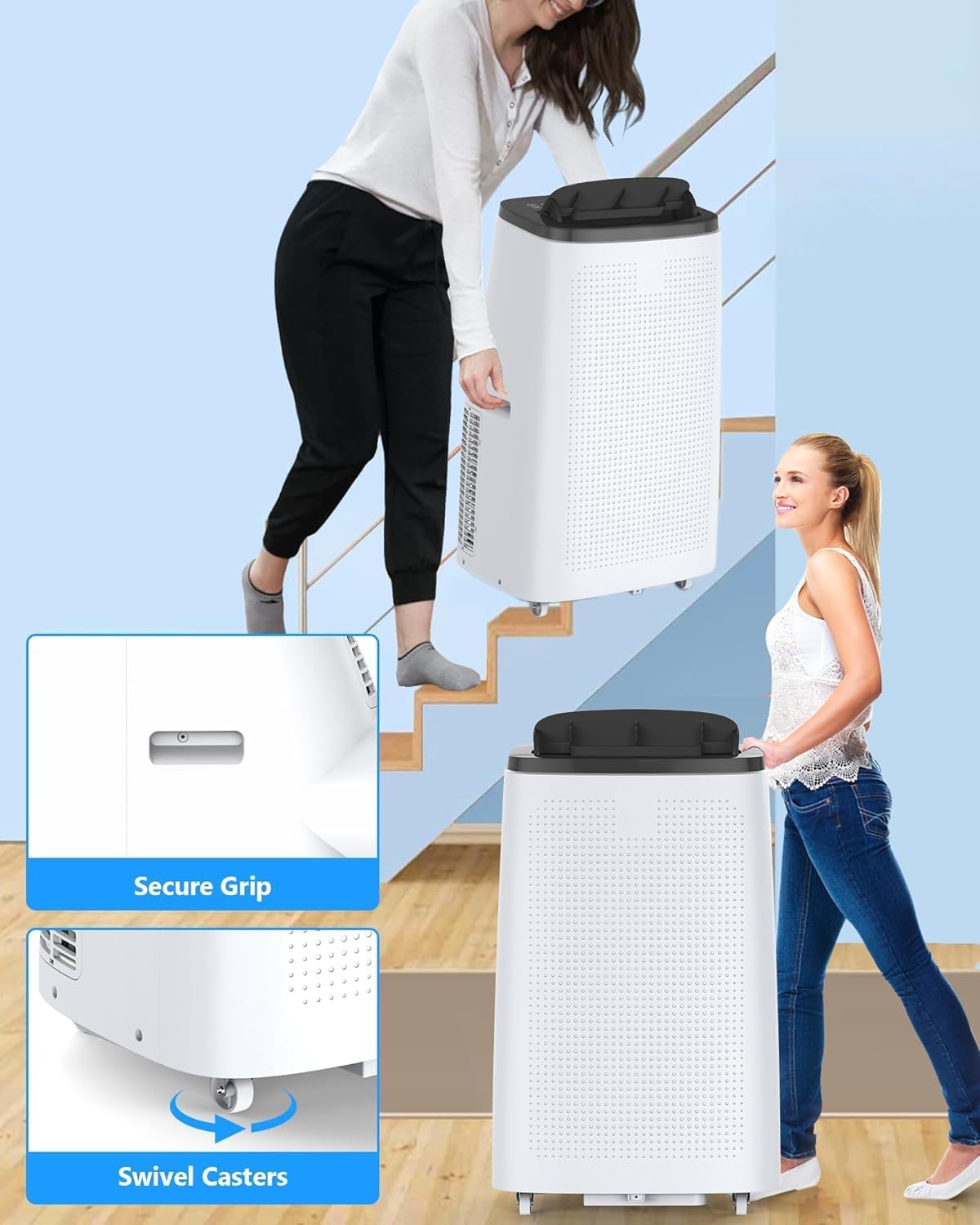
Figure 2.3: Included components for installation and operation.
3. Setup and Installation
The Garvee Portable AC Unit is designed for easy setup and mobility. Follow these steps for quick installation.
3.1 Placement
- Place the unit on a flat, stable surface.
- Ensure there is at least 20 inches (50 cm) of clearance around the unit for optimal airflow.
- Position the unit near a window for exhaust hose installation.
3.2 Window Kit and Exhaust Hose Installation
- Assemble the window kit by sliding the adjustable panel to fit your window opening. Secure it using the wing nut screw method.
- Attach one end of the vent hose to the exhaust outlet on the back of the AC unit.
- Attach the other end of the vent hose to the window kit adapter.
- Close the window securely against the window kit to seal the opening.

Figure 3.1: Steps for effortless installation of the window kit and exhaust hose.
3.3 Drainage Setup
The unit features auto evaporation for most conditions. However, in high humidity or dehumidifier mode, manual draining or continuous drainage may be required.
- Continuous Drainage: Connect the provided drain pipe to the continuous drain port on the unit. Route the pipe to a floor drain or a suitable container, ensuring it is lower than the drain port for gravity flow.
- Manual Drainage: When the internal water tank is full, the unit will stop operating and indicate a full tank. Refer to the Maintenance section for instructions on how to manually drain the unit.
3.4 Power Connection
Plug the unit's power cord into a standard 110V grounded electrical outlet. The power cord includes a built-in GFCI breaker for safety. Press the 'Reset' button on the plug if necessary to ensure power.

Figure 3.2: The unit is equipped with 360° swivel casters and secure grip handles for easy mobility between rooms.
4. Operating Instructions
Your Garvee Portable AC Unit can be operated using the control panel on top of the unit or the included remote control.
4.1 Control Panel and Remote Control

Figure 4.1: Intuitive control panel buttons for easy operation.
The control panel and remote control feature the following buttons:
- Power: Turns the unit on or off.
- Mode: Cycles through Cooling, Fan, and Dehumidifier modes.
- Up/Down Arrows: Adjusts temperature settings (in Cooling mode) or timer settings.
- Speed: Adjusts fan speed (Low, Medium, High).
- Timer: Sets the 24-hour on/off timer.
- Swing: Activates or deactivates the automatic air swing function (manual airflow tilt up to 30°).
- Sleep: Activates Sleep Mode for quiet operation.
4.2 Operating Modes
- Cooling Mode (AC): Provides powerful cooling for rooms up to 700 sq. ft. Set your desired temperature between 61℉ (16℃) and 88℉ (31℃) using the Up/Down arrows. The unit will cycle on and off to maintain the set temperature.
- Fan Mode: Circulates air without cooling. Select from Low, Medium, or High fan speeds.
- Dehumidifier Mode: Removes excess moisture from the air, capable of extracting up to 60 pints of moisture daily. The fan speed is fixed in this mode.
4.3 Special Features
- Sleep Mode: Activates a lower fan speed for quieter operation (approximately 50 decibels), ideal for nighttime use. The unit will maintain comfort while minimizing noise.

Figure 4.2: The unit's low noise operation in Sleep Mode ensures a cozy environment.
- 24-Hour Timer: Program the unit to automatically turn on or off after a set period, promoting energy efficiency.
- Auto Evaporation: The unit is designed to automatically evaporate most of the collected moisture through the exhaust hose, reducing the need for frequent manual draining.
5. Maintenance
Regular maintenance ensures optimal performance and extends the lifespan of your Garvee Portable AC Unit.
5.1 Air Filter Cleaning
The air filter should be cleaned every two weeks or more frequently depending on usage and air quality.
- Unplug the unit from the power outlet.
- Locate and remove the air filter from the back or side of the unit (refer to your unit's specific design).
- Wash the filter under running water (warm, soapy water if very dirty) or use a vacuum cleaner to remove dust.
- Allow the filter to air dry completely before reinserting it into the unit.
5.2 Draining the Unit
If the internal water tank becomes full (indicated by an error code or unit stopping), you will need to drain it manually.
- Unplug the unit from the power outlet.
- Place a shallow pan or tray under the drain plug located at the bottom rear of the unit.
- Remove the drain plug to allow water to flow out.
- Once all water has drained, replace the drain plug securely.
5.3 Storage
For long-term storage (e.g., off-season):
- Drain all water from the unit completely.
- Clean the air filter.
- Run the unit in Fan mode for a few hours to dry the internal components.
- Unplug the unit and coil the power cord.
- Store the unit in a cool, dry place, preferably covered to protect from dust.
6. Troubleshooting
Refer to this section for common issues and their solutions.
| Problem | Possible Cause | Solution |
|---|---|---|
| Unit does not turn on or trips circuit breaker. | No power; GFCI tripped; Circuit overloaded; Unit malfunction. | Ensure unit is plugged in firmly. Press 'Reset' button on the GFCI plug. Unplug other appliances from the circuit. If problem persists, contact customer support. |
| Unit does not cool effectively. | Air filter dirty; Exhaust hose blocked or disconnected; Room too large; Doors/windows open; Temperature setting too high. | Clean air filter. Check exhaust hose for kinks or disconnections. Ensure room size is within 700 sq. ft. Close all doors and windows. Lower the temperature setting. |
| Unit is noisy. | Fan speed too high; Unit not on a level surface; Obstruction in fan. | Reduce fan speed. Ensure unit is on a flat, stable surface. Check for any foreign objects near the fan. |
| Water leakage. | Drain plug loose; Drain pipe clogged or improperly connected; Internal water tank full. | Ensure drain plug is securely in place. Check drain pipe for clogs or proper connection. Drain the internal water tank if full. |
7. Specifications
Detailed technical specifications for your Garvee Portable AC Unit.
| Feature | Specification |
|---|---|
| Model Name | 3-in-1 Cooling AC Unit with Dehumidifier Fan Sleep Mode |
| Cooling Capacity | 14,000 BTU (ASHRAE) / 9,200 BTU (SACC) |
| Coverage Area | Up to 700 sq. ft. |
| Dehumidification Capacity | Up to 60 pints/day |
| Voltage | 110 Volts |
| Noise Level | 50 decibels (in Sleep Mode) |
| Product Dimensions (D x W x H) | 15.3" x 18.9" x 30.7" |
| Item Weight | 76.3 pounds |
| Manufacturer | Garvee |
| Included Components | Remote, Window Kit, Vent Hose, Drain Pipe |
8. Warranty and Support
Warranty information for your Garvee Portable AC Unit is typically provided with your purchase documentation. Please refer to the warranty card or contact the retailer for specific details regarding coverage and duration.
8.1 Customer Support
For technical assistance, troubleshooting not covered in this manual, or warranty claims, please contact Garvee customer support through the retailer's platform or the official Garvee website. Have your model number and purchase date ready when contacting support.
Ask a question about this manual
Ask about setup, troubleshooting, compatibility, parts, safety, or missing instructions. Manuals+ will review the question and use this page’s manual context to help answer it.