Introduction
Thank you for choosing the SPZTJK 3-Speed Electric Food Processor. This manual provides essential information for the safe and efficient operation, maintenance, and troubleshooting of your appliance. Please read it thoroughly before first use and keep it for future reference.

Image: SPZTJK 3-Speed Electric Food Processor with its two bowls, one glass and one stainless steel, showcasing its versatility for meat and vegetables.
Important Safety Precautions
Failure to follow these safety instructions may result in injury or damage to the appliance.
- Blade Handling: The blades are extremely sharp. Always handle them with extreme care. Always place the blade into the empty bowl first before adding food or attaching the motor unit. Never touch the sharp edges directly.
- Motor Unit: Never put your fingers or any utensil into the bowl while the motor is attached or the blades are still spinning. Always wait for the blades to stop completely before removing the lid or accessing the contents.
- Overheat Protection: The food processor has an overheat protection system. If the machine stops during operation, allow it to cool down completely before restarting.
- Ingredient Preparation: This food processor is designed for fresh and soft ingredients. To protect your safety and extend the life of your machine, partially thaw frozen items (like ice and frozen meat) before processing.
- Cleaning: Do not submerge the motor unit in water. The removable parts are dishwasher-safe, but always ensure the motor unit remains dry.
- Power: Ensure the appliance is unplugged before assembly, disassembly, or cleaning.
- Children: Keep the appliance out of reach of children.
Video: SPZTJK Food Processors Overview - Demonstrates key safety steps for handling blades and operating the unit.
Product Components
Your SPZTJK Food Processor comes with the following parts:
- 300W Power Pod (Motor Unit)
- 8-Cup Glass Bowl
- 8-Cup 304 Stainless Steel Bowl
- Lid (Translucent)
- 2 Sets of 4 S-shaped Blades (Bi-Level)
- 2 Non-slip Base Rings
- User Manual
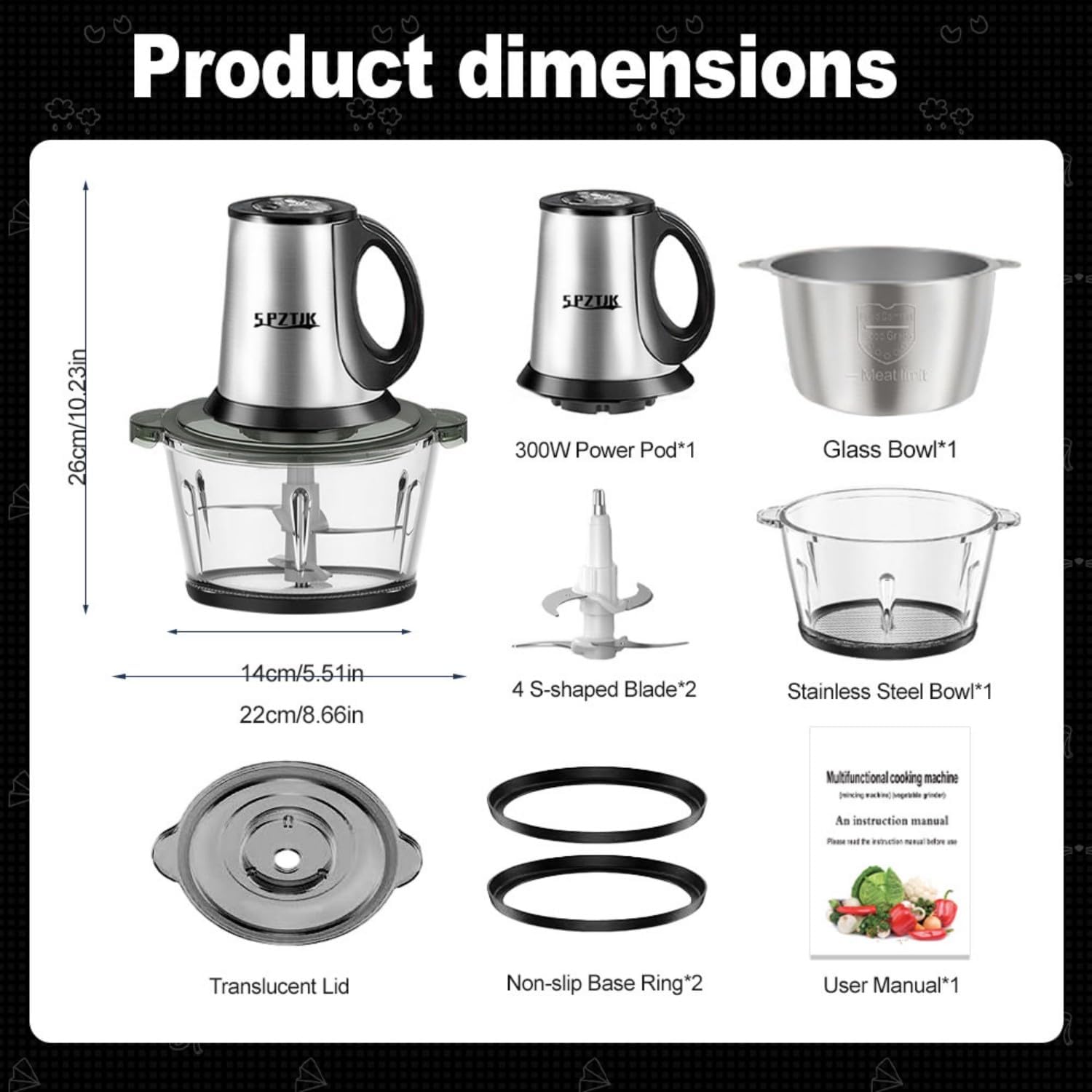
Image: Detailed view of all included components and their dimensions.
Setup and Assembly
- Prepare the Bowl: Place a non-slip base ring on the bottom of your chosen bowl (glass or stainless steel).
- Install Blades: Carefully remove the blade protector. Insert the blade assembly onto the spindle pin inside the bowl. Ensure it is securely seated.
- Add Ingredients: Place your pre-cut ingredients into the processing bowl. Do not overfill.
- Secure Lid: Place the translucent lid on top of the bowl, ensuring it is properly aligned and secured.
- Attach Motor Unit: Place the motor unit (power pod) onto the lid. Ensure it is correctly positioned and locked into place before operation.
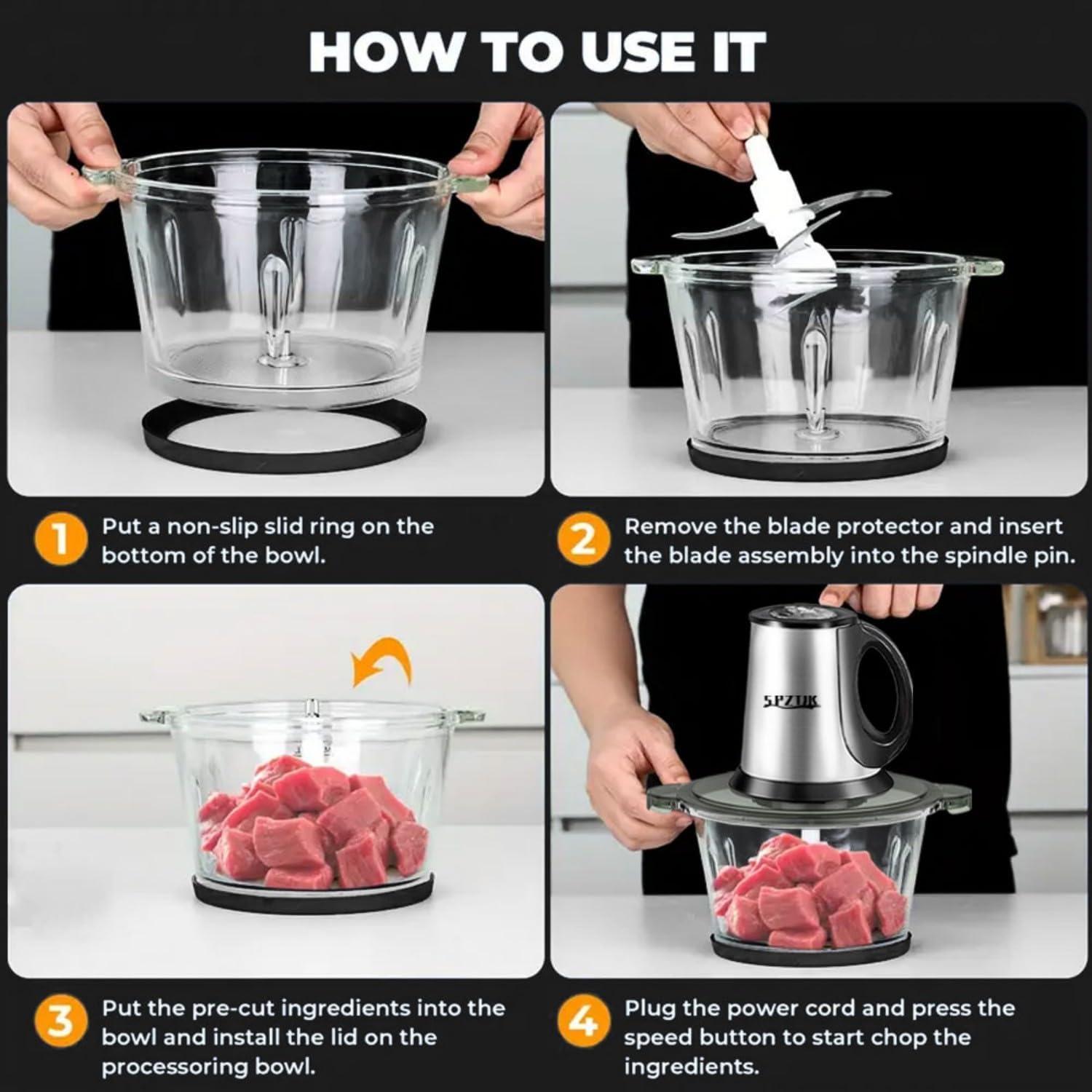
Image: Visual instructions for assembling the food processor.
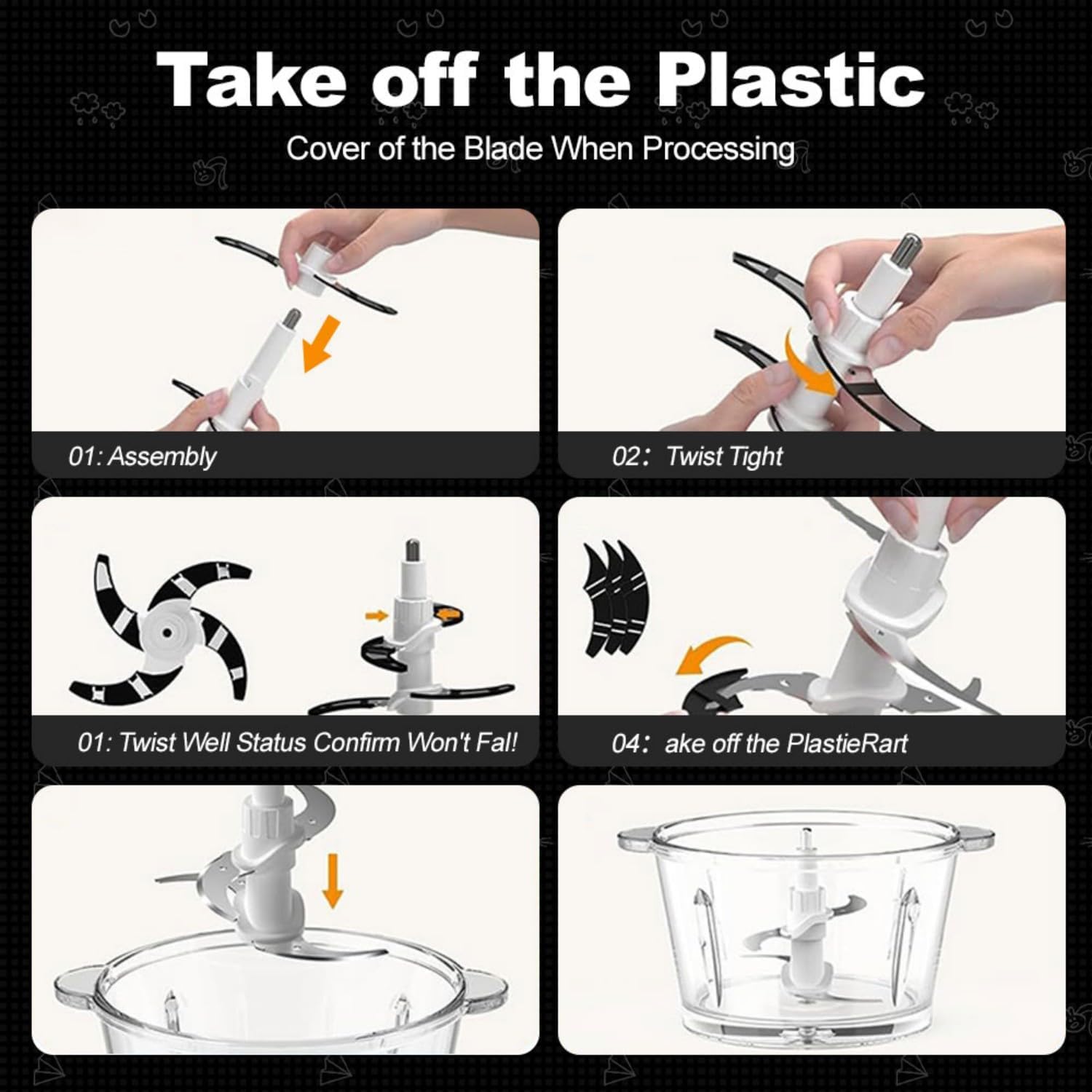
Image: Instructions for safely assembling and disassembling the blades.
Operating Instructions
Once assembled, plug in the power cord. The SPZTJK Food Processor features 3-speed control for precise texture management.
- Speed Control: Press the desired speed button on the motor unit to start processing. Use lower speeds for coarse chopping and higher speeds for finer grinding or blending.
- Pulsing: For optimal control and to prevent over-processing, use short pulses rather than continuous operation.
- Versatility: Use the glass bowl for vegetables, fruits, and baby food. Use the stainless steel bowl for meat and harder ingredients to maintain hygiene and prevent cross-contamination.

Image: Examples of ingredients processed with 3-speed control.
Video: SPZTJK Food Processors Operation Demonstration - Shows the food processor in action with various ingredients.
Maintenance and Cleaning
Proper cleaning ensures the longevity and hygiene of your food processor.
- Unplug: Always unplug the appliance from the power outlet before cleaning.
- Disassemble: Remove the motor unit, then the lid, and carefully lift out the blade assembly.
- Clean Components: The bowls, lids, and blade assemblies are removable and dishwasher-safe. For hand washing, use warm, soapy water and a brush for the blades. Rinse thoroughly.
- Motor Unit: Wipe the motor unit with a damp cloth. Never submerge the motor unit in water.
- Dry and Store: Ensure all parts are completely dry before reassembling or storing. Store in a cool, dry place.
Troubleshooting
| Problem | Possible Cause | Solution |
|---|---|---|
| Appliance stops during operation. | Overheat protection activated. | Unplug the appliance and allow it to cool down completely (approx. 30 minutes) before restarting. Reduce load or process in smaller batches. |
| Ingredients not chopping evenly. | Too many ingredients, or ingredients are too large. | Process in smaller batches. Cut larger ingredients into smaller, uniform pieces before processing. Use pulse function for better control. |
| Motor unit does not start. | Improper assembly or power connection. | Ensure the motor unit is correctly seated and locked onto the lid, and the lid is properly secured to the bowl. Check if the power cord is firmly plugged into a working outlet. |
Specifications
| Feature | Detail |
|---|---|
| Brand | SPZTJK |
| Model Number | 2LJRJ-3D |
| Power | 300W |
| Bowl Capacity | 8 Cups (Stainless Steel) & 8 Cups (Glass) |
| Number of Speeds | 3 |
| Blade Material | Stainless Steel |
| Product Dimensions | 5.51"D x 8.66"W x 10.23"H |
| Item Weight | 5.83 pounds |
| Special Feature | Interchangeable Blade |
| Product Care | Dishwasher Safe (removable parts), Hand Wash |
Warranty and Support
For warranty information or technical support, please refer to the contact details provided with your purchase documentation or visit the official SPZTJK website. Keep your purchase receipt as proof of purchase for any warranty claims.
For additional assistance, you may contact SPZTJK customer service through their Amazon Brand Store.


