
Introduction
The LORPHEIR DAB Car Adapter A4192 is designed to upgrade your vehicle's audio system with digital radio capabilities. It converts DAB/DAB+ radio signals into a stereo audio signal, transmitting it to your existing car radio via FM technology. This device also features Bluetooth connectivity for hands-free calling and music streaming, an AUX output for higher audio quality, and a TF card slot for MP3 playback. Its 2.4-inch color LCD provides essential information at a glance.
This manual provides detailed instructions for the setup, operation, maintenance, and troubleshooting of your DAB Car Adapter.
Product Features
- DAB/DAB+ Digital Radio: Converts digital radio signals to stereo audio for transmission to your car radio via FM.
- 2.4-inch Color LCD Display: Shows frequency, station names, track information, messages, and traffic updates.
- Bluetooth Connectivity: Supports safe hands-free calling and wireless music streaming.
- AUX Output: Provides a wired connection for enhanced audio quality.
- TF Card Support: Allows direct playback of MP3 files from a TF memory card.
- High-Sensitivity Active Antenna: Improves DAB+ reception and reduces interference.
- Service Following Function: Automatically detects the strongest signal while driving.
- Quick Scan: Scans and stores all available DAB/DAB+ stations.
- Built-in Speaker: For direct audio output.
- Rechargeable Battery: Provides portable power.
Package Contents
Please check the package for the following items:
- LORPHEIR DAB Adapter
- AUX Cable
- Power Cord (Car Charger)
- USB Cable
- User Manual
- Mounting Bracket

Image: Contents of the LORPHEIR DAB Car Adapter package.
Setup and Installation
1. Antenna Connection
- Ensure the DAB antenna is securely connected to the adapter.
- For optimal reception, connect the antenna to a pillar metal part (ground foreground) in your vehicle.
- Before installation, remove the protective paper from the DAB antenna. The copper part must be connected with metal (ground electrode).
- Leave a 2-3cm gap from the window frame when attaching the antenna in a vertical direction.

Image: DAB antenna installation guidelines.
2. Mounting the Adapter
The adapter offers two primary mounting options:
- Fix into Car Air Vent: Use the provided mounting bracket to secure the adapter to a car air vent.
- Stick on the Dashboard: Use the adhesive base of the mounting bracket to attach the adapter to your car's dashboard.

Image: Two modes of use for mounting the adapter.
3. Power Connection
Use the USB cable and power cord provided in the package to connect the adapter to your car's power source. This ensures compatibility and proper functionality.
Important Notice: Please use the USB cable that comes with our package to avoid any incompatibility issues.
Operating Instructions
1. Power On/Off
Press and hold the power button (usually marked 'M' or a similar symbol) to turn the device on or off. The 2.4-inch color display will illuminate upon power-on.
2. DAB/DAB+ Radio Mode
- Once powered on, select the DAB/DAB+ mode from the main menu on the display.
- Perform a "Quick Scan" to search for all available digital radio stations in your area. The device will automatically store them.
- Use the navigation buttons to browse and select your desired station.
- The "Service Following" function will automatically detect and switch to the strongest signal for your current station while driving, ensuring continuous listening.

Image: Display showing DAB/DAB+ mode and connectivity options.
3. FM Transmitter Function
To transmit the DAB/DAB+ audio to your car's existing FM radio:
- Enter the FM Transmitter settings on the adapter.
- Select an unused FM frequency (one with no strong radio station) on the adapter.
- Tune your car's FM radio to the exact same frequency.
- The DAB/DAB+ audio will now play through your car's speakers.
4. Bluetooth Connectivity
The adapter supports Bluetooth 5.0 for wireless audio and hands-free calls.
- Enable Bluetooth on your smartphone.
- On the DAB adapter, select the Bluetooth mode. The device will enter pairing mode.
- Search for "LORPHEIR A4192" (or similar name) on your smartphone's Bluetooth device list and connect.
- Once paired, you can stream music from your phone or make/receive hands-free calls through the adapter.
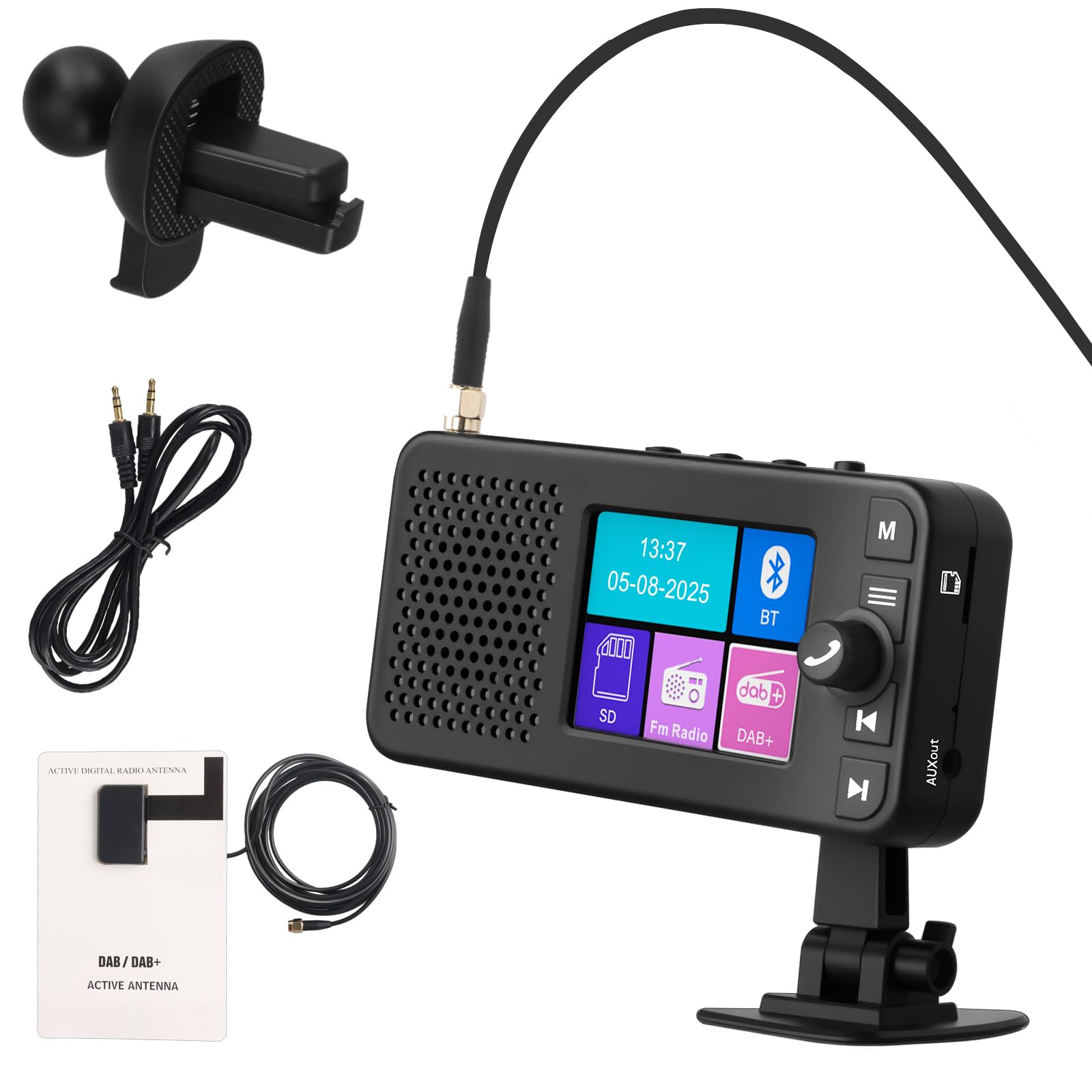
Image: Bluetooth 5.0 connection for hands-free calling and music.
5. AUX Output
For a direct, high-quality audio connection, use the provided AUX cable:
- Connect one end of the AUX cable to the AUX output port on the DAB adapter.
- Connect the other end to the AUX input port on your car's audio system.
- Select AUX input on your car's audio system.
6. TF Card Playback
To play MP3 files directly from a TF card:
- Insert a TF memory card (with MP3 files) into the designated TF card slot on the adapter.
- Select the TF Card mode from the adapter's display menu.
- Use the navigation controls to browse and play your music files.
Maintenance
- Cleaning: Use a soft, dry cloth to clean the device. Do not use liquid cleaners or aerosols.
- Storage: Store the device in a cool, dry place away from direct sunlight and extreme temperatures.
- Battery Care: To prolong battery life, avoid fully discharging the battery frequently. Charge the device regularly.
- Antenna: Ensure the antenna cable is not pinched or damaged, as this can affect reception quality.
Troubleshooting
| Problem | Possible Solution |
|---|---|
| No power / Device won't turn on. |
|
| Poor DAB/DAB+ reception. |
|
| FM transmission static or interference. |
|
| Bluetooth pairing issues. |
|
| TF card not recognized or music not playing. |
|
Specifications
| Feature | Detail |
|---|---|
| Brand | LORPHEIR |
| Model Number | A4192 |
| Colour | Black |
| Display Type | 2.4-inch Colour LCD |
| Connectivity Technology | Auxiliary, Bluetooth |
| Tuner Technology | DAB/DAB+, FM |
| Power Source | Battery Powered |
| Radio Bands Supported | FM |
| Compatible Devices | Smartphone, Speaker, TF card |
Warranty and Support
Your LORPHEIR DAB Car Adapter A4192 comes with a standard manufacturer's warranty. Please refer to the warranty card included in your package for specific terms and conditions, including the warranty period and coverage details.
For technical support, troubleshooting assistance, or warranty claims, please contact LORPHEIR customer service through the contact information provided on the product packaging or the official LORPHEIR website. Please have your model number (A4192) and purchase details ready when contacting support.