
Tauboly HM124BS4
Tauboly 1080P Mini Body Camera User Manual
Model: HM124BS4 | Brand: Tauboly
Product Overview
The Tauboly 1080P Mini Body Camera is a versatile and compact device designed for recording videos, photos, and audio. It features a 180° rotating lens, night vision capabilities, and an LED screen for direct content review and parameter adjustments. This camera is suitable for various applications including security, travel, outdoor activities, meetings, and law enforcement.

Image: The Tauboly 1080P Mini Body Camera, shown with its included 64GB Micro SD card and USB adapter. The camera features a compact design with a rotatable lens and a front-facing screen.

Image: Illustration highlighting the multi-functional capabilities of the camera, including 1080P video recording, photo capture, and audio recording. Examples show a snowboarder for video, an ambulance scene for video, and a microphone icon for audio.
Setup Guide
1. Inserting the Micro SD Card
Before initial use, ensure a Micro SD card is inserted into the camera. The camera supports up to 128GB. It is recommended to format the card to FAT32 before use. Always insert or remove the Micro SD card while the camera is turned off to prevent data corruption or damage to the device.
Video: An official operating guide demonstrating how to insert the Micro SD card, power on the camera, record video and audio, take photos, view files, set the time, and reset the camera. This video provides a comprehensive visual walkthrough of the camera's basic functions.
2. Charging the Camera
Connect the camera to a power source using the included USB cable. A full charge typically takes 3-4 hours. The camera supports simultaneous charging and recording, allowing for extended use.
Operating Instructions
Power On/Off
To power on the camera, press and hold the power button for 3 seconds. To power off, repeat the process.
Video Recording
Once powered on, push the designated switch up to begin video recording. Push the switch down to stop recording and save the video file. The camera supports loop recording, with options for 0/3/5/10/15-minute segments. When the Micro SD card is full, the oldest videos will be automatically overwritten.
Audio Recording
To record audio, push the audio recording switch up. Push the switch down to stop and save the audio file.
Photo Capture
Press and hold the night vision button for 3 seconds to switch to snapshot mode. Press and hold again for 3 seconds to take a photo. A prompt tone and a blue light flash indicate successful capture. If no tone is heard, adjust settings in the menu.
Night Vision Functionality
Equipped with four infrared lenses, the camera supports night vision mode. Click the night vision button to enable or disable this feature. It can be used for both photo and video modes in dark environments.
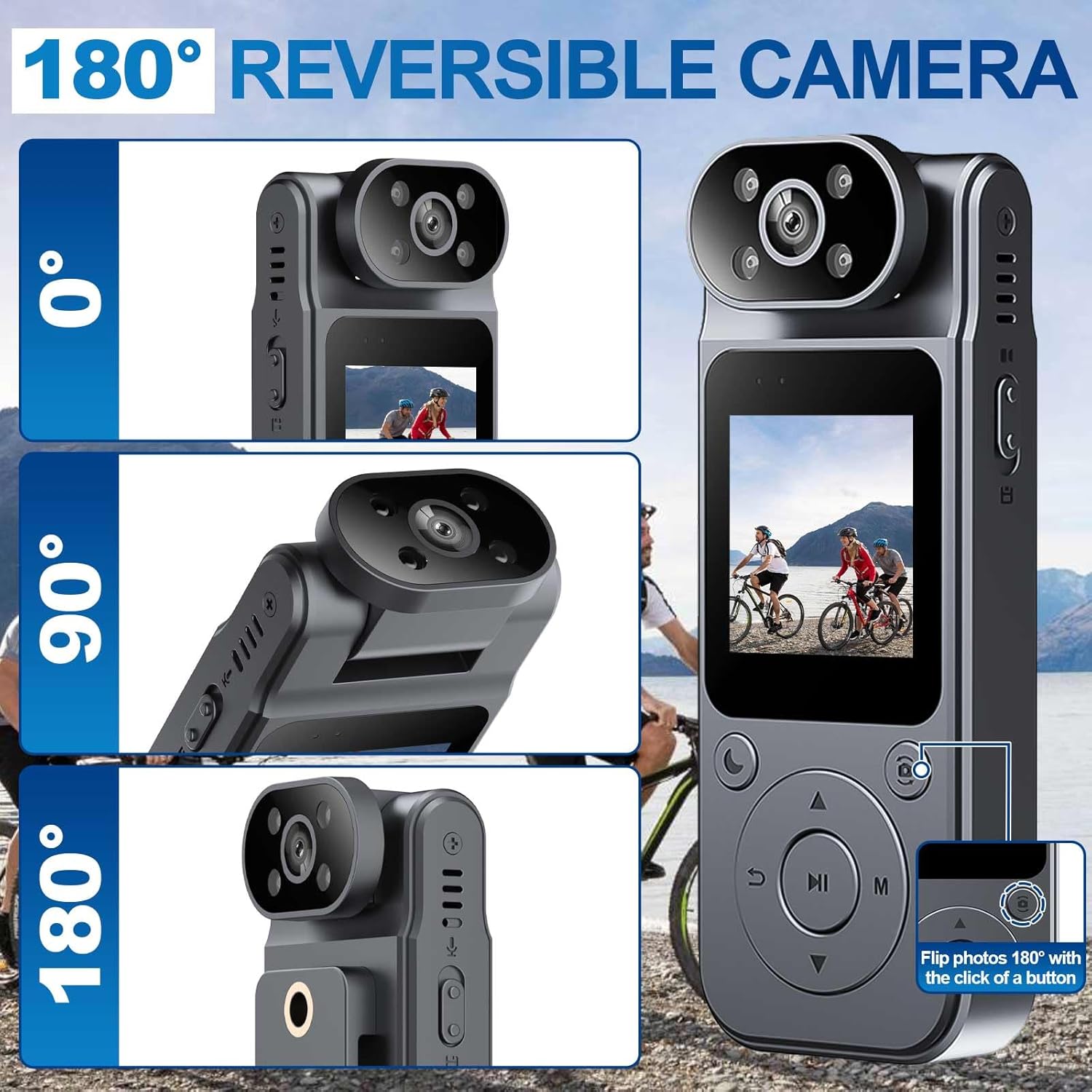
Image: Demonstrates the 180° reversible camera lens, allowing for flexible recording angles. The lens can be manually flipped for selfies or specific orientations.
Viewing Files
There are three methods to view recorded files:
- Directly on the camera: View and delete files using the portable video recorder's LED screen. Long-press the back button to open the playback page, then use the up/down buttons to switch between files. Press the confirm button to play the selected file.
- Connect to a computer via USB: Use the included USB cable to connect the camera to your computer. Select "Memory" on the camera's screen to access files.
- Using a card reader: After turning off the camera, remove the Micro SD card and insert it into a card reader connected to your computer.

Image: Illustrates the three methods for viewing files: directly on the camera's screen, connecting the camera to a computer via USB cable, and using a card reader to connect the Micro SD card to a computer.
Maintenance
To ensure the longevity and optimal performance of your Tauboly Mini Body Camera, follow these maintenance guidelines:
- Keep the camera clean by wiping it with a soft, dry cloth. Avoid using harsh chemicals or abrasive materials.
- Store the camera in a cool, dry place away from direct sunlight and extreme temperatures.
- Ensure the lens is free from dust and smudges for clear recordings.
- Regularly back up your important files to a computer or external storage device.
- Periodically format the Micro SD card (after backing up data) to maintain optimal recording performance and prevent file corruption.
Troubleshooting
| Problem | Solution |
|---|---|
| Camera freezes or does not respond. | Use a pin-like object to briefly press the reset hole to restart the camera. |
| Computer cannot recognize the memory card. | Replace the USB cable, or remove the SD card and use a card reader to connect it to your computer. Ensure the SD card is formatted to FAT32. |
| Cannot hear prompt tone when taking photos. | Go to the camera's menu settings to enable or adjust the prompt tone. |
| Video files are not playing. | Video files are in AVI format. Please use a player that supports this format to view them, such as VLC media player. |
Specifications
| Feature | Detail |
|---|---|
| Brand | Tauboly |
| Model Number | HM124BS4 |
| Item Weight | 6.4 ounces |
| Package Dimensions | 5 x 3.07 x 2.24 inches |
| Batteries | 1 9V battery required (included) |
| Photo Sensor Technology | CMOS |
| Video Capture Resolution | 1080p |
| Maximum Focal Length | 30 Millimeters |
| Flash Memory Type | Micro SD |
| Video Capture Format | AVI |
| Screen Size | 1.1 inches |
| Included Components | Memory Card |
| Minimum Focal Length | 28 Millimeters |
Warranty and Support
For any questions regarding your Tauboly Mini Body Camera, please feel free to contact the seller directly. They are committed to providing satisfactory service and support for your product.
Please refer to your purchase documentation for specific warranty details and contact information.
Ask a question about this manual
Ask about setup, troubleshooting, compatibility, parts, safety, or missing instructions. Manuals+ will review the question and use this page’s manual context to help answer it.