
1. Introduction
This manual provides detailed instructions for the installation, operation, and maintenance of your LORPHEIR Android Car Stereo. This unit is specifically designed for Peugeot 208 and 2008 models manufactured between 2012 and 2018. It features a 10-inch display, wireless CarPlay and Android Auto, DSP 32EQ audio processing, and supports an AHD rear camera. Please read this manual thoroughly before installation and use to ensure proper functionality and safety.
2. What's in the Box
Carefully unpack the contents and ensure all items are present:
- Android Car Radio Unit
- Power Cable with Canbus Decoder
- AHD Backup Camera
- Manual and Tools
- Various Connection Parts/Cables
3. Compatibility
This LORPHEIR Android Car Stereo is compatible with:
- Peugeot 208 (2012-2018)
- Peugeot 2008 (2012-2018)
It is designed to maintain original vehicle functions, including steering wheel controls and original reverse camera support (if applicable), through its integrated CAN-Bus decoding. The installation is plug-and-play, minimizing complex wiring.
4. Key Features
- Android Operating System: Powerful system with 4GB RAM and 64GB internal storage.
- 10-inch HD Touchscreen: Large, clear display for navigation and multimedia.
- Wireless CarPlay & Android Auto: Seamless smartphone integration for navigation, calls, and music.
- DSP 32EQ Audio: Advanced digital sound processing for customizable audio experience.
- AHD Rear Camera Support: Includes an AHD backup camera for enhanced safety.
- WiFi Connectivity: Access online entertainment and apps via hotspot or WiFi.
- GPS Navigation: Supports online and offline maps with multi-satellite signal (GPS/Galileo/GLONASS).
- OEM Compatibility: Retains original steering wheel controls and CAN-Bus decoding.
5. Setup & Installation
Professional installation is recommended. Ensure the vehicle's ignition is off and the battery is disconnected before beginning installation.
5.1 Installation Overview
The unit is designed for a direct fit into the dashboard of compatible Peugeot 208/2008 models. The image below illustrates the general appearance of the unit once installed.

Figure 5.1: Installation Effect in Peugeot 208/2008 (2012-2018) dashboard.
5.2 Wiring and Connections
Connect the provided power cable with the CAN-Bus decoder to the vehicle's wiring harness. Ensure all connections are secure. The unit supports OEM backup camera and steering wheel controls. Refer to the diagram below for typical connections.
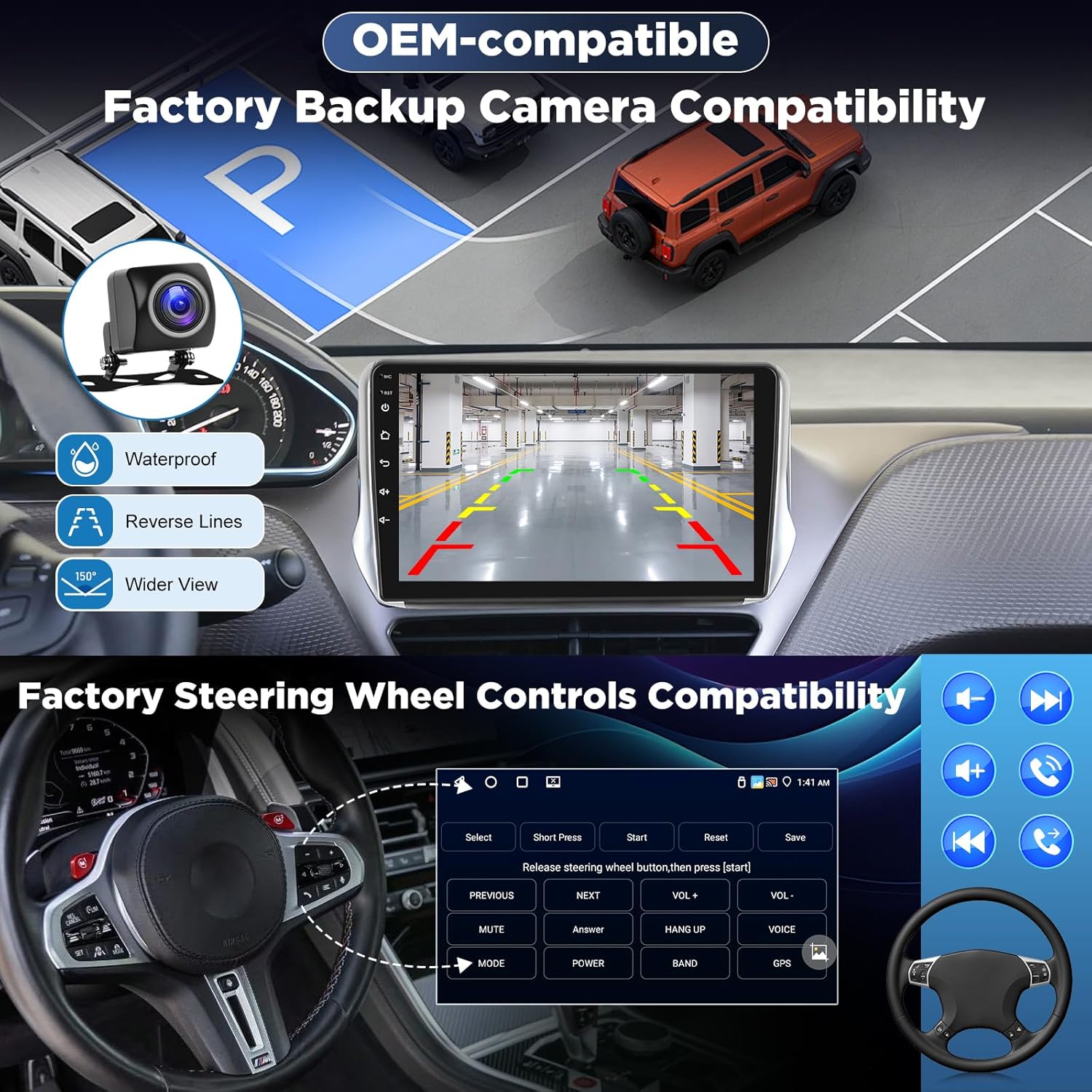
Figure 5.2: OEM Compatibility for Backup Camera and Steering Wheel Controls.
- Power Cable: Connect the main power harness. The integrated CAN-Bus decoder will manage communication with the vehicle's systems.
- AHD Backup Camera: Connect the included AHD camera to the designated input. Ensure proper routing of the cable to the rear of the vehicle.
- Steering Wheel Controls: The CAN-Bus decoder should automatically enable original steering wheel controls. If not, refer to the unit's settings for manual configuration.
- Antenna: Connect the GPS antenna and radio antenna. Position the GPS antenna in a location with a clear view of the sky.
- USB Ports: Connect any external USB devices as needed.
6. Operating Instructions
6.1 Basic Operation
- Power On/Off: The unit will power on with the vehicle's ignition. Press and hold the power button (if available) for manual control.
- Volume Control: Adjust volume using the on-screen controls or steering wheel buttons.
- Touchscreen Interface: Navigate through menus and applications by touching the screen.
6.2 Wireless CarPlay & Android Auto
This unit supports wireless connection for both Apple CarPlay and Android Auto, allowing seamless integration of your smartphone's features.

Figure 6.1: Wireless CarPlay and Android Auto Interface.
- Ensure Bluetooth and Wi-Fi are enabled on your smartphone.
- On the car stereo, open the 'CarPlay' or 'Android Auto' application.
- Search for your car stereo's Bluetooth name on your phone and pair.
- Confirm the pairing on both devices. The system will automatically connect to CarPlay or Android Auto.
- Once connected, you can access navigation, make calls, send messages, and play music directly from your phone's interface on the car stereo screen.
6.3 Audio Features (DSP 32EQ)
Enhance your listening experience with the integrated Digital Sound Processor (DSP) and 32-band Equalizer (EQ).

Figure 6.2: DSP 32EQ Audio Customization Interface.
- Access the 'DSP' or 'Equalizer' app from the main menu.
- Adjust the 32 frequency bands to fine-tune the audio output to your preference.
- Utilize preset sound effects (e.g., Pop, Rock, Jazz) or create custom profiles.
- Adjust sound balance and fader settings for optimal sound staging.
- If an external subwoofer is connected, configure its settings within the DSP menu for powerful bass.
6.4 Multimedia & Streaming
Connect to Wi-Fi or a mobile hotspot to access online content and streaming services.

Figure 6.3: HD Streaming and Online Entertainment.
- Wi-Fi Connection: Go to 'Settings' > 'Network & Internet' > 'Wi-Fi' to connect to an available network or your phone's hotspot.
- App Downloads: Access the Google Play Store to download and install your favorite streaming apps (e.g., Netflix, YouTube, Spotify, Prime Video).
- Local Media: Play audio and video files from USB drives connected to the unit's USB ports.
6.5 Navigation
The unit features precise GPS navigation with support for both online and offline maps.

Figure 6.4: Precision Real-Time Navigation.
- GPS Signal: The unit utilizes multi-satellite signals (GPS/Galileo/GLONASS) for stable and accurate positioning.
- Online Maps: With an internet connection, use pre-installed map applications or download others from the Play Store for real-time traffic and updates.
- Offline Maps: Download map data for your region to use navigation without an internet connection.
- Voice Guidance: Follow turn-by-turn voice instructions for easy navigation.
7. Maintenance
- Cleaning: Use a soft, dry cloth to clean the screen and unit. Avoid abrasive cleaners or solvents.
- Software Updates: Periodically check for software updates via the system settings to ensure optimal performance and access to new features. An internet connection is required for updates.
- Data Backup: Regularly back up important data if stored on the unit.
8. Troubleshooting
| Problem | Possible Cause | Solution |
|---|---|---|
| Unit does not power on. | Incorrect wiring, blown fuse, vehicle battery issue. | Check power connections, vehicle fuses, and battery charge. Ensure the ignition is on. |
| No sound. | Volume too low, incorrect audio settings, speaker wiring issues. | Increase volume. Check audio output settings (e.g., DSP settings). Verify speaker connections. |
| Backup camera shows 'No Signal'. | Camera not connected, faulty camera, incorrect camera input selected. | Ensure the AHD backup camera is securely connected to the correct input. Check camera power supply. Verify camera settings in the unit. |
| Steering wheel controls not working. | CAN-Bus decoder not connected, incorrect vehicle settings, manual configuration needed. | Ensure the CAN-Bus decoder is properly connected. Check the unit's settings for steering wheel control configuration. Some vehicles may require manual mapping. |
| Wireless CarPlay/Android Auto not connecting. | Bluetooth/Wi-Fi off on phone/unit, incorrect pairing, software glitch. | Ensure Bluetooth and Wi-Fi are active on both devices. Forget and re-pair the Bluetooth connection. Restart both the phone and the car stereo. |
| GPS signal is weak or inaccurate. | GPS antenna obstructed or improperly placed, software issue. | Ensure the GPS antenna has a clear view of the sky. Check antenna connection. Restart the navigation application. |
9. Specifications
| Feature | Detail |
|---|---|
| Brand | LORPHEIR |
| Model Name | 4+64G Autoradio Android |
| Model Number | 4+64G, 4 Core |
| Operating System | Android |
| RAM | 4 GB |
| Internal Storage | 64 GB |
| Screen Size | 10 Inches |
| Display Type | Touch screen |
| Connectivity | WiFi, Bluetooth, USB, Auxiliary |
| Bluetooth Version | Not specified (variant [BT 5.0] exists, but not current model) |
| Special Features | 4 RAM 64ROM, DSP 32EQ, Wireless Carplay & Android Auto, Crystal-clear screen |
| Compatible Devices | Smartphone, DAB, OBD, DVR |
| Tuner Technology | DAB (Digital Audio Broadcasting) |
| Supported Radio Bands | FM |
| Audio Output Mode | Stereo |
| Map Type | Roads (supports online/offline) |
| Installation Type | In-dash |
| Product Dimensions | 12 x 32 x 15 cm |
| Item Weight | 1.4 Kilograms |
10. Warranty and Support
For warranty information and technical support, please refer to the documentation included with your purchase or contact LORPHEIR customer service through the retailer where the product was purchased. Keep your proof of purchase for warranty claims.