1. Introduction
This manual provides essential information for the proper installation, operation, and maintenance of the Generic FRF71-292MGPPF RF Cable Assembly. This high-performance cable is designed for demanding RF applications requiring frequencies up to 40 GHz.
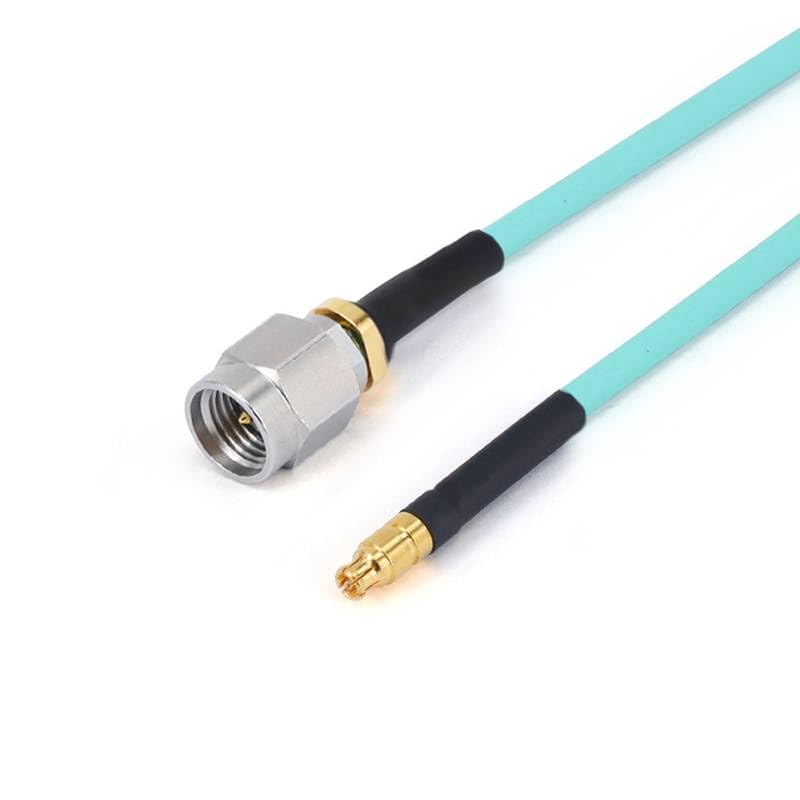
Figure 1: Generic RF Cable Assembly. It features a light blue flexible coaxial cable with a silver 2.92mm male connector on one end and a gold-plated GPPO female connector on the other end. The cable is coiled in a loose loop.
2. Key Features
- Compatibility: 2.92mm Male to GPPO (Mini-SMP) Female cable assembly for RF and microwave applications up to 40GHz.
- Construction: RG-405SS flexible coaxial cable with stainless steel male connector and gold-plated beryllium copper female connector.
- Performance: Engineered for excellent microwave performance with low insertion loss and optimal VSWR.
- Applications: Suitable for military, space, RF communication, test & measurement, and industrial applications.
- Specifications: Operating temperature range of -40°C to +80°C, 50 Ohm impedance, and minimum 500 mating cycles.
3. Technical Specifications
| Specification | Value |
|---|---|
| Model Name | FRF71-292MGPPF |
| Connector Type | 2.92mm Male to GPPO Female |
| Cable Type | RG-405SS Flexible Coax |
| Frequency Range | DC-40GHz |
| Impedance | 50 Ohm |
| Operating Temperature | -40°C to +80°C |
| Male Connector Material | Stainless Steel (Passivated) |
| Female Connector Material | Beryllium Copper (Gold Plated) |
| Mating Cycles | 500+ |
| Compliance | RoHS |
| Recommended Uses | RF industries, military & space, RF communication, test & measurement, industrial applications |
4. Setup and Connection
Follow these guidelines for proper connection of the RF Cable Assembly:
- Inspect Connectors: Before connecting, visually inspect both the 2.92mm Male and GPPO Female connectors for any signs of damage, debris, or contamination. Ensure pins are straight and clean.
- Align Carefully: Align the male connector with the female receptacle. For 2.92mm connectors, ensure the center pin is properly aligned before engaging the threads. For GPPO (Mini-SMP) connectors, ensure proper axial alignment for a smooth push-on connection.
- Tighten (2.92mm): For the 2.92mm male connector, gently hand-tighten the coupling nut until snug. Avoid over-tightening, which can damage the connector or the device. A torque wrench calibrated for 2.92mm connectors is recommended for critical applications to achieve the specified torque (typically 8 in-lbs or 0.9 Nm).
- Engage (GPPO): For the GPPO female connector, simply push it firmly onto the mating male connector until it clicks into place. Ensure a secure connection.
- Avoid Bending: Do not bend the cable sharply near the connectors. Maintain a minimum bend radius to prevent damage to the coaxial structure and maintain performance.
- Secure Cable: If necessary, secure the cable to prevent strain on the connectors, especially in dynamic environments.
5. Operating Guidelines
To ensure optimal performance and longevity of your RF Cable Assembly, adhere to the following operating guidelines:
- Frequency Range: Operate the cable within its specified DC-40GHz frequency range. Exceeding this range may lead to degraded performance.
- Temperature Range: Ensure the operating environment is within the specified -40°C to +80°C temperature range. Extreme temperatures can affect cable characteristics.
- Power Handling: Be aware of the power handling capabilities of the cable and connectors. Do not exceed the maximum power ratings of your system components.
- Environmental Conditions: While the cable is robust, protect it from excessive moisture, dust, and corrosive substances. This cable is rated for indoor usage.
- Minimize Bending: Avoid repeated or sharp bending of the flexible coaxial cable, as this can alter its electrical properties and reduce its lifespan.
6. Maintenance and Care
Proper maintenance extends the life and ensures the reliability of your RF Cable Assembly:
- Cleaning Connectors: Regularly clean connector interfaces using a lint-free swab and isopropyl alcohol. Allow to dry completely before re-mating. Avoid abrasive materials.
- Storage: Store the cable in a clean, dry environment, ideally coiled loosely to prevent kinks. Use protective caps on connectors when not in use to prevent dust and damage.
- Inspection: Periodically inspect the cable jacket and connectors for any signs of wear, cuts, cracks, or corrosion. Replace the cable if significant damage is observed.
- Handling: Always handle the cable by the connector bodies, not by the cable itself, to prevent strain on the cable-connector interface.
7. Troubleshooting
If you experience issues with your RF Cable Assembly, consider the following common troubleshooting steps:
| Problem | Possible Cause | Solution |
|---|---|---|
| Poor Signal Quality / High VSWR | Damaged connector, improper mating, cable bend radius exceeded, contaminated interface. | Inspect connectors for damage/debris, ensure proper tightening/engagement, check cable for sharp bends, clean connector interfaces. |
| Intermittent Connection | Loose connection, worn connectors, internal cable damage. | Re-tighten/re-engage connectors, inspect for wear, replace cable if internal damage is suspected. |
| No Signal | Completely disconnected cable, severely damaged cable/connector. | Verify all connections, check for continuity with a test instrument, replace cable if necessary. |
8. Warranty Information
Specific warranty terms for this Generic RF Cable Assembly may vary depending on the point of purchase and regional regulations. Please refer to your purchase documentation or contact the seller directly for detailed warranty information. Generally, products are covered against defects in materials and workmanship for a specified period from the date of purchase.
9. Technical Support
For technical assistance, questions regarding product functionality, or to report issues not covered in this manual, please contact the manufacturer or your authorized reseller. When contacting support, please have your product model name (FRF71-292MGPPF) and purchase details available.