1. Introduction
Thank you for purchasing the Ziro ZR-1030S Portable Bluetooth Speaker. This device is designed to provide high-quality audio with the convenience of portability, a built-in rechargeable battery, multiple connectivity options, and dynamic RGB lighting. Please read this manual carefully before using the product to ensure proper operation and to maximize its lifespan.
2. Safety Information
- Do not expose the speaker to water, moisture, or extreme temperatures.
- Avoid dropping or subjecting the speaker to strong impacts.
- Do not attempt to disassemble or repair the unit yourself. Contact qualified service personnel.
- Keep the speaker away from heat sources and direct sunlight.
- Use only the provided charging cable or a certified equivalent.
- Ensure proper ventilation when operating the speaker.
3. Package Contents
Please check the package for the following items:
- Ziro ZR-1030S Portable Bluetooth Speaker
- Microphone
- Charging Cable (USB)
- User Manual
4. Product Overview
Familiarize yourself with the main components of your Ziro ZR-1030S speaker.
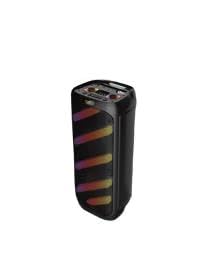
Figure 1: Ziro ZR-1030S Portable Bluetooth Speaker from the front, highlighting its black casing and colorful RGB lighting strips. The model number 'ZR-1030S' is visible on the top left.
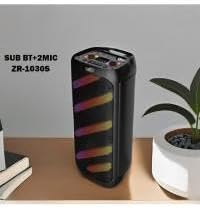
Figure 2: A side view of the Ziro ZR-1030S speaker, showing its compact design and the texture of the speaker grille. The RGB lighting is visible along the side.

Figure 3: The Ziro ZR-1030S speaker is shown in a living room setting, with a person and a child enjoying music. This illustrates the speaker's use in a typical home environment.
5. Setup
5.1 Charging the Speaker
- Connect the small end of the USB charging cable to the charging port on the speaker.
- Connect the larger end of the USB cable to a compatible USB power adapter (not included) or a computer's USB port.
- The charging indicator light will illuminate. Once fully charged, the light may change color or turn off.
- A full charge typically takes 3-4 hours.
5.2 Powering On/Off
- To power on, press and hold the Power button for a few seconds until the indicator lights turn on.
- To power off, press and hold the Power button again until the indicator lights turn off.
6. Operating Instructions
6.1 Bluetooth Pairing
- Ensure the speaker is powered on and in Bluetooth pairing mode (usually indicated by a flashing blue LED).
- On your mobile device, enable Bluetooth and search for available devices.
- Select "ZR-1030S" from the list of devices.
- Once paired, the speaker will emit a confirmation sound, and the LED indicator will stop flashing.
- The speaker will automatically reconnect to the last paired device when powered on, if within range.
6.2 USB Playback
- Insert a USB flash drive containing MP3 audio files into the USB port.
- The speaker will automatically switch to USB mode and begin playing music.
- Use the playback controls (Play/Pause, Next/Previous Track) on the speaker to manage your music.
6.3 MicroSD Card Playback
- Insert a MicroSD card containing MP3 audio files into the MicroSD card slot.
- The speaker will automatically switch to MicroSD mode and begin playing music.
- Use the playback controls (Play/Pause, Next/Previous Track) on the speaker to manage your music.
6.4 Microphone Usage
- Connect the included microphone to the microphone input port on the speaker.
- Adjust the microphone volume using the dedicated control knob (if available) or the main volume control.
- Speak into the microphone for karaoke or public address functions.
6.5 RGB Lighting Control
The speaker features integrated RGB lighting. Refer to the specific button on your speaker for lighting control. This button typically allows you to:
- Toggle the lighting on/off.
- Cycle through different lighting modes or colors.
7. Maintenance
- Cleaning: Use a soft, dry cloth to clean the exterior of the speaker. Do not use abrasive cleaners or solvents.
- Storage: Store the speaker in a cool, dry place away from direct sunlight and extreme temperatures when not in use for extended periods.
- Battery Care: To prolong battery life, avoid fully discharging the battery frequently. Charge the speaker regularly, even if not in use.
8. Troubleshooting
| Problem | Possible Solution |
|---|---|
| Speaker does not power on. | Ensure the battery is charged. Connect the speaker to a power source and try again. |
| Cannot pair via Bluetooth. | Ensure the speaker is in pairing mode. Disable and re-enable Bluetooth on your device. Move closer to the speaker. |
| No sound from speaker. | Check volume levels on both the speaker and your connected device. Ensure the correct input mode (Bluetooth, USB, MicroSD) is selected. |
| Microphone not working. | Ensure the microphone is securely connected. Check microphone volume settings. |
| RGB lights not working. | Press the dedicated RGB lighting button to cycle through modes or turn them on. |
9. Specifications
| Feature | Detail |
|---|---|
| Model Name | ZR-1030S |
| Brand | Ziro |
| Speaker Type | Subwoofer |
| Connectivity Technology | Bluetooth, USB, MicroSD |
| Audio Output Mode | Stereo |
| Max Speaker Output Power | 100 Watts |
| Materials | Plastic, Metal |
| Included Components | Speaker, Microphone, USB Cable |
| Item Weight | 50 grams |
| Product Dimensions (Approx.) | Refer to product packaging for exact dimensions. (Note: Provided dimensions in source data were inconsistent and likely incorrect for a portable speaker.) |
| Frequency Response | 199.97 GHz (Note: This value appears to be a typographical error in the source data. Typical speaker frequency responses are in the Hz to kHz range.) |
10. Warranty and Support
For warranty information and technical support, please refer to the documentation included with your purchase or contact your retailer. Keep your proof of purchase for any warranty claims.