
1. Product Overview
The HumsiENK 48V 100Ah LiFePO4 Lithium Battery is designed for reliable energy storage in various applications, including off-grid solar systems, home energy storage, and backup power. This 3U server rack battery features advanced active balancing, high-quality BYD cells, and a robust 100A Battery Management System (BMS) for optimal performance and safety.

Figure 1: HumsiENK 48V 100Ah LiFePO4 Battery with Bluetooth App Interface
Key Features:
- BYD LiFePO4 Cells: Utilizes premium BYD cells for enhanced performance and longevity.
- 100A BMS: Integrated Battery Management System provides comprehensive protection against overcharging, over-discharging, overload, and short circuits. Includes low-temperature cutoff and overheat protection.
- 3A Active Balancing: Features a 3A active balancing current for efficient cell equalization, reducing energy loss and extending battery life.
- High Capacity: Offers 5120Wh energy capacity and 5120W output power.
- Scalability: Supports up to 20 parallel connections (102.4kWh total) with automatic addressing and host-slave identification.
- Smart Monitoring: Mobile app for remote monitoring of battery status (voltage, current, capacity) via Bluetooth.
- Communication Protocols: Supports CAN, RS232, and RS485 for compatibility with various inverter chargers.
- Durable Design: Robust internal metal structure and fireproof, wear-resistant sheet metal casing for excellent heat dissipation.
- Space-Saving 3U Rack Design: Compact and lightweight for easy installation and vertical stacking.
2. Package Contents
Verify that all items are present in the package:
- 1 x HumsiENK 48V 100Ah LiFePO4 Battery
- 1 x Instruction Manual
- Parallel Cables
- Communication Cables
- Mounting Brackets (4X)
- Battery Terminal Covers
- Grounding Wire
- Fasteners and Screws
Video 1: Unboxing and initial inspection of the HumsiENK 48V 100Ah battery, showing included accessories and internal components.
3. Safety Information
Read all safety precautions before installation and operation. Failure to follow these instructions may result in electric shock, fire, or serious injury.
- Installation must be performed by qualified personnel.
- Check for any damage or missing parts before installation.
- Ensure the installation location is waterproof, moisture-proof, and provides adequate heat dissipation.
- Connect the battery correctly before powering on.
- Prohibit plugging and unplugging with electricity.
- Do not use the product for purposes not confirmed by HumsiENK.
- Always wear appropriate personal protective equipment (PPE) when handling batteries.
- Do not short-circuit the battery terminals.
- Keep away from children and pets.
4. Product Features in Detail
4.1 Active Balancing System
The battery incorporates a 3A active balancing system. This system continuously monitors the voltage of individual cells and redistributes energy to maintain cell voltage uniformity. This process prevents premature cell degradation, improves overall battery efficiency, and extends the lifespan of the battery by minimizing thermal impact.

Figure 2: Illustration of 3A Active Balancing for improved efficiency and lifespan.
4.2 Internal Construction and Cells
The HumsiENK battery utilizes high-quality BYD LiFePO4 cells, known for their reliability and long cycle life (15,000+ deep cycles at 60% DOD). The internal structure is designed for durability, featuring robust metal components and effective heat dissipation. The cells are securely housed within a fireproof and wear-resistant sheet metal casing.

Figure 3: Internal view of the battery showing EV Grade A+ BYD cells and anti-swelling design.
Video 2: Detailed overview of the HumsiENK 48V 100Ah battery, highlighting BYD cells and active balancing features.
4.3 Front Panel Interface
The front panel provides all necessary connections and controls for the battery:
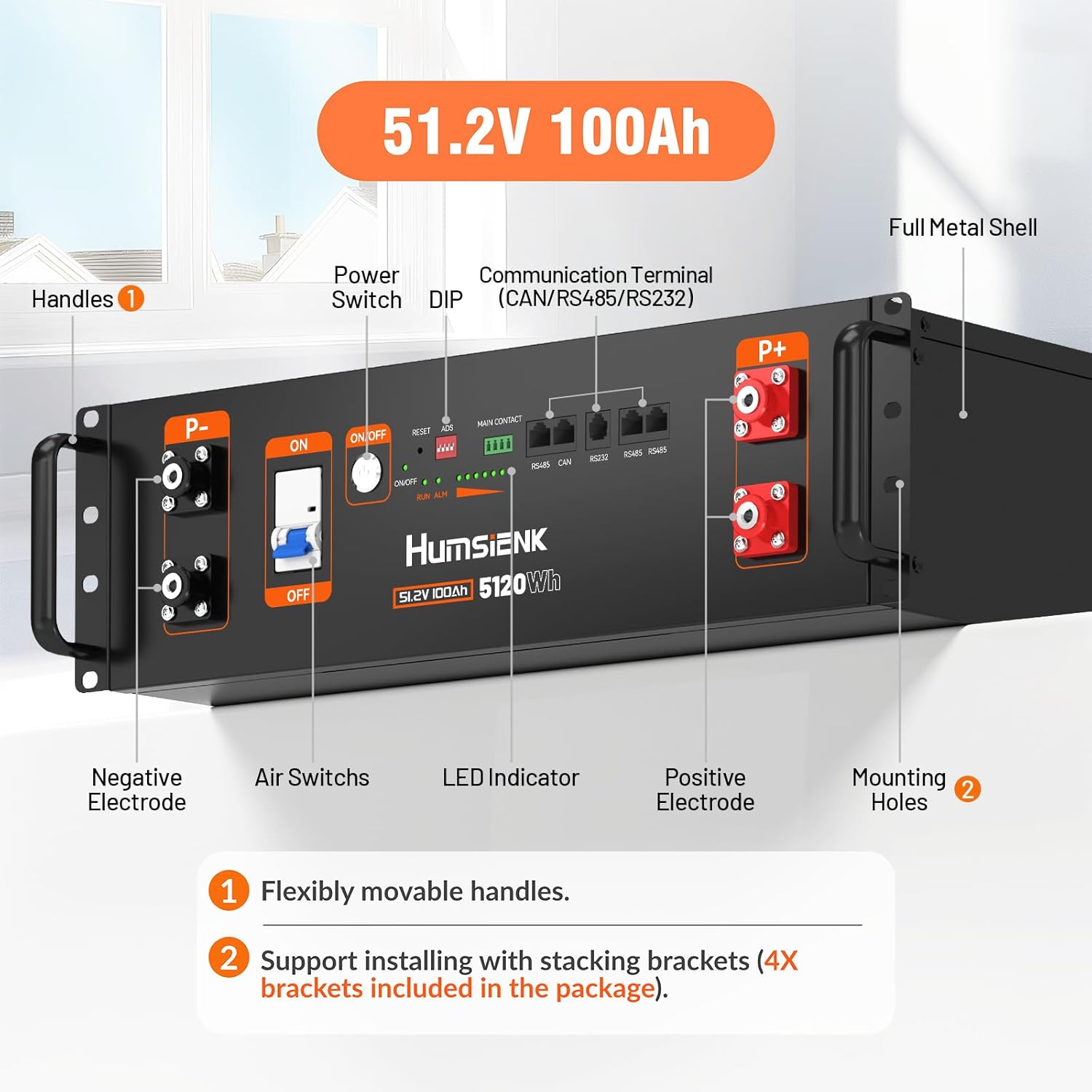
Figure 4: Front panel layout with labeled components including power switch, air switches, LED indicators, and communication terminals.
- Negative Electrode (P-): Main negative terminals for power connection.
- Positive Electrode (P+): Main positive terminals for power connection.
- Power Switch (ON/OFF): Main power control for the battery.
- Air Switches: Provides dual safety guarantees for power forced off/on and auto-shut off during overload.
- LED Indicator: Displays battery status and State of Charge (SOC).
- Communication Terminals: Includes RS485, CAN, and RS232 ports for external communication with inverters and other devices.
- Reset Button: For resetting the battery management system.
- ADS (DIP Switches): Used for automatic addressing in parallel configurations.
- Main Contact: Additional communication port.
5. Setup
Follow these steps for initial setup and installation of your HumsiENK battery:
- Unpacking: Carefully remove the battery and all accessories from the packaging. Inspect for any visible damage.
- Mounting Handles: Attach the provided handles to the front panel using the supplied screws. These handles facilitate easier movement and installation into a server rack.
- Rack Installation: If installing in a server rack, use the included mounting brackets to secure the battery. Ensure adequate ventilation around the battery.
- Grounding: Connect the grounding wire from the battery to a reliable ground point in your system.
- Power Connections: Connect the positive (P+) and negative (P-) terminals of the battery to your inverter or charge controller using appropriate cables. Ensure connections are tight and secure. Use the provided terminal covers for safety.
- Communication Connections: If connecting multiple batteries in parallel or integrating with an inverter, use the provided communication cables (RS485, CAN, RS232) to establish communication. Refer to the inverter's manual for specific connection requirements.
- Initial Power-Up: Flip the DC breaker (Air Switch) to the 'ON' position. Then, press the 'ON/OFF' button on the front panel to power on the battery. The LED indicators will illuminate, showing the battery's status.
Video 3: Detailed setup and internal component review of the HumsiENK 48V Server Rack Battery, including active balancing.
6. Operating Instructions
6.1 Powering On/Off
- To Power On: Ensure the DC breaker is in the 'ON' position. Press and hold the 'ON/OFF' button for a few seconds until the LED indicators light up.
- To Power Off: Press and hold the 'ON/OFF' button for a few seconds until the LED indicators turn off. For complete shutdown, also switch the DC breaker to 'OFF'.
6.2 Bluetooth App Monitoring
The HumsiENK battery can be monitored remotely using a mobile application via Bluetooth 5.0. This app allows you to view real-time battery status and adjust certain parameters.

Figure 5: Smart Bluetooth 5.0 app for real-time monitoring of battery state.
- Download App: Search for the 'HumsiENK' app in your device's app store and install it.
- Connect: Enable Bluetooth on your mobile device. Open the app and search for available batteries. Select your battery (identified by its serial number) and tap 'Connect'.
- Monitor Status: The app displays key information such as total voltage, current, remaining capacity (SOC), individual cell voltages, and temperature.
- Adjust Parameters: Access the 'Parameters' section to view and potentially modify settings like over-voltage protection, low-temperature protection, and charging/discharging current limits. Exercise caution when changing parameters.
6.3 Parallel Operation
For increased capacity, multiple HumsiENK batteries can be connected in parallel. The battery supports automatic addressing and host-slave identification for up to 20 parallel units.
- Connect the positive terminals of all batteries together and the negative terminals of all batteries together.
- Use the provided communication cables to link the batteries. The ADS (DIP switches) on the front panel will automatically configure the master and slave units.
- Ensure all connections are secure and properly insulated.
7. Maintenance
Proper maintenance ensures the longevity and optimal performance of your HumsiENK battery.
- Regular Inspection: Periodically inspect the battery for any physical damage, loose connections, or signs of corrosion.
- Cleaning: Keep the battery and its terminals clean and free of dust and debris. Use a dry, soft cloth for cleaning. Do not use solvents or abrasive cleaners.
- Temperature Management: Ensure the battery operates within its specified temperature range. Avoid exposing the battery to extreme heat or cold. The BMS includes low-temp cutoff and overheat protection.
- Storage: If storing the battery for an extended period, ensure it is charged to approximately 50-70% State of Charge and stored in a cool, dry place away from direct sunlight.
- Firmware Updates: Check the HumsiENK website or app for any available firmware updates to ensure optimal performance and compatibility.
8. Troubleshooting
If you encounter issues with your HumsiENK battery, refer to the following common problems and solutions:
- Battery Not Powering On:
- Check if the DC breaker is in the 'ON' position.
- Ensure the 'ON/OFF' button is pressed and held for the required duration.
- Verify all power connections are secure.
- No Output Power:
- Check if the battery is powered on and has sufficient charge.
- Inspect the DC breaker; it may have tripped due to an overload. Reset if necessary.
- Ensure all external connections to the inverter/load are secure.
- Bluetooth App Connection Issues:
- Ensure Bluetooth is enabled on your mobile device.
- Make sure the battery is powered on and within Bluetooth range.
- Restart the app or your mobile device.
- LED Indicators Showing Error/Alarm:
- Refer to the app's 'Warning' section for detailed error codes and descriptions.
- Common alarms include over-voltage, under-voltage, over-current, and temperature warnings. Address the underlying cause as indicated by the app.
If the issue persists, contact HumsiENK customer support for assistance.
9. Specifications
| Attribute | Value |
|---|---|
| Brand | HumsiENK |
| Model Name | 48V 100Ah Rack Battery |
| Item Model Number | HS48V100AH100RACK-3UBT |
| Battery Capacity | 100 Amp Hours |
| Voltage | 48 Volts (51.2V Nominal) |
| Energy | 5120Wh |
| BMS Current | 100A |
| Active Balancing | 3A |
| Cycles | 15,000+ Deep Cycles (@60% DOD) |
| Parallel Connection | Max 20 units (102.4kWh) |
| Communication Protocols | CAN/RS232/RS485 |
| Dimensions (Without Handle) | 17.32" x 19.69" x 5.24" |
| Item Weight | 96.45 lbs |
| Certifications | SDS, UN38.3, FCC, CE, RoHS |

Figure 6: Physical dimensions and weight of the HumsiENK 48V 100Ah battery.
10. Warranty and Support
The HumsiENK 48V 100Ah LiFePO4 Lithium Battery is backed by a 10-year limited warranty. This warranty covers defects in materials and workmanship under normal use and service conditions.
For technical support, warranty claims, or any questions regarding your product, please contact HumsiENK customer support. Dedicated 24/7 customer support is available to assist you.
Please retain your proof of purchase for warranty validation.