
Product Overview
The HUAYU KL PN-V1 remote control is designed for LCD-LED televisions, offering convenient access to various TV functions, including dedicated buttons for Netflix and integrated voice command capabilities. This manual provides instructions for setup, operation, maintenance, and troubleshooting.
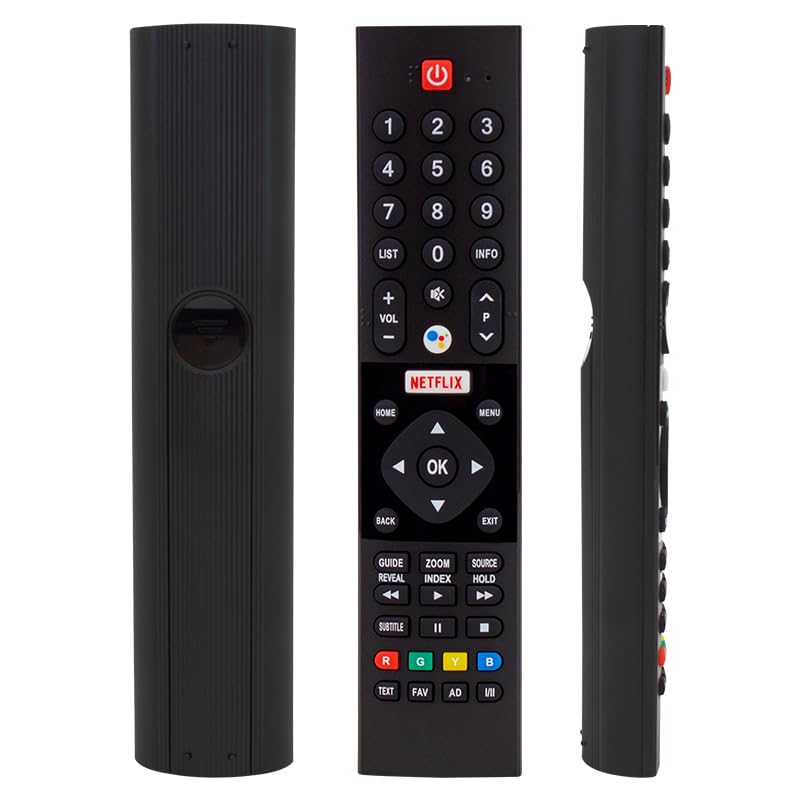
This image displays three views of the HUAYU KL PN-V1 remote control. From left to right: the back of the remote, showing its textured surface and battery compartment cover; the front of the remote, detailing all buttons including the power, number pad, volume, channel, navigation, Netflix, and colored function buttons; and a side profile view, highlighting its ergonomic shape.
Setup
1. Battery Installation
- Locate the battery compartment cover on the back of the remote control.
- Slide the cover downwards or press the latch and lift to open the compartment.
- Insert two AAA batteries (not included), ensuring the positive (+) and negative (-) terminals align correctly with the markings inside the compartment.
- Replace the battery compartment cover by sliding it back into place until it clicks securely.
2. Initial Pairing (for Voice Command)
For voice command functionality, the remote control may require pairing with your television. Refer to your TV's instruction manual for specific pairing procedures. Typically, this involves:
- Navigating to the TV's settings menu (e.g., 'Settings' > 'Remotes & Accessories' or 'Bluetooth Settings').
- Selecting 'Add Device' or 'Pair Remote Control'.
- Following the on-screen prompts, which may involve pressing specific buttons on the remote (e.g., 'Home' and 'Back' simultaneously) to initiate pairing mode.
Operating Instructions
This section details the functions of the buttons on your remote control.
- Power Button (⏻): Turns the TV on or off.
- Number Pad (0-9): Directly selects TV channels or inputs numerical data.
- LIST / INFO: Accesses channel lists or displays program information.
- Volume Control (VOL +/-): Increases or decreases the audio volume.
- Mute Button (🔇): Mutes or unmutes the TV audio.
- Channel Control (P ^ / P v): Changes to the next or previous channel.
- Voice Command Button (⊚): Activates the voice assistant for commands (e.g., search, open apps). Press and hold while speaking.
- Netflix Button: Directly launches the Netflix application.
- Navigation Pad (Up, Down, Left, Right, OK): Navigates through menus and confirms selections.
- HOME: Returns to the TV's main home screen.
- MENU: Opens the TV's main menu or settings.
- BACK: Returns to the previous screen or menu.
- EXIT: Closes the current menu or application.
- GUIDE / REVEAL: Accesses the electronic program guide or reveals hidden information.
- ZOOM / INDEX: Zooms in/out or accesses an index function.
- SOURCE / HOLD: Selects input sources or holds a function.
- Media Control Buttons (Rewind, Play/Pause, Fast Forward, Stop): Controls media playback.
- SUBTITLE: Toggles subtitles on or off.
- Colored Buttons (R, G, Y, B): Performs specific functions depending on the TV or application (e.g., red for teletext, green for interactive services).
- TEXT / FAV / AD / I/II: Accesses teletext, favorite channels, audio description, or dual audio functions.
Maintenance
Cleaning the Remote Control
- Wipe the remote control with a soft, dry cloth.
- For stubborn dirt, slightly dampen the cloth with water or a mild, non-abrasive cleaner. Do not spray cleaner directly onto the remote.
- Avoid using harsh chemicals, solvents, or abrasive cleaning pads, as these can damage the remote's surface or buttons.
Battery Replacement
- Replace batteries when the remote's response becomes sluggish or stops working.
- Always replace all batteries at the same time with new ones of the same type (AAA).
- Do not mix old and new batteries, or different types of batteries.
- Remove batteries if the remote control will not be used for an extended period to prevent leakage.
Troubleshooting
- Remote not responding:
- Check if the batteries are inserted correctly with the correct polarity.
- Replace old batteries with new ones.
- Ensure there are no obstructions between the remote control and the TV's infrared receiver.
- Point the remote directly at the TV.
- Voice command not working:
- Ensure the remote control is properly paired with your TV (refer to the 'Initial Pairing' section).
- Check your TV's internet connection, as voice commands often require online processing.
- Speak clearly and hold the voice command button while speaking.
- Buttons are sticky or unresponsive:
- Clean the remote control as described in the 'Maintenance' section.
- Avoid spilling liquids on the remote.
Specifications
| Brand | Genel |
| Manufacturer | Diğer (Other) |
| Model | PN-V1 (51229750140GTH) |
| Quantity | 1 |
| Batteries Included | No |
| Batteries Required | Yes (2x AAA, not included) |
| Product Model Number | 51229750140GTH |
| ASIN | B0FDQRDZRR |
| First Available Date | June 18, 2025 |
Warranty and Support
Specific warranty information for this product is not provided in the available data. For warranty details, technical support, or further assistance, please refer to the documentation provided with your purchase or contact the seller directly.