1. Introduction
This manual provides instructions for the XHGTJK RH-18A replacement remote control. This remote is designed to operate various Mitsubishi MSZ-HR series air conditioner models, including MSZ-HR50VF, MSZ-HR42VF, MSZ-HR25VF, and MSZ-HR35VF. It offers primary functions for convenient control of your air conditioning unit.
2. Safety Information
- Do not mix old and new batteries.
- Do not mix alkaline, standard (carbon-zinc), or rechargeable (nickel-cadmium) batteries.
- Always remove exhausted batteries promptly to prevent leakage.
- Dispose of batteries according to local regulations.
- Keep the remote control away from direct sunlight, heat sources, and moisture.
3. Package Contents
- 1 x XHGTJK RH-18A Replacement Remote Control
Note: Batteries (2 x AAA) and a detailed user manual are not included in the package.
4. Setup
4.1 Battery Installation
- Open the battery compartment cover on the back of the remote control.
- Insert two (2) new AAA 1.5V alkaline batteries, ensuring the correct polarity (+ and -) as indicated inside the compartment.
- Close the battery compartment cover securely.
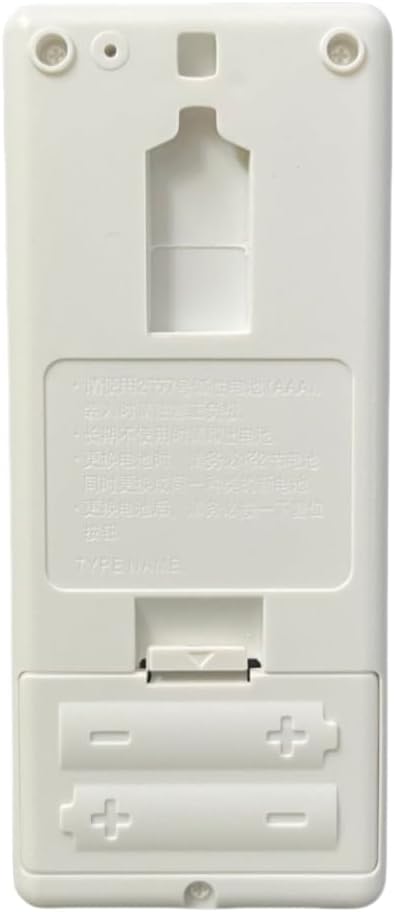
Figure 1: Back of the remote control showing the battery compartment.
4.2 Initial Use
No programming or pairing is required for this replacement remote control. Once batteries are correctly installed, the remote is ready for immediate use with compatible Mitsubishi MSZ-HR series air conditioners.
5. Operating Instructions
5.1 Remote Control Layout
Familiarize yourself with the buttons on the remote control:

Figure 2: Front view of the RH-18A remote control.
- OFF/ON: Powers the air conditioner on or off.
- TOO WARM / TOO COOL: Adjusts the temperature setting up or down.
- MODE: Cycles through operating modes (COOL, DRY, FAN, HEAT).
- FAN: Adjusts the fan speed.
- VANE: Controls the air swing direction.
- ECONO COOL: Activates or deactivates the Econo Cool function for energy saving.
- TIME (SELECT / ▼ / ▲): Used for setting timer functions.
- RESET: Resets the remote control settings.
5.2 Basic Functions
- Power On/Off: Press the OFF/ON button to turn the air conditioner on or off.
- Adjusting Temperature: Use the TOO WARM (up arrow) or TOO COOL (down arrow) buttons to set your desired temperature.
- Selecting Mode: Press the MODE button repeatedly to cycle through available operating modes: Cool, Dry, Fan, and Heat.
- Fan Speed: Press the FAN button to adjust the fan speed.
- Vane Control: Use the VANE button to control the direction of the airflow.
6. Troubleshooting
| Problem | Possible Cause | Solution |
|---|---|---|
| Remote control not working. | Dead or incorrectly inserted batteries. | Replace with new AAA alkaline batteries, ensuring correct polarity. Do not use rechargeable batteries. |
| Remote control has limited range or intermittent response. | Obstruction between remote and AC unit; weak batteries. | Ensure a clear line of sight to the air conditioner's receiver. Replace batteries if they are weak. |
| Certain functions do not work. | This is a replacement remote; some advanced functions may not be supported. | The remote is designed for main functions. Verify your air conditioner model is listed as compatible. |
7. Specifications
- Model: RH-18A
- Brand: XHGTJK
- Compatible Devices: Mitsubishi MSZ-HR50VF, MSZ-HR42VF, MSZ-HR25VF, MSZ-HR35VF Air Conditioners
- Power Source: 2 x AAA 1.5V Batteries (not included)
- Special Feature: No Programming Required
- Product Dimensions: 4.96 x 1.13 x 11.41 inches
- Item Weight: 3.59 ounces
8. Warranty and Support
This product comes with a 30-day quality warranty. If you encounter any issues or have questions regarding the remote control, please contact the seller for assistance. Ensure to provide your purchase details for efficient support.