
Introduction
The Dakexiong DS-869 is a scientific calculator designed for students and professionals, featuring 240 advanced functions and an integrated notepad. This dual-function engineering calculator allows for simultaneous calculation and note-taking, enhancing efficiency in various academic and office environments.
Key Features:
- Dual LCD Screen: Displays the entered formula on the upper screen and calculation results instantly on the lower screen, ensuring quick verification and accuracy.
- Practical Information Management: The scientific calculator with notepad function includes a dedicated erase button, allowing you to clear the entire touch panel content with a single press.
- Multi-function Touch Panel: The integrated touch panel serves as a convenient space for jotting down important information, ideal for quick notes, formula drafts, or memos.
- 240 Calculation Functions: Offers 240 advanced calculation functions, covering a wide range of mathematical needs from basic arithmetic to complex scientific and statistical operations.
- Thoughtful Design: Includes a stylus pen that can be stored inside the calculator's cover, ensuring it is always at hand.
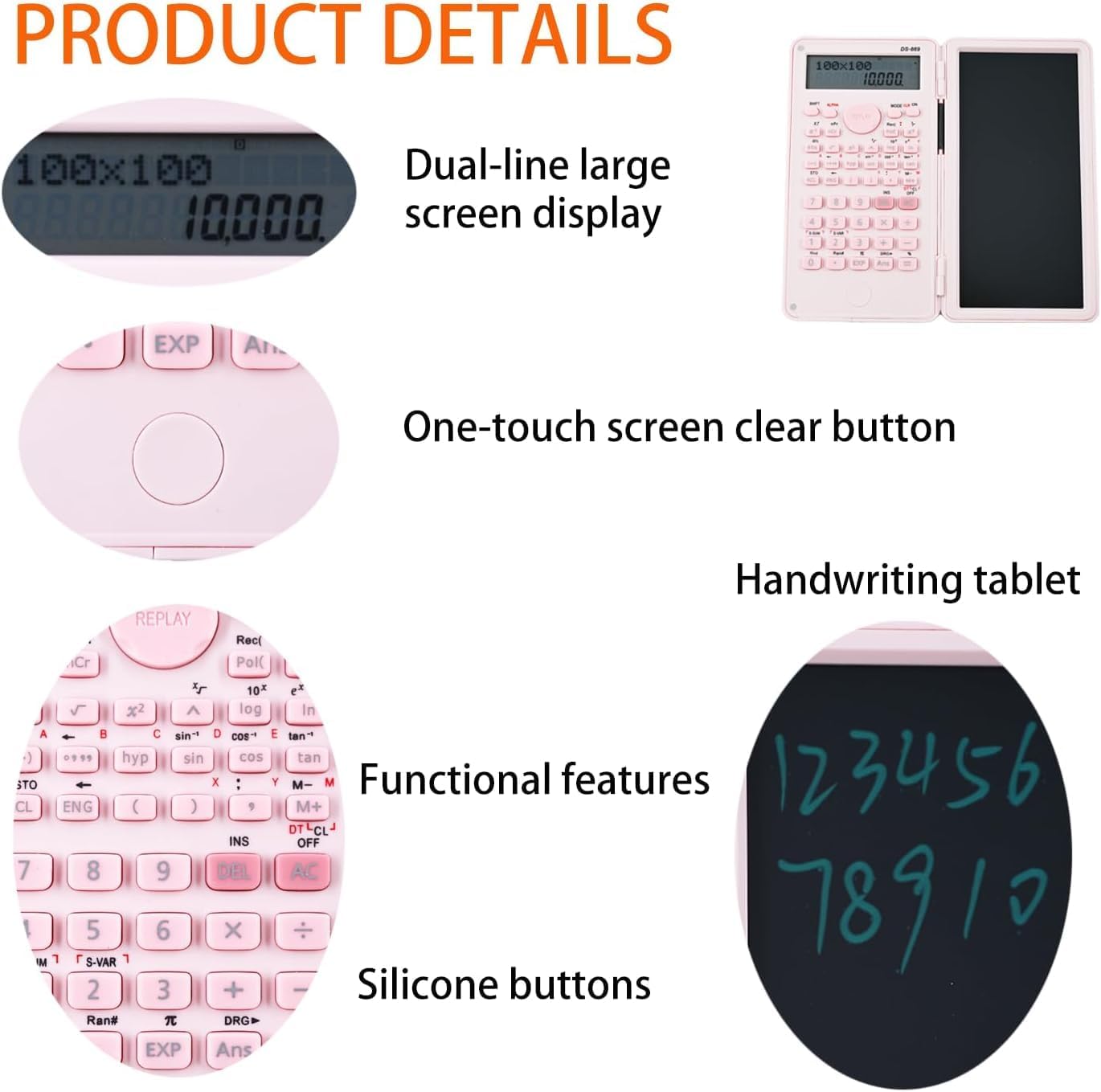
Figure 1: Overview of the DS-869 Scientific Calculator's features, including its dual-line display, one-touch clear button, handwriting tablet, functional keys, and silicone buttons.
Setup
- Battery Installation: The calculator uses a CR2025 battery. Locate the battery compartment on the back of the calculator. Use a small screwdriver to open the compartment, insert the CR2025 battery with the positive (+) side facing up, and then close the compartment securely.
- Stylus Pen Retrieval: The electronic stylus pen is stored within the calculator's cover. Gently slide it out from its designated slot.
- Power On: Press the ON button to power on the calculator. The display should light up.

Figure 2: The electronic stylus pen, conveniently stored on the side of the calculator for easy access.
Operating Instructions
Basic Calculations:
- Enter numbers using the numeric keypad.
- Use the +, -, x, ÷ keys for addition, subtraction, multiplication, and division.
- Press = to display the result.
Using Scientific Functions:
The DS-869 offers 240 functions. Many advanced functions are accessed by pressing the SHIFT key followed by the desired function key (indicated by secondary labels above the keys).
- For trigonometric functions (sin, cos, tan), press the respective key. For inverse functions (sin-1, cos-1, tan-1), press SHIFT then the function key.
- For powers and roots, use the x², √, xʸ keys.
- Refer to the calculator's key labels for specific function locations.
Using the Notepad:
- Open the calculator to reveal the writing tablet on the right side.
- Use the electronic stylus pen to write notes, draw diagrams, or draft formulas directly on the tablet.
- To clear the notepad, press the dedicated Erase button located above the notepad.

Figure 3: The dual-functionality of the calculator, combining calculation and writing for simultaneous use.
Demonstration Video:
Video 1: A demonstration of the calculator's ease of use and practical features, including basic calculations and notepad functionality. This video shows a black version of the calculator.
Maintenance
- Cleaning: Use a soft, dry cloth to clean the calculator's surface and screen. Avoid using abrasive cleaners or solvents, as they may damage the device.
- Battery Replacement: When the display becomes dim or the calculator functions erratically, it may be time to replace the CR2025 battery. Follow the battery installation steps in the Setup section.
- Storage: Store the calculator in a cool, dry place away from direct sunlight and extreme temperatures. Ensure the stylus pen is securely stored in its slot to prevent loss.
Troubleshooting
| Problem | Solution |
|---|---|
| Calculator does not power on. | Check if the battery is correctly installed and has sufficient charge. Replace the CR2025 battery if necessary. |
| Display is dim or unreadable. | Replace the battery. Ensure the calculator is not exposed to extreme temperatures. |
| Notepad does not clear. | Press the dedicated Erase button firmly. Ensure the stylus pen is not pressing on the screen when attempting to clear. |
| Incorrect calculation results. | Verify the input sequence and function usage. Ensure the correct mode (e.g., DEG/RAD) is selected if applicable. Refer to the operating instructions for specific function details. |
Specifications
| Feature | Detail |
|---|---|
| Model Number | DS-869 |
| Dimensions | 19.3 x 13.7 x 2.1 cm |
| Weight | 160 g (Product weight: 130g) |
| Display Type | LCD, 10+2 Digit Display |
| Number of Functions | 240 |
| Calculator Type | Engineering/Scientific |
| Power Source | CR2025 Battery |
| Materials | ABS |
| Country of Origin | China |

Figure 4: Detailed product parameters including dimensions, weight, and battery type.
Warranty and Support
Warranty: No specific warranty information is provided with this product. Please refer to your purchase receipt or contact the retailer for details regarding their return or warranty policies.
Support: For technical assistance or further inquiries, please contact the retailer or the manufacturer, Dakexiong, through their official channels.