
1. Introduction
This manual provides essential information for the safe and effective use of your KEYAYEYA WK-01BR2A Power Controller. This device is designed to be compatible with various Sang-A power controller models, ensuring reliable performance in industrial applications. Please read this manual thoroughly before installation and operation.
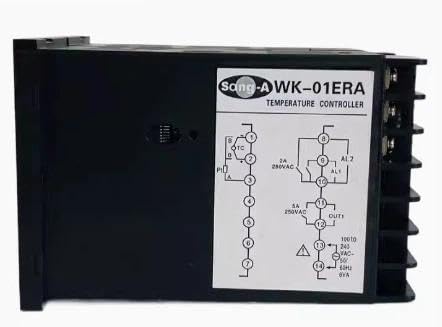
Figure 1: Main unit of the KEYAYEYA WK-01BR2A Power Controller. This image displays the compact design and primary connection points of the device.
2. Setup and Installation
Proper installation is crucial for the safe and optimal performance of the power controller. If you are unsure about any step, consult a qualified technician.
- Safety First: Ensure all power sources are disconnected before beginning installation. Verify that the installation environment is dry and free from excessive dust or corrosive gases.
- Mounting: Securely mount the power controller in a suitable enclosure or panel using appropriate fasteners. Ensure adequate ventilation around the unit to prevent overheating.
- Wiring Connections:
- Connect the input power supply to the designated terminals. Observe correct polarity for DC systems or phase for AC systems.
- Connect the motor or load to the output terminals. Ensure the load's voltage and current ratings are within the controller's specifications.
- Connect any control signals (e.g., speed reference, start/stop) to the respective control terminals as per your system design.
- Ensure all connections are tight and secure to prevent loose contacts, which can cause arcing or malfunction.
- Initial Power-Up: After all connections are made and verified, restore power to the system. Observe the controller for any unusual behavior or error indicators.
3. Operating Instructions
The WK-01BR2A power controller is designed for straightforward operation. Specific operating procedures will depend on the application and the external control system.
- Power On/Off: The unit powers on automatically when the main power supply is connected. To power off, disconnect the main power supply.
- Speed/Output Control: Adjust the desired output (e.g., motor speed, power level) using the external control signal connected to the controller's input. This could be a potentiometer, a 0-10V analog signal, or a PWM signal, depending on the specific model and application.
- Monitoring: Observe any indicator lights or external monitoring devices connected to the controller for operational status.
4. Maintenance
Regular maintenance helps ensure the longevity and reliable operation of your power controller.
- Cleaning: Periodically clean the exterior of the unit with a soft, dry cloth. Do not use liquid cleaners or solvents. Ensure ventilation openings are free from dust and debris.
- Connection Checks: Annually, or as needed, inspect all wiring connections for tightness and signs of corrosion or damage. Re-tighten any loose connections.
- Environmental Conditions: Ensure the operating environment remains within the specified temperature and humidity ranges. Avoid exposure to direct sunlight, excessive vibration, or strong electromagnetic fields.
5. Troubleshooting
If you encounter issues with your power controller, refer to the following common troubleshooting steps. For complex problems, contact technical support.
- No Power:
- Check the main power supply and circuit breaker.
- Verify all power connections to the controller are secure.
- No Output/Incorrect Output:
- Ensure the load (motor) is properly connected and not faulty.
- Verify the control signal input is correct and within the specified range.
- Check for any error indicators on the controller or associated equipment.
- Overheating:
- Ensure adequate ventilation around the unit.
- Verify the load is not exceeding the controller's maximum current rating.
- Unusual Noises or Smells:
- Immediately disconnect power.
- Do not attempt to operate the unit. Contact technical support.
6. Specifications
The following specifications apply to the KEYAYEYA WK-01BR2A Power Controller:
| Feature | Specification |
|---|---|
| Model Number | WK-01BR2A |
| Package Dimensions | 1 x 1 x 1 inches |
| Item Weight | 4.4 pounds |
| Manufacturer | original manufacturer |
| ASIN | B0FDQKVTQV |
| Batteries Required | No |
| Included Components | NEW |
7. Warranty Information
Warranty terms and conditions for the KEYAYEYA WK-01BR2A Power Controller are provided by the seller at the time of purchase. Please retain your proof of purchase for any warranty claims. For detailed warranty information, contact the merchant directly.
8. Technical Support
If you require technical guidance or have questions regarding the operation, installation, or troubleshooting of your KEYAYEYA WK-01BR2A Power Controller, please contact the merchant from whom you purchased the product. They can provide specific assistance and support.
Note: No official product videos from the seller were found to be relevant for embedding in this manual.