
1. Introduction
Thank you for choosing the Satisure Power Failure Alarm WiFi. This device is designed to provide timely notifications and alerts in the event of a power outage, helping you protect your home and property. It features smart app notifications, a loud audible alarm, and voltage detection capabilities. Please read this manual thoroughly before use to ensure proper installation and operation.
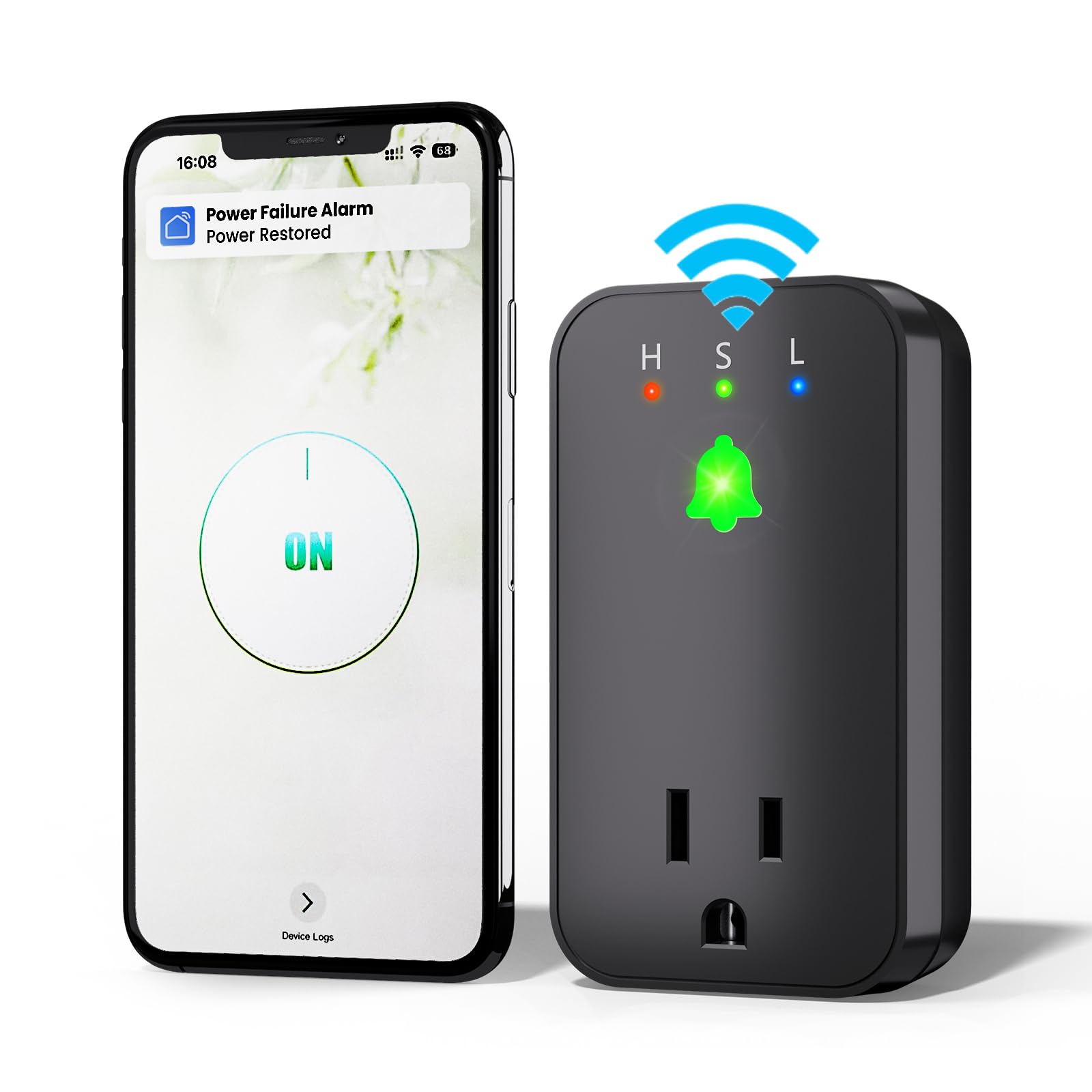
Figure 1: Satisure Power Failure Alarm WiFi
2. Product Overview
The Satisure Power Failure Alarm WiFi is a compact and intelligent device that plugs directly into a standard electrical outlet. It continuously monitors the power supply and alerts you via a loud 110dB alarm and app notifications if power is lost or restored. The device also includes an extended socket for other appliances and features LED indicators for voltage status and Wi-Fi connectivity.

Figure 2: Device Overview with Buttons and Indicators
Key Components:
- Alarm/Wi-Fi Indicator: Displays device status (Red flashing: Power OFF; Green always on: Power ON; Green flashing: Wi-Fi Setup).
- Voltage Indicator Light: Shows High (H), Standard (S), or Low (L) voltage.
- Cancel Alarm Button (Up Arrow): Short press to quickly silence the alarm.
- Setup Button (Middle Circle): Long press for 3 seconds to enter Wi-Fi setup mode (Power ON) or turn off the device (Power OFF).
- Volume Button (Down Arrow): Short press to adjust alarm volume (100dB, 105dB, 110dB).
- Extended Socket: Allows connection of another appliance.
3. Features
- Smart Wi-Fi Power Outage Alarm: Monitors power for appliances like refrigerators, freezers, furnaces, aquariums, and sump pumps.
- App Notifications: Connects to "Smart Life" or "Tuya" app via 2.4GHz Wi-Fi for timely alerts.
- Mini Size & Extended Socket: Compact design that does not block other outlets, with an additional socket for convenience.
- Loud 110dB Alarm with 3 Volume Levels: Adjustable alarm volume for enhanced home security.
- 12-Hour Alert & Easy Cancellation: Alarm can remain active for up to 12 hours on built-in battery. Automatically cancels when power is restored or can be manually canceled.
- Voltage Detection: Monitors and indicates high, standard, or low voltage levels.
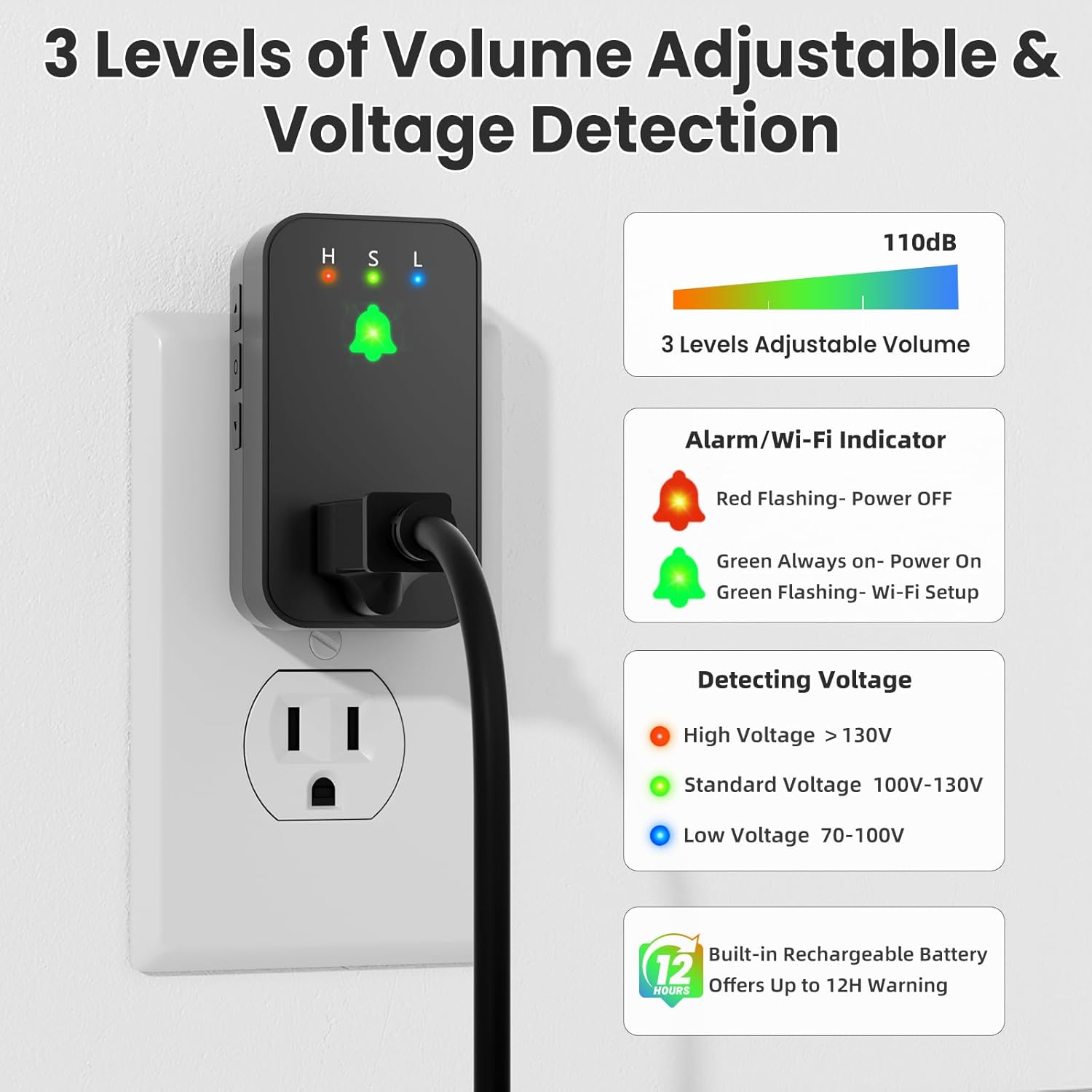
Figure 3: Volume and Voltage Detection Features
4. What's in the Box
Upon unpacking your Satisure Power Failure Alarm WiFi, please ensure all items are present:
- 1x Satisure Power Failure Alarm WiFi device
- 1x User Manual
5. Setup
5.1. App Download and Installation
To utilize the smart features of your Satisure Power Failure Alarm, you need to download the "Smart Life" or "Tuya" app on your smartphone. These apps are available on both iOS and Android app stores.
Video 1: How to Download the Correct "Tuya"/ "SmartLife" App
This video demonstrates the process of finding and downloading the correct "Smart Life" or "Tuya" application from your phone's app store.
5.2. Device Connection to Wi-Fi
- Plug the Satisure Power Failure Alarm into a standard electrical socket.
- Ensure your smartphone is connected to a 2.4GHz Wi-Fi network. The device only supports 2.4GHz Wi-Fi.
- Open the "Smart Life" or "Tuya" app.
- Long press the middle Setup Button on the device for 3 seconds until you hear a "ding" sound and the LED indicator flashes rapidly. This indicates the device is in Wi-Fi setup mode.
- In the app, click "Add Device" and follow the on-screen instructions to search for and connect your device to your 2.4GHz Wi-Fi network.
Video 2: How to Add "WiFi Power Failure Alarm" to "Smart Life" APP
This video guides you through the steps to add your Satisure Power Failure Alarm to the "Smart Life" application after plugging it in and activating pairing mode.

Figure 4: App Setup Steps
6. Operating Instructions
6.1. Power Monitoring and Alerts
Once successfully connected, the device will continuously monitor the power supply. In case of a power outage, the device will:
- Emit a loud audible alarm (up to 110dB).
- Flash its LED indicator red.
- Send a push notification to your connected "Smart Life" or "Tuya" app.

Figure 5: App Notification for Power Outage
6.2. Adjusting Alarm Volume
You can adjust the alarm volume to one of three levels (100dB, 105dB, 110dB) by short pressing the Down Volume Button on the side of the device.
Video 3: 3 Levels of Volume to Adjust
This video demonstrates how to cycle through the three available volume levels for the audible alarm using the device's volume button.
6.3. Cancelling the Alarm
The alarm will automatically cancel when power is restored. Alternatively, you can manually cancel the alarm by short pressing the Up Cancel Button on the device.
Video 4: Cancel the Alarm Quickly
This video shows how to quickly cancel the audible alarm by pressing the designated button on the device.

Figure 6: Cancelling the Alarm
6.4. Voltage Detection
The device features LED indicators for voltage detection:
- H (High): Voltage > 130V
- S (Standard): Voltage 100V-130V
- L (Low): Voltage 70-100V
7. Maintenance
The Satisure Power Failure Alarm features a built-in rechargeable battery that provides up to 12 hours of warning during a power outage. No user maintenance is required for the battery. Keep the device clean by wiping it with a dry cloth. Avoid exposing it to water or extreme temperatures.
8. Troubleshooting
8.1. Device Not Found in App
If the app cannot find the device during setup:
- Ensure your phone is connected to a 2.4GHz Wi-Fi network.
- Make sure the device is plugged in and the LED is flashing rapidly (in Wi-Fi setup mode).
- If the device was previously paired, you may need to reset it. Under power outage conditions, cancel the alarm first, then long press the middle Setup Button for 3 seconds to turn off the device. Finally, restore power to turn it on and re-enter Wi-Fi pairing mode.
Video 5: Resetting the Device for App Pairing
This video demonstrates how to reset the device and re-enter Wi-Fi pairing mode if it cannot be found by the app.
8.2. No App Notifications
- Check your phone's notification settings for the "Smart Life" or "Tuya" app to ensure notifications are enabled.
- Verify that the device is still connected to your Wi-Fi network (green LED should be solid).
- Ensure your phone has an active internet connection.
- Note: The device only supports free app notifications. Additional Text/SMS and email settings in the app may require a subscription fee.
9. Specifications
| Brand | Satisure |
| Product Dimensions | 1.5"L x 1.5"W x 3.2"H |
| Battery Description | Alkaline (Built-in) |
| Number of Batteries | 1 9V battery required (included) |
| Noise Level | 110 Decibels (Adjustable) |
| Operating Temperature | 32°F - 104°F (0°C - 40°C) |
| Operating Humidity | 10% - 90% RH |
| Voltage Range | 100-130 Volts AC |
| Max Current | 15A max |
10. Warranty and Support
The package includes 1X power failure alarm and a user manual. We are online 7 days a week, 24 hours a day. If you have any product queries, please get in touch with us for prompt assistance or a replacement if needed. Refer to your purchase documentation for specific warranty details.