
1. Introduction
Thank you for choosing the Siwi L35-3 Wireless Bluetooth Earphones. These earphones are designed to provide a high-quality audio experience with convenience and comfort. This manual will guide you through the setup, operation, and maintenance of your new earphones.
Key features include:
- Noise Reduction Design: Effectively reduces external noise for clearer audio.
- Comfortable Fit: Skin-friendly materials and ergonomic design ensure a secure and comfortable fit, ideal for active use.
- HD Call Quality: Built-in noise-cancelling microphones provide clear communication during calls.
- Efficient Power Consumption: Utilizes Bluetooth 5.3 for faster pairing, stable connection, and optimized battery life.
- Smart Pairing: Automatically connects to the last paired device upon power-on.
- Detailed Sound: 12.2mm neodymium drivers deliver clear mid-range frequencies and powerful bass.
- Long Playtime: Offers an impressive 60 hours of music playback.
- Sweat and Splash Proof: Designed for durability during sports and outdoor activities.
- Hands-Free Calling: Integrated controls for managing calls and music playback.

Image 1.1: Overview of Siwi L35-3 Earphones highlighting Bluetooth 5.0, magnetic absorption, high definition stereo, light and comfortable design, built-in mic, and super long standby.
2. Product Overview
The Siwi L35-3 earphones feature a neckband design with in-ear buds, providing a secure and comfortable fit for extended wear. The control module is integrated into the neckband for easy access.

Image 2.1: Front view of the Siwi L35-3 Wireless Bluetooth Earphones, showing the neckband and in-ear buds.

Image 2.2: Angled view of the Siwi L35-3 Wireless Bluetooth Earphones, showcasing the ergonomic neckband design.

Image 2.3: Exploded view illustrating the 10mm Bass Boost Drivers for enhanced audio performance.
3. Setup
3.1 Charging the Earphones
Before first use, fully charge the earphones. Locate the charging interface on the neckband. Connect the provided USB charging cable to the port and plug the other end into a compatible USB power source (e.g., computer, wall adapter).
- A red indicator light typically signifies charging.
- The light will change or turn off when charging is complete.
3.2 Bluetooth Pairing
To connect your earphones to a device:
- Power On: Press and hold the multi-function button (usually the play/pause button) on the earphone control panel until you hear a power-on prompt or see an indicator light flash.
- Activate Bluetooth: On your smartphone or other Bluetooth-enabled device, go to the Bluetooth settings and ensure Bluetooth is turned on.
- Select Device: In the list of available devices, look for "Siwi L35-3" or a similar name and select it to pair.
- Confirmation: Once paired, you will hear an audio confirmation, and the indicator light may change. The earphones will automatically reconnect to this device when powered on and within range.
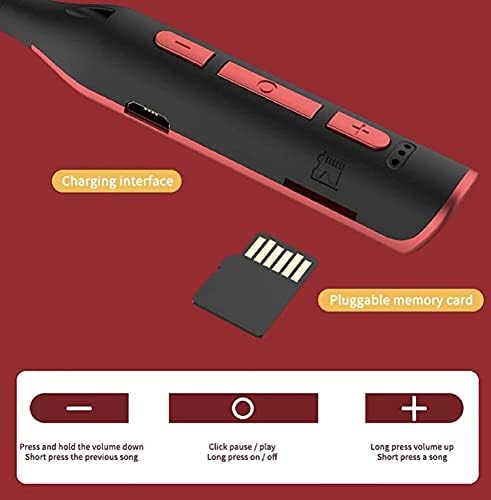
Image 3.1: Close-up of the earphone control panel, showing the charging interface and button layout.
4. Operation
4.1 Control Functions
The control panel on the neckband allows you to manage music playback and calls:
- Power On/Off: Long press the multi-function button (center button).
- Play/Pause: Short press the multi-function button.
- Volume Up: Short press the "+" button.
- Volume Down: Short press the "-" button.
- Next Song: Long press the "+" button.
- Previous Song: Long press the "-" button.
- Answer/End Call: Short press the multi-function button during an incoming call.
- Reject Call: Long press the multi-function button during an incoming call.
4.2 Memory Card Playback
Some models of these earphones may feature a pluggable memory card slot. If your earphones have this feature, you can insert a compatible memory card (e.g., microSD) loaded with audio files. The earphones will automatically switch to memory card playback mode or allow you to switch modes via the control buttons.
5. Maintenance
Proper care will extend the lifespan of your Siwi L35-3 earphones.
- Cleaning: Use a soft, dry cloth to wipe the earphones. Do not use harsh chemicals or abrasive materials.
- Sweat and Splash Resistance: The earphones are sweat and splash proof, making them suitable for workouts. However, they are not waterproof. Avoid submerging them in water.
- Storage: When not in use, store the earphones in a cool, dry place, away from direct sunlight and extreme temperatures.
- Charging: Always use the provided charging cable or a certified equivalent. Avoid overcharging.
6. Troubleshooting
If you encounter issues with your earphones, refer to the following common solutions:
- Earphones will not power on: Ensure the earphones are fully charged.
- Cannot pair with device:
- Make sure Bluetooth is enabled on your device.
- Ensure the earphones are in pairing mode (often indicated by a flashing light).
- Move the earphones closer to your device.
- Turn off and on both the earphones and your device's Bluetooth.
- Clear previous Bluetooth connections on your device if too many are stored.
- No sound or low volume:
- Check the volume levels on both the earphones and your connected device.
- Ensure the earphones are properly paired and connected.
- Try playing different audio sources.
- Intermittent connection:
- Ensure there are no obstructions between the earphones and your device.
- Move away from other wireless devices that might cause interference.
- Keep the connected device within the effective Bluetooth range.
- Charging issues:
- Verify the charging cable is securely connected to both the earphones and the power source.
- Try a different USB port or power adapter.
- Ensure the charging port on the earphones is clean and free of debris.
7. Specifications
| Feature | Detail |
|---|---|
| Brand | Siwi |
| Model | Wireless Earphone (L35-3) |
| Product Dimensions | 17 x 12 x 2 cm |
| Item Weight | 30 g |
| Special Features | Foldable, Microphone Included, Sweatproof |
| Amplifier Type | Magnetic |
| Microphone Format | Built-In |
| Headphones Form Factor | In Ear |
| Cable Feature | Tangle Free |
| Connector Type | Wireless (Bluetooth 5.3) |
| Material | Plastic, Rubber |
| Included Components | 1 Earphone |
| Country of Origin | India |
8. Warranty and Support
Siwi products are manufactured with quality and reliability in mind. For information regarding warranty coverage and terms, please refer to the packaging or contact the retailer where the product was purchased.
For technical support or further assistance, please contact Siwi customer service through their official channels. Contact details are typically available on the product packaging or the brand's official website.