1. Introduction
Welcome to the user manual for your new Generic T900 Ultra 3 Smartwatch. This guide provides essential information on how to set up, operate, maintain, and troubleshoot your device. Please read this manual thoroughly before using your smartwatch to ensure proper function and to maximize your user experience.
The T900 Ultra 3 Smartwatch is designed to integrate seamlessly with your daily life, offering features such as Bluetooth calling, health monitoring, and notification synchronization, all accessible via a vibrant 2.08-inch HD display.
2. Package Contents
Please verify that all items are present in your product package:
- Generic T900 Ultra 3 Smartwatch
- Charging Cable
- User Manual
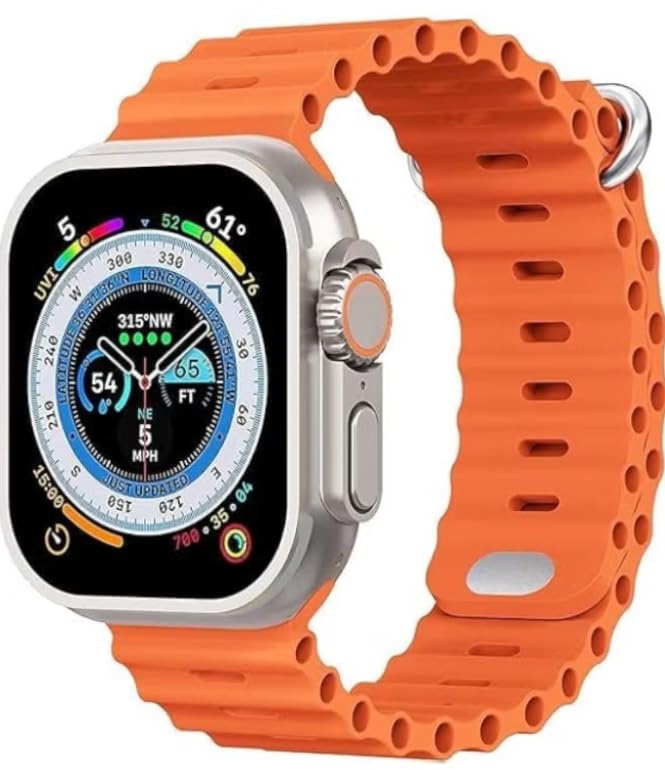
Image: The retail box of the Generic T900 Ultra 3 Smartwatch, indicating the product and its packaging.
3. Device Overview
Familiarize yourself with the physical components of your T900 Ultra 3 Smartwatch:
- Display: 2.08-inch HD touchscreen for interaction and information display.
- Side Button(s): Typically used for power on/off, menu access, or back functions.
- Microphone: For voice commands and Bluetooth calls.
- Speaker: For audio output, including call audio and alerts.
- Heart Rate Sensor: Located on the back of the watch, for health monitoring.
- Charging Contacts: On the back, for connecting the charging cable.

Image: The T900 Ultra 3 Smartwatch displaying a compass interface, showcasing the screen and side buttons.
4. Setup
4.1. Initial Charging
Before first use, fully charge your smartwatch. Connect the charging cable to the charging contacts on the back of the watch and plug the USB end into a standard USB power adapter (not included) or a computer USB port. The watch display will indicate charging status. A full charge typically takes 1-2 hours.
4.2. Power On/Off
- To Power On: Press and hold the side button until the screen lights up.
- To Power Off: Press and hold the side button, then select the 'Power Off' option on the screen.
4.3. Pairing with Your Smartphone
To unlock the full functionality of your smartwatch, pair it with your smartphone:
- Download the companion application (e.g., 'HiWatch' or similar, refer to the watch screen or packaging for the exact app name) from your phone's app store (Google Play Store for Android, Apple App Store for iOS).
- Ensure Bluetooth is enabled on your smartphone.
- Open the companion app and follow the on-screen instructions to add your device.
- The app will search for your smartwatch. Select 'T900 Ultra 3' from the list of available devices.
- Confirm the pairing request on both your phone and smartwatch.
5. Operating the Smartwatch
5.1. Navigation
- Swipe Up/Down: Scroll through menus or notifications.
- Swipe Left/Right: Access different widgets or quick settings.
- Tap: Select an item or open an application.
- Side Button: Press to return to the home screen or access the app menu.
5.2. Core Functions
- Time and Date: Automatically synchronized with your paired smartphone.
- Notifications: Receive alerts for calls, messages, and app notifications directly on your wrist.
- Bluetooth Calls: Make and receive calls using the watch's built-in microphone and speaker once paired via Bluetooth.
- Music Control: Control music playback on your smartphone (play, pause, skip tracks).
5.3. Health Tracking
The T900 Ultra 3 Smartwatch includes several health monitoring features:
- Heart Rate Monitor: Measures your heart rate throughout the day. Access this feature from the main menu.
- Step Counter (Pedometer): Tracks your daily steps, distance, and estimated calories burned.
- Sleep Tracker: Monitors your sleep patterns, including deep and light sleep stages. Wear the watch during sleep for accurate data.
5.4. Customization
- Watch Faces: Change the watch face from the watch settings or through the companion app to personalize your device.
- App Management: Manage and organize applications via the companion app on your smartphone.
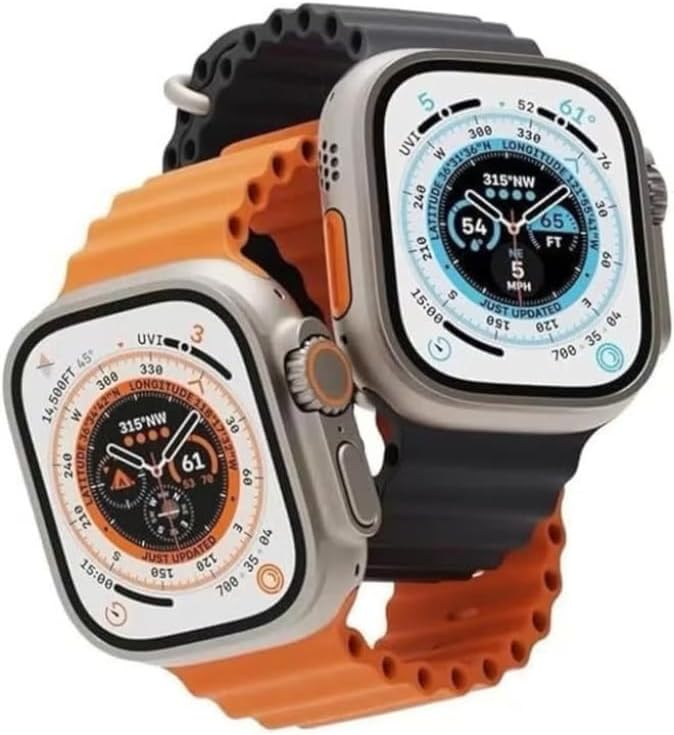
Image: Two T900 Ultra 3 Smartwatches, one showing a compass and the other displaying fitness data, illustrating various display options.
6. Maintenance
6.1. Cleaning
Regularly clean your smartwatch to ensure optimal performance and hygiene:
- Wipe the screen and watch body with a soft, lint-free cloth.
- For stubborn dirt, slightly dampen the cloth with water. Avoid using harsh chemicals or abrasive materials.
- Ensure the charging contacts are clean and dry before charging.
6.2. Water Resistance
The T900 Ultra 3 Smartwatch may offer basic splash resistance. Avoid submerging the watch in water, showering, or swimming with it, as this can cause damage not covered by warranty. Ensure the watch is dry before charging.
6.3. Battery Care
- Avoid fully discharging the battery frequently.
- Do not expose the watch to extreme temperatures, as this can degrade battery life.
- Use only the provided charging cable.
7. Troubleshooting
If you encounter issues with your smartwatch, refer to the following common solutions:
| Problem | Solution |
|---|---|
| Watch does not power on | Ensure the watch is fully charged. Press and hold the side button for at least 10 seconds. |
| Cannot pair with smartphone | Ensure Bluetooth is enabled on your phone and the watch. Restart both devices. Check that the companion app is installed and updated. |
| Inaccurate health readings | Ensure the watch is worn snugly on your wrist, not too tight or too loose. Clean the sensor area. Avoid excessive movement during readings. |
| Short battery life | Reduce screen brightness. Turn off unnecessary notifications. Limit continuous heart rate monitoring. Ensure background apps are closed on the watch. |
| Watch is unresponsive | Perform a force restart by pressing and holding the side button for approximately 15 seconds until the device reboots. |
8. Specifications
| Feature | Detail |
|---|---|
| Brand | Generic |
| Model Name | T900 Ultra 3 |
| Screen Size | 2.08 inches |
| Display Type | HD Touchscreen |
| Connectivity Technology | Bluetooth |
| Wireless Communication Standard | Bluetooth |
| Operating System | Android Wear 1.0 (Compatibility with Android & iOS devices) |
| Special Features | Screen protector, Health Monitoring (Heart Rate, Step Counter, Sleep Tracker) |
| GPS | Without GPS |
| Item Shape | Rectangular (based on product images) |
| Country of Origin | China |
| Shipping Dimensions | 20.2 x 7.2 x 3.1 cm |
| Item Weight | 180 grams (shipping weight) |
9. Safety Information
- Do not attempt to disassemble or modify the smartwatch. This will void the warranty and may cause damage.
- Keep the device away from extreme temperatures, direct sunlight, and open flames.
- Avoid exposing the watch to strong magnetic fields.
- If you experience skin irritation, discontinue use and consult a physician.
- Dispose of the device and its battery responsibly according to local regulations.
10. Warranty and Support
Your Generic T900 Ultra 3 Smartwatch is covered by a standard manufacturer's warranty against defects in materials and workmanship. Please retain your proof of purchase for warranty claims. For specific warranty terms and conditions, refer to the documentation provided at the time of purchase or contact your retailer.
For technical support or further assistance, please contact the retailer or manufacturer through their official support channels. Details are typically available on the product packaging or the retailer's website.


