
GHCFWKU H015R
Instruction Manual: GHCFWKU H015R Vacuum Cleaner Replacement Battery
Model: H015R | Capacity: 2500mAh 25.9V
1. Introduction
This manual provides essential information for the safe and effective use of your GHCFWKU H015R 2500mAh 25.9V Lithium Battery Pack, designed as a replacement for Laresar 3 Elite 2 Vacuum Cleaners. Please read this manual thoroughly before installation and operation to ensure optimal performance and longevity of your battery.
2. Safety Information
Your safety is paramount. Please observe the following precautions:
- Advanced BMS System: This battery is equipped with an advanced Battery Management System (BMS) that safeguards against abnormal temperatures, short circuits, overcharge, and over-discharge.
- Temperature: Do not expose the device to high temperatures. Store and operate within recommended temperature ranges.
- Disassembly: Do not disassemble, crush, or solder the battery. Unauthorized modifications can lead to hazards.
- Disposal: Do not throw into fire or water. Dispose of batteries according to local regulations.
- Compatibility: Use only with compatible Laresar 3 Elite 2 Vacuum Cleaners. Using with incompatible devices may cause damage.
- Storage: For long-term storage, ensure the battery is partially charged (around 50-60%) and stored in a cool, dry place.

Figure 2.1: Battery label with safety warnings and specifications. Note the "Do not expose to high temperature," "Do not disassemble, crush or solder," and "Do not throw into fire or water" symbols.
3. Product Overview
The GHCFWKU H015R is a high-capacity lithium battery pack designed for specific vacuum cleaner models. It features a robust design for durability and an integrated BMS for enhanced safety and performance.

Figure 3.1: Physical appearance of the H015R battery, highlighting its design and size.
Key Features:
- Capacity: 2500mAh
- Voltage: 25.9V
- Compatibility: Specifically designed for Laresar 3 Elite 2 Vacuum Cleaners.
- Safety: Integrated BMS for protection against overcharge, over-discharge, over-current, short circuit, and abnormal temperatures.
- Longevity: Cycle life of over 1000 charges/discharges.
- Low Self-Discharge: Maintains over 80% power after long-term storage with a monthly self-discharge rate of only 3%~5%.
4. Setup and Installation
Follow these steps to properly install your new battery into the compatible vacuum cleaner:
- Power Off: Ensure your Laresar 3 Elite 2 Vacuum Cleaner is completely powered off and unplugged from any power source before proceeding.
- Remove Old Battery: Locate the battery compartment on your vacuum cleaner. Refer to your vacuum cleaner's original manual for specific instructions on how to safely remove the old battery. Typically, this involves pressing a release button or unlatching a cover.
- Insert New Battery: Align the GHCFWKU H015R replacement battery with the battery slot in the vacuum cleaner. Gently push the battery into place until it clicks securely. Do not force the battery.
- Initial Charge: Before first use, it is recommended to fully charge the new battery. Connect your vacuum cleaner to its charging dock or power adapter.
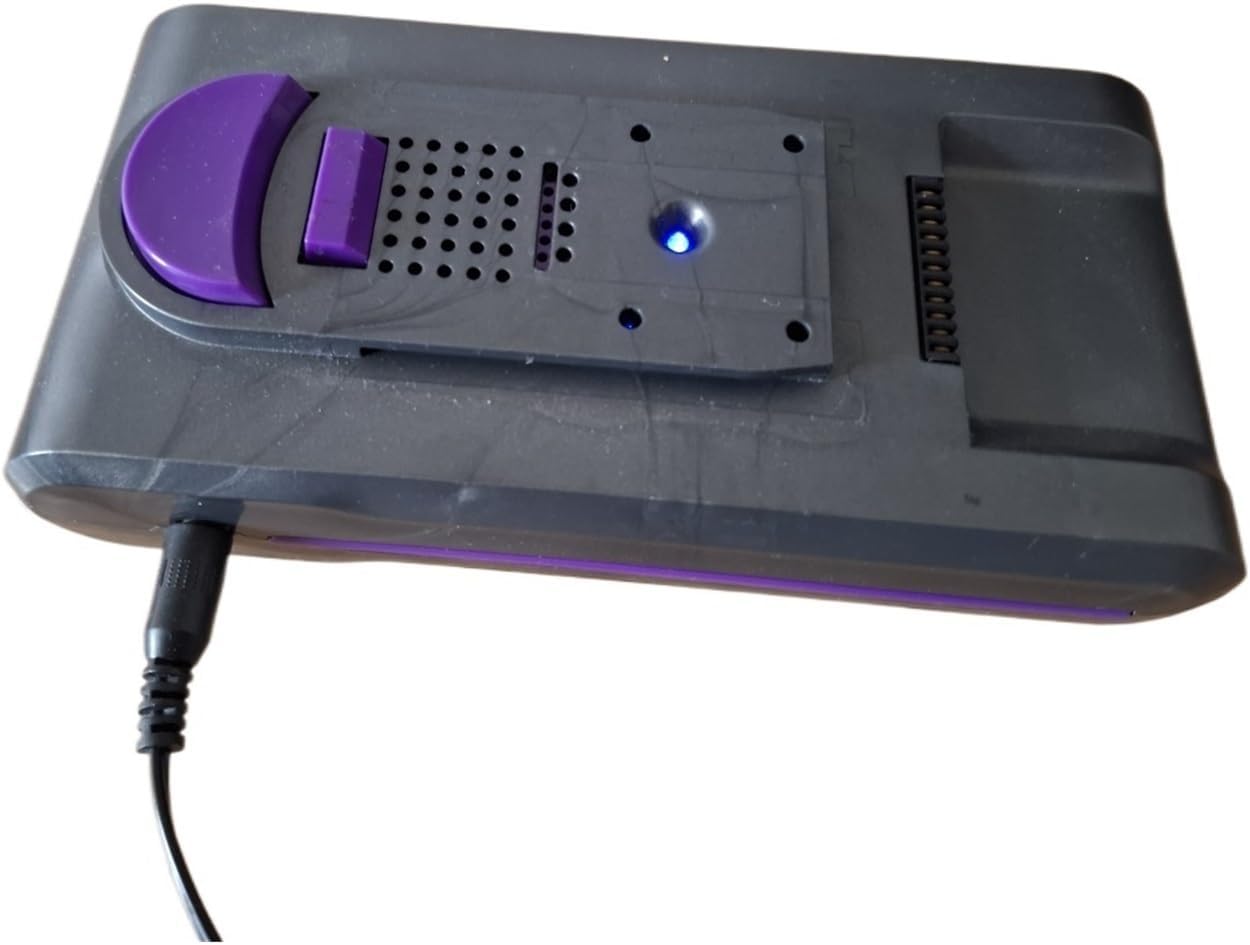
Figure 4.1: The H015R battery during charging, indicated by the blue light.
5. Operating Instructions
Once installed and charged, the battery operates seamlessly with your Laresar 3 Elite 2 Vacuum Cleaner.
Charging the Battery:
- Connect your vacuum cleaner to its original charging adapter or dock.
- The battery's indicator light (if present on the vacuum or battery itself) will typically show charging status (e.g., blinking, solid blue).
- Allow the battery to fully charge before extensive use, especially for the first few cycles, to optimize its performance and lifespan.
Discharging and Usage:
- Use your vacuum cleaner as normal. The battery will provide consistent power until it needs recharging.
- Avoid completely draining the battery frequently, as this can reduce its overall lifespan. Recharge when the vacuum cleaner indicates low battery.
6. Maintenance and Care
Proper maintenance ensures the longevity and optimal performance of your battery:
- Regular Charging: Recharge the battery regularly, even if the vacuum cleaner is not used frequently. Avoid leaving it fully discharged for extended periods.
- Temperature Control: Store and charge the battery in a cool, dry environment, away from direct sunlight and extreme temperatures.
- Cleaning: Keep the battery contacts clean and free from dust or debris. Use a dry cloth to wipe them if necessary.
- Long-Term Storage: If storing the battery for an extended period (e.g., several months), charge it to approximately 50-60% capacity. Recharge it every 3-6 months to prevent deep discharge.
7. Troubleshooting
If you encounter issues with your battery, refer to the following common problems and solutions:
| Problem | Possible Cause | Solution |
|---|---|---|
| Battery not charging. |
|
|
| Vacuum cleaner not turning on or losing power quickly. |
|
|
| Battery feels unusually hot during charging or use. |
|
|
If the problem persists after trying these solutions, please contact customer support for further assistance.
8. Specifications
| Attribute | Value |
|---|---|
| Model Number | H015R |
| Battery Type | Lithium Battery Pack |
| Capacity | 2500mAh |
| Voltage | 25.9V |
| Compatibility | Laresar 3 Elite 2 Vacuum Cleaner |
| Cycle Life | Over 1000 cycles |
| Self-Discharge Rate | 3%~5% per month |
| Item Weight | 1.76 ounces (50 Grams) |
| Package Dimensions | 0.39 x 0.39 x 0.39 inches |
| Manufacturer | lizi22543lam |
9. Warranty and Support
This product is a qualified accessory inspected by quality inspectors. For any questions or concerns regarding your GHCFWKU H015R battery, please contact the seller or manufacturer directly. They are committed to providing support and will respond to inquiries within 24 hours.
Please refer to your purchase documentation for specific warranty terms and conditions, or contact the seller for details on available protection plans.
Note: The packaging includes one (1) battery pack.
no relevant documents