
Introduction
This manual provides detailed instructions for the assembly, operation, and maintenance of your knoworld Buffet Sideboard with Storage Hutch and Power Outlets, Model 1131. Please read all instructions carefully before beginning assembly and retain this manual for future reference. This versatile furniture piece is designed to enhance your kitchen, dining room, or entryway with ample storage and convenient power access.

Image: The knoworld Buffet Sideboard with Storage Hutch and Power Outlets, showcasing its overall design and functionality.
Safety Information
- Always unplug the power outlet before cleaning or maintaining the cabinet.
- Do not overload the shelves or doors.
- Use appropriate safety gear when assembling the cabinet.
- Keep the cabinet away from heat sources and moisture to prevent warping or damage.
- Always follow the assembly instructions carefully to avoid injury or damage to the cabinet.
Package Contents
Before assembly, ensure all parts are present and undamaged. Refer to the included parts list in your packaging. Typical components include:
- Wooden panels (top, bottom, side, back, shelves, doors)
- Hardware kit (screws, dowels, cam locks, hinges, handles, anti-tip kit)
- Metal glass holders and cup hooks
- Power outlet unit with cord
- Assembly instructions manual
Assembly Instructions
Assembly is designed to be straightforward with detailed instructions and numbered parts. It is recommended to assemble the unit on a soft, clean surface to prevent scratches. Two people are recommended for assembly.
Assembly Video Guide
Video: Official Sideboard Assembly Guide from Knoworld Official. This video provides a visual walkthrough of the assembly process, demonstrating each step for clear understanding.
General Assembly Steps
- Unpack and Identify Parts: Lay out all components and hardware. Compare them with the parts list in your manual to ensure everything is present.
- Assemble Base Frame: Connect the bottom and side panels using the provided hardware. Ensure all connections are secure.
- Install Shelves: Insert the adjustable shelves into the designated slots.
- Attach Back Panel: Secure the back panel to the main frame.
- Assemble Hutch Section: Construct the upper hutch frame, including the top storage rack, glass holders, and cup hooks.
- Integrate Power Outlet: Install the power outlet unit into its designated cutout on the countertop.
- Attach Doors: Mount the four doors using the hinges and attach the handles. Adjust hinges as needed for proper alignment.
- Install Anti-Tip Kit: Securely attach the anti-tip kit to the back of the cabinet and to a wall stud to prevent accidental tipping.
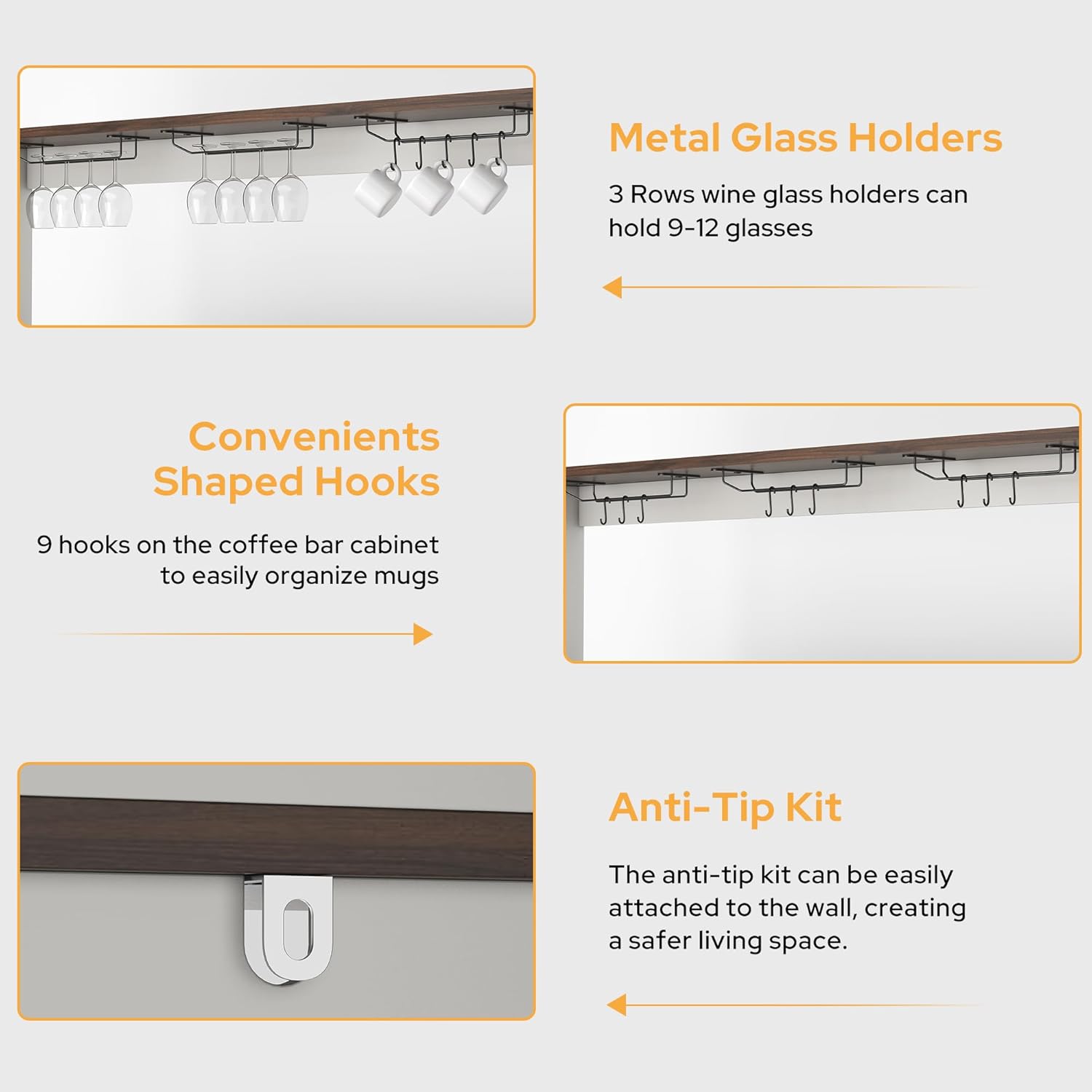
Image: Close-up view of the metal glass holders, convenient shaped hooks, and the anti-tip kit, illustrating key features for assembly and use.
Operating Instructions
Using the Charging Station
The integrated charging station provides convenient power access for your devices and small appliances. It features 2 AC outlets (125V/12A 60Hz 1500W) and 2 USB ports (5V/2A Max).
- Plug the cabinet's power cord into a standard wall outlet.
- Connect your coffee maker, microwave oven, bread machine, mobile phone, or other small appliances to the AC outlets or USB ports.
- Ensure that the total power consumption of connected devices does not exceed 1500W.

Image: The built-in charging station, showing the two AC outlets and two USB ports, ready for use with various devices.
Storage and Organization
Utilize the various storage options to organize your items:
- Top Storage Rack: Ideal for displaying decorative items or frequently used kitchen essentials.
- Glass Holders: The 3-row glass holders can accommodate 9-12 glasses.
- Cup Hooks: Use the 9 hooks for hanging cups or mugs.
- Open Storage Spaces: Perfect for items requiring easy access or for showcasing.
- Four-Door Cabinet: Provides concealed storage for larger items or to keep your space tidy. The adjustable shelves allow for flexible storage configurations.

Image: The buffet sideboard filled with various kitchen and dining items, demonstrating its ample storage capacity and organizational features.
Maintenance
- Cleaning: Wipe surfaces with a soft, damp cloth. Avoid harsh chemicals or abrasive cleaners that may damage the wood finish.
- Spills: Clean up spills immediately to prevent staining or water damage.
- Hardware: Periodically check and tighten all screws and hardware to ensure stability.
- Power Outlet: Ensure the power outlet area remains dry and free of debris. Do not attempt to repair the electrical components yourself.
Troubleshooting
| Problem | Possible Cause | Solution |
|---|---|---|
| Cabinet is wobbly | Loose hardware; uneven floor | Tighten all screws. Adjust leg levelers if present, or place shims under legs on uneven surfaces. |
| Doors do not align properly | Hinges not adjusted correctly | Adjust the screws on the hinges to align the doors. Refer to the assembly video for hinge adjustment tips. |
| Power outlets not working | Cabinet not plugged in; circuit breaker tripped; faulty device | Ensure the cabinet's power cord is securely plugged into a working wall outlet. Check your home's circuit breaker. Test with a different device. If issues persist, contact customer support. |
| Missing parts or damaged components | Shipping error; manufacturing defect | Do not proceed with assembly. Contact knoworld customer support immediately for replacement parts. |
Specifications
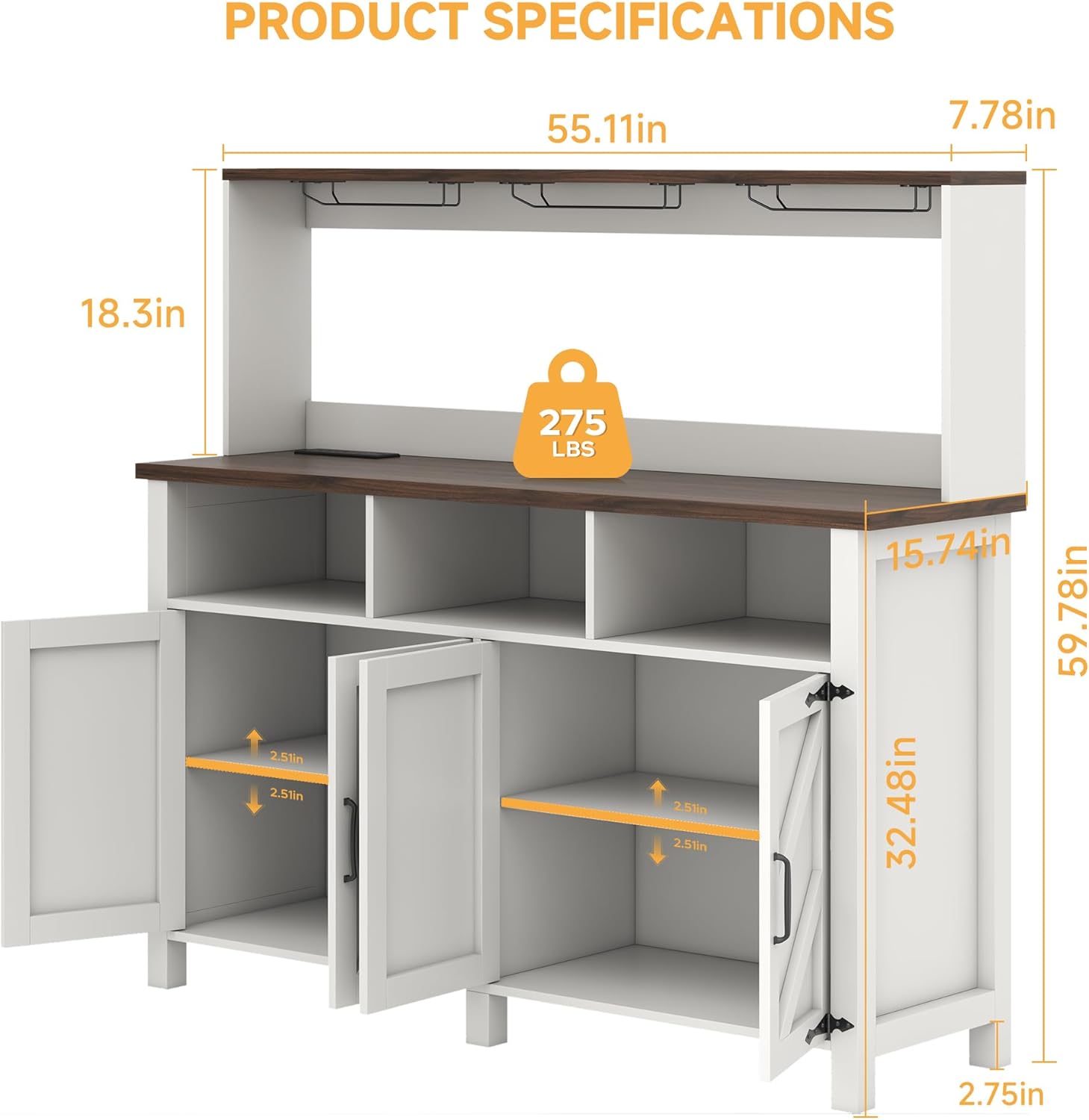
Image: Diagram illustrating the key dimensions and weight capacity of the buffet sideboard.
| Feature | Detail |
|---|---|
| Brand | knoworld |
| Model Number | 1131 |
| Color | White |
| Material | Wood, Engineered Wood (Top Material) |
| Product Dimensions (D x W x H) | 15.74"D x 55.11"W x 32.4"H |
| Item Weight | 81.57 Pounds |
| Number of Doors | 4 |
| Number of Shelves | 3 (adjustable) |
| Power Outlets | 2 AC Outlets (125V/12A 60Hz 1500W), 2 USB Ports (5V/2A Max) |
| Additional Features | Adjustable Shelf, Metal Glass Holders (3 rows), Cup Hooks (9 hooks), Anti-Tip Kit |
| Assembly Required | Yes |
Warranty and Support
For any questions regarding your knoworld Buffet Sideboard, including product inquiries, assembly assistance, or warranty claims, please contact knoworld customer support. Refer to your purchase documentation or the manufacturer's website for specific contact information and warranty details.
Please have your model number (1131) and purchase date available when contacting support.