
1. Introduction
Thank you for choosing the Haewon Small Vanity Desk. This manual provides essential information for the safe and efficient use of your new vanity desk. Please read these instructions carefully before assembly and operation, and retain them for future reference.
This vanity desk is designed for compact spaces, featuring a mirror with adjustable LED lighting, a built-in charging station, a foldable tabletop, a spacious drawer, and multiple shelves for organized storage.
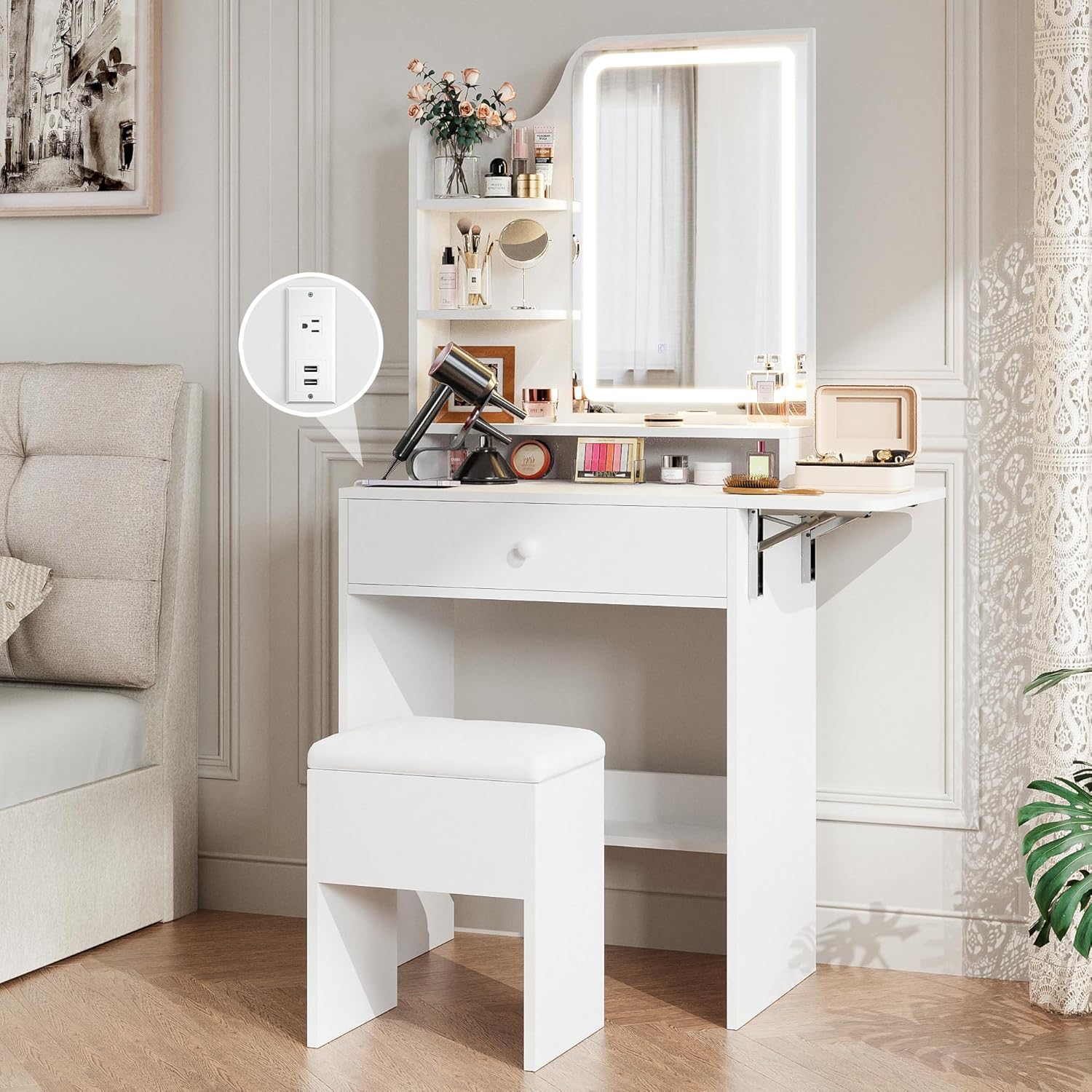
Image 1.1: The Haewon Small Vanity Desk, showcasing its compact design, mirror with integrated lighting, and included stool.
2. Safety Instructions
- Always assemble the product on a clean, soft surface to prevent scratches.
- Ensure all screws and fasteners are securely tightened before use. Periodically check and re-tighten as necessary.
- Do not overload shelves or drawers. Distribute weight evenly.
- Keep small parts and packaging materials away from children to prevent choking hazards.
- Do not stand or climb on the vanity desk or stool.
- Place the vanity desk on a level surface to prevent tipping.
- Avoid exposing the product to direct sunlight or extreme humidity.
- For electrical components (lights, charging station), ensure proper connection to a suitable power source. Do not use if wires are damaged.
3. Package Contents
Before beginning assembly, verify that all components listed below are present and undamaged. If any parts are missing or damaged, please contact customer support.
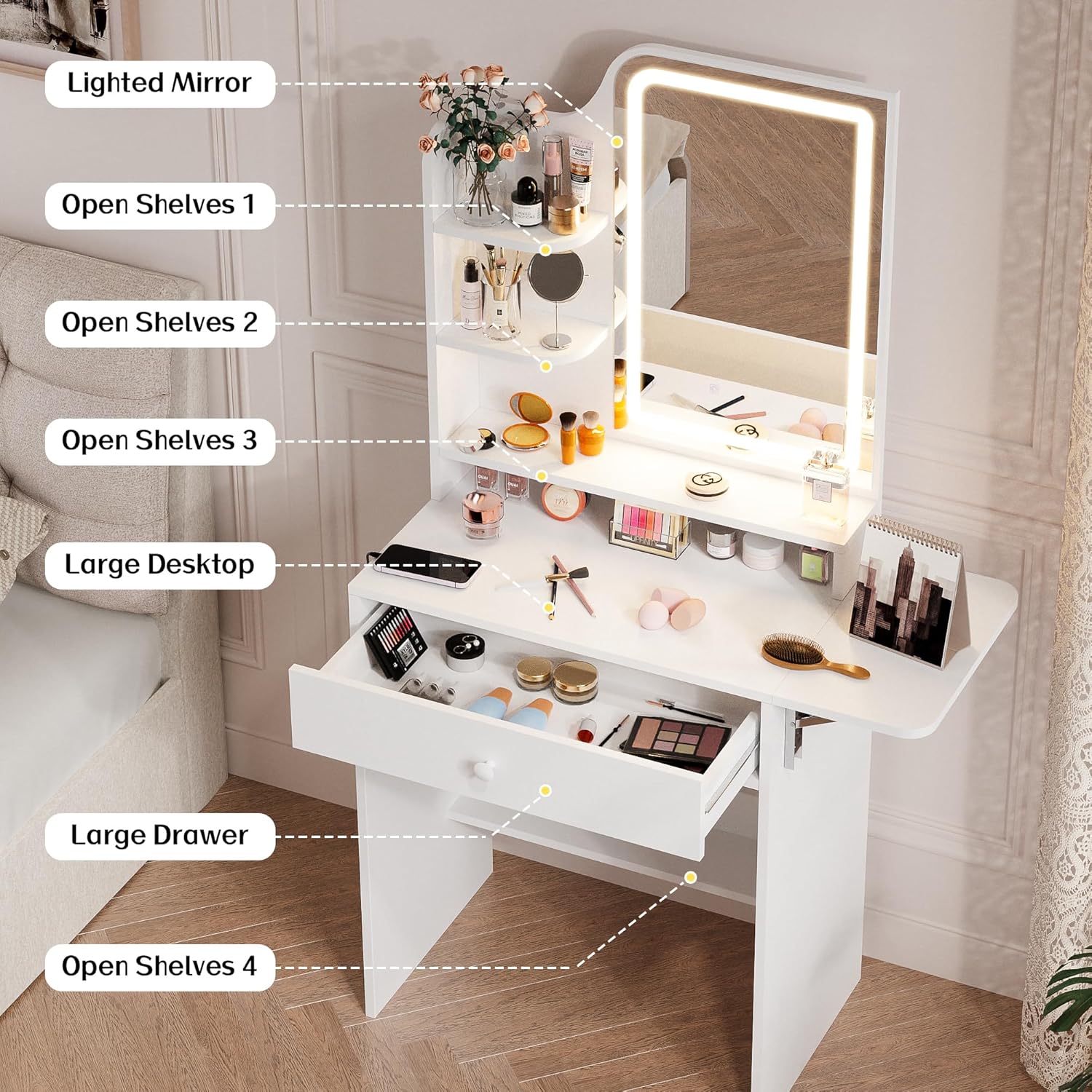
Image 3.1: Diagram illustrating the main components of the Haewon Small Vanity Desk, including the lighted mirror, various shelves, large desktop, and drawer.
- Vanity Desk Frame (Engineered Wood)
- Mirror with Integrated LED Lights
- Foldable Extension Board
- Storage Drawer
- Shelving Units
- Charging Station Module (1 AC outlet, 2 USB ports)
- Stool with Storage
- Assembly Hardware (screws, dowels, brackets, etc.)
- Assembly Tools (e.g., Allen wrench)
- Instruction Manual
4. Assembly Instructions
Assembly is required for this product. Please follow the step-by-step instructions provided in the separate assembly guide included in your package. Ensure you have sufficient space and all necessary tools before starting.
- Unpack and Identify Parts: Carefully remove all components from the packaging. Lay them out and compare them against the parts list in your assembly guide.
- Assemble the Main Desk Frame: Follow the diagrams to connect the side panels and support beams using the provided hardware.
- Install the Drawer: Assemble the drawer components and install the drawer slides into the desk frame.
- Attach Shelving: Secure the various shelving units to the main desk structure as indicated in the guide.
- Mount the Mirror and Lights: Carefully attach the mirror unit to the desk. Connect the LED light power cable.
- Install Charging Station: Integrate the charging station module into its designated slot and connect its power cord.
- Assemble the Stool: Put together the stool components.
- Final Checks: Ensure all connections are tight and the desk is stable.
If you encounter any difficulties during assembly, refer to the detailed diagrams in your assembly guide or contact customer support for assistance.
5. Operating Instructions
5.1. Adjustable LED Lighting
The vanity mirror features integrated LED lights with adjustable color modes and brightness levels.
- Power On/Off: Locate the touch sensor on the mirror surface to turn the lights on or off.
- Change Color Mode: Tap the touch sensor to cycle through the three available color modes: Warm Light, Natural Light, and Cold Light (also referred to as Warm Yellow, Warm White, and Cold White).
- Adjust Brightness: Press and hold the touch sensor to dim or brighten the lights to your preferred level.
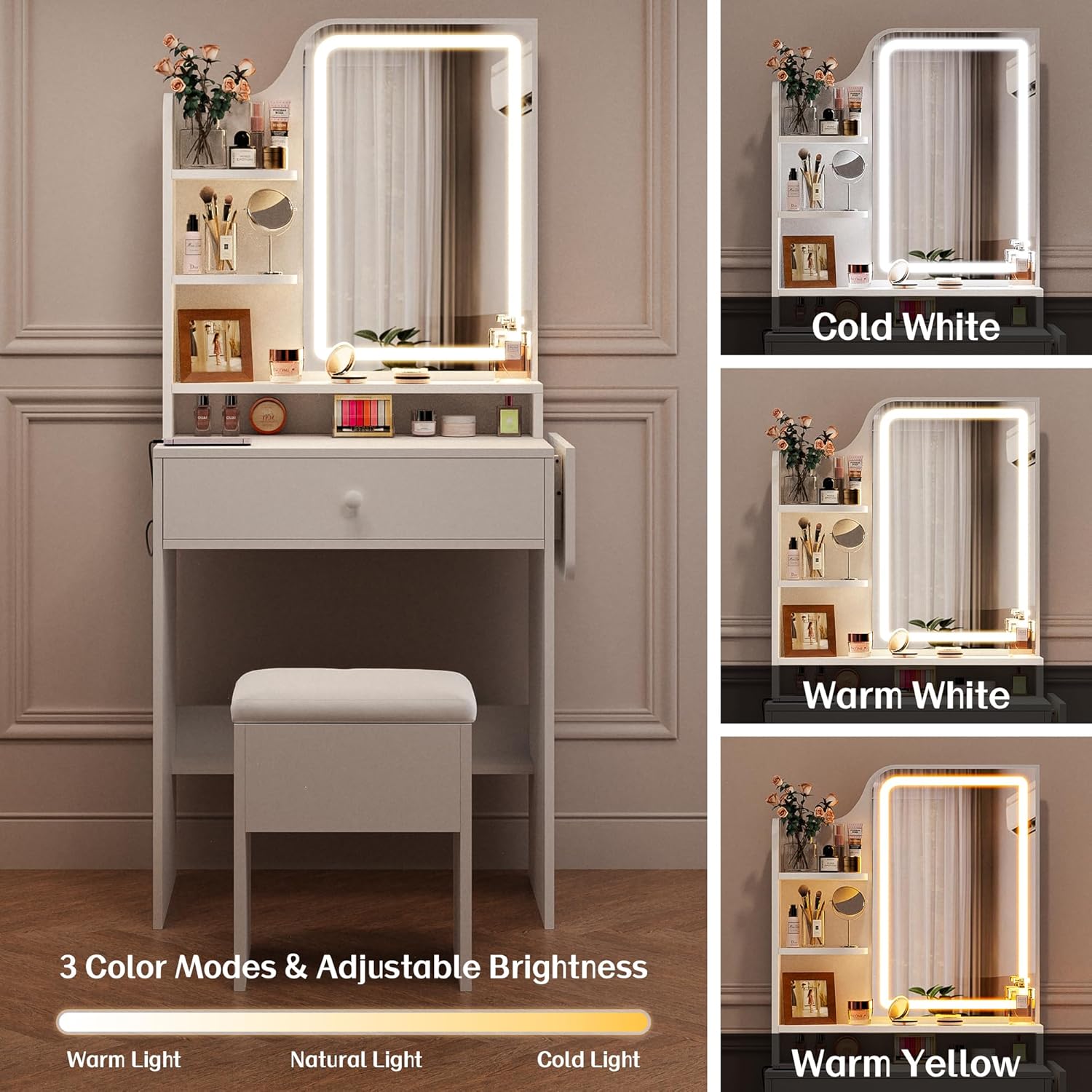
Image 5.1: Illustration of the three color modes (Cold White, Warm White, Warm Yellow) and adjustable brightness feature of the vanity mirror lights.
5.2. Built-in Charging Station
The vanity desk includes a convenient charging station to power your electronic devices and beauty tools.
- AC Outlet: One standard 120V/12A AC outlet is provided for plugging in hair dryers, straighteners, or other AC-powered devices.
- USB Ports: Two 5V/2A USB ports are available for charging smartphones, tablets, or other USB-powered accessories.
- Power Connection: Ensure the charging station's power cord is securely plugged into a wall outlet.
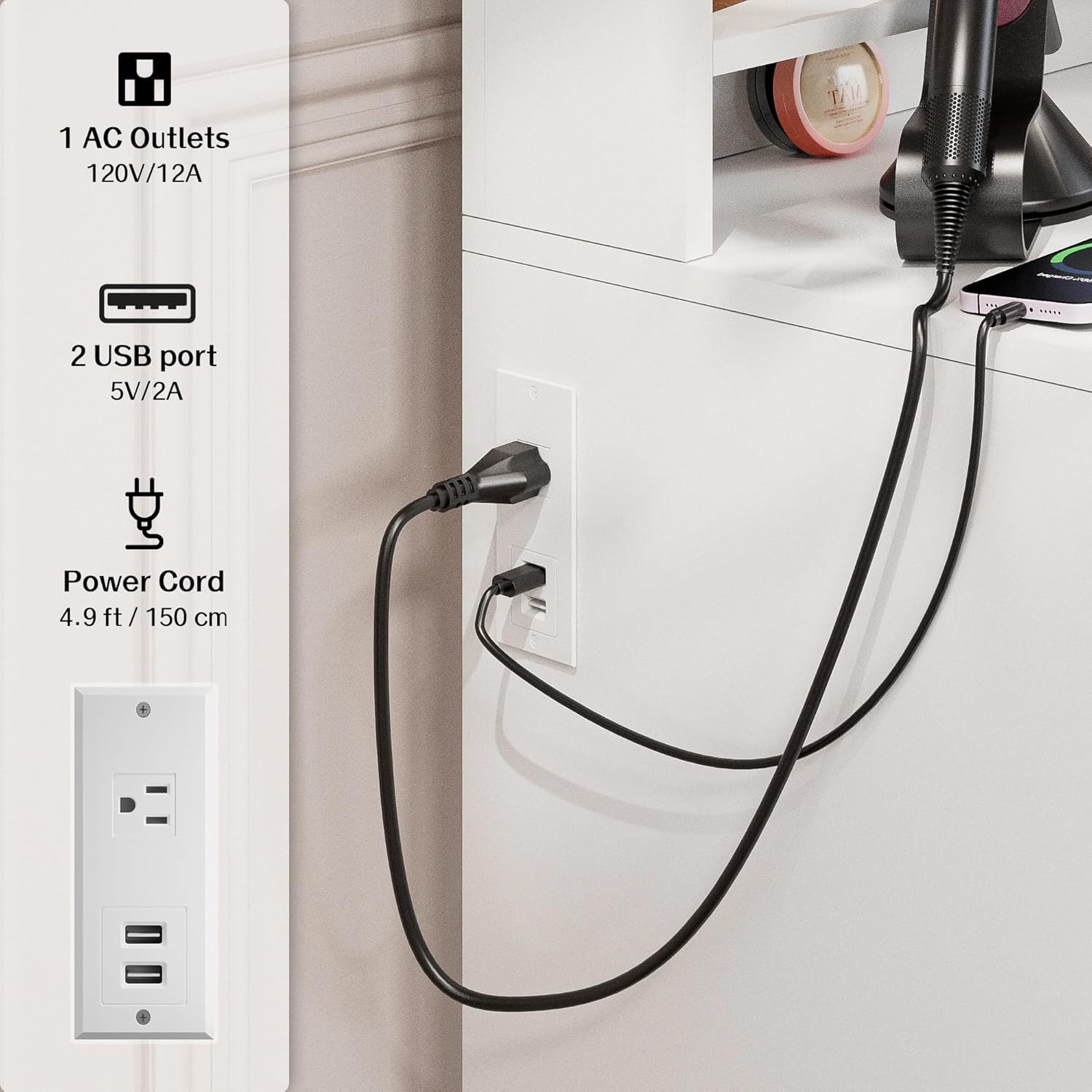
Image 5.2: Close-up view of the integrated charging station, showing one AC outlet and two USB ports, with a device connected for charging.
5.3. Foldable Tabletop
The vanity desk features a foldable extension board to provide additional workspace when needed and save space when not in use.
- Unfolding: Gently lift the extension board and pull it outwards until it locks into place, supported by its integrated brackets.
- Folding: Release the locking mechanism (if applicable, refer to assembly guide for specific details) and carefully fold the extension board back against the side of the desk.

Image 5.3: Visual demonstration of the foldable extension board, showing its unfolded and folded positions for space-saving functionality.
6. Maintenance
- Cleaning the Surface: Wipe the engineered wood surfaces with a soft, damp cloth. Avoid abrasive cleaners or harsh chemicals that may damage the finish.
- Cleaning the Mirror: Use a glass cleaner and a lint-free cloth to clean the mirror surface. Do not spray cleaner directly onto the mirror; apply it to the cloth first.
- Dusting: Regularly dust all surfaces with a dry, soft cloth.
- Hardware Check: Periodically inspect all screws and fasteners to ensure they remain tight. Re-tighten if necessary to maintain stability.
- Electrical Components: Ensure the power cord and connections for the lights and charging station are free from damage. Disconnect from power before cleaning electrical components.
7. Troubleshooting
| Problem | Possible Cause | Solution |
|---|---|---|
| LED lights do not turn on. | Power cord not connected; loose connection; faulty power outlet. | Ensure the power cord is securely plugged into a working wall outlet. Check all connections. |
| Charging station (AC/USB) is not working. | Power cord not connected; loose connection; device not compatible. | Verify the charging station's power cord is plugged in. Test with a different device or cable. |
| Desk feels unstable or wobbly. | Loose screws; uneven floor. | Check and tighten all assembly screws. Ensure the desk is on a level surface. |
| Drawer does not slide smoothly. | Improper installation of drawer slides; obstruction. | Re-check drawer slide installation according to the assembly guide. Remove any obstructions. |
8. Specifications
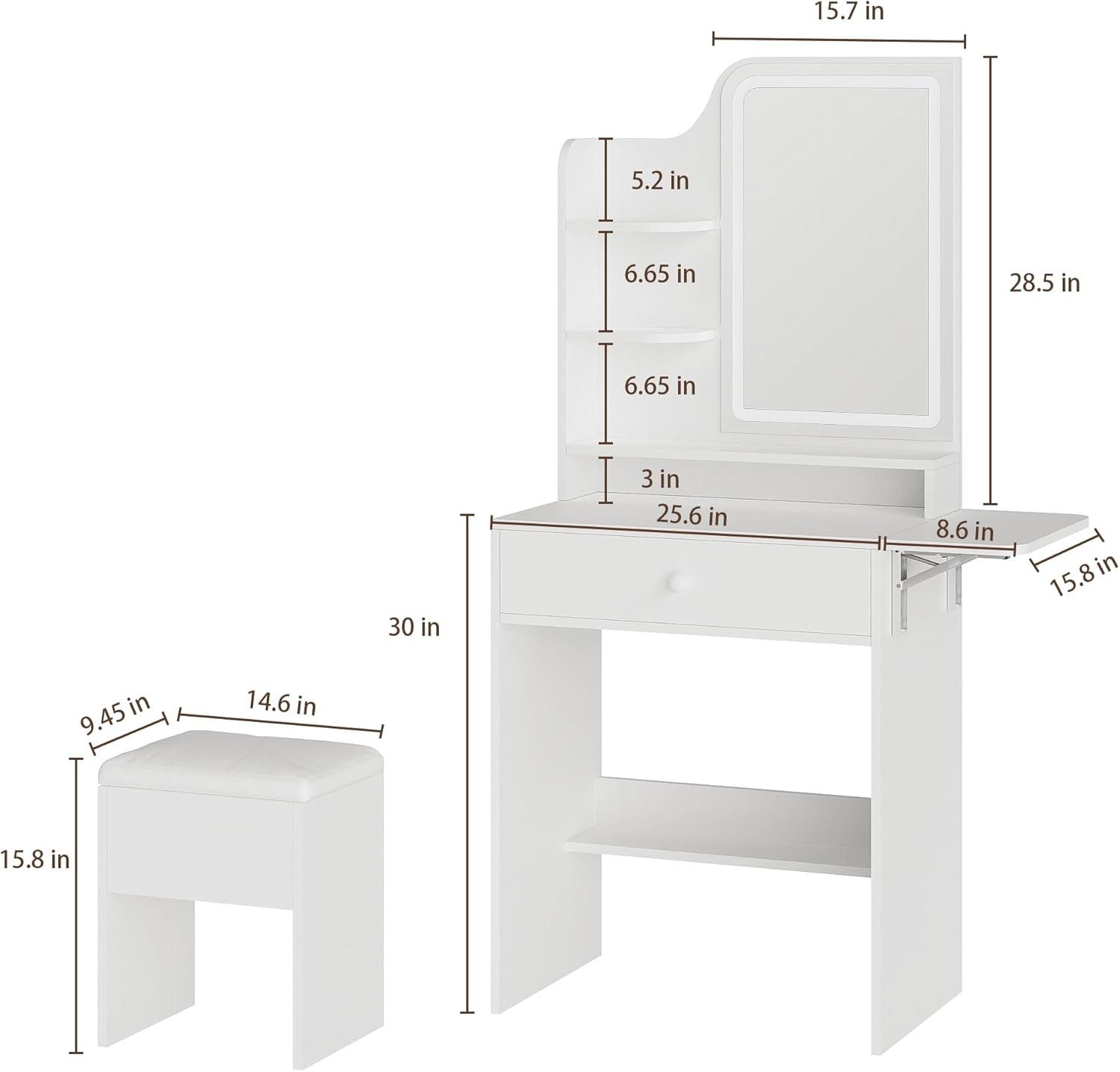
Image 8.1: Detailed diagram showing the dimensions of the Haewon Small Vanity Desk and its accompanying stool.
- Model: vanity desk
- Brand: Haewon
- Product Dimensions: 15.35"D x 24.41"W x 59.06"H
- Item Weight: 37 pounds
- Frame Material: Engineered Wood
- Color: White
- Assembly Required: Yes
- Charging Station: 1 AC Outlet (120V/12A), 2 USB Ports (5V/2A)
- Mirror Lights: Adjustable LED, 3 Color Modes (Warm, Natural, Cold), Dimmable
9. Warranty and Customer Support
Haewon is committed to providing quality products and customer satisfaction. This product comes with a standard manufacturer's warranty against defects in materials and workmanship. Please refer to the warranty card included in your package for specific terms and conditions.
For any questions, concerns, or assistance with assembly, operation, or troubleshooting, please contact our dedicated customer support team. Contact information can typically be found on the product packaging or on the official Haewon website.
Please have your model number (vanity desk) and purchase information ready when contacting support.


