
XUZENEST FN-003
XUZENEST Fluted Nightstand with Charging Station (Model FN-003) User Manual
Introduction
This manual provides detailed instructions for the assembly, operation, and maintenance of your XUZENEST Fluted Nightstand with Charging Station, Model FN-003. Please read this manual thoroughly before assembly and use to ensure proper function and safety.

Image: The XUZENEST Fluted Nightstand in black, featuring a charging station on its top surface, positioned beside a white sofa.
Safety Information
Important Safety Instructions:
- Always assemble the product according to the provided instructions.
- Ensure the product is stable and secure in its intended location to prevent tipping or collapse.
- Keep electrical components away from water.
- Do not overload the charging station to prevent electrical hazards.
- Regularly check all connections and fasteners to ensure they remain tight.
Components List
Before beginning assembly, verify that all parts are present and undamaged. Refer to the included assembly guide for a detailed list of hardware and panels.
- Assembly Guide
- Charging Station (pre-installed or separate unit)
- Installation Tool (e.g., Allen Key, Screwdriver)
- All necessary furniture panels and hardware
Setup and Assembly
The XUZENEST Fluted Nightstand is designed for straightforward assembly. Follow the step-by-step instructions provided in the separate Assembly Guide included with your package.
- Unpack all components and lay them out on a clean, soft surface to prevent scratches.
- Identify each part using the labels in the Assembly Guide.
- Assemble the main frame of the nightstand, ensuring all connections are secure.
- Install the drawer slides and then the drawer itself. Ensure smooth operation.
- Connect the charging station power cord to a wall outlet after the nightstand is fully assembled and in its final position.
Note: A drill can expedite assembly, but manual tools are sufficient.
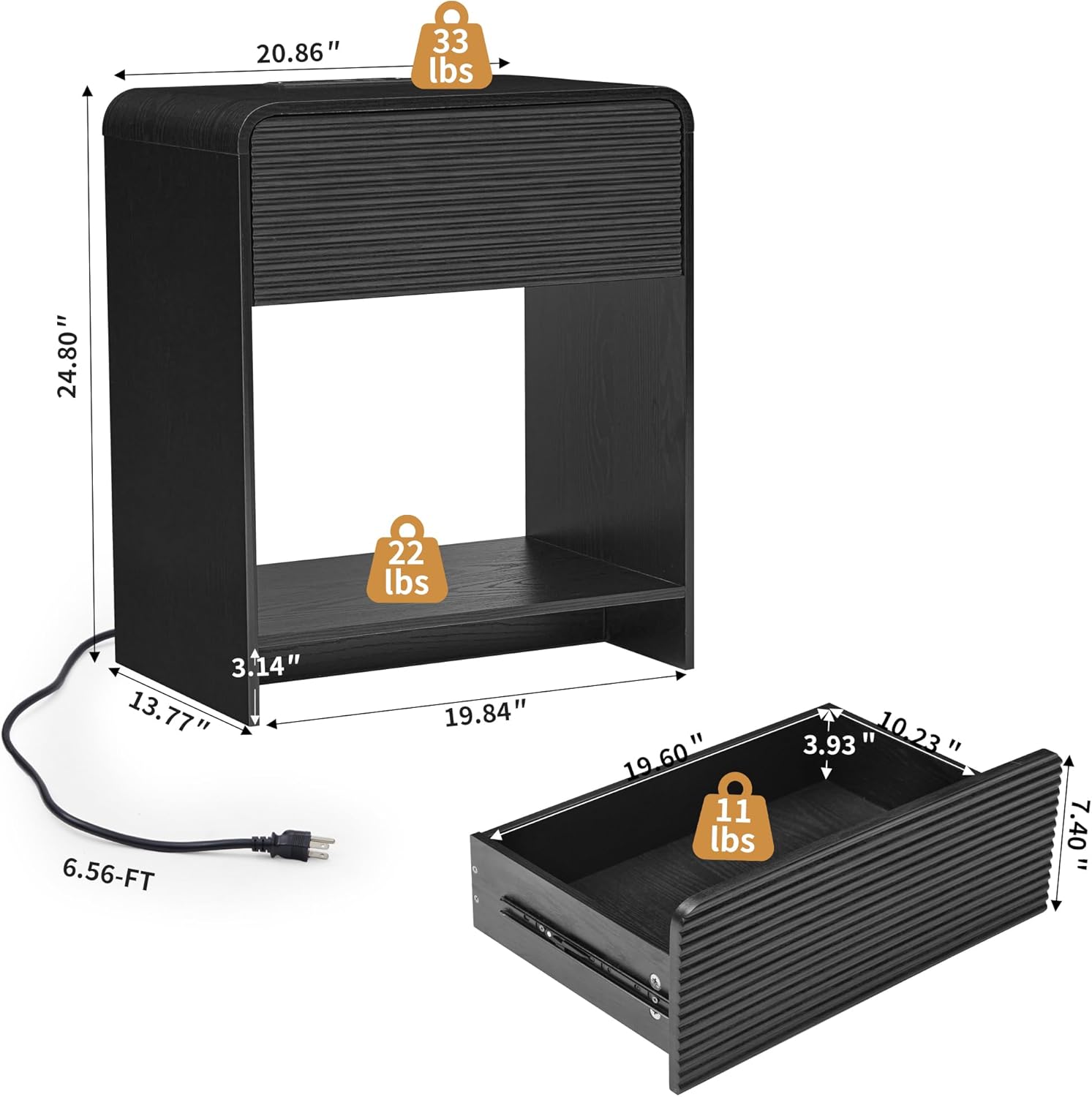
Image: A detailed diagram illustrating the dimensions of the nightstand and its drawer, along with weight limits for the top surface (33 lbs), open compartment (22 lbs), and drawer (11 lbs), and the 6.56-foot power cord.
Operating Instructions
Using the Charging Station
The integrated charging station provides convenient power access for your electronic devices.
- Plug the nightstand's power cord into a standard wall outlet.
- The charging station features 2 AC outlets (125V/12A) and 2 USB ports (5V/2A).
- Connect your devices to the appropriate outlets or USB ports for charging.
- Ensure devices are compatible with the provided power specifications.

Image: A close-up view of the nightstand's built-in charging station, demonstrating its use with a tablet and smartphone connected to the AC and USB ports.
Drawer and Storage
The nightstand includes a smooth-gliding drawer and an open compartment for storage.
- The drawer is designed for easy opening and closing, providing concealed storage for personal items.
- The open compartment offers accessible storage for books, decorative items, or other essentials.
- Do not exceed the weight capacity for the drawer (11 lbs), open compartment (22 lbs), or top surface (33 lbs).
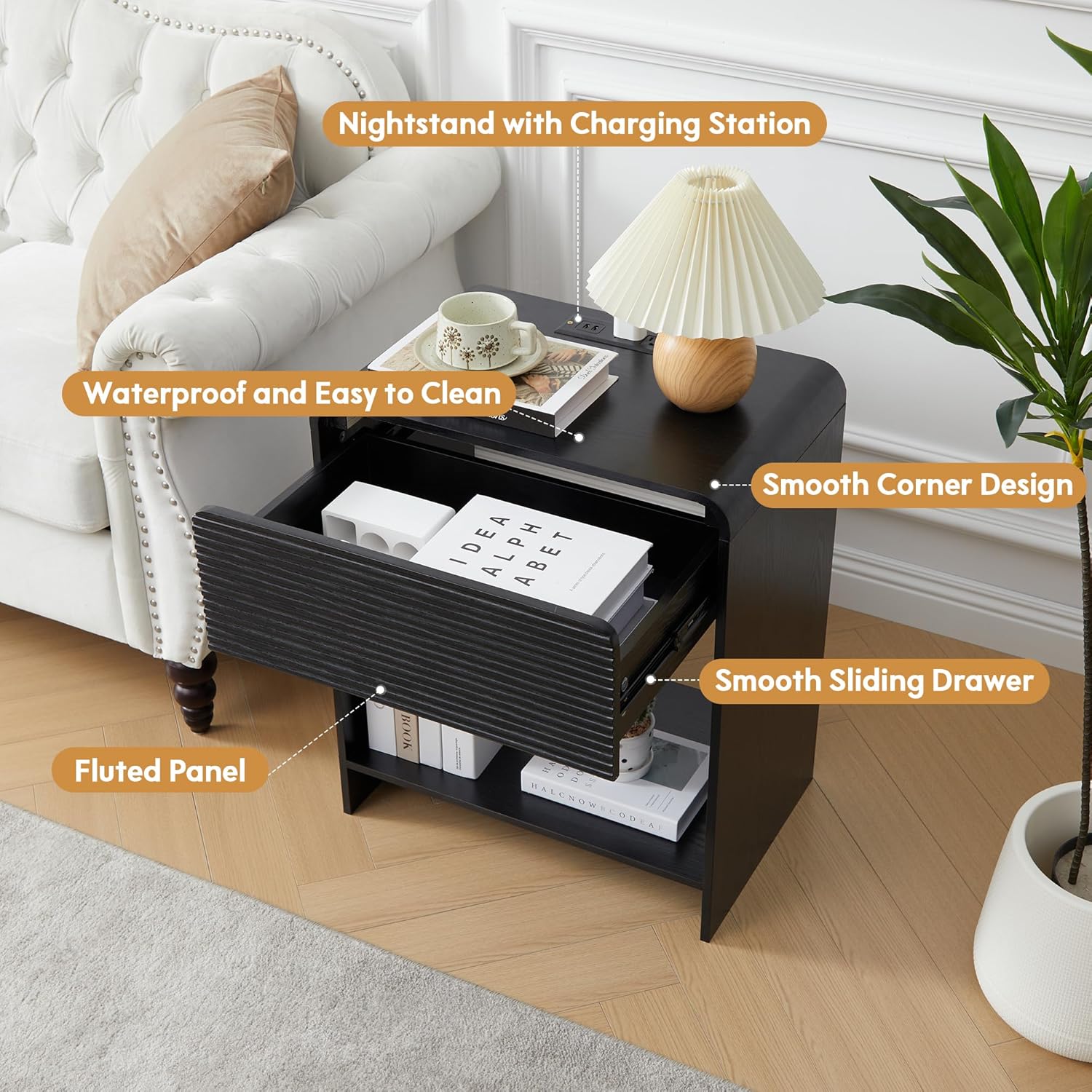
Image: The nightstand with its drawer open, showcasing the fluted panel design, smooth corners, and the smooth operation of the drawer slides. The top surface features a lamp and the charging station.
Maintenance
To maintain the appearance and longevity of your nightstand, follow these care instructions:
- Cleaning: Wipe surfaces with a damp cloth, then immediately dry with a clean, dry cloth. Avoid abrasive cleaners or harsh chemicals.
- Spills: Promptly clean up any spills to prevent staining or damage to the water-resistant surface.
- Inspection: Periodically check all screws and fasteners and tighten if necessary to ensure stability.
- Placement: Avoid placing the nightstand in direct sunlight or near heat sources to prevent material degradation.
Troubleshooting
If you encounter any issues with your XUZENEST Fluted Nightstand, refer to the following common solutions:
| Problem | Possible Cause | Solution |
|---|---|---|
| Drawer does not slide smoothly. | Misaligned drawer slides or loose screws. | Check the alignment of the drawer slides and tighten all screws. Ensure no obstructions are in the way. |
| Charging station not working. | Power cord not fully plugged in; wall outlet issue; overloaded circuit. | Ensure the power cord is securely plugged into a functional wall outlet. Check if the outlet is receiving power. Avoid overloading the charging station with too many high-power devices. |
| Nightstand feels unstable. | Loose assembly screws; uneven floor. | Tighten all assembly screws. If the floor is uneven, use furniture pads or shims to level the nightstand. |
Specifications
| Feature | Detail |
|---|---|
| Brand | XUZENEST |
| Model Name | Fluted Nightstand with Charging Station |
| Model Number | FN-003 |
| Product Dimensions (D x W x H) | 13.77"D x 20.86"W x 24.8"H |
| Item Weight | 25 Pounds |
| Frame Material | Engineered Wood |
| Color | Black |
| Charging Station | 2 AC Outlets (125V/12A), 2 USB Ports (5V/2A) |
| Power Cord Length | 6.56 feet |
| Number of Drawers | 1 |
| Recommended Uses | Bedside table, End table, Side table |
| Care Instructions | Wipe with Damp Cloth, Wipe with Dry Cloth |
Warranty and Support
For warranty information or customer support, please refer to the documentation included with your purchase or contact XUZENEST customer service directly.
If you have any questions or require assistance with assembly or operation, please do not hesitate to reach out to the manufacturer.
Ask a question about this manual
Ask about setup, troubleshooting, compatibility, parts, safety, or missing instructions. Manuals+ will review the question and use this page’s manual context to help answer it.