
Introduction
This instruction manual provides essential information for the safe and efficient operation of your inShareplus 200W Low Voltage Landscape Transformer. This device is designed to convert 120V AC household current to a safe 12V or 15V AC for outdoor landscape lighting systems, featuring a photocell sensor and timer functions for automated control.
Safety Information
- Electrical Safety: Always disconnect power before installing, servicing, or cleaning the transformer. Ensure all connections are secure and waterproof for outdoor use.
- Load Recommendation: To extend the lifespan of the transformer and ensure optimal performance, keep the total connected load under 160W (80% of the rated 200W capacity).
- Voltage Compatibility: Verify that your landscape lighting fixtures are compatible with either 12V AC or 15V AC output. Connecting incompatible fixtures may cause damage.
- Installation Height: For best performance of the photocell sensor, install the transformer at a height between 39-59 inches (1-1.5 meters) from the ground.
- Circuit Protection: The transformer includes built-in circuit and overload protection. In case of a short circuit or overload, the unit will automatically cut power to protect itself and connected lights.
- Weatherproofing: While designed for outdoor use with a durable 304 stainless steel housing, ensure the unit is installed in a location that minimizes direct exposure to extreme weather conditions.
Package Contents
Please check the package to ensure all items are present:
- 1 x Low Voltage Landscape Transformer
- 2 x Screws
- 2 x Wall Anchors
- 1 x Instruction Manual
Specifications
| Input Voltage | 120V AC, 60Hz |
| Output Voltage | 12V AC (16.6A MAX) / 15V AC (13.3A MAX) |
| Max Wattage | 200W |
| Power Cord | 6.5 ft (2m) 18AWG, UL-certified |
| Housing Material | 304 Stainless Steel |
| Dimensions (L x W x H) | 9.14 x 13.97 x 21.59 cm (3.6 x 5.5 x 8.5 inches) |
| Item Weight | 3.12 kg |
| Model Number | ISP-US-GGBYQ-120V-200W-1 |
Setup and Installation
Mounting the Transformer
The transformer features pre-drilled mounting holes on its back for easy wall installation. Use the provided screws and wall anchors to securely fix the unit to a suitable outdoor surface. Ensure the mounting location allows for the recommended photocell sensor height of 39-59 inches (1-1.5 meters) and provides access to a 120V AC power outlet.
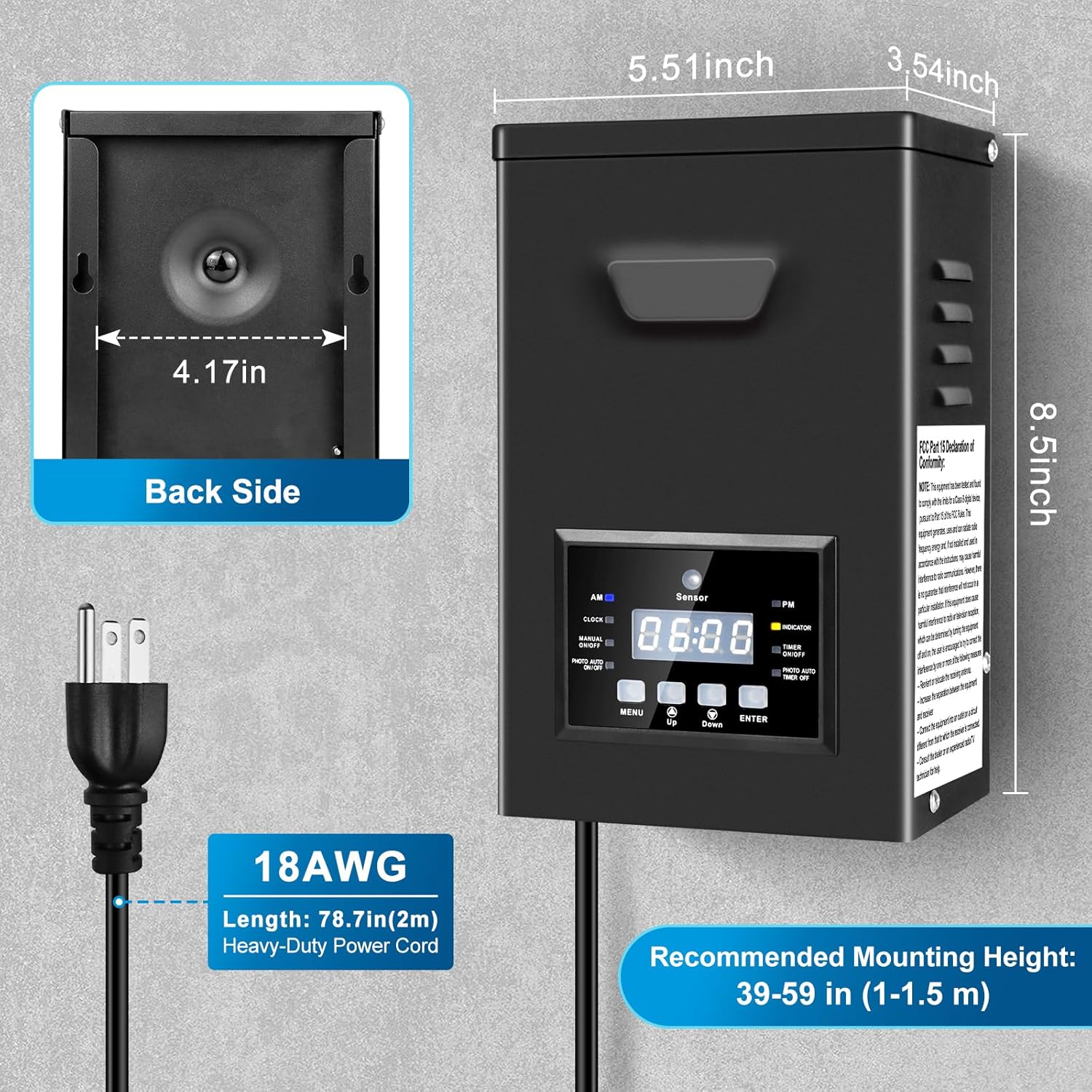
Image: Back view of the inShareplus landscape transformer, highlighting the mounting bracket and dimensions for installation. The image shows the back panel with a central mounting point and measurements of 4.17 inches for the mounting width.
Wiring Landscape Lights
The transformer is equipped with two output ports, providing both 12V AC and 15V AC options. The 15V output is beneficial for longer wire runs to compensate for voltage drop. Connect your landscape lighting wires to the appropriate terminals. Ensure all connections are tight and secure.
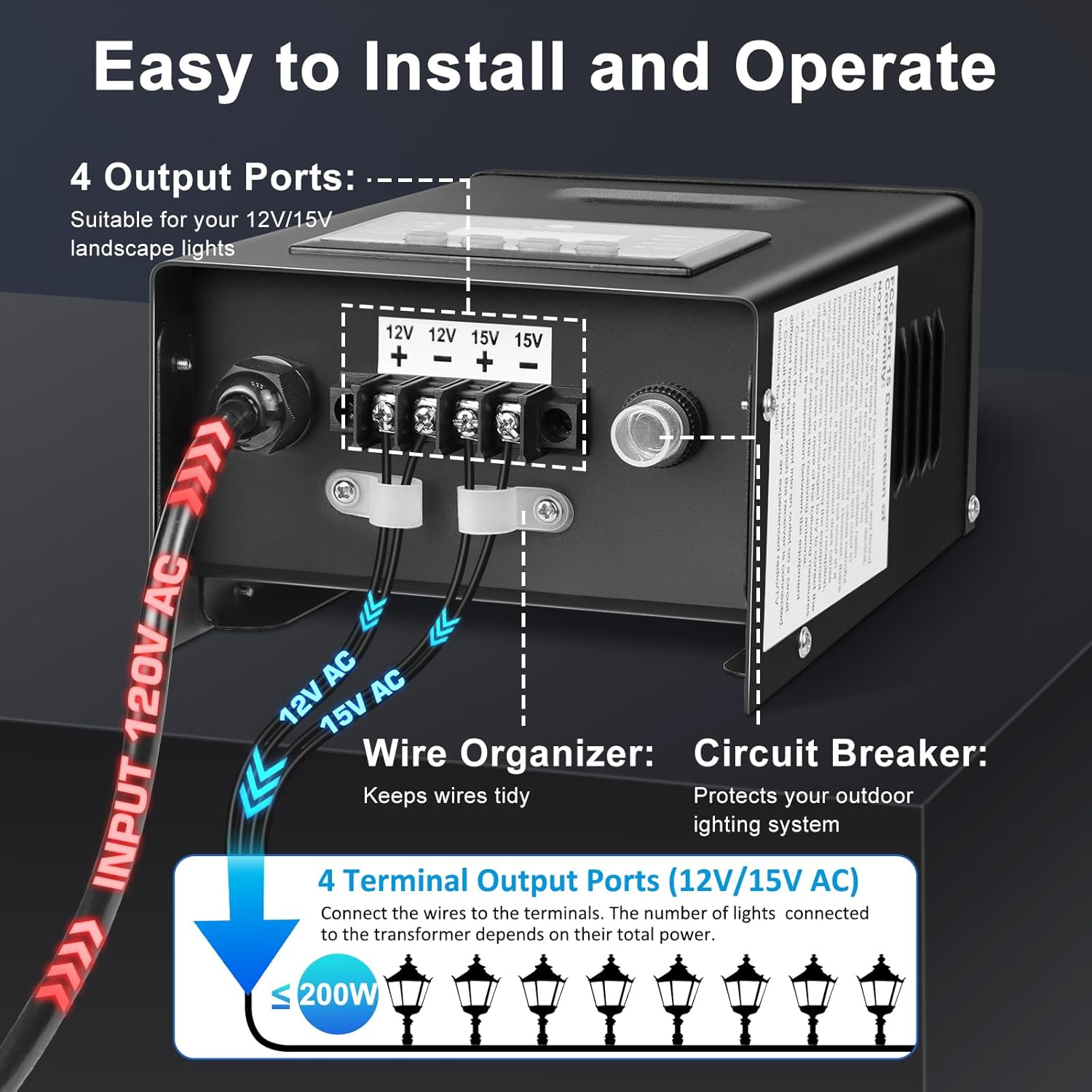
Image: A detailed diagram illustrating the wiring connections on the inShareplus landscape transformer. It shows the 120V AC input, the two output ports (12V AC and 15V AC) with terminal blocks for connecting landscape light wires, a wire organizer, and a circuit breaker. The diagram also indicates that the total connected load should be less than or equal to 200W.
- Prepare Wires: Strip approximately 1/2 inch of insulation from the ends of your landscape lighting cables.
- Connect to Terminals: Loosen the screws on the desired 12V or 15V output terminals. Insert the bare wire ends into the terminals and tighten the screws firmly. Ensure no stray wire strands are touching other terminals.
- Secure Connections: For outdoor use, it is recommended to use waterproof wire connectors or sealant to protect all low-voltage connections from moisture.
- Plug In: Once all lighting connections are made and secured, plug the transformer's 6.5-foot power cord into a grounded 120V AC outdoor outlet.
Operating Modes
The inShareplus transformer offers multiple operating modes to suit various lighting needs. Use the control panel buttons (MENU, Up, Down, ENTER) to navigate and set your preferred mode.

Image: An infographic displaying the various operating modes of the inShareplus 200W Low-Voltage Landscape Transformer. It shows icons and descriptions for Manual On/Off, Photocell Auto: Dusk to Dawn, Timer On/Off, and Dusk ON, OFF at Set Time, along with a close-up of the transformer's digital display and control buttons.
Available Modes:
- MANUAL ON/OFF: This mode allows you to manually switch your outdoor landscape lights on or off at any time using the transformer's controls.
- PHOTO AUTO ON/OFF (Dusk to Dawn): Utilizing the built-in photocell sensor, the transformer automatically turns lights on at dusk and off at dawn. There is a 30-second delay after detecting darkness before the lights activate.
- PHOTO AUTO ON/TIMER OFF: In this mode, the transformer turns on at dusk (triggered by the photocell sensor) and then turns off at a specific time you set (TIMER OFF). This ensures lights are off at a consistent time each night.
- TIMER ON/TIMER OFF: This mode allows you to set specific ON and OFF times for your lights. The transformer will activate and deactivate at these programmed times daily, regardless of ambient light conditions.

Image: A visual comparison of the 'Photocell Auto: Dusk to Dawn' and 'Dusk ON • OFF at set time' modes. The left panel shows lights turning on at dusk and off at dawn automatically. The right panel shows lights turning on at dusk and then switching off at a user-scheduled time, illustrating the functionality of the photocell sensor.
Maintenance
The inShareplus landscape transformer is designed for durability and minimal maintenance. However, regular checks can ensure its longevity and optimal performance:
- Cleaning: Periodically wipe the exterior of the transformer with a soft, damp cloth to remove dirt and debris. Ensure the photocell sensor is clean and unobstructed for accurate light detection.
- Connection Checks: Annually inspect all wire connections to ensure they remain tight and free from corrosion. Re-tighten if necessary.
- Environmental Factors: While weatherproof, avoid prolonged submersion or installation in areas prone to standing water. Ensure proper drainage around the unit.
Troubleshooting
| Problem | Possible Cause | Solution |
|---|---|---|
| Lights not turning on | No power to transformer; Circuit breaker tripped; Loose wire connections; Photocell obstructed; Incorrect timer settings; Overload. | Check power outlet; Reset circuit breaker (if tripped); Inspect and tighten all wire connections; Clear any obstructions from the photocell sensor; Verify timer settings; Reduce total connected wattage to below 160W. |
| Lights stay on/off constantly | Photocell sensor malfunction or obstruction; Incorrect mode selection; Timer settings incorrect. | Ensure photocell is clean and exposed to natural light/darkness; Verify the correct operating mode (e.g., Dusk to Dawn) is selected; Adjust timer settings as needed. |
| Lights flicker or dim | Overload; Loose connections; Voltage drop on long runs. | Reduce total connected wattage; Check and tighten all wire connections; For long runs, consider using the 15V output or thicker gauge wire. |
If the transformer is not working, try resetting the circuit breaker located on the unit. If issues persist after troubleshooting, contact customer support.
Warranty and Support
Specific warranty information for this product is not provided within this manual. For warranty details, technical support, or service inquiries, please refer to the product packaging or contact inShareplus customer service directly through their official website or the retailer where the product was purchased.