
Introduction
Thank you for choosing the Tatub Twin Loft Bed with Desk and LED Lights. This manual provides essential information for the safe assembly, operation, and maintenance of your new loft bed. Please read all instructions carefully before beginning assembly and retain this manual for future reference.

Image: Overview of the Tatub Twin Loft Bed, highlighting its multi-functional design for sleeping, studying, storage, and integrated LED lighting.
Safety Information
Your safety is paramount. Adhere to all warnings and instructions to prevent injury or damage.
- Always assemble according to the provided instructions.
- This loft bed is not intended for children under 6 years old.
- Do not exceed the weight limit of 200 lbs for the bed frame.
- The desk surface has a weight limit of 100 lbs.
- Keep the area around the bed clear to prevent falls.
- Always use the ladder to access the bed. Do not climb on the frame.
- Do not allow children to play on or around the bed unsupervised.
- Regularly check all bolts and connections to ensure they remain tight.
- Use a mattress that meets the recommended dimensions for a twin bed.

Image: Illustration of the loft bed's durable metal construction and its designated weight capacities.
Package Contents
Before assembly, verify that all components are present and undamaged. If any parts are missing or damaged, contact customer support immediately.
- Metal Bed Frame Components
- Desk Surface Panels
- Adjustable Monitor Stand Components
- Ladder
- LED Light Strip with Controller (App/Remote)
- Hardware Pack (screws, bolts, nuts, Allen wrench)
- Instruction Manual
Setup and Assembly
Assembly requires at least two adults. Clear a large, open space for assembly. Lay out all parts and hardware. Carefully review the assembly diagrams before attaching any components. Pay close attention to the orientation of each piece to avoid reassembly.
- Prepare the Area: Clear a spacious, flat area. Place a blanket or cardboard on the floor to prevent scratching components.
- Identify Parts: Unpack all components and identify them using the provided parts list and diagrams. Ensure all holes align correctly before tightening any fasteners.
- Assemble Base Frame: Begin by assembling the main vertical and horizontal support beams for the bed and desk structure. Do not fully tighten bolts until the entire frame is loosely assembled.
- Attach Desk Components: Secure the desk surface panels to the frame. Ensure they are level and stable.
- Install Monitor Stand: Attach the adjustable monitor stand to the designated area on the desk.
- Assemble Bed Platform: Install the bed slats onto the upper frame. Ensure all slats are securely fastened.
- Attach Guardrails: Secure the guardrails around the perimeter of the bed platform.
- Install Ladder: The ladder can be installed on either side of the bed. Choose the desired side and securely attach the ladder.
- Final Tightening: Once all components are in place and aligned, systematically tighten all bolts and screws. Do not overtighten.
- Install LED Lights: Adhere the LED light strip to the underside of the monitor stand or desired location. Connect the power supply and controller.
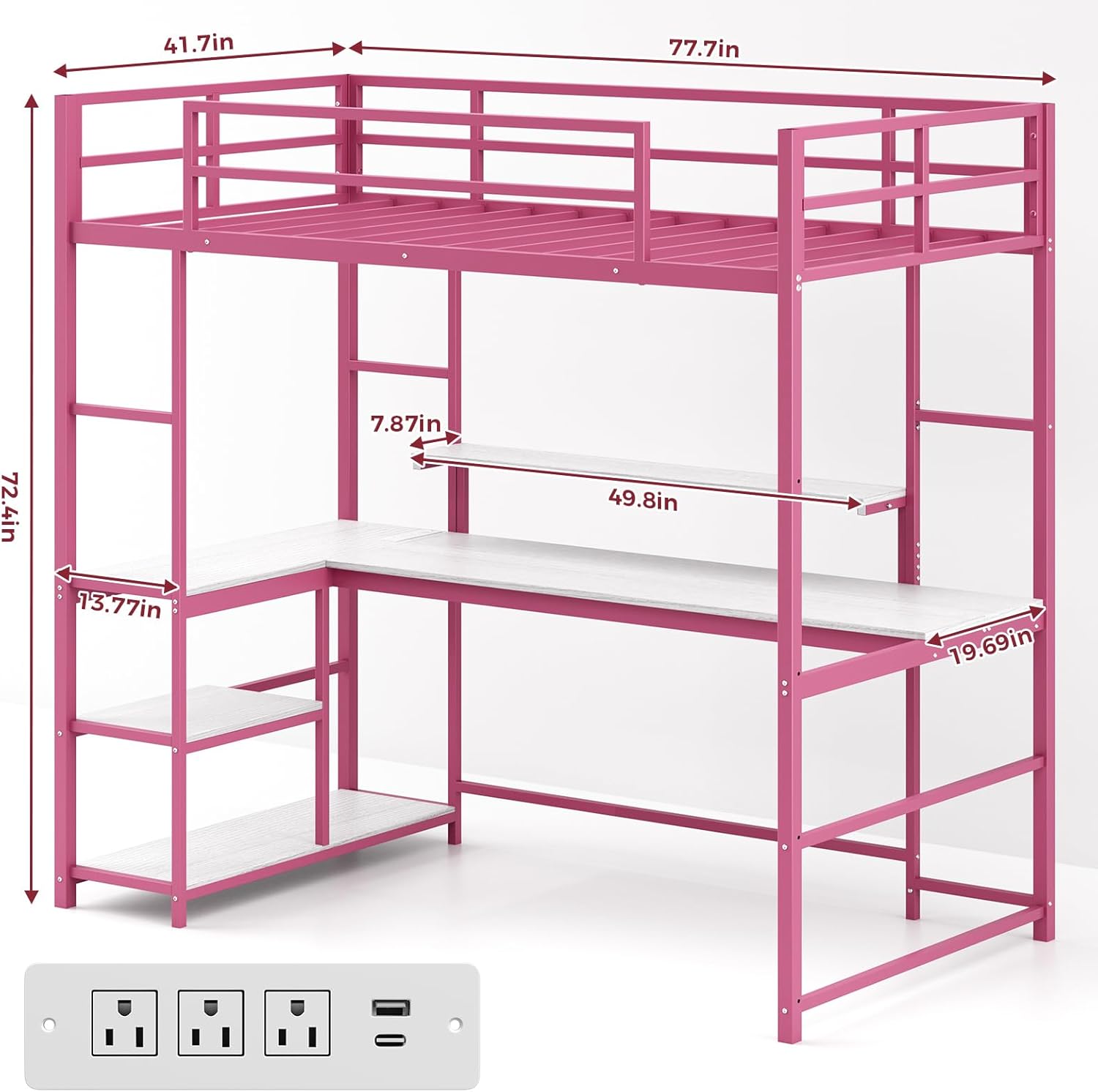
Image: Dimensional diagram of the Tatub Twin Loft Bed, illustrating overall measurements and key component sizes for planning and assembly.
Operating Instructions
Adjustable Monitor Stand
The monitor stand is designed for height adjustment to optimize viewing comfort. To adjust, gently lift or lower the stand to the desired position. Ensure it clicks into place or is securely fastened if it uses a locking mechanism (refer to specific hardware instructions if applicable).

Image: Detailed view of the adjustable monitor stand, demonstrating its vertical movement capability for ergonomic setup.
LED Lights
The integrated LED lights offer a wide range of color options and music synchronization. They can be controlled via a dedicated app on your smartphone or the included remote control.
- App Control: Download the specified app (check packaging or included instructions for app name). Follow the app's instructions to pair with the LED lights. This allows for extensive customization of colors, brightness, and lighting modes, including music sync.
- Remote Control: Use the provided remote to turn the lights on/off, change colors, adjust brightness, and select pre-set modes. Ensure the remote has working batteries and is pointed towards the LED receiver.
Maintenance
- Cleaning: Wipe down metal and desk surfaces with a soft, damp cloth. Avoid abrasive cleaners or harsh chemicals that could damage the finish.
- Hardware Check: Periodically (e.g., every 3 months) inspect all bolts, screws, and connections. Tighten any loose hardware to maintain stability and safety.
- LED Lights: If LED lights malfunction, check the power connection and remote control batteries. If issues persist, contact customer support.
Troubleshooting
| Problem | Possible Cause | Solution |
|---|---|---|
| Bed feels wobbly or unstable. | Loose hardware. Uneven floor. | Tighten all bolts and screws. Ensure the bed is on a level surface. Consider using furniture pads if the floor is uneven. |
| LED lights not turning on. | Power disconnected. Remote battery dead. App not paired. | Check power adapter connection. Replace remote batteries. Re-pair the app with the LED controller. |
| Difficulty assembling parts. | Incorrect orientation of parts. Missing hardware. | Review the assembly diagrams carefully for part orientation. Ensure all hardware is present. Do not force parts; contact support if components do not fit. |
| Squeaking noises from bed. | Loose connections. Friction between metal parts. | Tighten all bolts. Apply a small amount of lubricant (e.g., silicone spray) to contact points if necessary, avoiding areas that contact the mattress. |
Specifications
- Model: Loft Bed
- Brand: Tatub
- Size: Twin
- Color: Pink
- Product Dimensions: 77.8"L x 41.7"W x 72.5"H
- Desk Width: 19.68"
- Bed Weight Capacity: 200 lbs
- Desk Weight Capacity: 100 lbs
- Item Weight: 122 Pounds
- Special Features: L-Shape Desk, Adjustable Monitor Stand, Integrated LED Lights, Ladder (reversible)
- UPC: 797383015799
Warranty Information
This Tatub Twin Loft Bed comes with a Limited Warranty. Please refer to the warranty card included in your package or contact Tatub customer support for specific terms and conditions regarding coverage, duration, and claims procedures.
Customer Support
For assistance with assembly, missing parts, troubleshooting, or warranty claims, please contact Tatub customer support. Have your model number and purchase date ready when you call or email.
Contact information (e.g., phone number, email, website) would typically be provided here by the manufacturer.