
1. Introduction
The coczow PM8200A is a versatile and precise multifunction electrical tester designed for a wide range of applications, from industrial production to DIY electrical work. It features automatic range adjustment and can measure AC/DC voltage, perform phase sequence tests, continuity tests, and RCD tests. With its robust design and safety features, it provides reliable performance in various environments.
2. Safety Information
Always prioritize safety when working with electrical systems. This device is designed with several safety features:
- Overvoltage Protection: CATIV 600V, CATII 1000V.
- Double Insulation Protection: Enhances user safety.
- High Voltage Indicator: Alerts the user to dangerous voltage levels.
- IP65 Protection Level: Ensures safe operation even in rain or wet conditions, protecting against dust and water jets.
- Low Battery Indicator: Prompts battery replacement when power is low to ensure accurate readings.
Before each use, inspect the device and test leads for any damage. Do not use the device if it appears damaged or is not operating correctly. Always follow local safety regulations and guidelines for electrical work.
3. Package Contents
The coczow PM8200A package includes the following items:
- PM8200A Voltage Tester
- 2 x 1.5V AAA Batteries (pre-installed or included separately)
- User Manual
- Protective Rubber Cover for Test Leads
4. Product Overview
The PM8200A is an ergonomic and robust electrical tester designed for ease of use and durability. It features a clear LED display for voltage indication and various function buttons.

Figure 4.1: Overview of the coczow PM8200A Electrical Tester with key features highlighted.

Figure 4.2: Detailed view of the PM8200A tester with voltage indication LEDs, connectivity indicator, and AC/DC indicators.
5. Setup
Before using your PM8200A tester, ensure the batteries are correctly installed and the device is ready for operation.
5.1 Battery Installation
The PM8200A requires two 1.5V AAA batteries. Refer to the battery compartment on the device for correct polarity. Replace batteries when the low battery indicator appears on the display.
5.2 Initial Check
Before performing any measurements, it is recommended to perform a quick continuity test by touching the two test probes together. The continuity indicator and buzzer should activate, confirming the device is functioning correctly.
6. Operating Instructions
The PM8200A offers several measurement functions. Always ensure proper connection and safety precautions.
6.1 AC/DC Voltage Measurement
The tester automatically detects AC or DC voltage and displays the approximate voltage level using its 9-level LED indicator. It can measure up to 1200V AC and 1500V DC.
- Connect the test probes to the circuit or component to be measured.
- The device will automatically detect the voltage type (AC/DC) and display the voltage level via LEDs.
- The digital display will show the precise voltage value.

Figure 6.1: The PM8200A measuring AC/DC voltage, indicating its wide measurement range.
6.2 Phase Sequence Test (Three-Phase)
This function is used to determine the phase rotation in three-phase AC systems.
- Connect the test probes to two phases of the three-phase system.
- The tester will indicate forward (L) or reverse (R) rotation using the dedicated LEDs.
- Applicable for three-phase AC voltage between 150V and 400V (50Hz-60Hz).

Figure 6.2: Performing a phase sequence test with the PM8200A. The rotation is indicated by L and R symbols, applicable to three-phase AC systems within 150V-400V (50Hz-60Hz).

Figure 6.3: Visual representation of the three-phase rotation measurement on the PM8200A.
6.3 Continuity Test
The continuity test checks for an unbroken path in a circuit. The tester will emit a buzzer sound and illuminate the continuity LED if continuity is detected (resistance ≤ 100 kΩ).
- Ensure the circuit is de-energized before testing continuity.
- Touch the test probes to the two points of the circuit you wish to test.
- A continuous beep and LED illumination indicate continuity.
6.4 RCD Test
The Residual Current Device (RCD) test checks the functionality of RCDs, ensuring they trip correctly to prevent electric shock.
- Connect the test probes to the live and earth terminals of the circuit protected by an RCD.
- Press the RCD test button. The RCD should trip within 10 seconds.
- Test conditions: 230V (40-500Hz), trip current 30mA-40mA. Recovery time is 60 seconds.

Figure 6.4: The PM8200A conducting an RCD test on a standard power outlet.

Figure 6.5: Visual demonstration of the RCD test function.
6.5 Single Neutral/Phase Detection
The PM8200A can identify live and neutral wires using a single test probe.
- Insert one test probe (typically L2) into the socket or touch the wire.
- The device will indicate if it's a live wire (phase) or a neutral wire.

Figure 6.6: Using a single test pen (L2) to measure and detect whether a wire is neutral or live.
6.6 Additional Functions
- Lighting Function: The integrated flashlight assists in working in dimly lit areas.
- HOLD Function: Allows you to freeze the current measurement on the display for easier reading.
6.7 Automobile Voltage Detection
The PM8200A can also be used for detecting voltage and identifying positive and negative poles in automobile electrical systems.
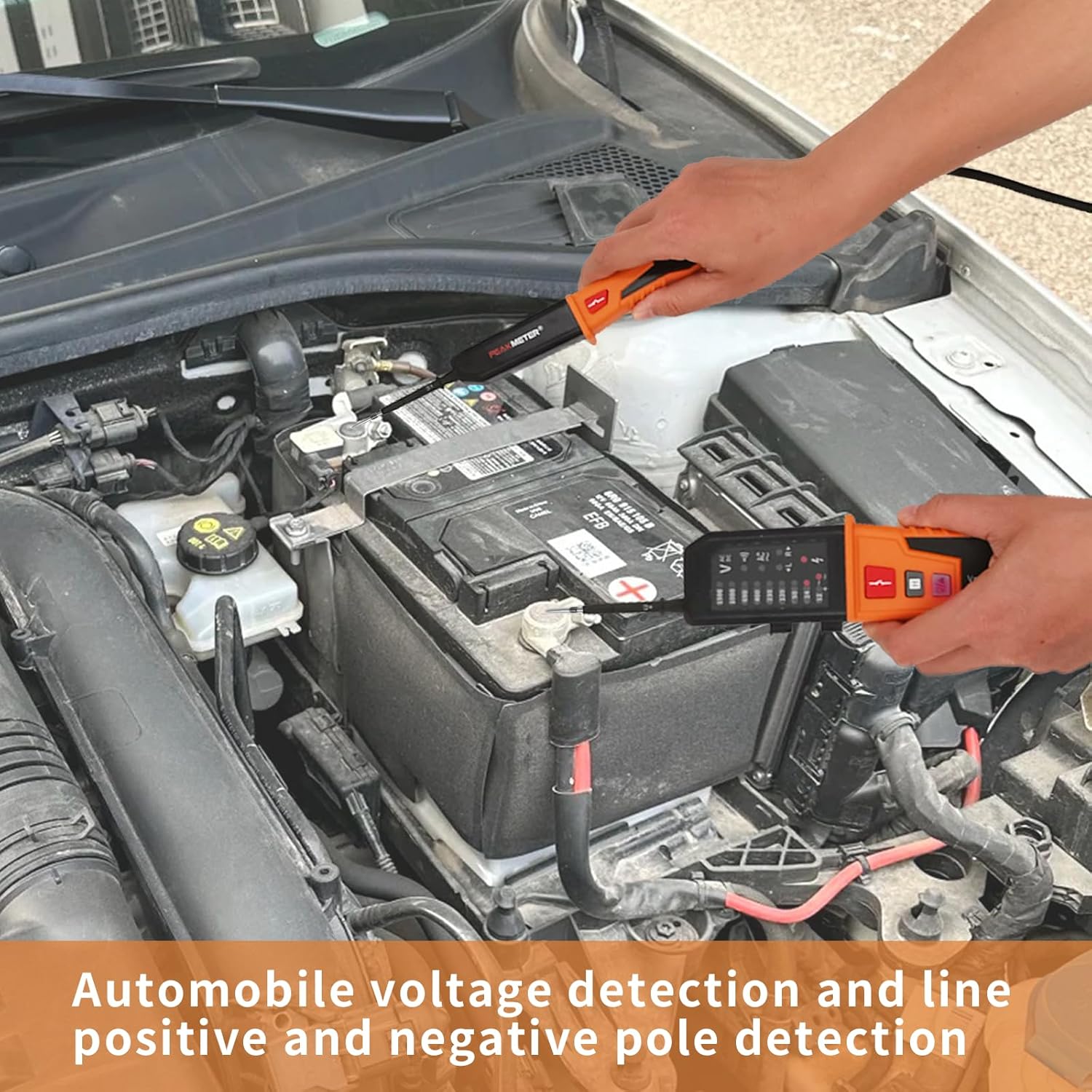
Figure 6.7: The PM8200A used for automobile voltage detection and identifying positive and negative poles.
6.8 Instructional Video
Video 6.1: Demonstration of the UNI-T UT18D Voltage and Continuity Tester, which shares similar functionalities with the coczow PM8200A, showcasing voltage and continuity measurements.
7. Maintenance
Proper maintenance ensures the longevity and accuracy of your PM8200A tester.
- Cleaning: Wipe the device with a dry, soft cloth. Do not use abrasive cleaners or solvents.
- Battery Replacement: Replace batteries promptly when the low battery indicator appears. Ensure correct polarity.
- Storage: Store the device in a cool, dry place away from direct sunlight and extreme temperatures. If storing for extended periods, remove the batteries to prevent leakage.
- Test Leads: Regularly inspect test leads for cuts, cracks, or damage. Replace damaged leads immediately.
8. Troubleshooting
If you encounter issues with your PM8200A, refer to the following common troubleshooting steps:
- No Display/Device Not Turning On: Check battery installation and ensure batteries are not depleted. Replace if necessary.
- Inaccurate Readings: Ensure test probes are making good contact. Check battery level. Avoid strong electromagnetic fields.
- No Continuity Indication: Verify the circuit is de-energized. Check for open circuits or damaged wires.
- RCD Not Tripping: Ensure the RCD test button is pressed correctly. Verify the RCD itself is functional. Check the voltage and frequency of the circuit.
- Intermittent Operation: Check for loose connections in the test leads or battery compartment.
If problems persist after following these steps, contact customer support.
9. Specifications
| Feature | Specification |
|---|---|
| Model Number | PM8200A |
| Manufacturer | coczow |
| AC Voltage Range | 12V ~ 1200V |
| DC Voltage Range | 12V ~ 1500V |
| Phase Sequence Test | 150V ~ 400V AC (50Hz ~ 60Hz) |
| Continuity Test | Resistance ≤ 100 kΩ |
| RCD Test Voltage | 230V (40-500Hz) |
| RCD Test Current | 30mA ~ 40mA |
| RCD Test Time | < 10s |
| Protection Level | IP65 |
| Overvoltage Category | CATIV 600V, CATII 1000V |
| Power Source | 2 x 1.5V AAA Batteries |
| Item Weight | 440 g |
| Product Dimensions | 8 x 3.4 x 27.5 cm |
| Measurement Accuracy | 0.5 |
| Certifications | CE, IEC 1010 |
10. Warranty and Support
The coczow PM8200A comes with a standard manufacturer's warranty. For warranty claims, technical support, or service inquiries, please refer to the contact information provided with your purchase or visit the official coczow website. Keep your proof of purchase for warranty validation.