
1. Introduction
This instruction manual provides detailed guidance for the assembly, safe operation, and maintenance of your ADORNEVE Low Bunk Bed. Please read all instructions carefully before beginning assembly and retain this manual for future reference.

Image 1.1: The ADORNEVE Low Bunk Bed in black, featuring integrated bookshelves, storage drawers, and LED lighting.
2. Safety Information
WARNING: Failure to follow these warnings and instructions could result in serious injury or death.
- Always assemble according to the provided instructions to prevent instability.
- Be cautious of sharp steel legs and potential pinch points, especially when making the bed or adjusting the drawers.
- Keep the bed away from walls to prevent tip-overs unless secured with the anti-toppling device.
- Do not exceed the weight capacity of 82.5 pounds per level.
- Ensure all connections are tight before use. Periodically check and tighten all fasteners.
- The top bunk is not suitable for children under 6 years of age.
- Use only mattresses that are 4-6 inches thick for the upper bunk and 6-12 inches thick for the lower bunk.
- Always use the ladder for entering and exiting the upper bunk.
- Prohibit more than one person on the upper bunk.
- Prohibit horseplay on or under the bed.
- Do not attach or hang items to any part of the bunk bed that are not designed for use with the bed; for example, but not limited to, hooks, belts, or jump ropes.
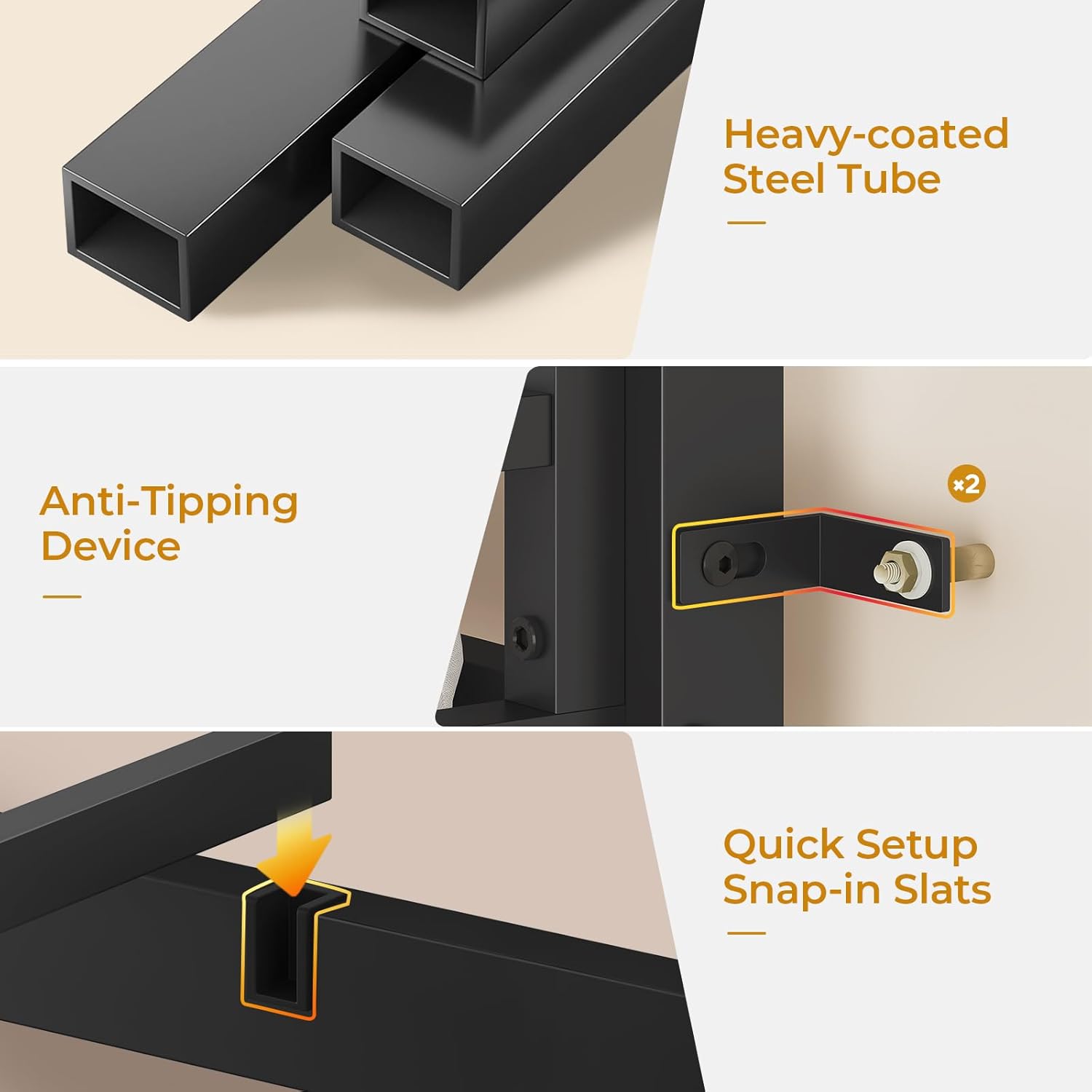
Image 2.1: Detail of the anti-tipping device and heavy-coated steel tube construction, highlighting safety features.
3. Product Features
- Durable Construction: Crafted with high-quality, non-toxic powder-coated steel for stability and longevity.
- Integrated Storage: Features a 3-tier bookshelf, a sling rack, and two durable drawers for organizing books, toys, and clothing.
- RGB LED Lighting: Under-bed RGB lights offer customizable color options for various moods and activities, controllable via remote or app.
- Floating Power Hub: A suspended power outlet includes two AC outlets, one USB-A port, and one USB-C port for convenient device charging.
- Enhanced Safety: Includes a full-length guardrail on the top bunk (13.4 inches high) and an anti-toppling device for added stability. The ladder features wide rungs with pool noodles for comfort.
- Easy Assembly: Designed for quick setup with labeled parts, tools, and step-by-step instructions, estimated to take 1.5 hours with two people.

Image 3.1: Close-up of the integrated 3-tier bookshelf, sling rack, and two pull-out drawers, providing ample storage.
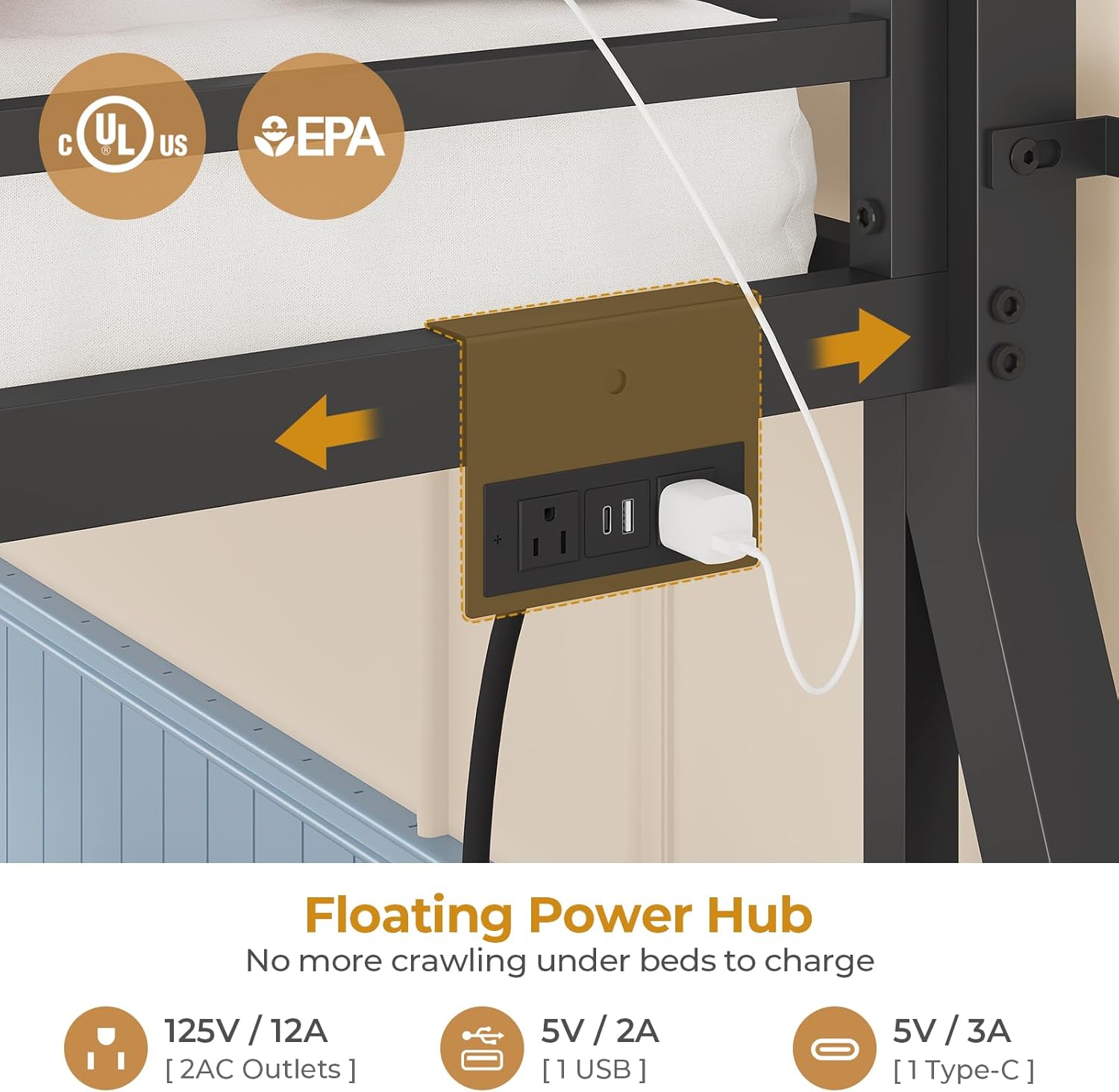
Image 3.2: The suspended power hub, offering convenient access to two AC outlets, one USB-A, and one USB-C port.

Image 3.3: The RGB LED lighting system illuminating the lower bunk area, with icons indicating remote and app control capabilities.
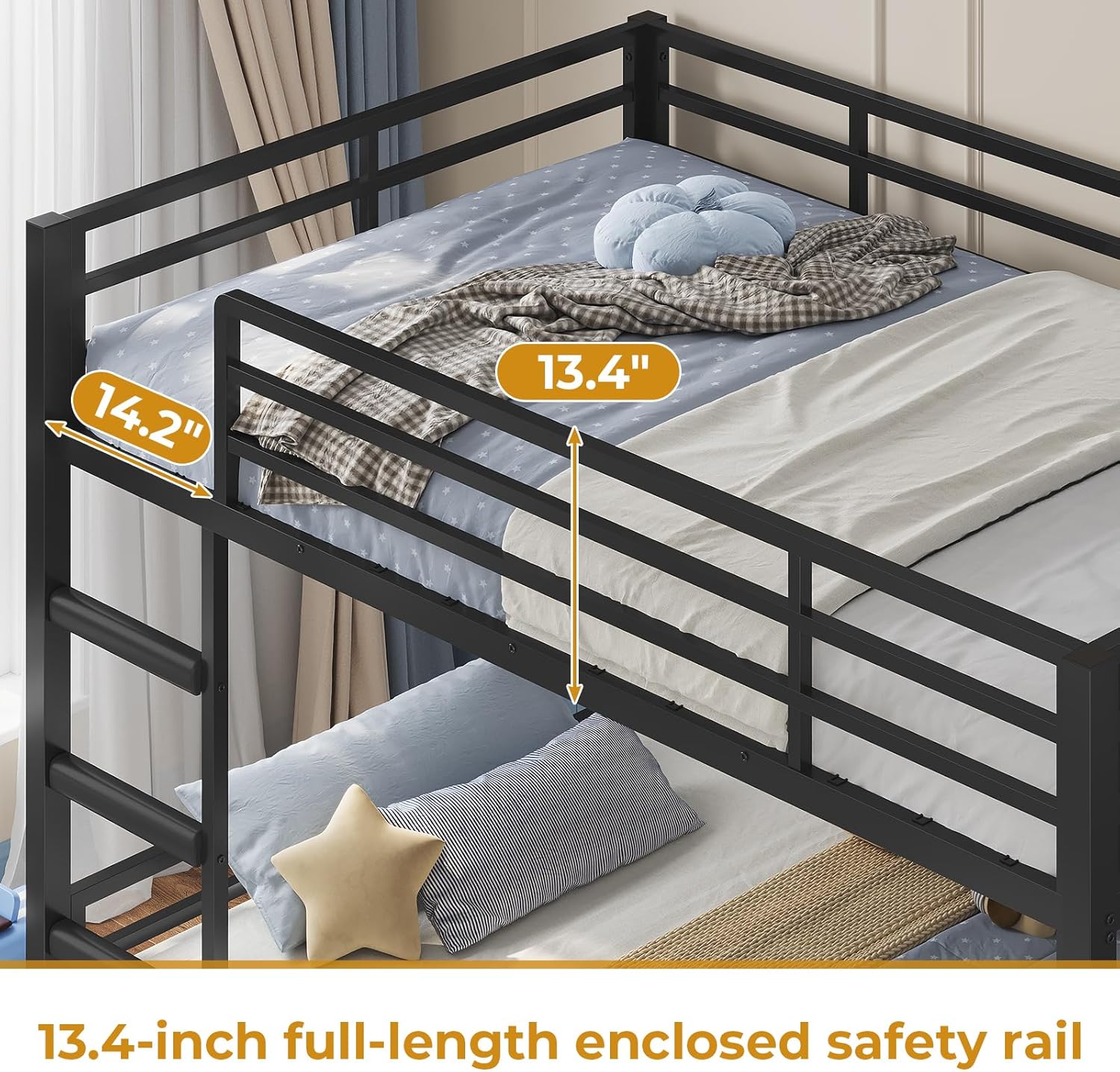
Image 3.4: Detail of the 13.4-inch full-length guardrail on the top bunk, designed for user safety.
4. Setup and Assembly
Assembly of the ADORNEVE Low Bunk Bed requires two people and is estimated to take approximately 1.5 hours. All necessary parts, tools, and step-by-step instructions are included in the packaging.
- Unpack Components: Carefully unpack all parts and hardware. Verify that all components listed in the parts list are present and undamaged.
- Frame Assembly: Follow the provided diagrams to assemble the main metal frame of the bunk bed. Ensure all bolts are finger-tightened initially.
- Slat Installation: Install the snap-in metal slats for both the upper and lower bunks. Ensure they are securely seated.
- Ladder Attachment: Attach the ladder securely to the designated side of the bunk bed.
- Bookshelf and Drawer Assembly: Assemble the 3-tier bookshelf and sling rack, then integrate the storage drawers into their respective positions.
- Power Hub Installation: Mount the floating power hub to the side of the bed frame as indicated in the instructions.
- LED Light Installation: Adhere the RGB LED light strip to the underside of the top bunk or desired location, connecting it to the power source.
- Anti-Toppling Device: Securely install the anti-toppling device to the bed frame and an adjacent wall to prevent accidental tipping.
- Final Tightening: Once all components are in place, systematically tighten all bolts and fasteners using the provided tools. Do not overtighten.

Image 4.1: Visual representation of key assembly components including upgraded steel tubes, snap-in slats, and ladder design.

Image 4.2: Detailed view of the anti-tipping device, illustrating its components and installation method.
5. Operating Instructions
5.1. RGB LED Lighting System
The integrated RGB LED lights can be controlled via a remote control or a smartphone application. Refer to the separate LED light instruction sheet for specific pairing and operation details.
- Power On/Off: Use the designated button on the remote or app to turn the lights on or off.
- Color Selection: Choose from over 60,000 colors using the color wheel or preset options.
- Brightness Adjustment: Adjust the light intensity to your preference.
- Modes: Explore various modes such as Music Mode (lights react to sound), Mic Mode, and Timing Function for scheduled operation.
Image 5.1: The RGB LED lighting system in operation, with icons indicating remote and app control capabilities.
5.2. Floating Power Hub
The power hub provides convenient access to electrical outlets and USB charging ports.
- AC Outlets: Two 125V/12A AC outlets are available for standard electrical devices.
- USB-A Port: One 5V/2A USB-A port for charging compatible devices.
- USB-C Port: One 5V/3A USB-C port for charging compatible devices.
- Ensure devices are compatible with the specified voltage and current ratings.
Image 5.2: Close-up of the floating power hub, showing the types of outlets and ports available.
6. Maintenance
- Cleaning: Wipe down the metal frame with a soft, damp cloth. Avoid abrasive cleaners or harsh chemicals that could damage the powder coating.
- Fastener Check: Periodically (e.g., monthly) check all bolts and screws to ensure they remain tight. Retighten as necessary to maintain structural integrity.
- Drawer Maintenance: Ensure drawers slide smoothly. Clean any debris from the drawer tracks if they become stiff.
- LED Lights: If LED lights malfunction, refer to the separate LED light instruction sheet for troubleshooting or contact customer support.
7. Troubleshooting
| Problem | Possible Cause | Solution |
|---|---|---|
| Bed feels wobbly or unstable. | Loose fasteners; anti-toppling device not installed or secured. | Check and tighten all bolts and screws. Ensure the anti-toppling device is correctly installed and secured to a wall stud. |
| Drawers do not slide smoothly. | Debris in tracks; misaligned drawers. | Clean drawer tracks. Realign drawers if necessary. |
| LED lights not working. | Power connection issue; remote/app not paired; faulty LED strip. | Check power connection to the LED strip. Ensure remote/app is correctly paired. Refer to the LED light manual for specific troubleshooting. |
| Power outlet not providing power. | Power hub not plugged in; circuit breaker tripped. | Ensure the power hub's plug is fully inserted into a working wall outlet. Check your home's circuit breaker. |
8. Specifications
| Feature | Detail |
|---|---|
| Model | Low Bunk Bed Twin Over Twin |
| Brand | ADORNEVE |
| Color | Black |
| Product Dimensions | 77.8"L x 42"W x 54.3"H |
| Material | Steel, MDF, Non-woven Fabric |
| Finish Type | Powder Coated |
| Item Weight | 82.5 pounds |
| Weight Capacity (per level) | 82.5 pounds [Note: The provided weight capacity of 82.5 pounds per level appears to be an error or refers to the product's shipping weight. Please refer to the product listing or contact customer support for accurate weight limits for users.] |
| Compatible Mattress Size | Twin over Twin |
| Recommended Mattress Thickness (Upper Bunk) | 4-6 inches |
| Recommended Mattress Thickness (Lower Bunk) | 6-12 inches |
| Special Feature | Squeak Resistant, Integrated Bookshelves, Storage Drawers, Power Outlet, LED Lights, Full-Length Guardrail |
| Assembly Required | Yes (Estimated 1.5 hours with 2 people) |

Image 8.1: Detailed dimensions of the ADORNEVE Low Bunk Bed, including height, length, and width measurements.

Image 8.2: Mattress thickness recommendations for the upper (4-6 inches) and lower (6-12 inches) bunks.
9. Warranty and Support
For warranty information, missing parts, or any questions regarding your ADORNEVE Low Bunk Bed, please contact ADORNEVE customer support. Refer to your purchase documentation for specific warranty terms and contact details.
You can typically find support contact information on the manufacturer's website or through the retailer where the product was purchased.
10. Product Video
Watch this video for an overview of the ADORNEVE Low Bunk Bed's features and design.
Video 10.1: An official product video showcasing the ADORNEVE RGB Low Bunk Bed with Built-in Bookshelves, highlighting its features and design in a room setting.