
1. Introduction
This manual provides detailed instructions for the installation, operation, and maintenance of your GTRUI 10.1 Inch QLED Android Car Stereo. This unit is designed to enhance your in-car entertainment and navigation experience with advanced features such as Wireless Apple CarPlay, Android Auto, GPS, Bluetooth 5.0, and a high-resolution QLED touch screen. Please read this manual thoroughly before installation and use to ensure proper functionality and safety.
2. Vehicle Compatibility
This car stereo is specifically designed for the following vehicle models and years:
- Jeep Wrangler/Unlimited: 2007-2018
- Jeep Compass: 2009-2016
- Jeep Patriot: 2009-2016
- Jeep Grand Cherokee: 2005-2011
- Jeep Commander: 2008-2011
- Chrysler Sebring: 2007-2010
- Chrysler Town&Country: 2007-2010
- Dodge Grand Caravan: 2011-2014
- Dodge Charger: 2008-2010
- Dodge Ram 1500/2500/3500: 2009-2012
The unit supports existing steering wheel controls for these compatible models.
3. Package Contents
Please verify that all items listed below are included in your package:

This diagram displays the complete package contents, including the 10.1-inch head unit, various cables, antennas, and accessories.
- 10.1 Inch QLED Android Car Stereo Head Unit
- Power Cable & CANBus
- Radio Antenna Adapter
- Microphone
- AHD 1080P Camera (for reverse view)
- 4G SIM Slot & RCA Cables
- Reversing Control Cable
- GPS Antenna
- USB Cable
- User Manual
- 4G Antenna
4. Setup and Installation
Installation of the GTRUI car stereo is designed to be a 'Plug and Play' process, retaining the original wiring harness of your vehicle. Professional installation is recommended to ensure correct wiring and functionality.
4.1 Installation Overview

This image illustrates the transformation of the vehicle's dashboard, replacing the factory radio with the GTRUI 10.1-inch QLED Android Car Stereo. It highlights the 'Plug and Play' installation, indicating that the original wiring harness is retained for an undamaged setup.
- Preparation: Disconnect the vehicle's battery before starting any electrical work.
- Remove Old Unit: Carefully remove the existing factory radio from your dashboard.
- Connect Wiring: Connect the provided power cable, CANBus, radio antenna adapter, and other necessary cables to the corresponding ports on the new head unit and your vehicle's wiring harness. Ensure all connections are secure.
- Install Antennas: Connect the GPS antenna and 4G antenna to the designated ports on the head unit. Position them in a location with clear signal reception, typically on the dashboard or under the windshield.
- Install Microphone: Connect the external microphone for optimal call quality. Position it near the driver for clear voice capture.
- Install Reverse Camera: If using the included AHD 1080P camera, route the camera cable from the rear of the vehicle to the head unit and connect it to the 'Reversing Control Cable' input. Ensure the camera is mounted securely and provides a clear view.
- Mount Head Unit: Carefully slide the GTRUI head unit into the dashboard opening, securing it with the appropriate mounting brackets.
- Reconnect Battery: Reconnect the vehicle's battery.
- Initial Power-On: Turn on your vehicle's ignition to power on the stereo. Follow any on-screen prompts for initial setup.
4.2 Steering Wheel Control Integration
The unit is designed to integrate with your vehicle's existing steering wheel controls. This allows you to manage audio, calls, and other functions without taking your hands off the wheel. No additional setup is typically required for compatible vehicles as it's a plug-and-play feature.

This image demonstrates the compatibility of the GTRUI car stereo with existing steering wheel controls. It shows various functions such as volume adjustment, track skipping, mute, power, call answer/reject, navigation, and mode selection, indicating a seamless integration with the vehicle's factory features.
5. Operating Instructions
5.1 QLED Display and Touch Screen
The 10.1-inch QLED display features a 1280x720 resolution and Glass+Glass full lamination technology, providing a bright, clear, and responsive touch interface. Navigate through menus and applications by tapping, swiping, and pinching on the screen.
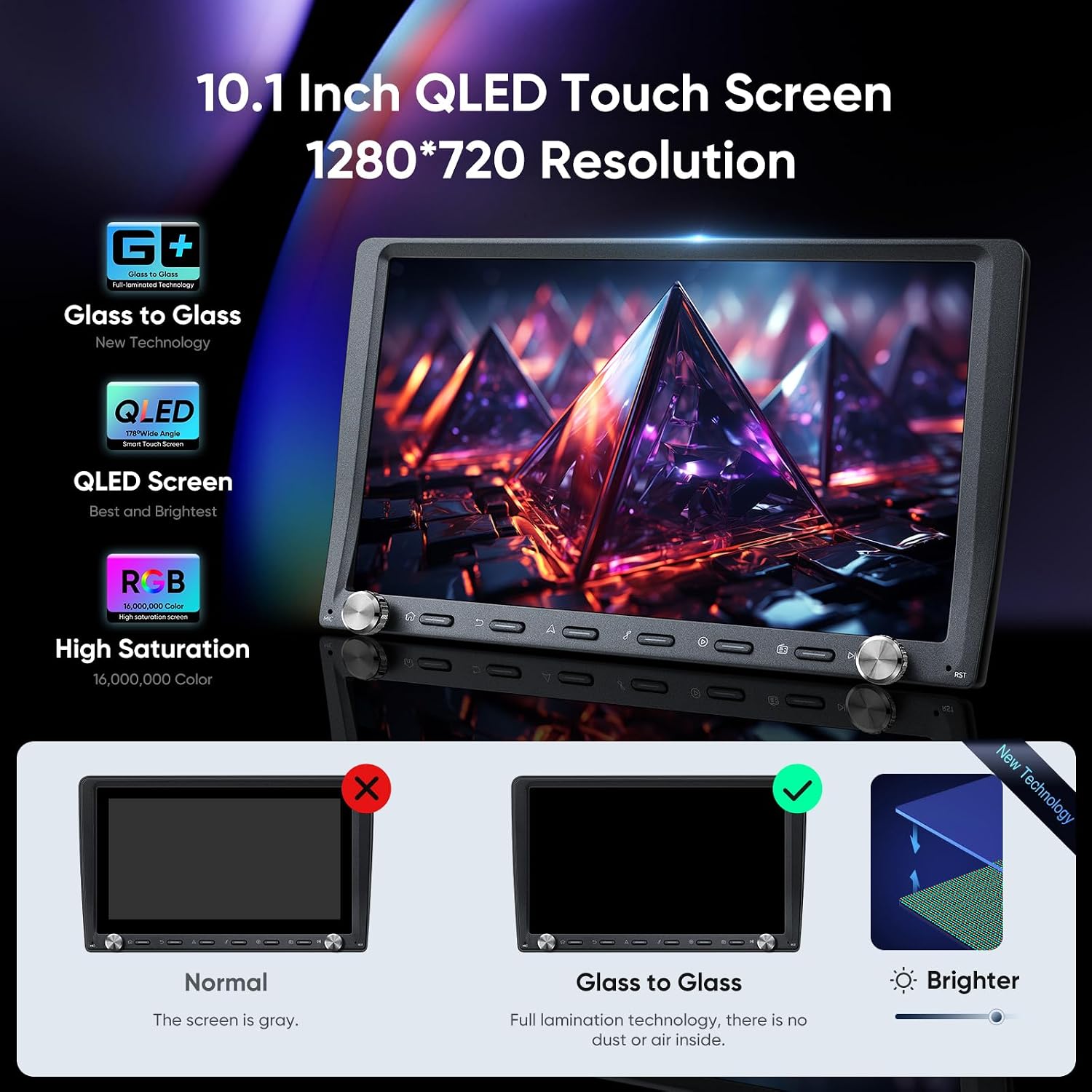
This visual details the advanced display technology of the GTRUI car stereo. It explains the 10.1-inch QLED touch screen with 1280x720 resolution, Glass+Glass full lamination technology for a brighter display without air gaps, and 16 million colors for high saturation.
5.2 Android 12 Operating System
The unit runs on Android 12, powered by an 8-core Cortex A55 processor with 2GB RAM and 32GB ROM. This configuration ensures a fast and smooth user experience, allowing for responsive multitasking and ample storage for apps and media.

This image provides a visual representation of the internal hardware, detailing the 8-core Cortex A55 processor, 2GB RAM, and 32GB ROM. These specifications ensure a faster and smoother operating experience, enabling responsive multitasking and ample storage.
5.3 Wireless Apple CarPlay & Android Auto
Connect your smartphone wirelessly to access Apple CarPlay or Android Auto. This allows for safe use of phone features like navigation, calls, messages, and music through the car stereo's interface or voice commands.
- Activation: Ensure Bluetooth and Wi-Fi are enabled on your smartphone. Follow the on-screen instructions on the car stereo to pair your device.
- Voice Commands: Use "Hey Siri" or "OK Google" to control functions hands-free.
- Note: Some smartphones may require a wired connection for Android Auto.

This image showcases the Wireless Apple CarPlay and Android Auto functionalities. It displays the familiar app layouts for navigation, music, and communication, emphasizing the convenience of integrating smartphone features directly onto the car stereo's large QLED screen.
5.4 GPS Navigation
The unit features built-in GPS navigation. It supports various navigation applications such as Sygic, iGo, Waze, and Google Maps. Ensure the GPS antenna is properly installed for accurate positioning.
- Map Updates: Connect to Wi-Fi to download and update maps as needed.
- Route Planning: Enter your destination to receive turn-by-turn directions and real-time traffic information.
5.5 AM/FM Radio & AKM DSP Stereo
Access local radio stations with the built-in RDS radio receiver, which supports AF (Automatic Frequency Adjustment) and TA (Traffic Announcement). The AKM DSP stereo, with a 4x50W amplifier, offers a customizable audio experience through a 48-band graphic equalizer and 8 EQ modes.

This image highlights the audio capabilities of the car stereo, featuring an AKM DSP for a realistic audio experience, 4x50W maximum output power, and a 48-band graphic equalizer with 8 EQ modes for personalized sound tuning.
5.6 Bluetooth 5.0
Bluetooth 5.0 connectivity allows for hands-free calling, Bluetooth music streaming, and contact synchronization. Pair your phone via the Bluetooth settings menu on the stereo.

This image details the Bluetooth 5.0 functionality, powered by a Realtek 8761 Chipset. It enables hands-free calling, synchronization of contacts, and high-quality Bluetooth music streaming for a connected driving experience.
5.7 Dual Knob Control
The unit features dual physical knobs for convenient control of volume and menu navigation. The left knob typically controls volume (press to mute), while the right knob can be assigned to various functions or used for scrolling.
5.8 Split Screen Function
Utilize the split-screen feature to run two applications simultaneously on the display. For example, you can have navigation on one side and music playback on the other.

This image illustrates the split-screen function, allowing users to display and operate two applications concurrently on the 10.1-inch screen. An example shows a video player on one side and a navigation map on the other, enhancing multitasking capabilities.
5.9 AHD Backup Camera Support
The included AHD 1080P backup camera provides a clear view of the area behind your vehicle when reversing, enhancing safety and assisting with parking. The display automatically switches to the camera feed when the vehicle is put into reverse gear.

This image highlights the support for an AHD 1080P reverse view camera, which is included in the box. It shows the camera's perspective on the stereo screen with dynamic parking guidelines, contributing to enhanced safety and easier parking.
5.10 Quick Boot Time
The system features a 1-second quick boot time, allowing for rapid startup and immediate access to functions after the vehicle is started.

This image emphasizes the rapid 1-second boot time feature, allowing the head unit to power on quickly after a setting is made, ensuring immediate access to functions upon starting the vehicle.
6. Maintenance
- Screen Cleaning: Use a soft, lint-free cloth to gently wipe the QLED screen. For stubborn smudges, slightly dampen the cloth with water or a screen-safe cleaner. Avoid harsh chemicals or abrasive materials.
- General Cleaning: Keep the unit free from dust and debris. Use a soft brush or compressed air to clean around buttons and ports.
- Software Updates: Periodically check for software updates via the system settings to ensure optimal performance and access to new features. Connect to a stable Wi-Fi network for updates.
- Avoid Extreme Temperatures: Do not expose the unit to extreme heat or cold, as this can affect its performance and lifespan.
7. Troubleshooting
If you encounter issues with your GTRUI car stereo, refer to the following common problems and solutions:
| Problem | Possible Cause | Solution |
|---|---|---|
| Unit does not power on. | Loose power connection, blown fuse, vehicle battery issue. | Check all power cable connections. Inspect vehicle fuses. Ensure vehicle battery is charged. |
| No sound from speakers. | Volume too low, mute activated, incorrect wiring, speaker issues. | Increase volume. Check if mute is active. Verify speaker wiring connections. Test with different audio sources. |
| GPS signal lost or inaccurate. | GPS antenna improperly installed or obstructed. | Ensure GPS antenna has a clear view of the sky. Check antenna connection to the unit. |
| CarPlay/Android Auto not connecting. | Bluetooth/Wi-Fi off, phone compatibility, software glitch. | Ensure Bluetooth and Wi-Fi are active on your phone and stereo. Restart both devices. Try a wired connection for Android Auto if wireless fails. |
| Touch screen unresponsive. | Temporary software issue, screen damage. | Restart the unit. If issue persists, contact support. |
| Reverse camera not displaying. | Camera wiring issue, camera malfunction, incorrect settings. | Check camera power and video signal connections. Ensure the unit is set to automatically display the camera feed when reversing. |
If these solutions do not resolve the issue, please contact GTRUI customer support for further assistance.
8. Technical Specifications
| Feature | Specification |
|---|---|
| Brand | GTRUI |
| Model Number | B0FDK8M8HD |
| Screen Size | 10.1 Inches |
| Display Type | QLED |
| Resolution | 1280x720 |
| Operating System | Android 12 |
| Processor | 8-Core Cortex A55 |
| RAM | 2GB |
| Internal Storage (ROM) | 32GB |
| Connectivity | Wireless, Bluetooth 5.0, WiFi (2.4Ghz & 5Ghz) |
| Special Features | Wireless Apple CarPlay, Android Auto, GPS Navigation, AM/FM Radio (RDS), AKM DSP Stereo, 48-band graphic equalizer, 8 EQ modes, Steering wheel controls, Dual Knob Control, Hands-free calling, Voice commands (Siri, Google Assistant), Split Screen Function, AHD 1080P Camera Support |
| Audio Output | 4x50W (Max) |
| Boot Time | 1 second (after initial setup) |
| Human Interface Input | Touchscreen, Physical Knobs, Voice |
| UPC | 725414054974 |
9. Warranty & Support
For warranty information and customer support, please refer to the documentation included with your purchase or visit the official GTRUI website. If you encounter any issues not covered in this manual, or require technical assistance, please contact GTRUI customer service. Ensure you have your product model number (B0FDK8M8HD) and purchase details available when contacting support.