
1. Introduction
This manual provides detailed instructions for the assembly, operation, and maintenance of your ADORNEVE Low Bunk Bed Twin Over Twin. This bunk bed features a sturdy metal frame, an integrated storage staircase, RGB LED lighting, and a convenient power outlet. Please read this manual thoroughly before assembly and use to ensure safe and correct operation.

Image 1.1: The ADORNEVE Low Bunk Bed, showcasing its twin-over-twin design, integrated storage staircase, and under-bed RGB LED lighting.
2. Safety Information
Adherence to these safety guidelines is crucial for preventing injury and ensuring the longevity of your bunk bed.
- Weight Capacity: The bunk bed has a maximum weight capacity of 600 lbs. Ensure this limit is not exceeded.
- Mattress Thickness: For the upper bunk, use a mattress with a thickness of 4-6 inches. For the lower bunk, use a mattress with a thickness of 4-10 inches.
- Guardrails: The top bunk is equipped with full-length guardrails. Always ensure these are securely in place.
- Anti-Toppling Device: Utilize the provided anti-toppling device to secure the bed to a wall, enhancing stability and preventing accidental tipping.
- Assembly: Assembly should be performed by two adults. Follow all instructions carefully.
- Regular Checks: Periodically check all bolts, screws, and connections to ensure they remain tight.
- No Jumping: Do not allow jumping on the bunk bed.
- Staircase Use: Always use the staircase for access to the upper bunk. Do not climb on the frame.

Image 2.1: Close-up view of the upper bunk's 13.4-inch full-length enclosed safety rail, designed for enhanced user safety.
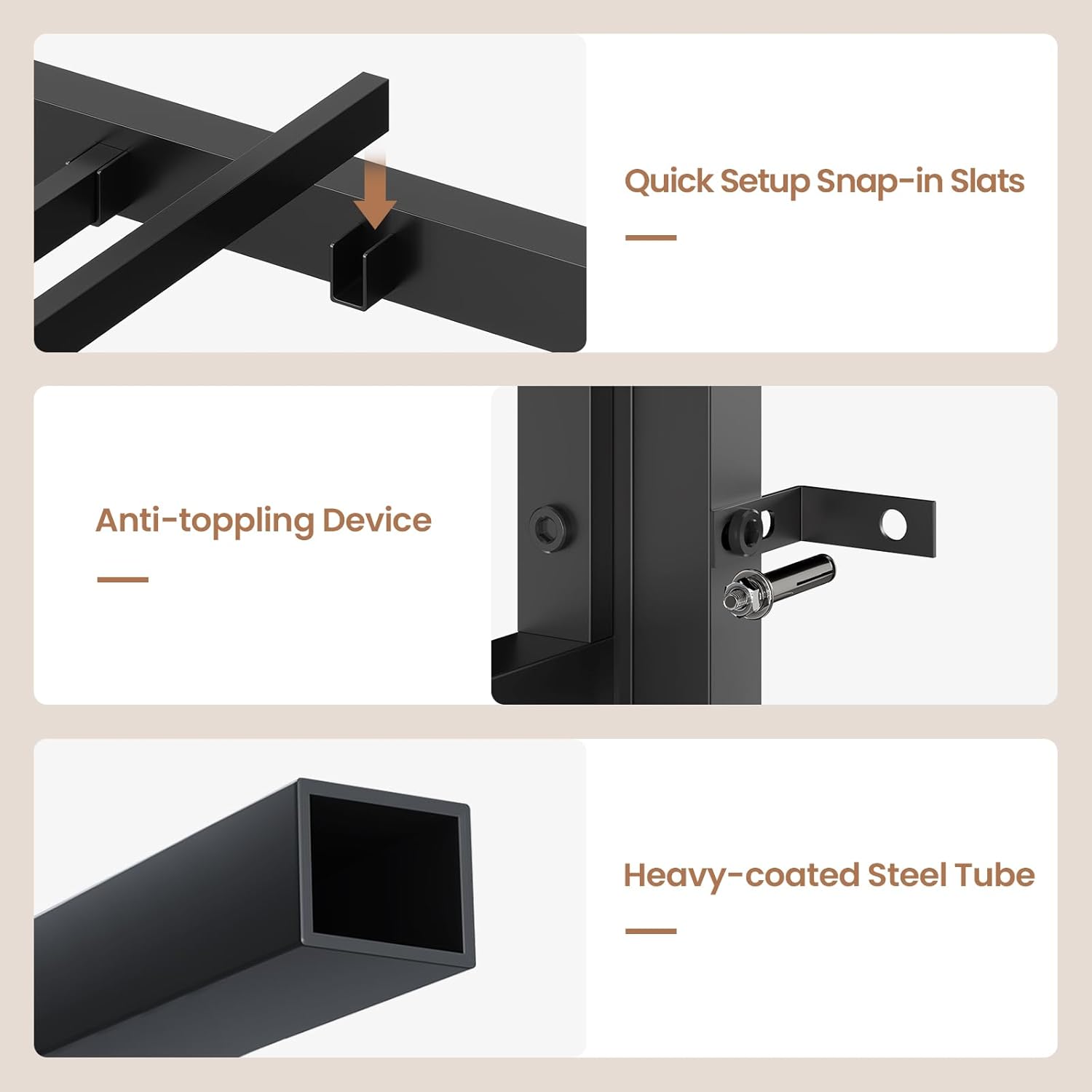
Image 2.2: Details of key safety and structural components, including quick setup snap-in slats, the anti-toppling device for wall attachment, and the heavy-coated steel tube construction.
3. Package Contents
Before beginning assembly, verify that all components listed below are present. If any parts are missing or damaged, contact customer support immediately.
- Metal Bed Frame Components (labeled parts)
- Storage Staircase Components
- Storage Drawers (3 units)
- Open Shelves (2 units)
- RGB LED Light Kit
- Power Outlet Hub (2 AC plugs, 1 USB-A, 1 USB-C)
- Hardware Pack (screws, bolts, Allen wrench, etc.)
- Anti-Toppling Device
- Instruction Manual
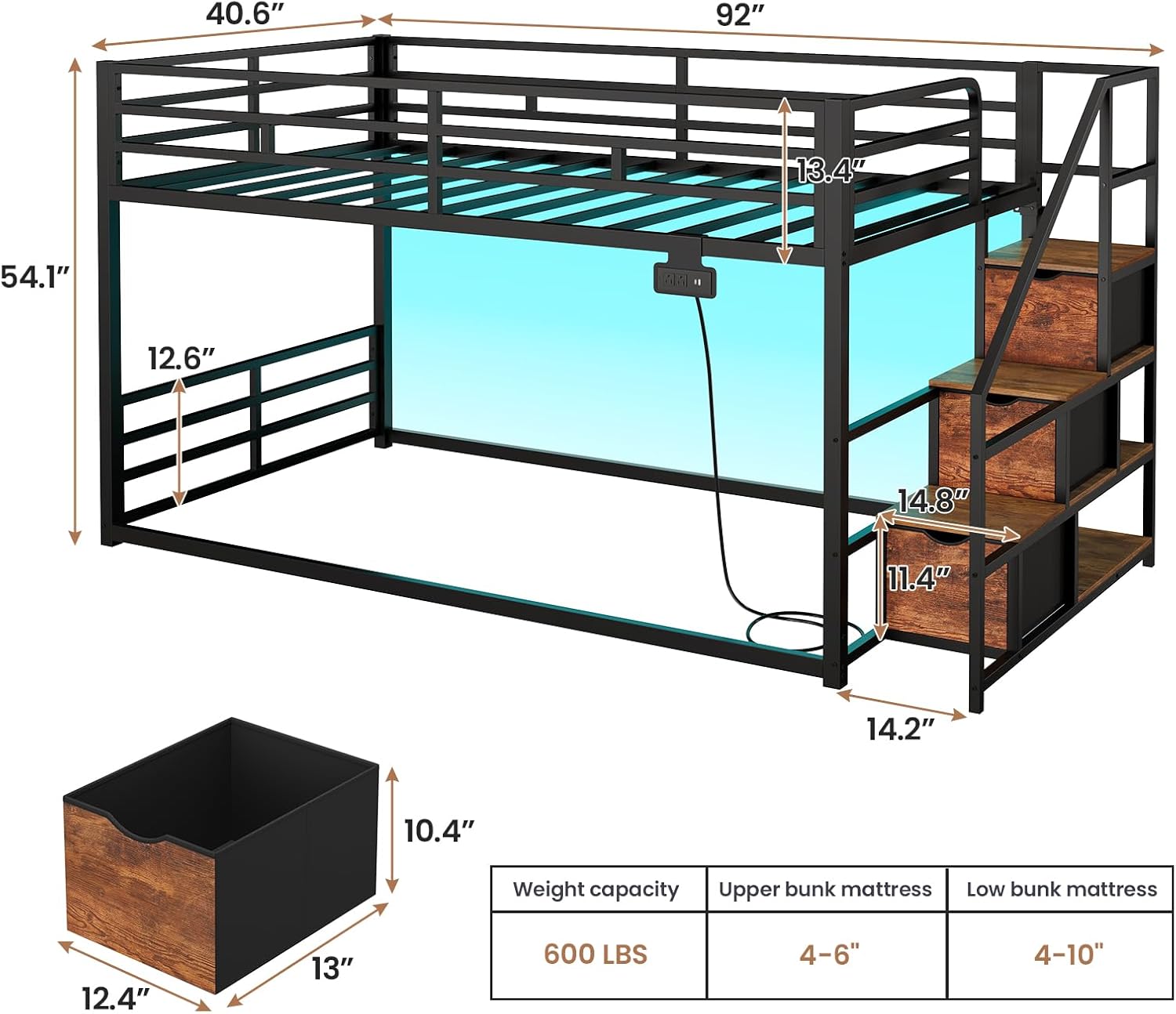
Image 3.1: Diagram illustrating the overall dimensions of the bunk bed, including height, length, and width, along with recommended mattress thickness for both upper and lower bunks.
4. Setup and Assembly Instructions
Assembly typically takes approximately 1.5 hours with two people. All parts are labeled, and necessary tools are included. For optimal stability, ensure all connections are tightened securely.
- Preparation: Clear a spacious area for assembly. Lay out all parts and hardware, verifying against the package contents list.
- Frame Assembly: Begin by assembling the main metal bed frame according to the step-by-step diagrams provided in the separate assembly guide. Ensure all bolts are finger-tightened initially.
- Staircase Assembly: Assemble the storage staircase, integrating the drawers and shelves as instructed.
- Attach Staircase: Securely attach the assembled staircase to the main bed frame.
- Slat Installation: Install the metal slats for both the upper and lower bunks. Some slats snap into place, while others require screws for secure fastening.
- Final Tightening: Once the entire structure is assembled, systematically tighten all bolts and screws using the provided Allen wrench. Ensure the frame is level and stable.
- Anti-Toppling Device: Attach the anti-toppling device to the bed frame and secure it to a wall stud to prevent tipping.

Image 4.1: Detailed view of the integrated storage staircase, featuring three pull-out drawers and two open shelves for organizing various items.
5. Operating Instructions
5.1 RGB LED Lighting System
The integrated RGB LED lighting system offers customizable illumination for the bunk bed area.
- Power On/Off: Use the included remote control or a compatible smartphone application to turn the lights on or off.
- Color Selection: Choose from over 60,000 colors to match your preference.
- Dynamic Modes: Select from various pre-programmed dynamic lighting effects.
- Music Mode: The lights can synchronize with music, reacting to sound.
- Microphone Mode: Lights respond to ambient sounds detected by the microphone.
- Timing Function: Set timers for the lights to automatically turn on or off.

Image 5.1: The bunk bed illuminated by RGB LED lights, demonstrating various color and mode options controllable via remote or smartphone application.
5.2 Floating Power Hub
The power hub provides convenient charging access directly from the bed.
- AC Outlets: Two standard AC power outlets are available for devices requiring wall power.
- USB-A Port: One USB-A port is provided for charging compatible devices.
- USB-C Port: One USB-C port is provided for charging compatible devices.
- Usage: Plug in your devices directly to the hub for charging. Ensure the bed is connected to a wall power source for the hub to function.

Image 5.2: Close-up of the floating power hub, showing its two AC outlets, USB-A port, and USB-C port for convenient device charging.
6. Maintenance
Regular maintenance helps preserve the condition and functionality of your bunk bed.
- Cleaning: Wipe down the metal frame and wooden surfaces with a soft, damp cloth. Avoid abrasive cleaners or harsh chemicals.
- Hardware Check: Every 3-6 months, inspect all bolts, screws, and connections. Tighten any that have become loose.
- LED Lights: If the LED strip detaches, re-secure it using appropriate adhesive tape.
- Power Hub: Ensure the power hub's cable is not pinched or damaged. Keep the ports free of dust and debris.
7. Troubleshooting
| Issue | Possible Cause | Solution |
|---|---|---|
| Bed feels unstable or wobbly. | Loose hardware; anti-toppling device not installed. | Check and tighten all bolts and screws. Ensure the anti-toppling device is securely attached to a wall stud. |
| LED lights not working. | Power connection issue; remote control battery low; LED strip detached. | Verify the LED light kit is properly plugged into a power source. Check remote control batteries. Re-secure any detached LED strips. |
| Power outlet hub not functioning. | Bed not plugged into wall outlet; hub cable damaged. | Ensure the bed's main power cord is securely plugged into a functional wall outlet. Inspect the hub's cable for damage. |
| Parts do not align during assembly. | Incorrect orientation of parts; bolts overtightened prematurely. | Review the assembly guide for correct part orientation. Loosen previously tightened bolts, align parts, then re-tighten. |
8. Specifications
| Feature | Detail |
|---|---|
| Brand | ADORNEVE |
| Model | Twin Over Twin |
| Color | Black |
| Material | Steel, MDF, Non-woven Fabric |
| Product Dimensions | 198.4L x 103.1W x 137.4H Centimetres (78.1L x 40.6W x 54.1H inches) |
| Item Weight | 46.4 kg (102.3 lbs) |
| Weight Capacity | 600 lbs |
| Upper Bunk Mattress Thickness | 4-6 inches |
| Lower Bunk Mattress Thickness | 4-10 inches |
| Special Features | Squeak Resistant, RGB LED Lights, Power Outlet (2 AC, 1 USB-A, 1 USB-C), Storage Staircase, Full-Length Guardrails |
9. Warranty and Support
ADORNEVE is committed to providing quality products and customer satisfaction. If you encounter any issues or have questions regarding your bunk bed, please contact our support team.
- Customer Service: For assistance with missing parts, assembly questions, or product concerns, please reach out to ADORNEVE customer support. Contact information is typically found on the product packaging or the retailer's website.
- Warranty: Specific warranty details may vary. Please refer to your purchase documentation or contact customer support for information regarding warranty coverage.


