
1. Product Overview
This manual provides instructions for the SPYMINNPOO 3 Mode Sine Controller, S869 LCD Display Panel, and 130X Thumb Throttle kit. This kit is designed for the modification and enhancement of 36V and 48V electric bikes and scooters, offering improved control and a comfortable riding experience.

Figure 1.1: Complete SPYMINNPOO Controller Kit, including the sine wave controller, S869 LCD display, and 130X thumb throttle.
Key Features:
- Integrated Kit: Includes a 22A motor speed controller, S869 LCD display panel, and 130X thumb throttle for comprehensive electric bike conversion.
- Versatile Compatibility: Suitable for electric bikes, scooters, and folding bikes, ideal for DIY projects.
- Enhanced Control: Provides precise control over motor speed, braking, and direction changes.
- Motor Compatibility: The 3-mode sine wave controller is compatible with brushless motors, supporting 36V 500W, 36V 750W, 48V 500W, and 48V 750W motor configurations.
- Durable Construction: Features an aluminum alloy controller case and an ABS display panel, ensuring durability, efficient heat dissipation, and protection against damage.
2. Package Contents
Please verify that all items are present and undamaged upon opening the package:
- 1 x Electric Bike Controller (3 Mode Sine Wave)
- 1 x 130X Thumb Throttle
- 1 x S869 LCD Display Panel
- 1 x User Manual (this document)
3. Setup and Installation
Careful installation is crucial for the proper function and safety of your electric bike or scooter. It is recommended to have this kit installed by a qualified technician if you are unfamiliar with electrical wiring.
3.1 Controller Installation
Mount the electric bike controller in a secure location on your bike frame, away from direct water exposure and moving parts. The aluminum alloy case is designed for heat dissipation, so ensure adequate airflow around it.
3.2 S869 LCD Display Panel Installation
The S869 LCD display panel is designed for handlebars with a diameter of 22.2mm (0.9 inches). Securely attach the display to your handlebar using the integrated clamp.

Figure 3.1: Side view of the S869 LCD display showing the handlebar mounting bracket.
3.3 130X Thumb Throttle Installation
Install the 130X thumb throttle on your handlebar in a position that allows for comfortable and safe operation. Ensure it does not interfere with braking or other controls.
3.4 Wiring Connections
The controller, display, and throttle require specific wiring connections. Refer to the detailed wiring diagram provided in the separate instruction manual included in your package. Ensure all connections are secure and properly insulated to prevent short circuits or damage.

Figure 3.2: S869 LCD display showing the 5-core common plug and connection light, indicating key wiring points.
Important: Incorrect wiring can damage the components or lead to unsafe operation. Always double-check connections before powering on the system.
4. Operating Instructions
Once installed, the S869 LCD display and 130X thumb throttle provide intuitive control over your electric bike or scooter.
4.1 S869 LCD Display Functions
The S869 display provides essential information and control over your electric bike's settings.
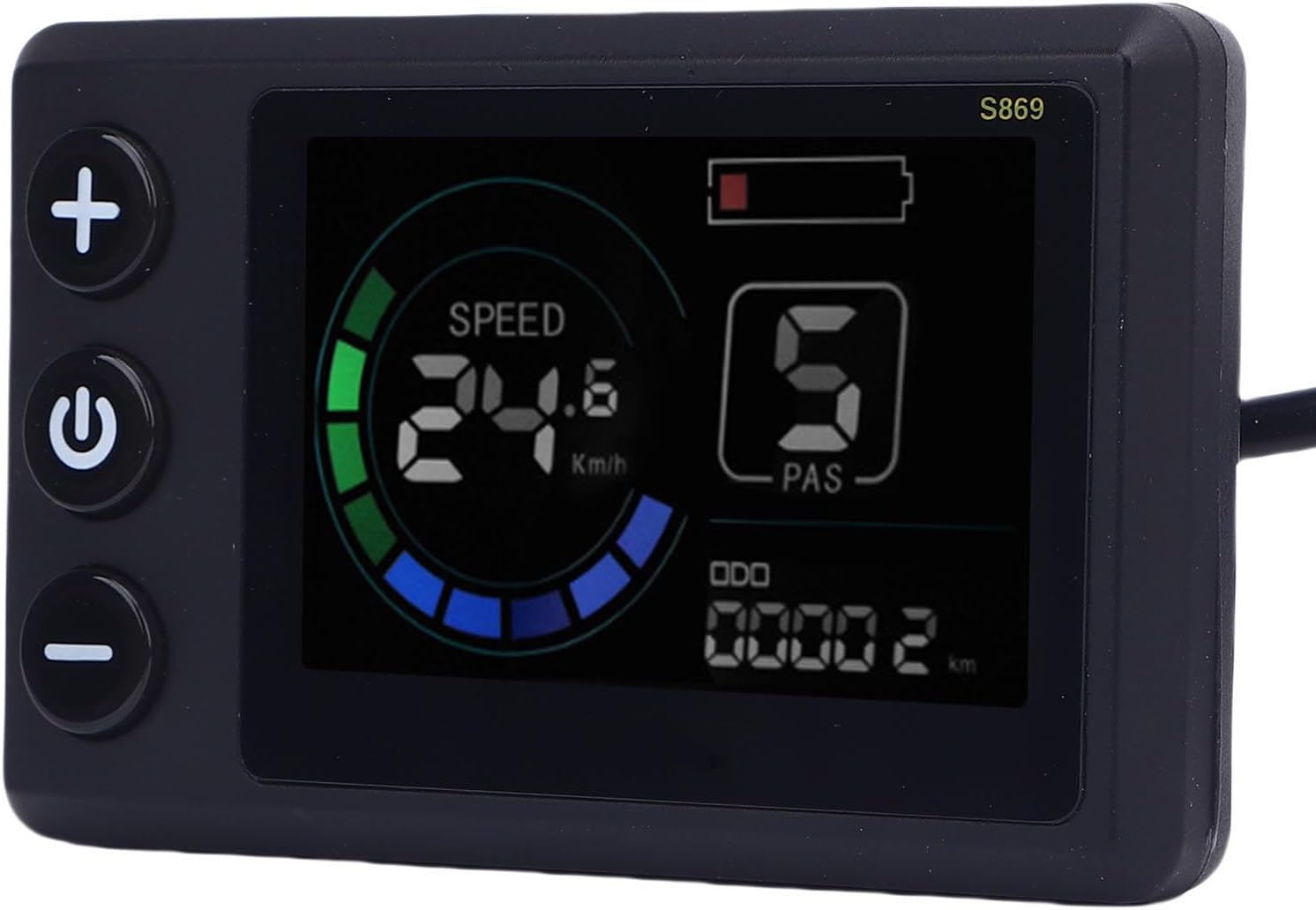
Figure 4.1: Close-up of the S869 LCD display showing speed, battery level, PAS level, and odometer.
- Power Button (U): Press and hold to turn the system ON/OFF.
- Mode/Setting Buttons (+ and -): Use these buttons to adjust Pedal Assist System (PAS) levels, navigate menus, or change settings as indicated on the display.
- Information Display: The screen typically shows:
- Current Speed (km/h or mph)
- Battery Level Indicator
- Pedal Assist System (PAS) Level (0-5)
- Odometer (ODO) / Trip Distance (TRIP)
Refer to the separate instruction manual for detailed information on accessing and adjusting advanced settings through the S869 display.
4.2 130X Thumb Throttle Operation
The 130X thumb throttle provides direct control over motor power, allowing you to accelerate without pedaling. Gently press the thumb lever to engage the motor. The amount of pressure applied corresponds to the level of power delivered. Release the throttle to disengage power.
Safety Note: Always ensure you have full control of your bike before engaging the throttle. Use the throttle responsibly and in accordance with local regulations.
5. Maintenance and Care
Proper maintenance ensures the longevity and reliable performance of your SPYMINNPOO controller kit.
5.1 General Care
- Keep all components clean and free from dust and debris.
- Regularly check all wiring connections for tightness and signs of wear or damage.
- Avoid exposing the controller and display to extreme temperatures or direct sunlight for prolonged periods.
5.2 Water Resistance
The S869 LCD display screen features a rainproof design, offering resilience against rainy conditions. However, it is not recommended for prolonged exposure to heavy rain or submersion in water. The controller also has a durable metal case, but direct water ingress should be avoided.

Figure 5.1: Rear view of the S869 LCD display, highlighting its sealed, rainproof construction.
5.3 Cleaning
Use a soft, damp cloth to clean the display and controller surfaces. Do not use abrasive cleaners, solvents, or spray water directly onto the electronic components.
6. Troubleshooting
If you encounter issues with your SPYMINNPOO controller kit, consider the following common troubleshooting steps:
- System Not Powering On:
- Check battery connection and charge level.
- Verify all wiring connections between the battery, controller, and display are secure.
- Motor Not Responding:
- Ensure the throttle and PAS sensors are correctly connected.
- Check for any error codes displayed on the S869 LCD. Refer to the separate instruction manual for error code interpretations.
- Confirm the motor is properly connected to the controller.
- Inaccurate Speed/Distance Readings:
- Verify wheel circumference settings in the S869 display menu (if applicable).
- Check the speed sensor connection (if external).
- Intermittent Operation:
- Inspect all cables for loose connections or damage.
- Ensure no water has entered the controller or display.
For persistent issues or complex problems, consult the detailed troubleshooting section in the separate instruction manual or contact SPYMINNPOO customer support.
7. Specifications
| Feature | Specification |
|---|---|
| Product Type | 3 Mode Sine Controller LCD Display Kit |
| Brand | SPYMINNPOO |
| Model | S869 (LCD Display) |
| Material | Aluminum Alloy (Controller), ABS (Display Panel) |
| Compatible Voltage | 36V, 48V |
| Compatible Motor Wattage | 500W, 750W (for 36V/48V systems) |
| Controller Current | 22A |
| Display Handlebar Diameter | 22.2mm / 0.9in |
| Display Dimensions (W x H) | 80mm (3.1in) x 50mm (2.0in) |
| Display Cable Length | 1640mm / 64.56in |
| Item Weight | 625 g (approx. for the kit) |
| Parcel Dimensions | 18 x 12 x 10 cm |

Figure 7.1: Dimensions of the S869 LCD display panel.
8. Warranty and Support
For information regarding product warranty, returns, or technical support, please refer to the official documentation provided with your purchase or contact SPYMINNPOO customer service directly. Details for contacting support are typically found on the product packaging or the manufacturer's official website.