
Star Shower Superstar Santa Pop-Up Christmas Tree
Star Shower Superstar Santa 7-Foot Pre-Lit Pop-Up Christmas Tree Instruction Manual
Model: Superstar Santa Pop-Up Christmas Tree | Brand: Star Shower
Introduction
This manual provides essential instructions for the safe and efficient setup, operation, and maintenance of your Star Shower Superstar Santa 7-Foot Pre-Lit Pop-Up Christmas Tree. Please read this manual thoroughly before assembly and retain it for future reference.
1. Setup
Follow these steps to assemble your Superstar Santa Pop-Up Christmas Tree:
- Unpack Components: Carefully remove all items from the packaging. Ensure you have the tree stand, the main tree pole sections, the pre-decorated tree body, the Santa topper with star projector, and the remote control.
- Assemble the Stand: Open the foldable legs of the tree stand to form a stable base.
- Insert Tree Pole: Insert the bottom section of the tree pole into the assembled stand. Ensure it is firmly seated. Connect any additional pole sections as required to achieve the full 7-foot height.
- Attach Tree Body: Carefully lift the collapsed tree body and slide it over the assembled pole. Gently lower the tree body until it expands and rests securely on the base.
- Connect Santa Topper: Place the Santa topper onto the top of the tree pole. Connect the topper's power cable to the designated port at the top of the tree.
- Power Connection: Locate the power cord at the base of the tree and plug it into a standard electrical outlet.

Image: A person lifting the collapsed tree body over the central pole, demonstrating the pop-up setup process.
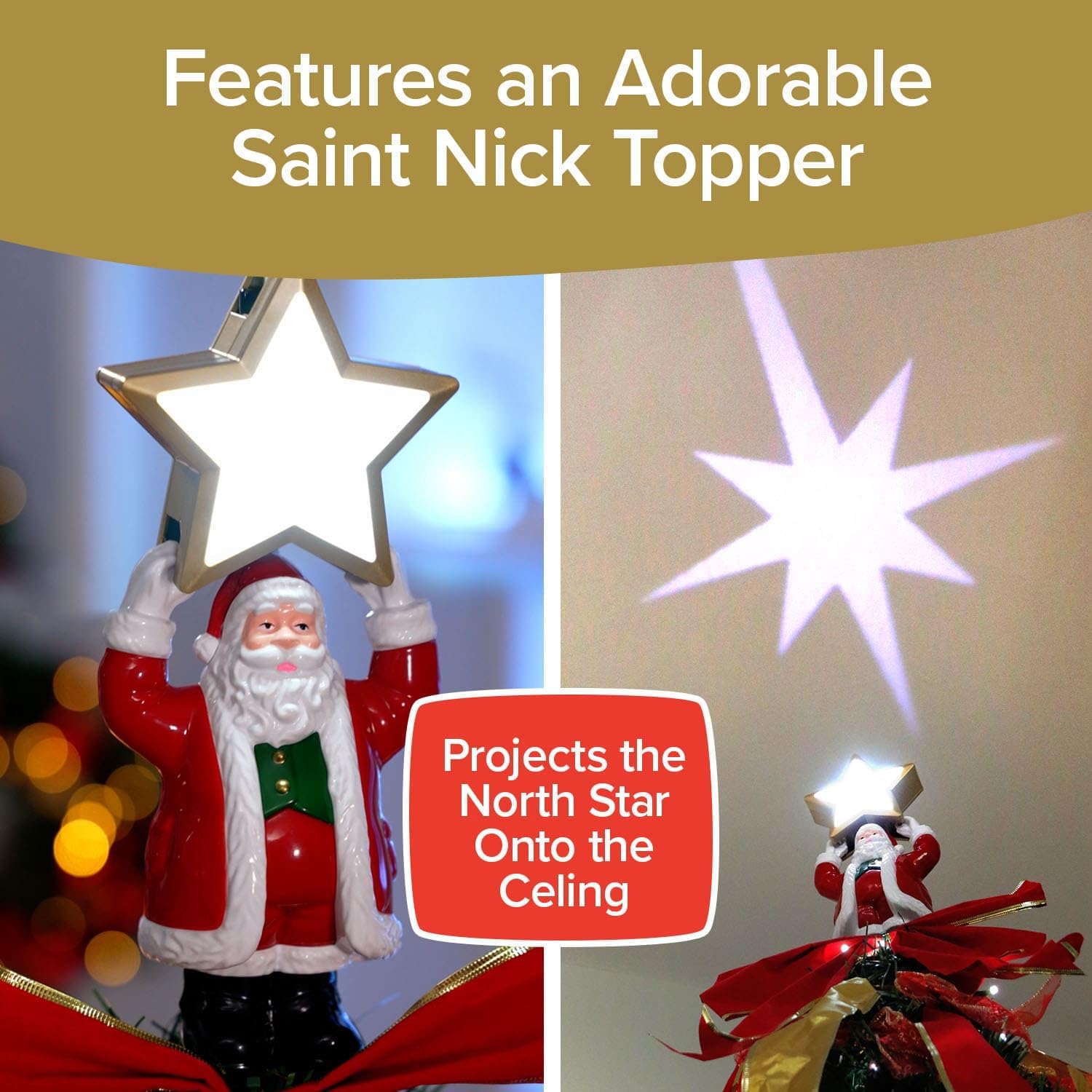
Image: Close-up of the Santa tree topper with a star projector, casting a star pattern onto the ceiling.
Video: Official product video demonstrating the quick setup of the Superstar Santa Tree by Star Shower.
Video: A detailed guide on how easy it is to set up the Superstar Pop-Up Christmas Tree.
2. Operating Instructions
Your Superstar Santa Christmas Tree features integrated LED lights and a remote control for various lighting options.
- Power On/Off: Use the 'ON' and 'OFF' buttons on the remote control to power the tree lights. Alternatively, a foot pedal switch is located on the power cord for basic on/off functionality.
- Change Light Colors: The remote allows you to select from 7 different light colors (e.g., Red, Green, Blue, Yellow, Purple, Cyan, White). Press the corresponding color button on the remote.
- Select Light Modes: Choose from 32 different lighting modes, including Twinkling, Fading, Flashing, Chasing, Multi-Fade, Random, and Combination. Press the desired mode button on the remote.
- Santa Topper Projector: The Santa topper automatically projects a North Star image onto your ceiling when the tree is powered on.

Image: The remote control unit, showing buttons for various light colors and modes.

Image: The Christmas tree illuminated with different light colors and demonstrating various lighting effects.
3. Maintenance
Proper care ensures the longevity of your Christmas tree.
- Cleaning: Dust the tree gently with a soft, dry cloth. Do not use liquid cleaners or solvents, as these may damage the decorations or electrical components.
- Ornament Care: While the tree comes pre-decorated, some ornaments or ribbons may shift during shipping or handling. Gently adjust them back into place. If any detach, they can typically be re-secured with small ties or a dab of hot glue (ensure tree is unplugged if using hot glue).
- Storage: To store the tree, unplug it and carefully lift the tree body from the pole. It will collapse flat. Disassemble the pole sections and the stand. Store all components in the provided storage bag in a cool, dry place away from direct sunlight.

Image: Demonstrates the compact storage of the tree, showing it being placed into a black storage bag.
4. Troubleshooting
| Problem | Possible Cause | Solution |
|---|---|---|
| Lights not turning on. | Power cord not fully plugged in; remote battery depleted; foot pedal switch off. | Ensure power cord is securely plugged into an outlet. Check remote battery and replace if necessary. Press the foot pedal switch to activate. |
| Santa topper projector not working. | Topper not connected to tree power; internal light issue. | Verify the Santa topper's power cable is securely connected to the tree. If the issue persists, contact customer support. |
| Tree appears unstable. | Stand not fully extended; pole not properly seated. | Ensure all legs of the tree stand are fully extended and locked. Confirm the tree pole is firmly inserted into the stand. |
| Ornaments or ribbons are loose/detached. | Movement during shipping or handling. | Gently re-attach or adjust the decorations. Small ties or a minimal amount of hot glue can be used for re-securing. |
5. Specifications
- Brand: Star Shower
- Model: Superstar Santa Pop-Up Christmas Tree
- Height: 7 Feet (84 inches)
- Dimensions: 37.4"D x 37.4"W x 84"H
- Lights: 200 Pre-Lit LED Lights
- Light Colors: 7 (Red, Green, Blue, Yellow, Purple, Cyan, White)
- Light Modes: 32 (including Twinkling, Fading, Flashing, Chasing, Multi-Fade, Random, Combination)
- Material: Plastic, Polyvinyl Chloride
- Item Weight: 9.7 Pounds
- Included Components: Tree Stand, Pre-lit LED Lights, Santa Topper with North Star Projector, Remote Control, Storage Bag
- UPC: 097298400919
6. Warranty and Support
For warranty information and customer support, please refer to the product packaging or contact the manufacturer directly. Keep your purchase receipt for warranty claims.
Ask a question about this manual
Ask about setup, troubleshooting, compatibility, parts, safety, or missing instructions. Manuals+ will review the question and use this page’s manual context to help answer it.