1. Introduction
Thank you for choosing the MINISO MS201 AI Translation Earbuds. These earbuds are designed to facilitate real-time communication across language barriers, offering advanced translation capabilities alongside standard audio functions. This manual provides essential information for setting up, operating, and maintaining your device to ensure optimal performance.

Image 1.1: MINISO MS201 AI Translation Earbuds and Charging Case. The image displays the two black clip-on earbuds and their charging case, which features a small LCD screen displaying a stylized face.
2. Important Safety Information
- Do not expose the device to extreme temperatures, direct sunlight, or high humidity.
- Avoid dropping or subjecting the device to strong impacts.
- Keep the device away from water and other liquids.
- Do not attempt to disassemble or repair the device yourself. Contact authorized service personnel.
- Use only the provided charging cable and compatible power adapters.
- Prolonged listening at high volume levels may cause hearing damage.
3. Package Contents
Ensure all items are present in the package:
- Open Ear Earbuds x 1 pair
- Charging Case x 1
- User Manual x 1
- Type-C Charging Cable x 1

Image 3.1: MINISO MS201 Package Contents. The image shows the earbuds, charging case, user manual, and Type-C charging cable laid out next to the product box.
4. Product Overview
The MINISO MS201 earbuds feature an open-ear clip-on design for comfort and stability. The charging case includes an LCD full-color touchscreen for various controls and settings.
4.1 Earbud Design
The earbuds utilize an open-ear clip-on design, weighing 4.1g per earbud, ensuring comfort for extended wear. This design provides enhanced stability during activity.

Image 4.1: MINISO MS201 Earbud Design Comparison. This image illustrates the open-ear clip-on design of the MS201 earbuds on a model ear, contrasting it with a traditional in-ear design.
4.2 Charging Case with LCD Touchscreen
The charging case is equipped with an LCD full-color touchscreen, allowing direct control over various functions without needing to access your phone for every setting.

Image 4.2: MINISO MS201 LCD Full-Color Smart Touch Screen. The image displays the charging case with its touchscreen showing various interface options like language switch, timer, equalizer, and music controls.
5. Setup
5.1 Charging the Device
Before first use, fully charge the earbuds and charging case. Connect the provided Type-C charging cable to the charging port on the case and a compatible USB power source. The LCD screen will indicate charging status.

Image 5.1: MINISO MS201 Long-lasting Battery. This image shows the charging case connected to a Type-C cable, indicating its battery life and charging capabilities.
5.2 App Download and Connection
The AI translation features require the 'SayMi' app. Follow these steps to connect your earbuds:
- Download the App: Scan the QR code in the user manual or search for 'SayMi' in your device's app store.
- Enable Bluetooth: Turn on Bluetooth on your mobile phone.
- Pair Earbuds: Open the 'SayMi' app, click "Connect" on the homepage, and select "MS201" from the available devices to pair.
- Start Translation: Once connected, you can choose your desired translation mode within the app.
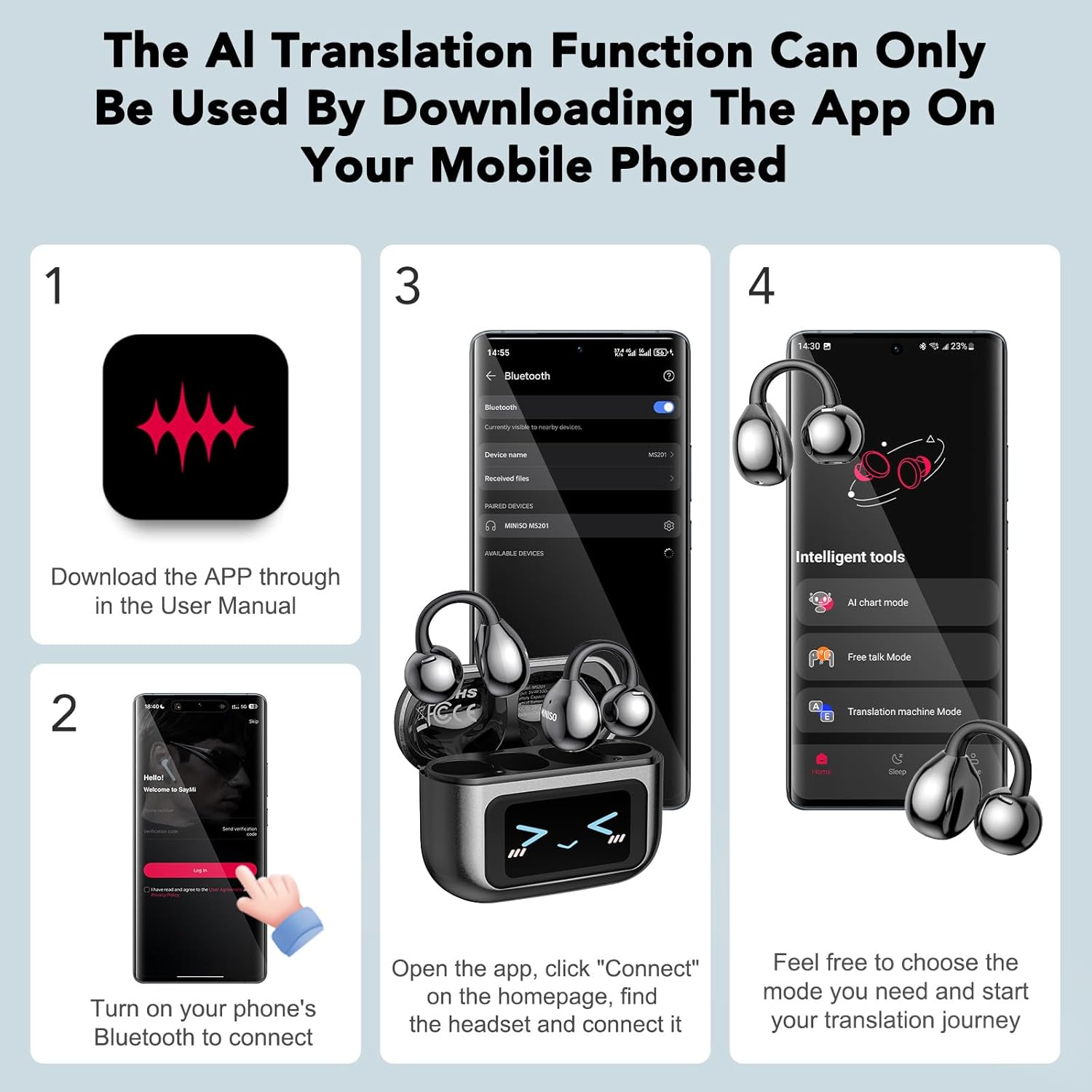
Image 5.2: MINISO MS201 App Download and Connection Steps. This image illustrates the four-step process of downloading the app, enabling Bluetooth, connecting the earbuds via the app, and selecting a translation mode.
6. Operating Instructions
6.1 Basic Earbud Controls
The earbuds feature touch controls for various functions:
- Single Press: Play/Pause music, Answer/Hang up calls.
- Double Press: Adjust volume (left for down, right for up).
- Triple Press: Previous song/Next song.
- Long Press: Wake up voice assistant, Reject call.
Video 6.1: MINISO MS201 AI Language Translation Earbuds. This video demonstrates the various touch controls on the earbuds for music playback, volume adjustment, call management, and voice assistant activation.
6.2 Charging Case Touchscreen Functions
The LCD touchscreen on the charging case provides direct access to several features:
- Language Switch: Change the display language of the case (17 languages supported).
- Screen Brightness: Adjust screen illumination.
- Mode Selection: Choose different operational modes.
- Timer: Set a timer.
- Equalizer: Select from 5 professional equalizer modes (Pop/Jazz/Rock/Classical/Country).
- Volume Adjustment: Control audio volume.
- Music Remote Control: Manage music playback.
- Game: Access a simple game.
- Voice Assistant: Activate the phone's AI assistant.
- Camera Control: Remotely trigger your phone's camera (only with built-in camera app).
- Flashlight: Turn on/off a flashlight function.
- Find Headphones: Locate misplaced earbuds.
- Time Setting: Adjust time.
- Background Wallpaper: Customize the screen background (long press for 2 seconds to switch).
- Lock Screen Wallpaper: Set a lock screen image.

Image 6.2: MINISO MS201 LCD Full-Color Smart Touch Screen Functions. This image highlights the various functions accessible directly from the charging case's touchscreen, including music controls, settings, and a game.
6.3 Translation Modes
The earbuds support 135 languages with 95% translation accuracy through the 'SayMi' app. Five translation modes are available:
- AI Dialogue Mode: Real-time voice dialogue where the app responds through voice.
- Free Talk Mode: Automatic recognition, sentence segmentation, and translation for natural conversations.
- Translation Machine Mode: Functions like a traditional handheld translator.
- Headphones+Phone Mode: One person wears the earbuds, and the translated language is played through the mobile phone for the other party.
- Photo Translation: Recognizes and translates text from images, supporting both real-time capture and imported photos.

Image 6.3: MINISO MS201 Multiple Translation Modes. This image displays the various translation modes available, including AI chart mode, Free Talk mode, Translation machine mode, Headphones+Phone mode, Dual headphones translation mode, and Photo translation function.
6.4 Voice Note Mode
The Voice Note Mode allows you to transcribe voices in real-time. To use this feature, click the 'Recording' button in the app, select the recording language, and confirm to start recording.

Image 6.4: MINISO MS201 Voice Note Mode. The image shows two individuals in a business setting, with one using the earbuds and a phone displaying the 'Recording' interface for real-time voice transcription.
7. Maintenance
- Cleaning: Use a soft, dry cloth to clean the earbuds and charging case. Avoid using abrasive cleaners or solvents.
- Storage: Store the earbuds in their charging case when not in use to protect them and keep them charged. Store in a cool, dry place.
- Battery Care: To prolong battery life, avoid fully discharging the device frequently. Charge regularly, even if not used for extended periods.
8. Troubleshooting
| Problem | Possible Cause | Solution |
|---|---|---|
| Earbuds not pairing/connecting | Bluetooth off, earbuds out of range, low battery, app not connected. | Ensure Bluetooth is on, earbuds are charged and within range. Re-open the SayMi app and attempt to connect. |
| No sound or poor audio quality | Low volume, improper fit, interference, low battery. | Adjust volume on device and earbuds. Ensure earbuds are properly seated. Charge earbuds. Move away from sources of interference. |
| Translation not working or inaccurate | No internet connection, incorrect language selection, app not running, background noise. | Ensure stable internet connection. Verify correct source and target languages in the SayMi app. Reduce background noise. |
| Charging case screen unresponsive | Low battery, temporary software glitch. | Charge the case. Press the multi-function button once to turn the screen on/off. If unresponsive, allow battery to drain completely then recharge. |
| Short battery life | High volume usage, frequent translation, aging battery. | Reduce volume. Minimize continuous translation use. Ensure full charge cycles. |
9. Specifications
- Model Name: MS201
- Connectivity Technology: Wireless (Bluetooth 6.0)
- Earpiece Shape: Clip-on (Open Ear)
- Control Method: Touch
- Material: Plastic, Silicone
- Item Weight: 0.08 Kilograms (2.89 ounces)
- Battery Life (Earbuds): Up to 6 Hours (single charge)
- Battery Life (with Charging Case): Up to 60 Hours
- Charging: Type-C (Fast Charging: 15 min for 3H playtime)
- Translation Languages: 135
- Special Features: AI Real-Time Translation, Touchscreen Controls, Lightweight and Comfortable Design with Secure Fit
- Compatible Devices: Smartphones, Laptops, Desktops, Tablets, Smart Speakers, Televisions, Car Audio Systems, Cellphones
- UPC: 850073442210
10. Warranty Information
MINISO products are manufactured to the highest quality standards. This product is covered by a limited warranty from the date of purchase against defects in materials and workmanship. Please retain your proof of purchase for warranty claims. The warranty does not cover damage caused by misuse, accident, unauthorized modification, or normal wear and tear. For specific warranty terms and conditions, please refer to the documentation included with your purchase or contact customer support.
11. Customer Support
If you encounter any issues or have questions regarding your MINISO MS201 AI Translation Earbuds, please contact our customer support team. You can find contact information on the MINISO official website or through the 'SayMi' app. Please have your product model and purchase details ready when contacting support.
The translation feature requires the SayMi App (no subscription needed). If you have any issues, please contact us.