Introduction
This manual provides comprehensive instructions for the Generic DZ09 Bluetooth 4.1 Smart Watch. It covers setup, operation, maintenance, and troubleshooting to ensure optimal use of your device. The smartwatch is designed to enhance daily routines with seamless connectivity and various functions.
Please read this manual carefully before using the device.
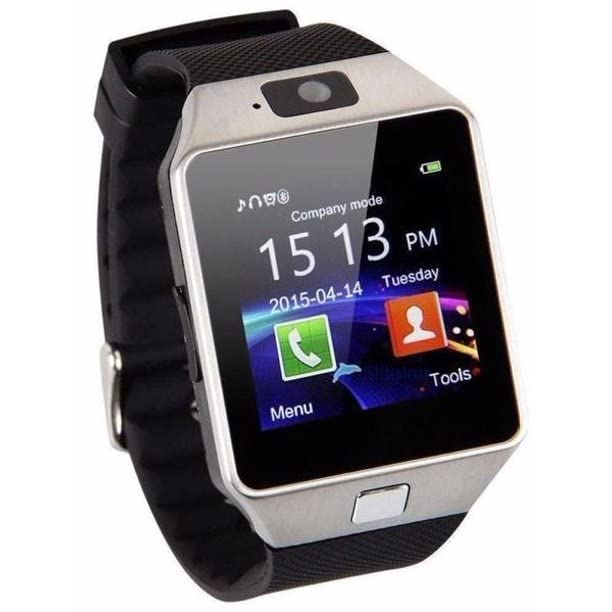
Figure 1: Front view of the Generic DZ09 Bluetooth 4.1 Smart Watch.
What's in the Box
Verify that all items are present in the package:
- DZ09 Smart Watch
- USB Charging Cable
- User Manual
Setup
1. Charging the Smart Watch
Before first use, fully charge the smartwatch. Connect the USB charging cable to the charging port on the watch and to a standard USB power adapter (not included) or a computer USB port.
Charging Time: Approximately 2 hours.
Battery Life: Up to 24 hours on a single charge (usage dependent).
2. Powering On/Off
- To Power On: Press and hold the power button (usually located on the side of the watch) until the screen lights up.
- To Power Off: Press and hold the power button until a power-off option appears on the screen, then confirm.
3. SIM Card Installation (Optional)
The DZ09 Smart Watch supports a SIM card for standalone call functionality. Locate the SIM card slot, typically under the back cover or battery. Insert a micro-SIM card with the gold contacts facing down, ensuring it clicks into place. Ensure the watch is powered off before inserting or removing the SIM card.
4. Bluetooth Pairing with Smartphone
The smartwatch connects to your smartphone via Bluetooth 4.1. It is compatible with Android 4.3 and later versions. For iOS devices, basic functions like answering calls and music playback are supported, but advanced features like SMS and remote camera control are not.
- Ensure Bluetooth is enabled on your smartphone.
- On the smartwatch, navigate to the Bluetooth settings and enable visibility.
- On your smartphone, search for available Bluetooth devices. Select "DZ09" from the list.
- Confirm the pairing request on both devices if prompted.
Operating Instructions
Basic Navigation
The smartwatch features a touchscreen display and physical buttons for navigation. Swipe left/right or up/down on the screen to access different menus and functions. Use the side button to return to the home screen or power on/off.
Key Functions
- Making/Answering Calls: Once paired with your phone or with a SIM card inserted, you can dial numbers directly from the watch or answer incoming calls.
- Music Playback: Control music playing on your connected smartphone or play music stored on the watch (if applicable).
- Pedometer: Tracks your steps, distance, and calories burned. Access this feature from the main menu.
- Anti-Loss Alarm: When connected to your smartphone, the watch will alert you if your phone moves out of Bluetooth range, helping to prevent loss.
- Camera: The watch includes a camera for basic photo capture.
Important Limitations
Please note the following functionalities are not supported by this device:
- SMS messaging (for iOS devices, and potentially limited for Android depending on app compatibility).
- Remote camera control (for iOS devices).
- Advanced smartphone notifications beyond basic call and music control (especially for iOS).
Maintenance
- Cleaning: Wipe the watch and strap with a soft, dry cloth. Avoid using harsh chemicals or abrasive materials.
- Water Resistance: This device is not waterproof. Avoid exposure to water, rain, or excessive moisture.
- Temperature: Do not expose the watch to extreme temperatures (hot or cold) or direct sunlight for prolonged periods.
- Battery Care: To prolong battery life, avoid fully discharging the battery frequently. Charge the watch regularly.
Troubleshooting
Watch Does Not Power On
- Ensure the watch is fully charged. Connect it to the charger for at least 30 minutes.
- Press and hold the power button for 10-15 seconds to attempt a forced restart.
Cannot Pair with Smartphone
- Verify Bluetooth is enabled on both the watch and your smartphone.
- Ensure the watch is in pairing mode (visible to other devices).
- Check that your smartphone's operating system is Android 4.3 or higher.
- Move the devices closer together to ensure they are within Bluetooth range.
- Restart both the watch and the smartphone, then try pairing again.
Functions Not Working (e.g., SMS, Remote Camera)
- Refer to the "Important Limitations" section. Some functions are not supported, especially with iOS devices.
- Ensure the necessary permissions are granted to the companion app (if applicable) on your Android smartphone.
Specifications
| Feature | Detail |
|---|---|
| Brand | Generic |
| Model | ef7c8545-ece4-4213-9e8f-4c98e248e703 |
| Connectivity | Bluetooth 4.1 |
| Compatible OS | Android 4.3+ (Limited iOS compatibility) |
| Display Type | Analog-Digital |
| Input Interface | Buttons, Touchscreen |
| Battery Type | Lithium-ion |
| Battery Life (Avg.) | 24 Hours |
| Charging Time | 2 Hours |
| Weight | 100 g |
| Special Features | SIM Card support, Multifunction |
| Included Components | DZ09 Smart Watch, USB cable, User manual |
Warranty and Support
For warranty information and customer support, please refer to the documentation provided at the time of purchase or contact your retailer. Keep your proof of purchase for any warranty claims.
This product is manufactured by Generic.


