
1. Product Overview
The AUDEEKON DD1802H is a 15-channel remote control designed for managing bi-directional motors, including those found in motorized roller shades, blinds, retractable awnings, and gates. This controller offers convenient wireless operation and features an LCD display for channel indication. It is specifically designed for use with compatible bi-directional motor systems.
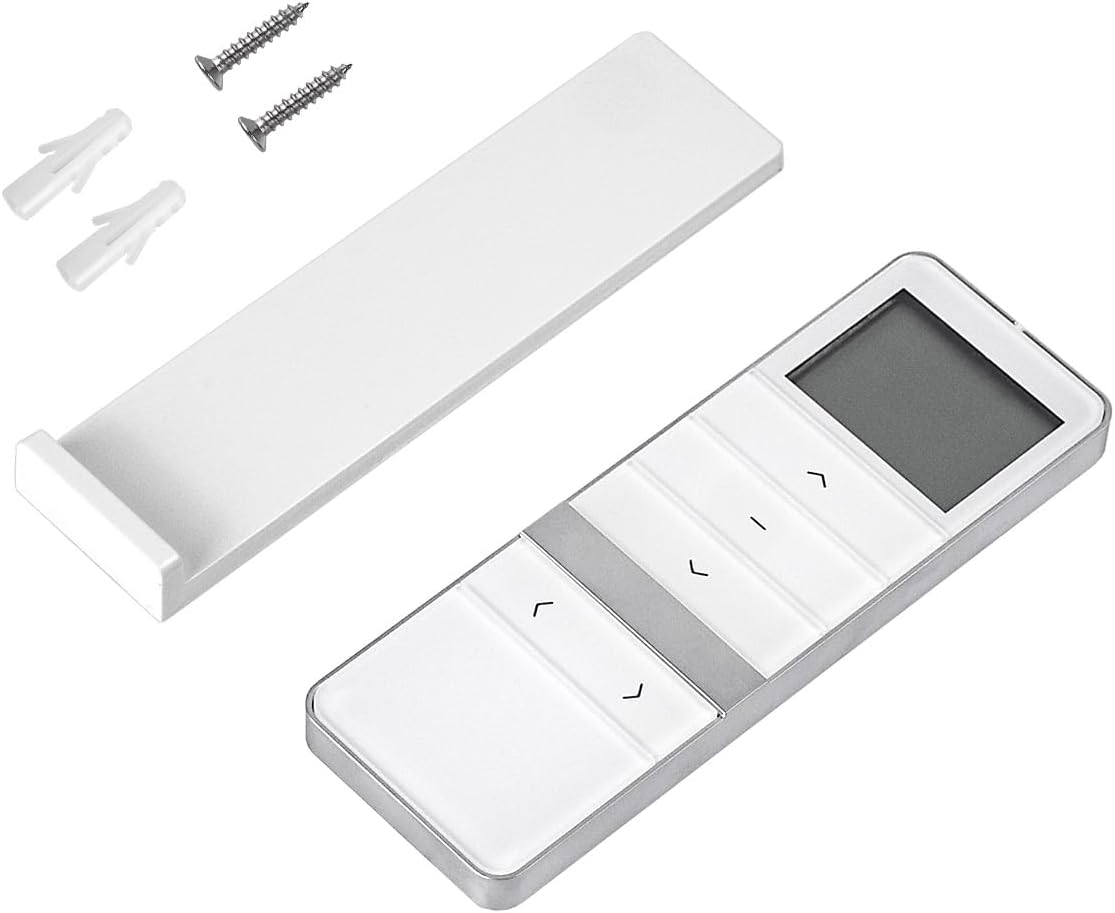
The AUDEEKON DD1802H 15-channel remote control unit shown with its accompanying wall mount bracket and installation screws.
2. Package Contents
Upon opening the package, verify that all the following items are present:
- 1x DD1802H 15-Channel Controller
- 1x Magnetic Back Cover (Wall Mount Base)
- 1x Instruction Manual
- Installation Screws and Wall Plugs

This image displays the main components: the 15-channel remote control, its wall-mounted base, and a close-up of the battery compartment showing the included battery.
3. Setup and Installation
3.1 Battery Installation
The DD1802H remote control uses a CR2450 lithium cell battery. To install or replace the battery:
- Locate the battery compartment on the back of the remote control.
- Use a small tool (such as a SIM card pin, mini screwdriver, or fine needle) to press the elastic button while simultaneously pushing the battery cover down to open it.
- Insert the CR2450 battery with the positive (+) side facing up.
- Close the battery cover securely.

Detailed view of the DD1802H remote control's back, showing the battery compartment, CR2450 battery, and the P2 setting button.
3.2 Wall Mounting
The included magnetic back cover allows for convenient wall mounting of the remote control:
- Choose a suitable location on a wall for the magnetic back cover.
- Use the provided screws and wall plugs to securely attach the magnetic back cover to the wall.
- The remote control can then be magnetically attached to the installed base for easy storage and access.

A hand demonstrates attaching the DD1802H remote control to its wall-mounted base, highlighting the magnetic attachment for easy access and storage.
4. Operating Instructions
4.1 Basic Functions
The DD1802H remote control features intuitive buttons for basic operation:
- Opening Button (Up Arrow): Moves the connected device (e.g., shade) upwards.
- Pause Button (Dash): Stops the movement of the connected device.
- Close Button (Down Arrow): Moves the connected device downwards.
4.2 Channel Switching
The remote supports up to 15 channels, allowing control of multiple devices or groups of devices. Use the channel switch buttons to select the desired channel:
- Channel Switch (Left Arrow): Decreases the channel number.
- Channel Switch (Right Arrow): Increases the channel number.
The currently selected channel number will be displayed on the LCD screen.
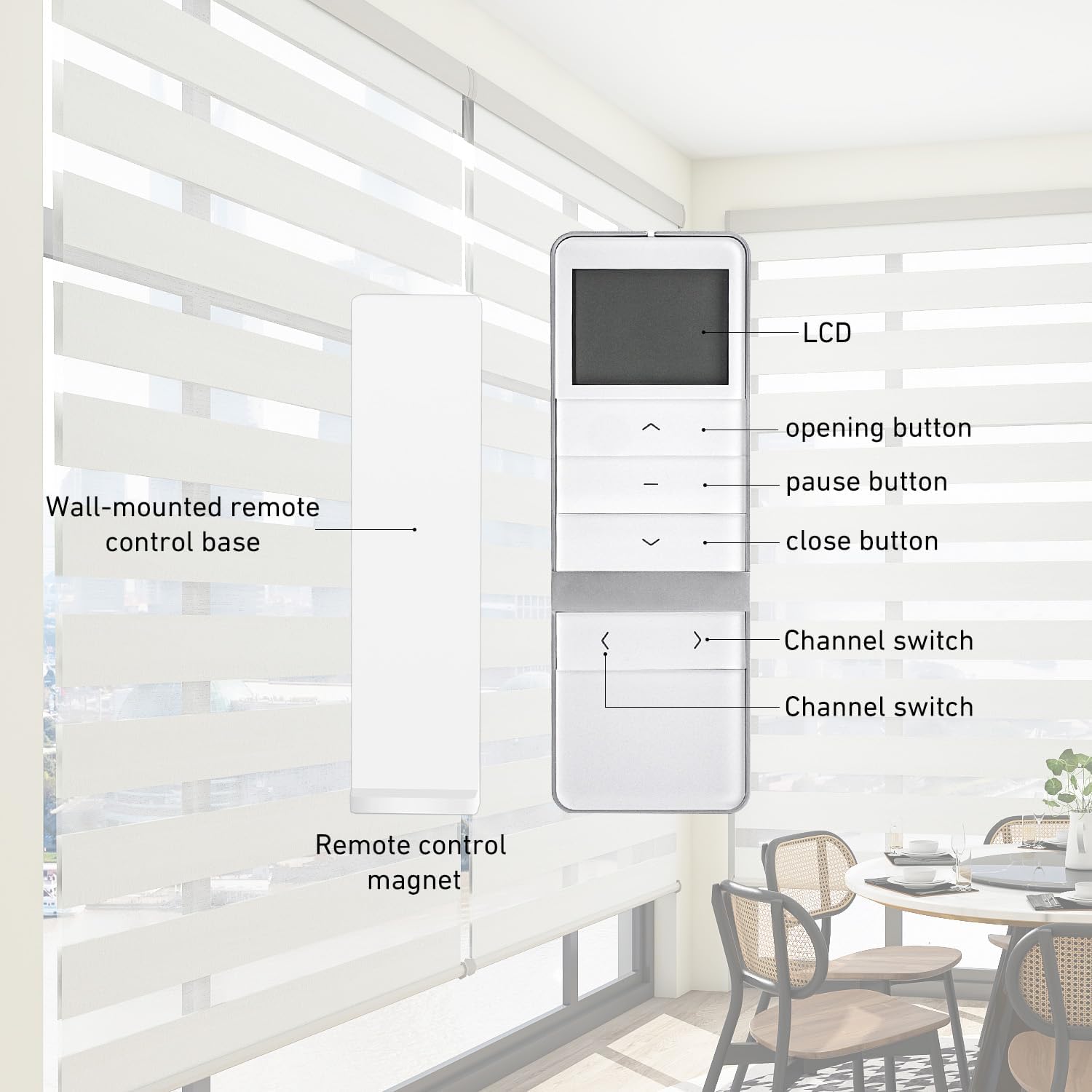
This diagram illustrates the functions of each button on the DD1802H remote control, including the LCD display, opening button, pause button, close button, and channel switch buttons.
4.3 Switching Between One-way and Two-way Mode
The DD1802H remote is set to two-way mode by default. To switch between one-way and two-way mode:
- Remove the battery from the remote control.
- Press and hold the P2 button (located in the battery compartment) while reinserting the battery.
- Observe the display: If '1' is displayed, one-way mode is activated. If '2' is displayed, two-way mode is activated.
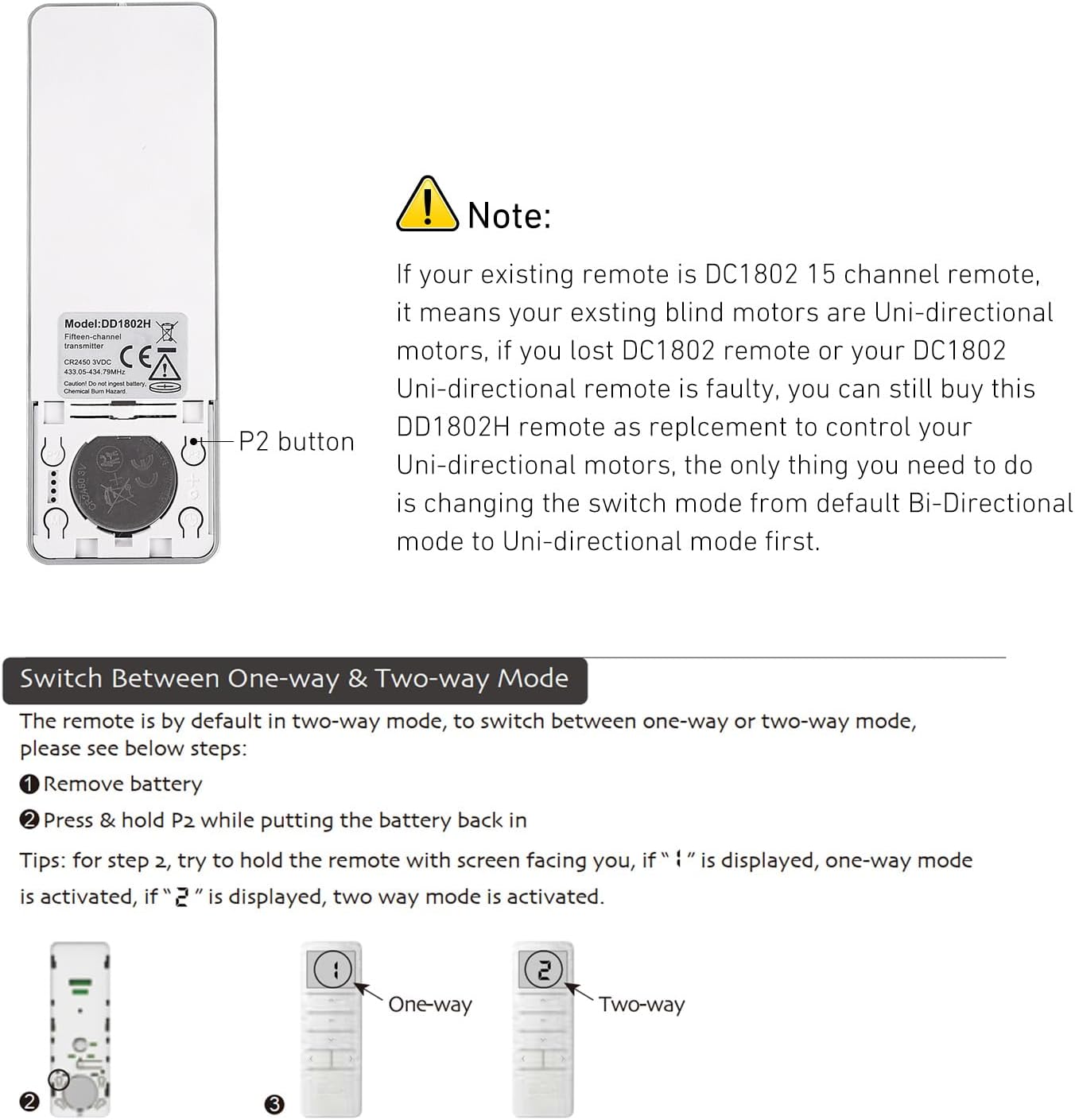
This image provides detailed steps for switching the remote's operating mode between one-way and two-way control, along with visual indicators.
4.4 Pairing/Unpairing Additional Remotes
To link a new DD1802H remote (Remote B) to an existing system controlled by another DD1802H remote (Remote A):
- On the existing remote (Remote A), press the P2 button once. The motor will jog once and emit one beep.
- Press the P2 button on Remote A again. The motor will jog once and emit one beep.
- On the new remote (Remote B), press the P2 button. The motor will jog twice and emit three beeps.
- The new remote (Remote B) is now linked. Repeat this process for any additional remotes.

A visual guide illustrating the step-by-step process for pairing an additional DD1802H remote control to an existing system.
4.5 Lock/Unlock Status
To prevent accidental operation, the remote control buttons can be locked or unlocked:
- To Lock: Press and hold the STOP button for more than 15 seconds. The display will show 'L', then 'o', then 'c'. Release the button within 10 seconds. The remote is now locked.
- To Unlock: Press and hold the STOP button for more than 15 seconds. The display will show 'U', then 'n', then 'L'. Release the button within 10 seconds. The remote is now unlocked.

This diagram illustrates the sequence of button presses and display indicators for locking and unlocking the DD1802H remote control.
5. Compatibility
The AUDEEKON DD1802H controller is compatible with the following types of systems:
- Bi-directional control blind motors
- Rechargeable battery-powered bi-directional tubular motors
- Roller shades & blinds
- Retractable awnings
- Motorized gates & barriers
- Bi-directional motor systems
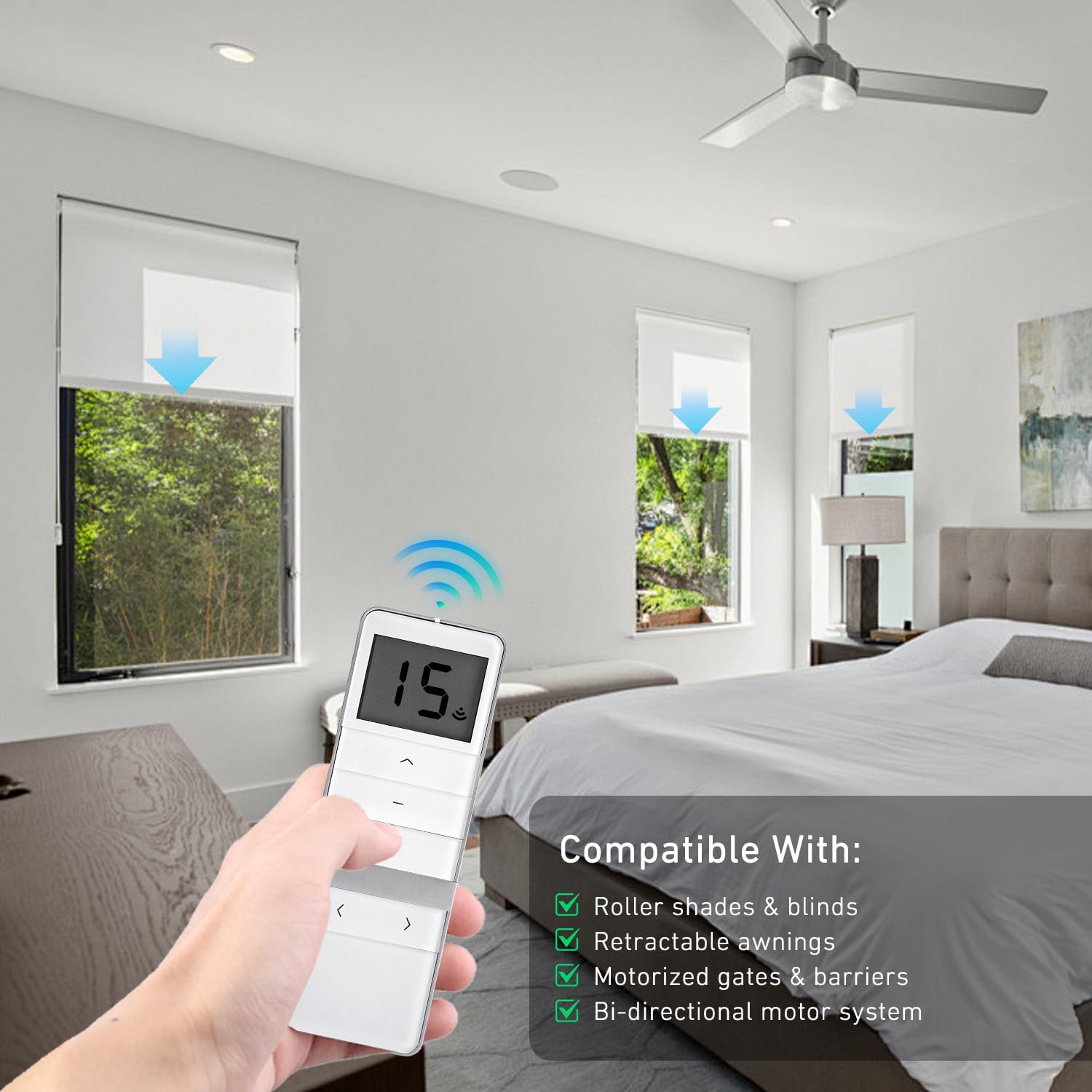
The DD1802H remote control is shown operating roller shades, with a list of compatible devices including roller shades & blinds, retractable awnings, motorized gates & barriers, and bi-directional motor systems.

This image illustrates various types of window coverings and outdoor shading systems compatible with the DD1802H remote control, such as Shangri-La shades, outdoor shades, Roman shades, roller shades, zebra shades, and dual roller shades.
6. Specifications
| Feature | Specification |
|---|---|
| Model Number | DD1802H-88 |
| Brand | AUDEEKON |
| Max Number of Supported Devices | 15 |
| Compatible Devices | Bi-Directional Motors |
| Special Feature | No Programming Required (for basic pairing) |
| Color | White |
| Item Weight | 3.2 ounces |
| Package Dimensions | 5.5 x 2.59 x 0.9 inches |
7. Important Notes and Troubleshooting
Note on Replacement: If your existing remote is a DC1802 15-channel remote, and your blind motors are Uni-directional, you can still use this DD1802H as a replacement. The only necessary step is to change the switch mode from the default Bi-Directional mode to Uni-directional mode first (refer to Section 4.3).

This notice provides crucial tips before purchasing, emphasizing that the remote is a replacement for specific models and may not be compatible with other brands.
Compatibility Check: This remote control is designed for specific devices and is not a universal remote. Always double-check the model of your existing emitter and ensure compatibility with AUDEEKON bi-directional motor systems before purchasing or attempting to pair.