
YUANWIN YW-TD-D4BR34W-600lb
YUANWIN Smart Video Doorbell Intercom System with 600lb Magnetic Lock - User Manual
Model: YW-TD-D4BR34W-600lb | Brand: YUANWIN
1. Introduction
This manual provides detailed instructions for the installation, operation, and maintenance of your YUANWIN Smart Video Doorbell Intercom System. This system includes a 1080P HD video doorbell camera, a 7-inch IPS touch screen Wi-Fi monitor, a 600lb magnetic lock, a power supply controller, an exit button, and a remote control kit, designed to enhance your property's security and access control.
2. Safety Information
- Read all instructions carefully before installation and use.
- Ensure all power is disconnected before performing any wiring or maintenance.
- Installation should be performed by qualified personnel if you are unfamiliar with electrical wiring.
- Do not expose the outdoor unit to extreme temperatures or direct water immersion.
- The indoor monitor supports 2.4GHz Wi-Fi only. Ensure your router operates on this frequency for stable connection.
- Keep small components out of reach of children.
3. Package Contents
Verify that all items listed below are present in your package:
- 1x 1080P Video Doorbell Camera (Outdoor Unit)
- 1x 7-inch IPS Touch Screen Wi-Fi Monitor (Indoor Unit)
- 1x 600lb Magnetic Lock
- 1x Power Supply Controller
- 1x Exit Button
- 2x Remote Control Key Fobs
- 1x Remote Control Receiver Module
- 1x Power Cord (for Power Supply)
- Mounting Screws and Accessories
- User Manual (this document)
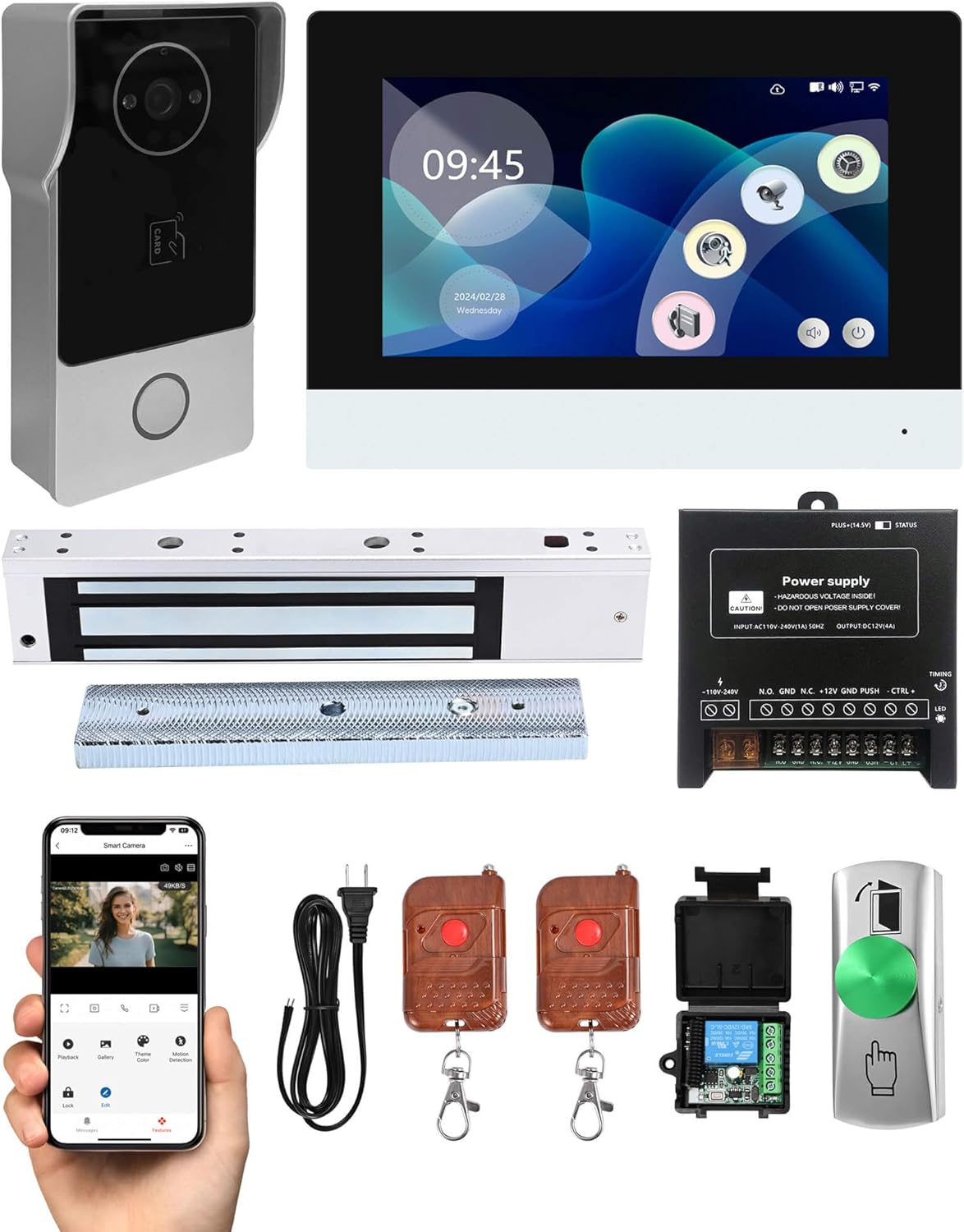
Image: All components included in the YUANWIN Smart Video Doorbell Intercom System kit, including the doorbell, monitor, magnetic lock, power supply, remote controls, exit button, and power cord.
4. Product Overview
4.1 Outdoor Unit (Video Doorbell Camera)
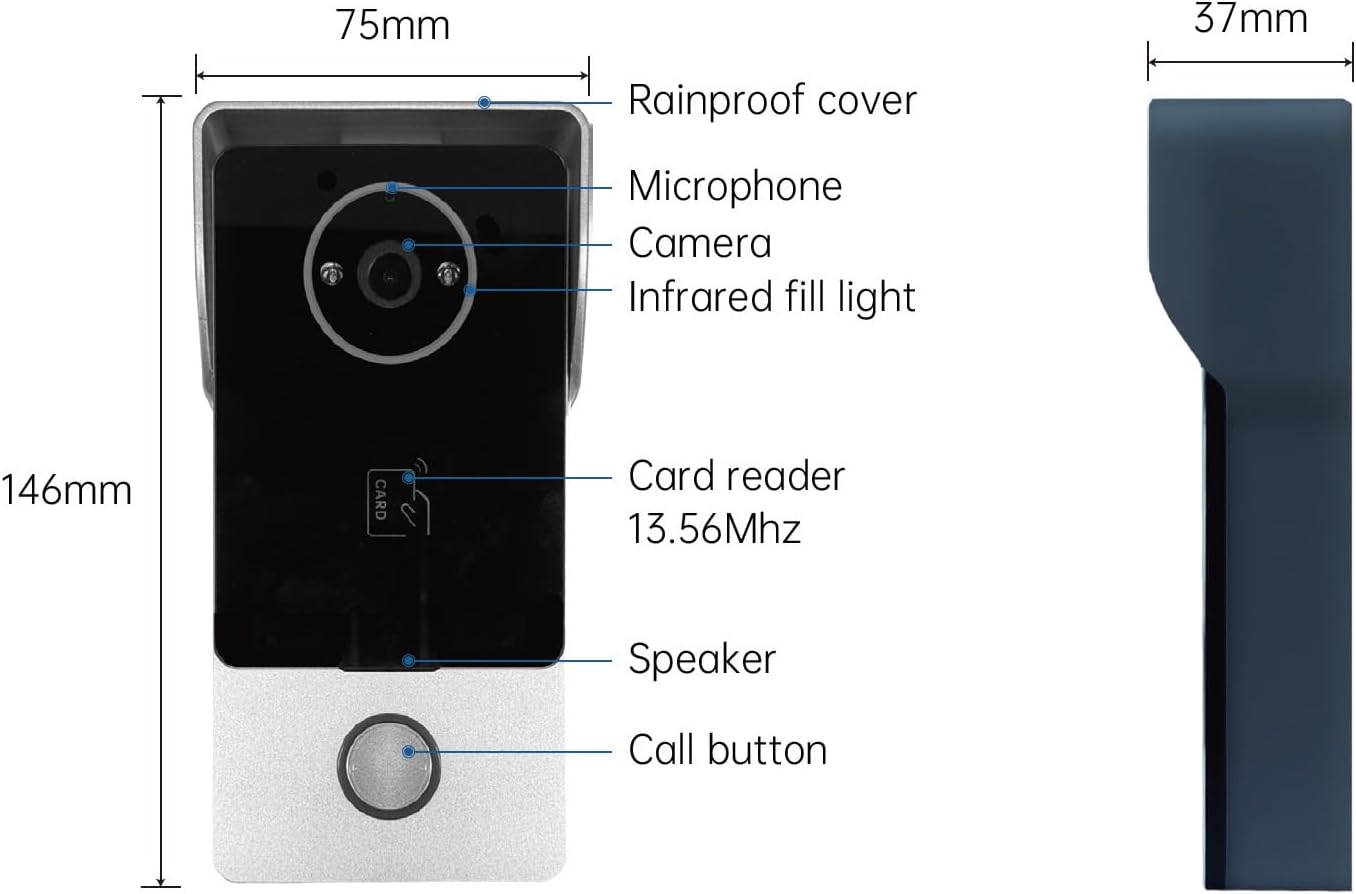
Image: Detailed view of the outdoor doorbell unit, highlighting its dimensions (75mm width, 146mm height, 37mm depth) and key features such as the rainproof cover, microphone, camera, infrared fill light, 13.56MHz card reader, speaker, and call button.
- Camera: 1080P 2.0MP HD for clear video.
- Infrared Fill Light: Enables night vision for low-light conditions.
- Microphone & Speaker: For two-way audio communication.
- Call Button: Initiates a call to the indoor monitor.
- Card Reader: 13.56MHz RFID for IC card access.
- Rainproof Cover: Provides protection against weather elements.
4.2 Indoor Unit (7-inch Wi-Fi Monitor)
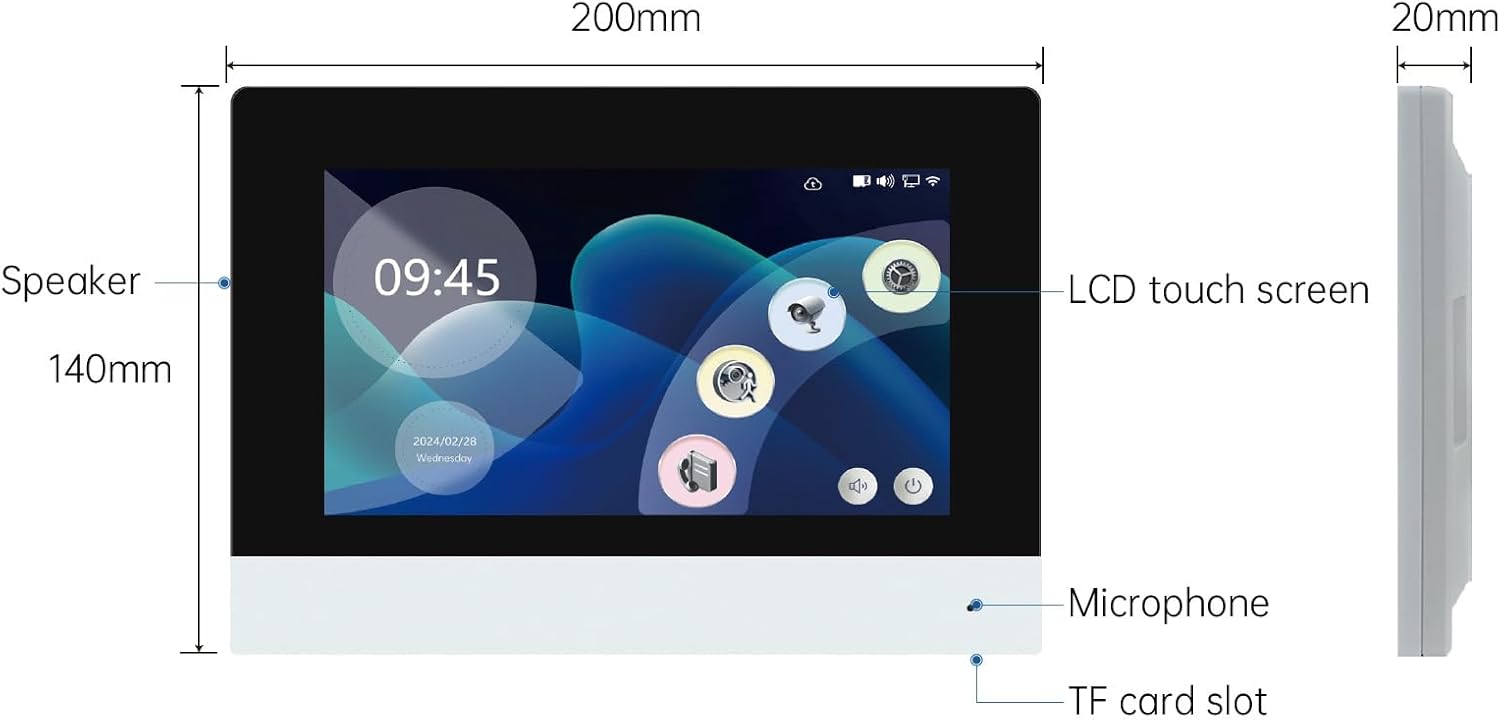
Image: Detailed view of the indoor monitor unit, showing its dimensions (200mm width, 140mm height, 20mm depth) and features including the LCD touch screen, speaker, microphone, and TF card slot.
- Display: 7-inch IPS LCD touch screen for intuitive control.
- Wi-Fi Connectivity: Supports 2.4GHz Wi-Fi for Tuya App integration.
- Speaker & Microphone: For two-way communication with the outdoor unit.
- TF Card Slot: For local storage of captured photos and videos.
4.3 600lb Magnetic Lock

Image: The 600lb magnetic lock and its corresponding armature plate, with dimensions indicated (e.g., lock body 250mm length, 49mm width, 25mm height; armature plate 180mm length, 38mm width, 11mm height).
- Holding Force: 600 pounds, providing secure door locking.
- Operation: Electromagnetically controlled, typically failsafe (unlocks when power is removed).
4.4 Power Supply Controller

Image: The power supply controller unit, showing input terminals for AC110V-240V and output terminals for DC12V(4A), along with connections for N.O., GND, N.C., +12V, PUSH, CTRL+, CTRL-, and LED indicators.
- Input: AC110V-240V (1A) 50Hz.
- Output: DC12V (4A).
- Functions: Provides regulated power to the system components and includes terminals for connecting the magnetic lock, exit button, and other access control devices.
4.5 Remote Control Kit (Receiver and Key Fobs)
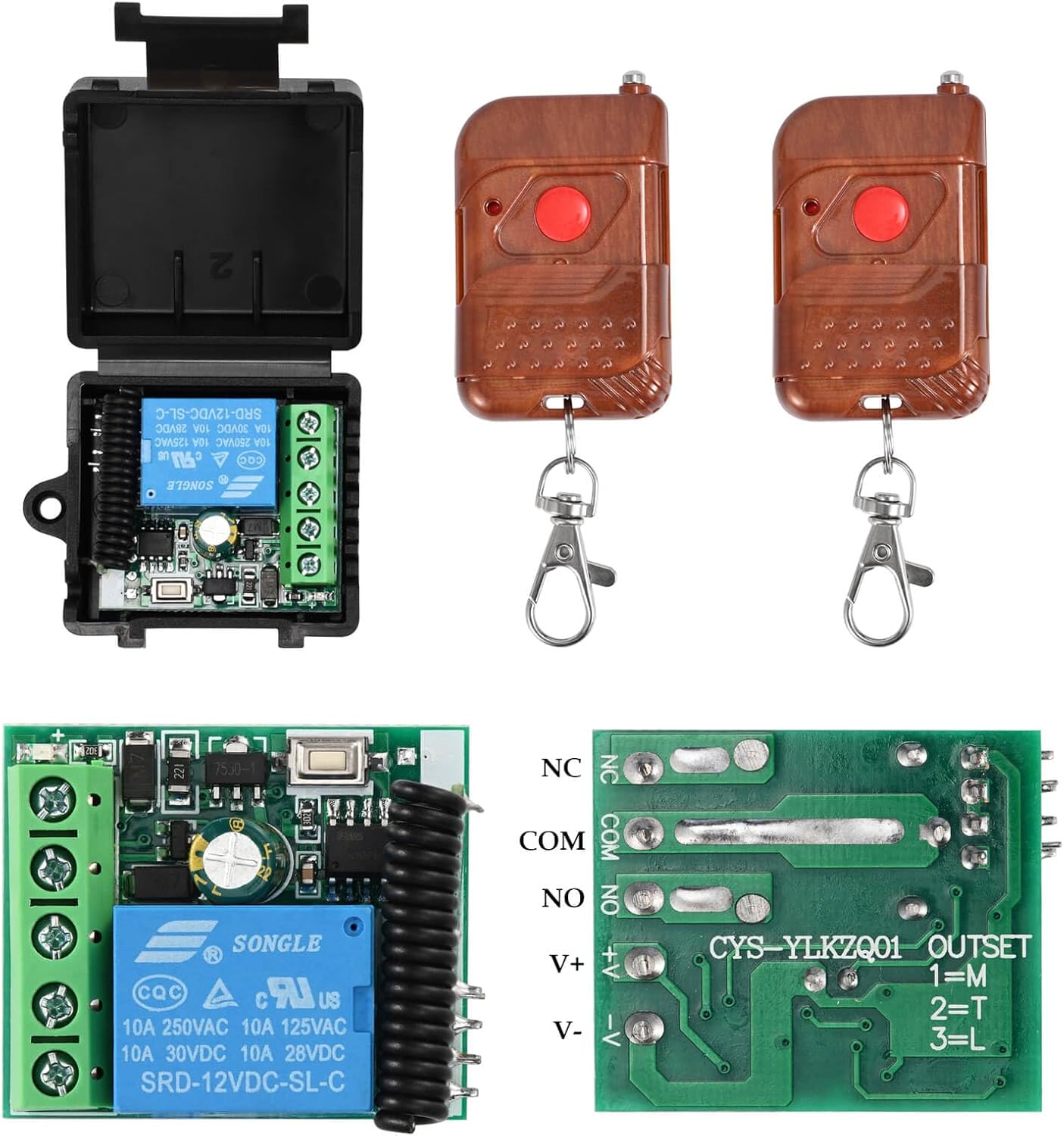
Image: The remote control kit, featuring the receiver module with its internal circuitry and connection points (NC, COM, NO, V+, V-), alongside two brown remote control key fobs with red buttons.
- Function: Allows remote unlocking of the magnetic lock.
- Components: Includes a receiver module and two wireless key fobs.
4.6 Exit Button

Image: The green push-to-exit button, showing its dimensions (80mm height, 30mm width) and symbols indicating door opening and a finger pressing the button.
- Function: Provides a convenient way to exit by temporarily disengaging the magnetic lock from inside.
5. Setup and Installation
Careful planning and correct wiring are essential for the proper functioning of your system. Refer to the wiring diagram below for connections.
5.1 Wiring Diagram
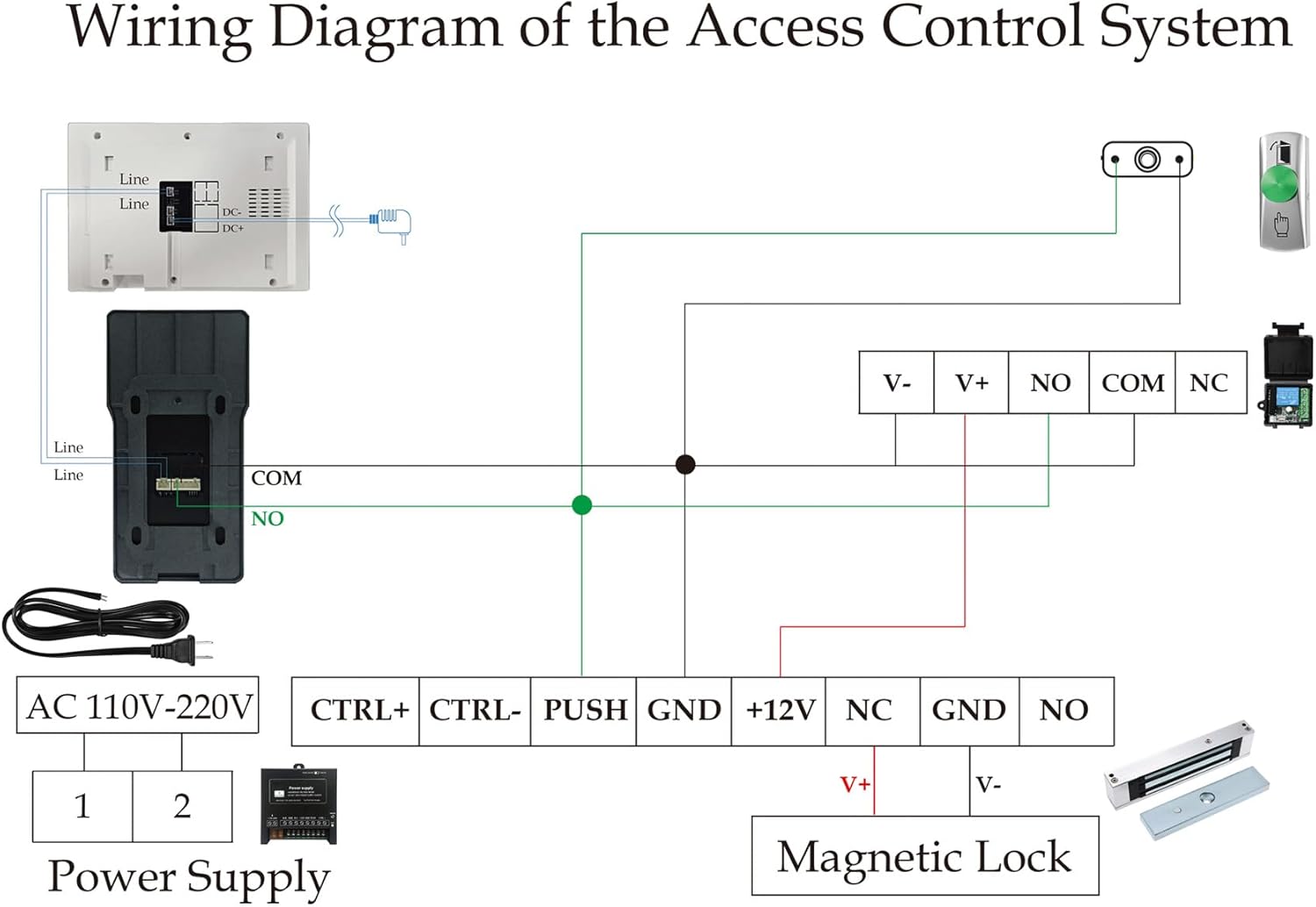
Image: A detailed wiring diagram illustrating the connections between the indoor monitor, outdoor doorbell, power supply, magnetic lock, exit button, and remote control receiver. It shows AC 110V-220V input to the power supply, which then connects to the magnetic lock, exit button, and remote receiver, with the doorbell and monitor also integrated into the system.
Important: Ensure all power is off before making any electrical connections. Follow the diagram precisely to avoid damage to components or electrical hazards.
5.2 Component Installation Steps
- Outdoor Unit (Doorbell):
- Mount the rainproof cover to the desired outdoor location using screws.
- Secure the doorbell unit inside the cover.
- Connect the doorbell's wiring to the indoor monitor as per the wiring diagram.
- Indoor Unit (Monitor):
- Mount the monitor bracket to an indoor wall at a convenient height.
- Connect the necessary wires from the doorbell and power supply to the monitor.
- Attach the monitor to its bracket.
- Magnetic Lock:
- Install the magnetic lock body on the door frame and the armature plate on the door, ensuring proper alignment. Refer to the image below for a typical installation example.
- Connect the magnetic lock to the power supply controller as shown in the wiring diagram.

Image: An illustration demonstrating the typical installation of a magnetic lock on a door frame, with the main lock unit on the frame and the armature plate on the door itself.
- Power Supply Controller:
- Mount the power supply controller in a secure, dry location.
- Connect the AC power input (110V-240V) to the power supply.
- Connect the output terminals to the magnetic lock, exit button, and remote control receiver according to the wiring diagram.
- Exit Button & Remote Control Receiver:
- Install the exit button on the inside of the door frame.
- Connect the exit button and the remote control receiver to the power supply controller as indicated in the wiring diagram.
5.3 Tuya App Setup (Wi-Fi Connection)
- Download the "Tuya Smart" app from your smartphone's app store.
- Register or log in to your Tuya account.
- On the indoor monitor, navigate to the Wi-Fi settings and connect to your 2.4GHz Wi-Fi network.
- Follow the app's instructions to add a new device. Select "Video Doorbell" or "Smart Camera" if prompted.
- The app will guide you through pairing the monitor with your account. This typically involves scanning a QR code displayed on the monitor or entering a device ID.
- Once connected, you will receive notifications and be able to control the system remotely via the app.
6. Operating Instructions
6.1 Answering a Call
- When a visitor presses the call button on the outdoor unit, the indoor monitor will ring and display the visitor's video feed.
- On the monitor, tap the "Answer" icon to initiate two-way communication.
- If using the Tuya App, you will receive a push notification. Tap the notification to answer the video call and communicate with the visitor.
6.2 Monitoring
- From the indoor monitor, you can view the live feed from the outdoor camera at any time by selecting the camera icon.
- Through the Tuya App, you can access the live camera feed remotely from your smartphone.
6.3 Unlocking the Door
The system offers multiple methods for unlocking the magnetic lock:
- Via Indoor Monitor: During a call or while monitoring, tap the "Unlock" icon on the monitor's screen.
- Via Tuya App: During a call or while viewing the live feed, tap the "Unlock" button within the app interface.
- Via RFID IC Card: Present a pre-programmed IC card to the card reader on the outdoor doorbell unit.
- Via Remote Control: Press the button on the remote control key fob.
- Via Exit Button: Press the green exit button located inside the door.
6.4 Photo and Video Capture
- The indoor monitor allows you to manually capture photos or record short videos of visitors.
- These recordings are stored on the TF card inserted into the monitor.
- The Tuya App may also offer options for recording or capturing screenshots, which are typically stored on your smartphone or cloud storage (if subscribed).
7. Maintenance
- Cleaning: Use a soft, damp cloth to clean the surfaces of the outdoor unit and indoor monitor. Avoid abrasive cleaners or solvents.
- Lens Care: Gently wipe the camera lens with a microfiber cloth to ensure clear image quality.
- Firmware Updates: Periodically check the Tuya App for any available firmware updates for the indoor monitor to ensure optimal performance and security.
- Wiring Inspection: Annually inspect all wiring connections for any signs of wear or corrosion. Ensure connections remain secure.
8. Troubleshooting
| Problem | Possible Cause | Solution |
|---|---|---|
| No power to monitor/doorbell. | Loose power connection, faulty power supply, circuit breaker tripped. | Check all power connections. Verify power supply is functioning. Reset circuit breaker. |
| No video/audio from doorbell. | Incorrect wiring between doorbell and monitor, damaged cable. | Review wiring diagram and ensure all connections are correct and secure. Inspect cables for damage. |
| Wi-Fi connection unstable or fails. | Monitor connected to 5GHz Wi-Fi, weak signal, incorrect password. | Ensure monitor is connected to a 2.4GHz Wi-Fi network. Move router closer or use a Wi-Fi extender. Re-enter Wi-Fi password carefully. |
| Magnetic lock not engaging/disengaging. | Incorrect wiring to power supply/lock, insufficient power, misalignment. | Check wiring to the magnetic lock and power supply. Ensure power supply is providing 12V DC. Verify lock and armature plate alignment. |
| Remote unlock not working. | Remote control battery dead, receiver not powered, receiver not paired. | Replace remote control battery. Check power to the remote receiver. Refer to receiver instructions for pairing. |
| Tuya App remote unlock not working. | App not connected to monitor, internet connectivity issues, app permissions. | Verify monitor's Wi-Fi connection. Check your smartphone's internet connection. Ensure Tuya App has necessary permissions. Re-pair device in app if needed. |
9. Specifications
| Brand | YUANWIN |
| Model Name | YW-TD-D4BR34W-600lb |
| Outdoor Unit Camera | 1080P 2.0MP HD |
| Indoor Monitor Display | 7-inch IPS Touch Screen |
| Connectivity Protocol | Wi-Fi (2.4GHz only) |
| Power Source | Corded Electric (AC110V-240V input, DC12V output) |
| Magnetic Lock Holding Force | 600lb |
| Access Control Methods | Monitor, Tuya App, RFID IC Card, Remote Control, Exit Button |
| Indoor/Outdoor Usage | Outdoor (doorbell), Indoor (monitor) |
| Item Weight | 5.5 pounds (2.5 Kilograms) |
| UPC | 769894489413 |
10. Warranty and Support
For warranty information and technical support, please refer to the documentation provided with your purchase or contact YUANWIN customer service through the retailer where the product was purchased. You may also visit the official YUANWIN website for further assistance.